WDT
WDT 用于在应用程序崩溃并进入不可恢复状态时重启系统。一旦启动,就无法以任何方式停止或重新配置。启用后,应用程序必须定期“喂狗”以防止看门狗超时并复位系统。
MicroPython 应用示例:
 1# SPDX-FileCopyrightText: 2024 M5Stack Technology CO LTD
 2#
 3# SPDX-License-Identifier: MIT
 4
 5import os, sys, io
 6import M5
 7from M5 import *
 8from hardware import *
 9
10
11title0 = None
12label0 = None
13label1 = None
14label2 = None
15label3 = None
16wdt = None
17
18
19isTouch = None
20
21
22def setup():
23    global title0, label0, label1, label2, label3, wdt, isTouch
24
25    M5.begin()
26    Widgets.fillScreen(0x222222)
27    title0 = Widgets.Title("WDT CoreS3 example", 3, 0xFFFFFF, 0x0000FF, Widgets.FONTS.DejaVu18)
28    label0 = Widgets.Label("Touch State:", 2, 92, 1.0, 0xFFFFFF, 0x222222, Widgets.FONTS.DejaVu18)
29    label1 = Widgets.Label("WDT State:", 2, 155, 1.0, 0xFFFFFF, 0x222222, Widgets.FONTS.DejaVu18)
30    label2 = Widgets.Label(
31        "pls touch screen to feed the dog", 0, 27, 1.0, 0xFFCF00, 0x222222, Widgets.FONTS.DejaVu18
32    )
33    label3 = Widgets.Label("label3", -117, 96, 1.0, 0xFFFFFF, 0x222222, Widgets.FONTS.DejaVu18)
34
35    wdt = WDT(timeout=2500)
36    isTouch = 0
37
38
39def loop():
40    global title0, label0, label1, label2, label3, wdt, isTouch
41    M5.update()
42    isTouch = M5.Touch.getCount()
43    label0.setText(str((str("Touch State:") + str(isTouch))))
44    if isTouch:
45        wdt.feed()
46        label1.setText(str("WDT State: Feed!"))
47    else:
48        label1.setText(str("WDT State: Not Feed! Will crush!"))
49
50
51if __name__ == "__main__":
52    try:
53        setup()
54        while True:
55            loop()
56    except (Exception, KeyboardInterrupt) as e:
57        try:
58            from utility import print_error_msg
59
60            print_error_msg(e)
61        except ImportError:
62            print("please update to latest firmware")
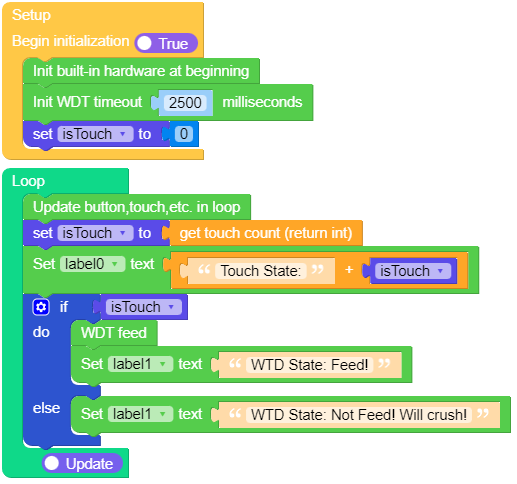
UiFlow2 应用示例
class WDT —— 看门狗定时器。
构造函数
- class WDT(id=0, timeout=5000)
创建一个 WDT 对象并启动它。超时时间必须以毫秒为单位给出。一旦开始运行,超时时间就无法更改,并且 WDT 也无法停止。
注意:在 esp8266 上无法指定超时时间,它由底层系统决定。在 rp2040 设备上,最大超时时间为 8388 ms。
UIFLOW2:

方法
- WDT.feed()
喂狗 WDT 以防止其重置系统。应用程序应在合适的位置调用此函数,确保仅在验证一切均正常运行后才喂狗 WDT。
UIFLOW2:
