触摸
Touch 类提供用于读取触摸坐标、触点数量以及带触摸屏的 M5Stack 设备上详细触摸信息的方法。
UiFlow2 应用示例
获取触摸坐标
在 UiFlow2 中打开 cores3_touch_example.m5f2 工程。
该示例演示如何获取触摸事件的 X 和 Y 坐标并将其显示在屏幕上。
UiFlow2 代码块:
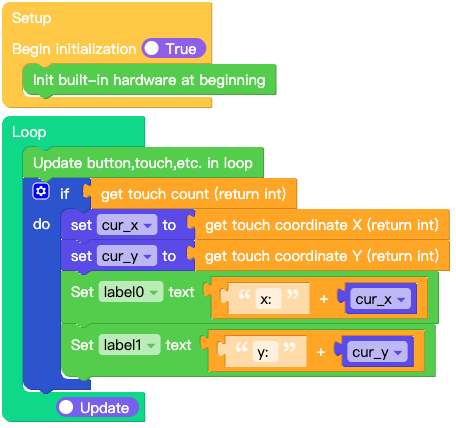
示例输出:
屏幕会显示当前触摸事件的 X 和 Y 坐标。
MicroPython 应用示例
获取触摸坐标
该示例演示如何获取触摸事件的 X 和 Y 坐标并将其显示在屏幕上。
MicroPython 代码块:
 1# SPDX-FileCopyrightText: 2026 M5Stack Technology CO LTD
 2#
 3# SPDX-License-Identifier: MIT
 4
 5import os, sys, io
 6import M5
 7from M5 import *
 8
 9
10label0 = None
11label1 = None
12
13
14cur_x = None
15cur_y = None
16
17
18def setup():
19    global label0, label1, cur_x, cur_y
20
21    M5.begin()
22    Widgets.setRotation(1)
23    Widgets.fillScreen(0x222222)
24    label0 = Widgets.Label("x: 0", 32, 41, 1.0, 0xFFFFFF, 0x222222, Widgets.FONTS.DejaVu18)
25    label1 = Widgets.Label("y: 0", 33, 84, 1.0, 0xFFFFFF, 0x222222, Widgets.FONTS.DejaVu18)
26
27
28def loop():
29    global label0, label1, cur_x, cur_y
30    M5.update()
31    if M5.Touch.getCount():
32        cur_x = M5.Touch.getX()
33        cur_y = M5.Touch.getY()
34        label0.setText(str((str("x: ") + str(cur_x))))
35        label1.setText(str((str("y: ") + str(cur_y))))
36
37
38if __name__ == "__main__":
39    try:
40        setup()
41        while True:
42            loop()
43    except (Exception, KeyboardInterrupt) as e:
44        try:
45            from utility import print_error_msg
46
47            print_error_msg(e)
48        except ImportError:
49            print("please update to latest firmware")
示例输出:
屏幕会显示当前触摸事件的 X 和 Y 坐标。
API参考
触摸
- class M5.Touch
- getX()
获取当前触摸点的 X 坐标。
The returned coordinate is automatically adjusted based on the current display rotation set by
setRotation().- 返回:
int - X 坐标。
UiFlow2 代码块:

MicroPython 代码块:
x = M5.Touch.getX()
- getY()
获取当前触摸点的 Y 坐标。
The returned coordinate is automatically adjusted based on the current display rotation set by
setRotation().- 返回:
int - Y 坐标。
UiFlow2 代码块:

MicroPython 代码块:
y = M5.Touch.getY()
- getCount()
获取当前触点数量。
- 返回:
int - 当前有效触点数量(无触摸时为 0)。
UiFlow2 代码块:

MicroPython 代码块:
count = M5.Touch.getCount()
- getDetail(index=0)
获取指定触点的详细信息。
- 参数:
index (int) – 触点索引(默认值为 0)。
- 返回:
元组 - 一个包含 11 个元素的元组,提供触摸状态的详细信息:
[0] deltaX(int):自上次测量以来在 X 轴上的位移差;[1] deltaY(int):自上次测量以来在 Y 轴上的位移差;[2] distanceX(int):自触摸开始以来在 X 轴上的累计移动距离;[3] distanceY(int):自触摸开始以来在 Y 轴上的累计移动距离;[4] isPressed(bool):当前是否处于按下状态;[5] wasPressed(bool):是否刚刚变为按下状态;[6] wasClicked(bool):是否刚刚完成一次点击;[7] isReleased(bool):当前是否处于释放状态;[8] wasReleased(bool):是否刚刚从按下变为释放状态;[9] isHolding(bool):当前是否处于长按保持状态;[10] wasHold(bool):是否曾经处于长按保持状态。
MicroPython 代码块:
detail = M5.Touch.getDetail(0)
- getTouchPointRaw(index=0)
获取原始触点坐标。
警告
This method returns raw hardware coordinates that are NOT adjusted for the current display rotation set by
setRotation(). If you have changed the display rotation, you must manually transform the coordinates to match the display orientation.For single-touch scenarios, prefer
getX()/getY()which automatically adjust for rotation. UsegetTouchPointRaw()only when you need multi-touch support.- 参数:
index (int) – 触点索引(默认值为 0)。
- 返回:
元组 - 一个包含 4 个元素的元组,提供原始触点数据:
[0] x(int):原始 X 坐标;[1] y(int):原始 Y 坐标;[2] size(int):触点的大小或压力;[3] id(int):用于跟踪该触点的唯一标识。
UiFlow2 代码块:


MicroPython 代码块:
raw = M5.Touch.getTouchPointRaw(0)
Coordinate Transformation for Multi-Touch
When the display rotation is changed via
setRotation(), the raw coordinates fromgetTouchPointRaw()must be manually transformed to match the current screen orientation:def transform_touch(raw_x, raw_y, rotation, raw_w, raw_h): """Transform raw touch coordinates to match display rotation.""" if rotation == 0: return raw_x, raw_y elif rotation == 1: return raw_y, (raw_w - 1) - raw_x elif rotation == 2: return (raw_w - 1) - raw_x, (raw_h - 1) - raw_y elif rotation == 3: return (raw_h - 1) - raw_y, raw_x return raw_x, raw_y # Usage: raw = M5.Touch.getTouchPointRaw(0) if raw: x, y, _, _ = raw # raw_w, raw_h = physical panel size (before rotation) sx, sy = transform_touch(x, y, M5.Lcd.getRotation(), 1280, 720)
For single-touch scenarios, prefer
getX()/getY()which handle rotation automatically.