Chain 8Servos2
The Servos8V2Chain class controls the Unit 8Servos2-Chain through a
ChainBus. The device provides eight configurable channels for GPIO input,
GPIO output, ADC, servo, RGB, and PWM operation. It also provides power
monitoring, UID, firmware, bootloader, and device type APIs.
Support the following products:
Constants
Use the following constants with set_channel_mode():
MODE_INPUT: GPIO input mode.MODE_OUTPUT: GPIO output mode.MODE_ADC: ADC input mode.MODE_SERVO: Servo control mode.MODE_RGB: RGB output mode for WS2812 LEDs.MODE_PWM: PWM duty output mode.
Use PULL_NONE, PULL_UP, or PULL_DOWN with
set_input_pull().
备注
Channels 0-3 share one PWM frequency, and channels 4-7 share another. Setting the frequency of one channel changes every channel in the same group. Selecting servo mode sets the channel’s shared group to 50 Hz.
UiFlow2 Example
Servo control
Initialize Unit 8Servos2-Chain, set a channel to servo mode, and set its angle.
UiFlow2 Code Block:
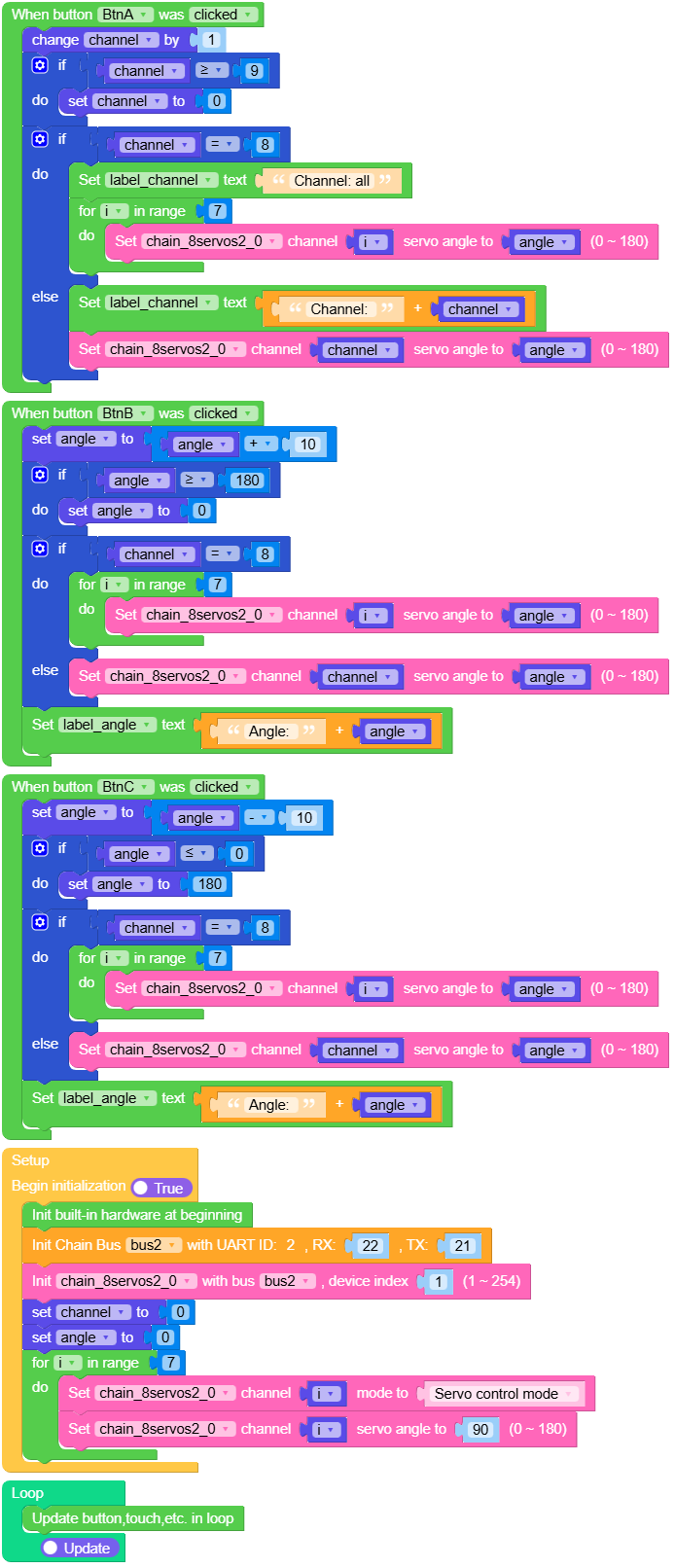
Example output:
The selected servo moves to the configured angle.
MicroPython Example
Basic control
This example reads device information and power values from Unit 8Servos2-Chain, then moves each servo channel between 0 and 180 degrees.
MicroPython Code Block:
  1# SPDX-FileCopyrightText: 2026 M5Stack Technology CO LTD
  2#
  3# SPDX-License-Identifier: MIT
  4
  5import M5
  6from M5 import *
  7from chain import ChainBus
  8from chain import Servos8V2Chain
  9import time
 10
 11
 12title = None
 13label_angle = None
 14label_timer = None
 15label_power = None
 16label_state = None
 17bus2 = None
 18servos8v2_0 = None
 19last_move = 0
 20position = 0
 21
 22ANGLES = (45, 135)
 23
 24
 25def require_ok(result, action):
 26    if not result:
 27        raise RuntimeError(action + " failed")
 28
 29
 30def setup():
 31    global title, label_angle, label_timer, label_power, label_state
 32    global bus2, servos8v2_0, last_move
 33
 34    M5.begin()
 35    Widgets.setRotation(1)
 36    Widgets.fillScreen(0x222222)
 37    title = Widgets.Title("Chain 8Servos2 Servo", 3, 0xFFFFFF, 0x0055AA, Widgets.FONTS.DejaVu18)
 38    label_angle = Widgets.Label(
 39        "All channels: 90 deg", 10, 58, 1.0, 0x17E6CF, 0x222222, Widgets.FONTS.DejaVu18
 40    )
 41    label_timer = Widgets.Label(
 42        "Servo PWM: 50 Hz", 10, 98, 1.0, 0xFFFFFF, 0x222222, Widgets.FONTS.DejaVu18
 43    )
 44    label_power = Widgets.Label(
 45        "Use external servo power", 10, 138, 1.0, 0xFFD166, 0x222222, Widgets.FONTS.DejaVu18
 46    )
 47    label_state = Widgets.Label(
 48        "Sweeps 45 <-> 135 deg", 10, 178, 1.0, 0xFFFFFF, 0x222222, Widgets.FONTS.DejaVu18
 49    )
 50
 51    bus2 = ChainBus(2, tx=21, rx=22)
 52    servos8v2_0 = Servos8V2Chain(bus2, 1)
 53    for channel in range(8):
 54        require_ok(
 55            servos8v2_0.set_channel_mode(channel, Servos8V2Chain.MODE_SERVO),
 56            "set IO%d servo mode" % channel,
 57        )
 58    for channel in range(8):
 59        require_ok(servos8v2_0.set_servo_angle(channel, 90), "center servo %d" % channel)
 60    modes = tuple(servos8v2_0.get_channel_mode(channel) for channel in range(8))
 61    freqs = (
 62        servos8v2_0.get_pwm_freq(0),
 63        servos8v2_0.get_pwm_freq(4),
 64    )
 65    label_timer.setText("PWM groups: %d / %d Hz" % freqs)
 66    label_state.setText("Mode: %s" % ("OK" if modes == (3,) * 8 else str(modes)))
 67    last_move = time.ticks_ms()
 68    print("Chain 8Servos2: modes =", modes, "PWM groups =", freqs)
 69    print("Chain 8Servos2: all channels centered at 90 degrees")
 70
 71
 72def loop():
 73    global last_move, position
 74
 75    M5.update()
 76    if time.ticks_diff(time.ticks_ms(), last_move) < 1500:
 77        return
 78    last_move = time.ticks_ms()
 79    angle = ANGLES[position]
 80    position = (position + 1) % len(ANGLES)
 81    for channel in range(8):
 82        require_ok(servos8v2_0.set_servo_angle(channel, angle), "set servo %d angle" % channel)
 83    label_angle.setText("All channels: %d deg" % angle)
 84    print("Servo angle:", angle)
 85
 86
 87if __name__ == "__main__":
 88    try:
 89        setup()
 90        while True:
 91            loop()
 92    except (Exception, KeyboardInterrupt) as e:
 93        try:
 94            if bus2 is not None:
 95                bus2.deinit()
 96            from utility import print_error_msg
 97
 98            print_error_msg(e)
 99        except ImportError:
100            print("please update to latest firmware")
Example output:
Device information and power values are printed to the serial console, and each connected servo moves through the test sequence.
API
Servos8V2Chain
- class chain.servos8_v2.Servos8V2Chain(bus, device_id)
基类:
KeyChainUnit 8Servos2 Chain device.
UiFlow2 Code Block:

MicroPython Code Block:
from chain import ChainBus
from chain import Servos8V2Chain

bus2 = ChainBus(2, tx=21, rx=22)
servos8v2_0 = Servos8V2Chain(bus2, 1)
For general Chain device methods, refer to
KeyChain.- get_channel_mode(channel)
Get the current mode of a specific channel.
The channel mode values:
MODE_INPUT:0x00MODE_OUTPUT:0x01MODE_ADC:0x02MODE_SERVO:0x03MODE_RGB:0x04MODE_PWM:0x05
UiFlow2 Code Block:

MicroPython Code Block:
mode = servos8v2_0.get_channel_mode(0)
- set_channel_mode(channel, mode)
Set the mode of a specific channel.
The channel mode values:
MODE_INPUT:0x00MODE_OUTPUT:0x01MODE_ADC:0x02MODE_SERVO:0x03MODE_RGB:0x04MODE_PWM:0x05
When a channel is set to
MODE_SERVO, the driver automatically sets its shared frequency group to 50 Hz. Channels 0-3 share one frequency, and channels 4-7 share another frequency.- 参数:
- 返回:
True if the operation was successful, False otherwise.
- 返回类型:
UiFlow2 Code Block:

MicroPython Code Block:
servos8v2_0.set_channel_mode(0, Servos8V2Chain.MODE_SERVO)
- set_input_pull(channel, pull)
Set the input pull configuration of a specific channel.
- 参数:
- 返回:
True if the operation was successful, False otherwise.
- 返回类型:
UiFlow2 Code Block:

MicroPython Code Block:
servos8v2_0.set_input_pull(0, Servos8V2Chain.PULL_UP)
- get_input_pull(channel)
Get the input pull configuration of a specific channel.
- 参数:
channel (int) – The channel number (0 to 7).
- 返回:
Pull configuration of the specified channel.
- 返回类型:
UiFlow2 Code Block:

MicroPython Code Block:
pull = servos8v2_0.get_input_pull(0)
- get_gpio_input_value(channel)
Get the GPIO input value of a specific channel.
- 参数:
channel (int) – The channel number (0 to 7).
- 返回:
True for high level, False for low level.
- 返回类型:
UiFlow2 Code Block:

MicroPython Code Block:
level = servos8v2_0.get_gpio_input_value(0)
- set_gpio_output_value(channel, value)
Set the GPIO output value of a specific channel.
- 参数:
- 返回:
True if the operation was successful, False otherwise.
- 返回类型:
UiFlow2 Code Block:

MicroPython Code Block:
servos8v2_0.set_gpio_output_value(0, True)
- get_gpio_output_value(channel)
Get the GPIO output value of a specific channel.
- 参数:
channel (int) – The channel number (0 to 7).
- 返回:
True for high level, False for low level.
- 返回类型:
UiFlow2 Code Block:

MicroPython Code Block:
level = servos8v2_0.get_gpio_output_value(0)
- get_adc_input(channel)
Get the 12-bit ADC input value of a specific channel.
UiFlow2 Code Block:

MicroPython Code Block:
adc = servos8v2_0.get_adc_input(0)
- set_servo_angle(channel, angle)
Set the servo angle of a specific channel.
- 参数:
- 返回:
True if the operation was successful, False otherwise.
- 返回类型:
UiFlow2 Code Block:

MicroPython Code Block:
servos8v2_0.set_servo_angle(0, 90)
- get_servo_angle(channel)
Get the servo angle of a specific channel.
UiFlow2 Code Block:

MicroPython Code Block:
angle = servos8v2_0.get_servo_angle(0)
- set_rgb_config(channel, count, refresh=False)
Set the WS2812 LED count and refresh flag of a specific channel.
- 参数:
- 返回:
True if the operation was successful, False otherwise.
- 返回类型:
UiFlow2 Code Block:

MicroPython Code Block:
servos8v2_0.set_rgb_config(0, 4, refresh=True)
- get_rgb_config(channel)
Get the raw WS2812 config value of a specific channel.
UiFlow2 Code Block:

MicroPython Code Block:
config = servos8v2_0.get_rgb_config(0)
- get_rgb_count(channel)
Get the configured WS2812 LED count of a specific channel.
UiFlow2 Code Block:

MicroPython Code Block:
count = servos8v2_0.get_rgb_count(0)
- refresh_rgb(channel)
Trigger WS2812 refresh for a specific channel.
- 参数:
channel (int) – The channel number (0 to 7).
- 返回:
True if the operation was successful, False otherwise.
- 返回类型:
UiFlow2 Code Block:

MicroPython Code Block:
servos8v2_0.refresh_rgb(0)
- set_rgb_buffer(index, color)
Set one WS2812 color buffer entry.
- 参数:
- 返回:
True if the operation was successful, False otherwise.
- 返回类型:
UiFlow2 Code Block:

MicroPython Code Block:
servos8v2_0.set_rgb_buffer(0, 0xFF0000)
- get_rgb_buffer(index)
Get one WS2812 color buffer entry.
- 参数:
index (int) – WS2812 color buffer index, range 0 to 15.
- 返回:
RGB888 color value in
0xRRGGBBformat.- 返回类型:
UiFlow2 Code Block:

MicroPython Code Block:
color = servos8v2_0.get_rgb_buffer(0)
- set_pwm_duty(channel, duty)
Set the PWM duty of a specific channel.
- 参数:
- 返回:
True if the operation was successful, False otherwise.
- 返回类型:
UiFlow2 Code Block:

MicroPython Code Block:
servos8v2_0.set_pwm_duty(0, 50)
- get_pwm_duty(channel)
Get the PWM duty of a specific channel.
UiFlow2 Code Block:

MicroPython Code Block:
duty = servos8v2_0.get_pwm_duty(0)
- set_pwm_freq(channel, freq)
Set the PWM frequency of a specific channel.
Channels 0-3 share one frequency, and channels 4-7 share another frequency. Setting the frequency of any channel changes the frequency of every channel in the same group.
- 参数:
- 返回:
True if the operation was successful, False otherwise.
- 返回类型:
UiFlow2 Code Block:

MicroPython Code Block:
servos8v2_0.set_pwm_freq(0, 1000)
- get_pwm_freq(channel)
Get the PWM frequency of a specific channel.
Channels 0-3 share one frequency, and channels 4-7 share another frequency. The returned value is the shared frequency of the channel’s group.
UiFlow2 Code Block:

MicroPython Code Block:
freq = servos8v2_0.get_pwm_freq(0)
- get_reference_voltage()
Get the reference voltage.
- 返回:
Reference voltage in mV.
- 返回类型:
UiFlow2 Code Block:

MicroPython Code Block:
voltage = servos8v2_0.get_reference_voltage()
- get_grove_voltage()
Get the Grove port voltage.
- 返回:
Grove port voltage in mV.
- 返回类型:
UiFlow2 Code Block:

MicroPython Code Block:
voltage = servos8v2_0.get_grove_voltage()
- get_dc_voltage()
Get the DC input voltage.
- 返回:
DC input voltage in mV.
- 返回类型:
UiFlow2 Code Block:

MicroPython Code Block:
voltage = servos8v2_0.get_dc_voltage()
- get_current()
Get the system current.
- 返回:
System current in mA.
- 返回类型:
UiFlow2 Code Block:

MicroPython Code Block:
current = servos8v2_0.get_current()
- get_uid(uid_type=0)
Get the device UID.
- 参数:
uid_type (int) – UID type. Use 0 for 4-byte UID or 1 for 12-byte UID. Default is 0.
- 返回:
Tuple of UID bytes. Returns an empty tuple if failed.
- 返回类型:
UiFlow2 Code Block:

MicroPython Code Block:
uid = servos8v2_0.get_uid(0)
- get_bootloader_version()
Get the bootloader version.
- 返回:
Bootloader version, or None if failed.
- 返回类型:
UiFlow2 Code Block:

MicroPython Code Block:
version = servos8v2_0.get_bootloader_version()
- get_firmware_version()
Get the firmware version.
- 返回:
Firmware version.
- 返回类型:
UiFlow2 Code Block:

MicroPython Code Block:
version = servos8v2_0.get_firmware_version()
