Chain Joystick
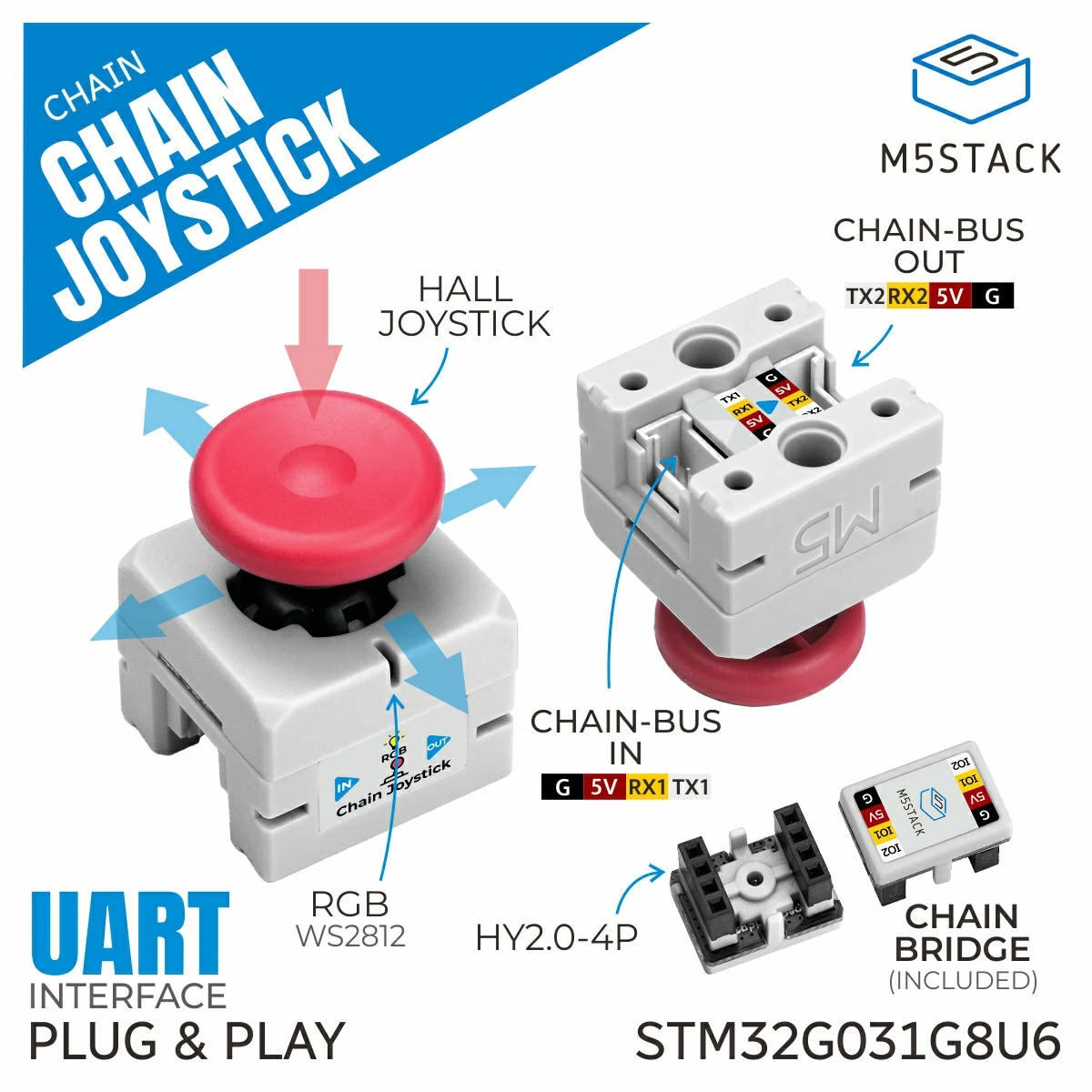
Chain Joystick 是一个可连接到 M5Chain 系列设备的摇杆模块,提供读取摇杆位置和按键状态的功能。
支持以下产品:
UiFlow2 应用示例
USB 鼠标
在 UiFlow2 中打开 chain_joystick_usb_mouse_example.m5f2 项目。
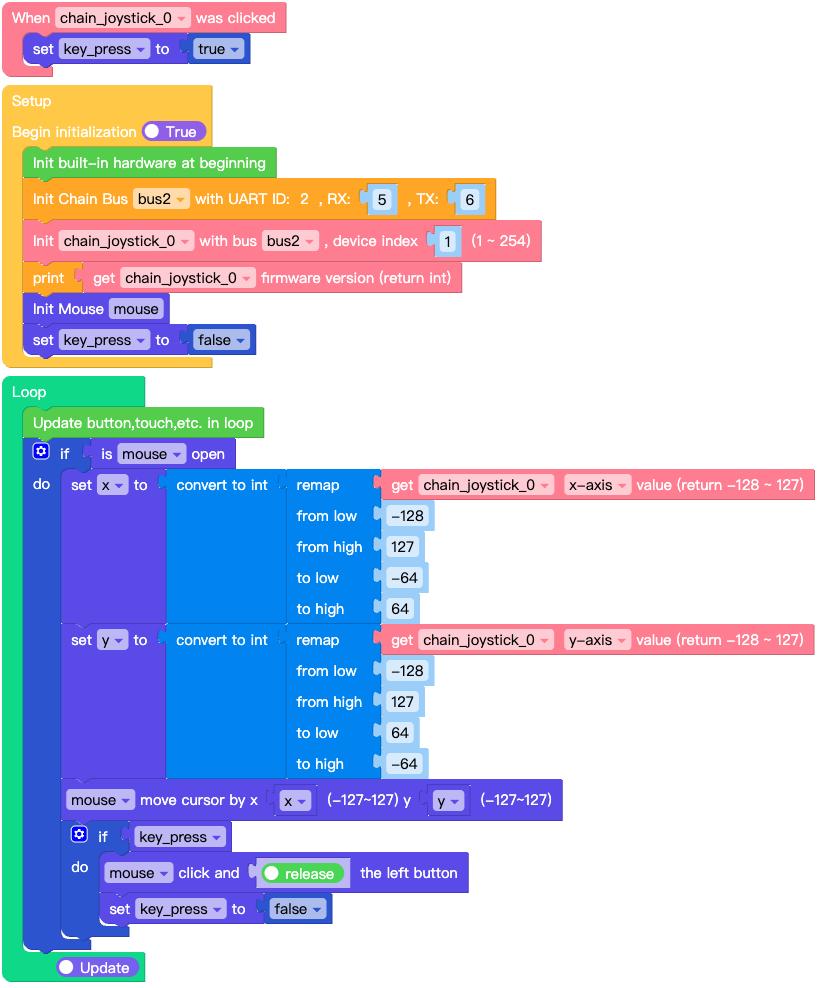
该示例演示如何将 Chain Joystick 作为 USB 鼠标使用。
UiFlow2 代码块:
示例输出:
None
MicroPython 示例
USB 鼠标
该示例演示如何将 Chain Joystick 作为 USB 鼠标使用。
MicroPython 代码块:
 1# SPDX-FileCopyrightText: 2025 M5Stack Technology CO LTD
 2#
 3# SPDX-License-Identifier: MIT
 4
 5import os, sys, io
 6import M5
 7from M5 import *
 8from chain import JoystickChain
 9from chain import ChainBus
10from usb.device.mouse import Mouse
11import m5utils
12
13
14bus2 = None
15mouse = None
16chain_joystick_0 = None
17
18
19key_press = None
20x = None
21y = None
22
23
24def chain_joystick_0_click_event(args):
25    global bus2, mouse, chain_joystick_0, key_press, x, y
26    key_press = True
27
28
29def setup():
30    global bus2, mouse, chain_joystick_0, key_press, x, y
31
32    M5.begin()
33    bus2 = ChainBus(2, tx=6, rx=5)
34    chain_joystick_0 = JoystickChain(bus2, 1)
35    chain_joystick_0.set_click_callback(chain_joystick_0_click_event)
36    print(chain_joystick_0.get_firmware_version())
37    mouse = Mouse()
38    key_press = False
39
40
41def loop():
42    global bus2, mouse, chain_joystick_0, key_press, x, y
43    M5.update()
44    if mouse.is_open():
45        x = int(m5utils.remap(chain_joystick_0.get_x(), -128, 127, -64, 64))
46        y = int(m5utils.remap(chain_joystick_0.get_y(), -128, 127, 64, -64))
47        mouse.move(x, y)
48        if key_press:
49            mouse.click_left(True)
50            key_press = False
51
52
53if __name__ == "__main__":
54    try:
55        setup()
56        while True:
57            loop()
58    except (Exception, KeyboardInterrupt) as e:
59        try:
60            from utility import print_error_msg
61
62            print_error_msg(e)
63        except ImportError:
64            print("please update to latest firmware")
示例输出:
None
API参考
JoystickChain
- class chain.joystick.JoystickChain(bus, device_id)
基类:
KeyChain用于通过 Chain 总线与摇杆设备交互的 JoystickChain 类。
UiFlow2 代码块:

MicroPython 代码块:
from chain import ChainBus
from chain import JoystickChain

chainbus_0 = ChainBus(2, 32, 33, verbose=True)
joystick_0 = JoystickChain(chainbus_0, 1)
其它按键及通用方法请参考
ChainKey类。- get_x()
获取摇杆的 X 位置。
- 返回:
X 位置 (-128 到 127)。
- 返回类型:
UiFlow2 代码块:

MicroPython 代码块:
x = joystick_0.get_x()
- get_y()
获取摇杆的 Y 位置。
- 返回:
Y 位置 (-128 到 127)。
- 返回类型:
UiFlow2 代码块:
MicroPython 代码块:
y = joystick_0.get_y()
- get_x_16bit()
获取摇杆的 X 位置(16 位分辨率)。
- 返回:
X 位置 (-4095 到 4095)。
- 返回类型:
UiFlow2 代码块:

MicroPython 代码块:
x = joystick_0.get_x_16bit()
- get_y_16bit()
获取摇杆的 Y 位置(16 位分辨率)。
- 返回:
Y 位置 (-4095 到 4095)。
- 返回类型:
UiFlow2 代码块:
MicroPython 代码块:
y = joystick_0.get_y_16bit()
- get_x_raw()
获取摇杆的原始 X ADC 值。
- 返回:
原始 X ADC 值 (0-255)。
- 返回类型:
UiFlow2 代码块:

MicroPython 代码块:
x = joystick_0.get_x_raw()
- get_y_raw()
获取摇杆的原始 Y ADC 值。
- 返回:
原始 Y ADC 值 (0-255)。
- 返回类型:
UiFlow2 代码块:
MicroPython 代码块:
y = joystick_0.get_y_raw()
- get_x_16bit_raw()
获取摇杆的原始 X ADC 值(16 位分辨率)。
- 返回:
原始 X ADC 值 (0-65535)。
- 返回类型:
UiFlow2 代码块:

MicroPython 代码块:
x = joystick_0.get_x_16bit_raw()
- get_y_16bit_raw()
获取摇杆的原始 Y ADC 值(16 位分辨率)。
- 返回:
原始 Y ADC 值 (0-65535)。
- 返回类型:
UiFlow2 代码块:
MicroPython 代码块:
y = joystick_0.get_y_16bit_raw()
- get_mapping_value()
获取摇杆的映射值。
- 返回:
包含映射值的元组 (x_negative_min, x_negative_max, x_positive_min, x_positive_max, y_negative_min, y_negative_max, y_positive_min, y_positive_max)。
- 返回类型:
UiFlow2 代码块:

MicroPython 代码块:
mapping = joystick_0.get_mapping_value()
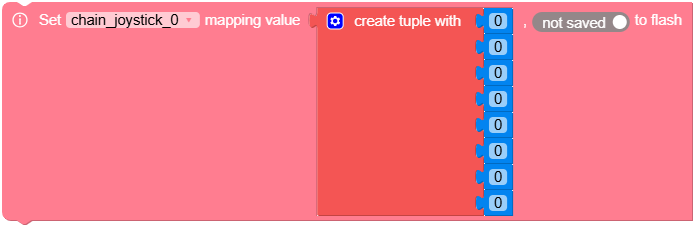
- set_mapping_value(value, save=False)
设置摇杆的映射值。
- 参数:
- 返回:
设置成功返回 True,否则返回 False。
- 返回类型:
UiFlow2 代码块:
MicroPython 代码块:
success = joystick_0.set_mapping_value((100, 200, 300, 400, 100, 200, 300, 400), True)