jpg
备注
当前模块只适用于 CoreS3 主机
jpg 模块用于处理 JPG 格式图像的编码和解码操作
Micropython 案例
拍照
点击屏幕开始倒计时拍照
 1# SPDX-FileCopyrightText: 2024 M5Stack Technology CO LTD
 2#
 3# SPDX-License-Identifier: MIT
 4import os, sys, io
 5import M5
 6from M5 import *
 7import camera
 8import image
 9import time
10import jpg
11
12
13file_0 = None
14img = None
15cnt = None
16last_time = None
17index = None
18img_jpg = None
19
20
21def setup():
22    global file_0, img, cnt, last_time, index, img_jpg
23    M5.begin()
24    Widgets.fillScreen(0x222222)
25    camera.init(pixformat=camera.RGB565, framesize=camera.QVGA)
26    cnt = 0
27    last_time = 0
28    index = 0
29
30
31def loop():
32    global file_0, img, cnt, last_time, index, img_jpg
33    M5.update()
34    img = camera.snapshot()
35    if (M5.Touch.getCount()) > 0:
36        cnt = 5
37        print("hello M5")
38    if cnt > 0:
39        if (time.ticks_diff((time.ticks_ms()), last_time)) >= 1000:
40            last_time = time.ticks_ms()
41            cnt = cnt - 1
42            if cnt == 0:
43                img_jpg = jpg.encode(img, 80)
44                index = index + 1
45                file_0 = open(
46                    "/flash/" + str((str("photo") + str((str(index) + str(".jpg"))))), "w"
47                )
48                file_0.write(img_jpg.bytearray())
49                file_0.close()
50        img.draw_string(140, 80, str(cnt), color=0x000099, scale=5)
51    M5.Lcd.show(img, 0, 0, 320, 240)
52
53
54if __name__ == "__main__":
55    try:
56        setup()
57        while True:
58            loop()
59    except (Exception, KeyboardInterrupt) as e:
60        try:
61            from utility import print_error_msg
62
63            print_error_msg(e)
64        except ImportError:
65            print("please update to latest firmware")
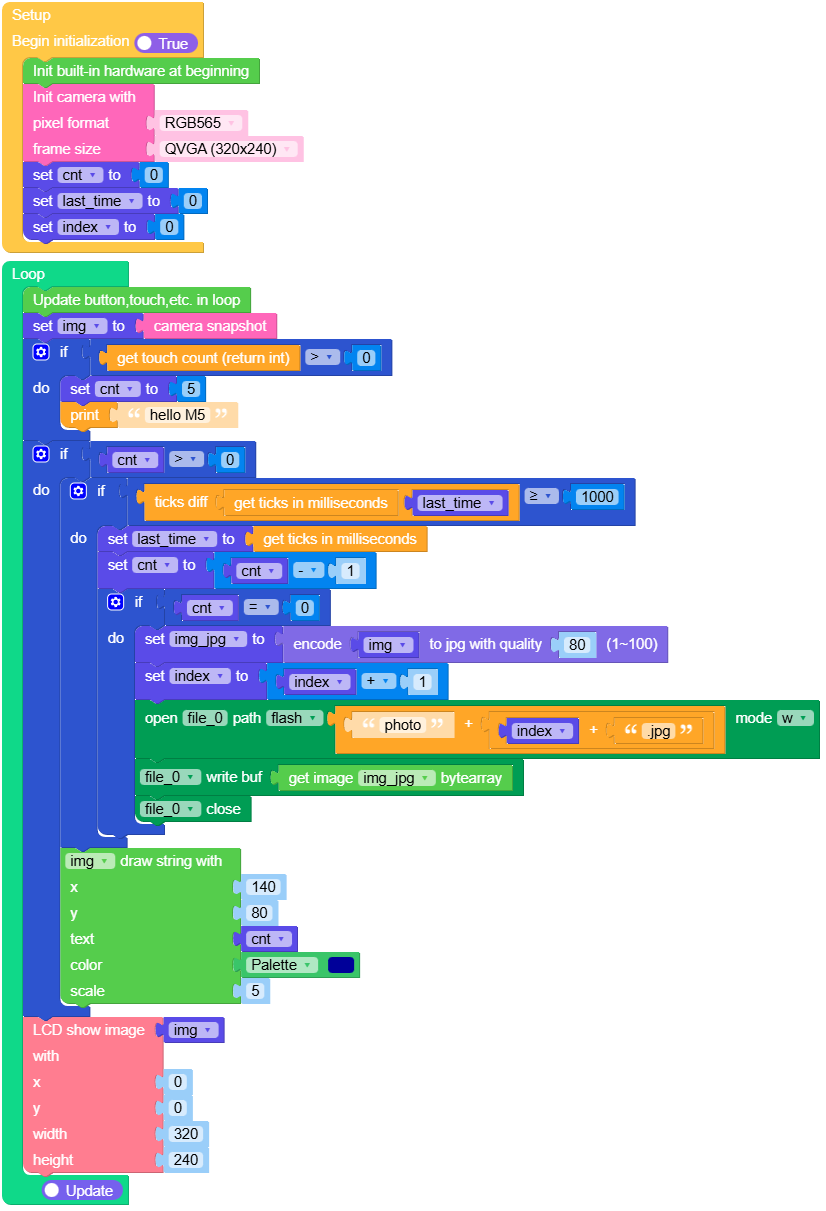
UiFlow2 应用示例
拍照
点击屏幕开始倒计时拍照
Methods
- jpg.encode(img: image.Image, quality=60) image.Image
编码为 jpg 图像
img需要编码的图像,格式为 image.RGB565
返回
image.Image对象,图像格式为 image.JPEGUIFlow2.0

- jpg.decode(img_jpg: image.Image) image.Image
jpg 图像解码
img需要解码的图像,格式为 image.JPEG
返回
image.Image对象,图像格式为 image.RGB565UIFlow2.0
