image
备注
当前模块只适用于 CoreS3 主机
UiFlow2 应用示例
绘图测试
在 UiFlow2 上打开 cores3_example_draw_test.m5f2 项目。
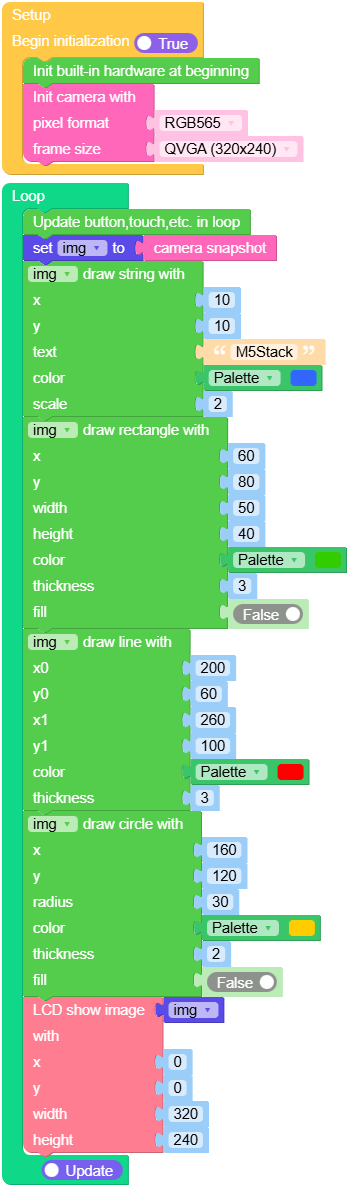
此示例从摄像头拍摄图像,并演示如何在其上绘制文本和基本图形。
UiFlow2 代码块:
示例输出:
None
查找二维码
在 UiFlow2 上打开 cores3_image_find_qrcode_example.m5f2 项目。
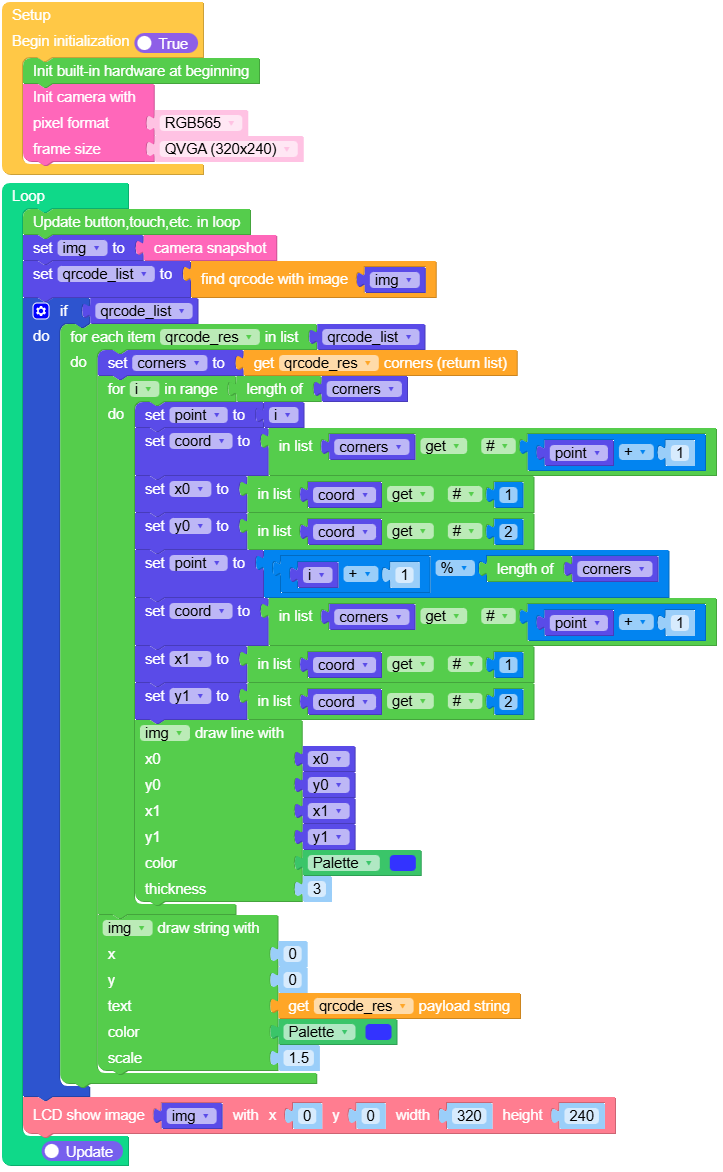
此示例从摄像头拍摄图像,检测二维码,并在 LCD 上绘制其边界框和解码后的文本。
UiFlow2 代码块:
示例输出:
None
MicroPython 应用示例
绘图测试
 1# SPDX-FileCopyrightText: 2024 M5Stack Technology CO LTD
 2#
 3# SPDX-License-Identifier: MIT
 4import os, sys, io
 5import M5
 6from M5 import *
 7import camera
 8import image
 9
10img = None
11
12
13def setup():
14    global img
15    M5.begin()
16    Widgets.fillScreen(0x222222)
17    camera.init(pixformat=camera.RGB565, framesize=camera.QVGA)
18
19
20def loop():
21    global img
22    M5.update()
23    img = camera.snapshot()
24    img.draw_string(10, 10, str("M5Stack"), color=0x3366FF, scale=2)
25    img.draw_rectangle(60, 80, 50, 40, color=0x33CC00, thickness=3, fill=False)
26    img.draw_line(200, 60, 260, 100, color=0xFF0000, thickness=3)
27    img.draw_circle(160, 120, 30, color=0xFFCC00, thickness=2, fill=False)
28    M5.Lcd.show(img, 0, 0, 320, 240)
29
30
31if __name__ == "__main__":
32    try:
33        setup()
34        while True:
35            loop()
36    except (Exception, KeyboardInterrupt) as e:
37        try:
38            from utility import print_error_msg
39
40            print_error_msg(e)
41        except ImportError:
42            print("please update to latest firmware")
查找二维码
 1# SPDX-FileCopyrightText: 2025 M5Stack Technology CO LTD
 2#
 3# SPDX-License-Identifier: MIT
 4import os, sys, io
 5import M5
 6from M5 import *
 7import camera
 8import image
 9
10
11img = None
12qrcode_list = None
13qrcode_res = None
14corners = None
15i = None
16point = None
17coord = None
18x0 = None
19y0 = None
20x1 = None
21y1 = None
22
23
24def setup():
25    global img, qrcode_list, corners, point, i, coord, x0, y0, x1, y1
26    M5.begin()
27    Widgets.setRotation(1)
28    Widgets.fillScreen(0x222222)
29    camera.init(pixformat=camera.RGB565, framesize=camera.QVGA)
30
31
32def loop():
33    global img, qrcode_list, corners, point, i, coord, x0, y0, x1, y1
34    M5.update()
35    img = camera.snapshot()
36    qrcode_list = img.find_qrcodes()
37    if qrcode_list:
38        for qrcode_res in qrcode_list:
39            corners = qrcode_res.corners()
40            for i in range(len(corners)):
41                point = i
42                coord = corners[int((point + 1) - 1)]
43                x0 = coord[0]
44                y0 = coord[1]
45                point = (i + 1) % len(corners)
46                coord = corners[int((point + 1) - 1)]
47                x1 = coord[0]
48                y1 = coord[1]
49                img.draw_line(x0, y0, x1, y1, color=0x3333FF, thickness=3)
50            img.draw_string(0, 0, str(qrcode_res.payload()), color=0x3333FF, scale=1.5)
51    M5.Lcd.show(img, 0, 0, 320, 240)
52
53
54if __name__ == "__main__":
55    try:
56        setup()
57        while True:
58            loop()
59    except (Exception, KeyboardInterrupt) as e:
60        try:
61            from utility import print_error_msg
62
63            print_error_msg(e)
64        except ImportError:
65            print("please update to latest firmware")
API应用
- class image.Image
image.Image对象由 camera.snapshot() 返回.- width()
返回图像的宽度(以像素为单位)。
- Returns width:
图片宽度。
- Return type:
int
UiFlow2 代码块:

MicroPython 代码块:
width()
- height()
返回图像的高度(以像素为单位)。
- Returns height:
图片高度。
- Return type:
int
UiFlow2 代码块:

MicroPython 代码块:
height()
- format()
返回图像的格式
返回值为 image.GRAYSCALE(灰度图)、image.RGB565(RGB565 图)、image.BAYER(Bayer 图像)、或 image.JPEG(JPEG 图像)。
- 返回格式:
图像格式。
- Return type:
int
UiFlow2 代码块:

MicroPython 代码块:
format()
- size()
返回图像的大小(以字节为单位)。
- Returns size:
图像大小,单位:字节
- Return type:
int
UiFlow2 代码块:

MicroPython 代码块:
size()
- bytearray()
返回一个 bytearray 对象,该对象指向图像数据,允许进行字节级别的读写访问。
- 返回数据:
图像数据缓冲区。
- Return type:
bytearray
UiFlow2 代码块:

MicroPython 代码块:
bytearray()
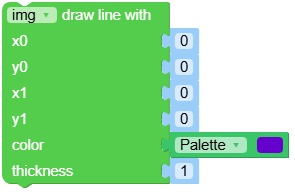
- draw_line(x0, y0, x1, y1, color, thickness)
在图像上绘制一条从 (x0, y0) 到 (x1, y1) 的线段。你可以分别传递 x0, y0, x1, y1,或者将它们作为元组 (x0, y0, x1, y1) 一起传递。
- 参数:
- 返回 self。:
图像对象,可用于链式调用方法。
- Return type:
Image
UiFlow2 代码块:
MicroPython 代码块:
img.draw_line(10, 10, 100, 100, color=(255,0,0), thickness=2)
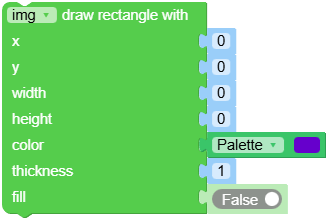
- draw_rectangle(x, y, w, h, color, thickness, fill)
在图像上绘制一个矩形。你可以分别传递 x, y, w, h,或者将它们作为元组 (x, y, w, h) 一起传递。
- 参数:
- 返回 self。:
图像对象,可用于链式调用方法。
- Return type:
Image
UiFlow2 代码块:
MicroPython 代码块:
img.draw_rectangle(20, 20, 80, 60, color=(0,255,0), thickness=2, fill=True)
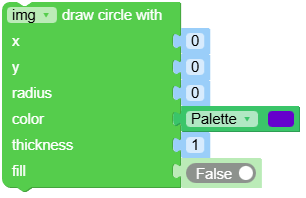
- draw_circle(x, y, radius, color, thickness, fill)
在图像上绘制一个圆形。你可以分别传递 x, y, radius,或者将它们作为元组 (x, y, radius) 一起传递。
- 参数:
- 返回 self。:
图像对象,可用于链式调用方法。
- Return type:
Image
UiFlow2 代码块:
MicroPython 代码块:
img.draw_circle(50, 50, 30, color=(0,0,255), thickness=3, fill=False)
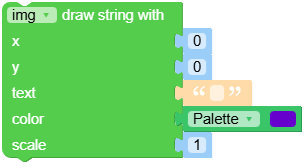
- draw_string(x, y, text, color, scale)
在图像上绘制从位置 (x, y) 开始的 8x16 文本。你可以分别传递 x, y,或者将它们作为元组 (x, y) 一起传递。
- 参数:
- 返回 self。:
图像对象,可用于链式调用方法。
- Return type:
Image
UiFlow2 代码块:
MicroPython 代码块:
img.draw_string(10, 10, "Hello", color=(255,255,0), scale=2)
- find_qrcodes()
查找所有二维码,并返回一个包含
image.qrcode对象的列表。更多详情请参见 image.qrcode 对象。- 返回 qrcodes。:
检测到的二维码列表。
- Return type:
List[image.qrcode]
UiFlow2 代码块:

MicroPython 代码块:
qrcodes = img.find_qrcodes()
- class image.qrcode
请调用 Image.find_qrcodes() 来创建该对象。
- corners()
按顺时针顺序获取二维码的四个角点,从左上角开始。
- Returns corners:
包含 4 个 (x, y) 元组的列表。
- Return type:
List[Tuple[int, int]]
UiFlow2 代码块:

MicroPython 代码块:
q.corners()
- rect()
获取二维码的边界框。
- 返回 rect。:
(x, y, w, h) 元组
- Return type:
Tuple[int, int, int, int]
UiFlow2 代码块:

MicroPython 代码块:
q.rect()
- x()
获取边界框的 x 坐标。
- Returns x:
坐标 x
- Return type:
int
UiFlow2 代码块:

MicroPython 代码块:
q.x()
- y()
获取边界框的 y 坐标。
- Returns y:
坐标 y
- Return type:
int
UiFlow2 代码块:

MicroPython 代码块:
q.y()
- w()
获取边界框的宽。
- Returns w:
二维码宽。
- Return type:
int
UiFlow2 代码块:

MicroPython 代码块:
q.w()
- h()
获取边界框的高。
- Returns h:
二维码高。
- Return type:
int
UiFlow2 代码块:

MicroPython 代码块:
q.h()
- payload()
获取二维码解码后的数据字符串(例如 URL)。
- Returns payload:
decoded 字符串。
- Return type:
str
UiFlow2 代码块:

MicroPython 代码块:
q.payload()
- version()
获取二维码版本号。
- Returns version:
二维码版本。
- Return type:
int
UiFlow2 代码块:

MicroPython 代码块:
q.version()
- ecc_level()
获取二维码的 ECC(纠错)等级。
ECC 等级:L、M、Q、H。等级越高,二维码对损坏的容忍度越高,但可存储的数据量会减少。
- Returns ecc:
ECC 等级(0~3)。
- Return type:
int
UiFlow2 代码块:

MicroPython 代码块:
q.ecc_level()
- mask()
获取二维码的掩码模式(0~7)。
掩码用于提高二维码的可读性。
- Returns mask:
掩码模式 ID。
- Return type:
int
UiFlow2 代码块:

MicroPython 代码块:
q.mask()
- eci()
获取二维码的 ECI(扩展通道解释)值。
ECI 表示文本编码(例如 UTF-8、Shift-JIS)。0 表示未使用 ECI。
- Returns eci:
ECI 值。
- Return type:
int
UiFlow2 代码块:

MicroPython 代码块:
q.eci()
