dl — 深度学习
备注
当前模块只适用于 CoreS3 主机
UiFlow2 应用示例
人脸检测
在 UiFlow2 中打开 cores3_example_human_face_detect.m5f2 项目。
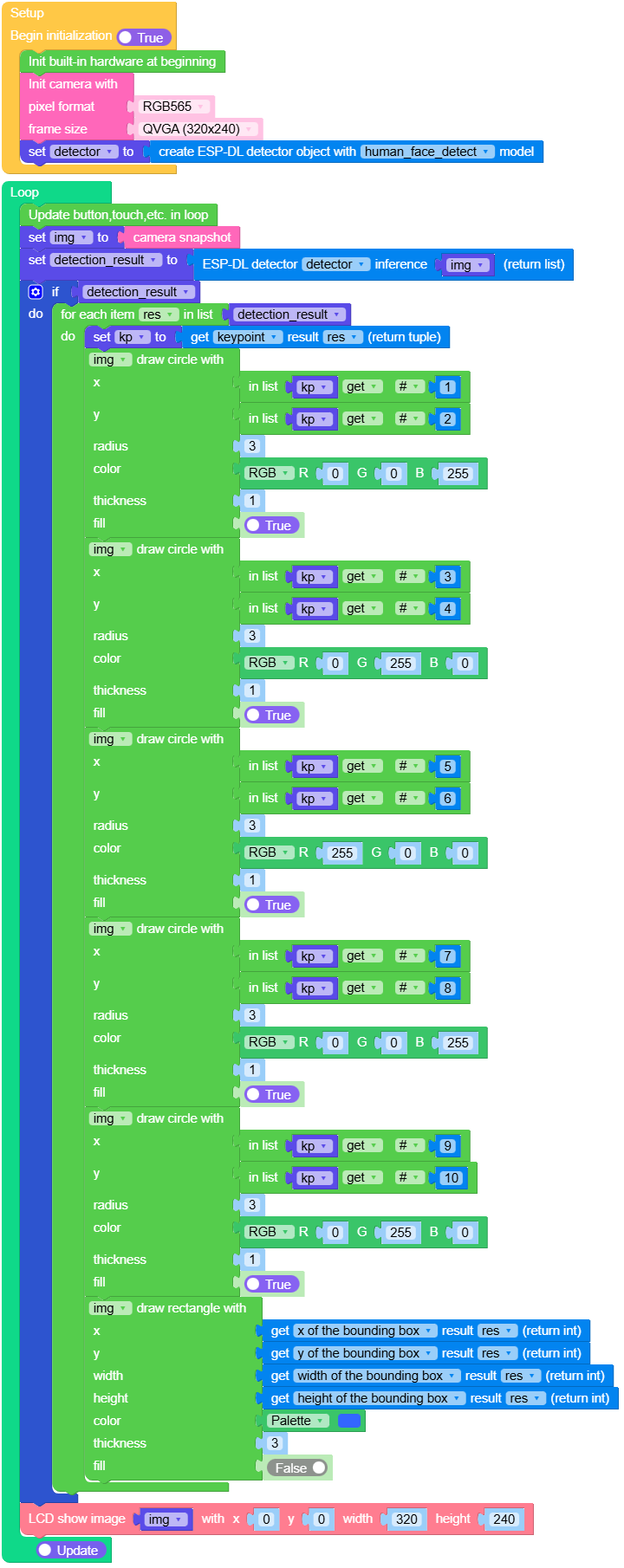
该示例使用人脸检测算法,从摄像头画面中实时检测人脸。当检测到人脸时,会在屏幕上绘制一个边界框以标记人脸的位置,从而直观地显示检测结果。
UiFlow2 代码块:
示例输出:
None
行人检测
在 UiFlow2 中打开 cores3_example_pedestrian_detect.m5f2 项目。
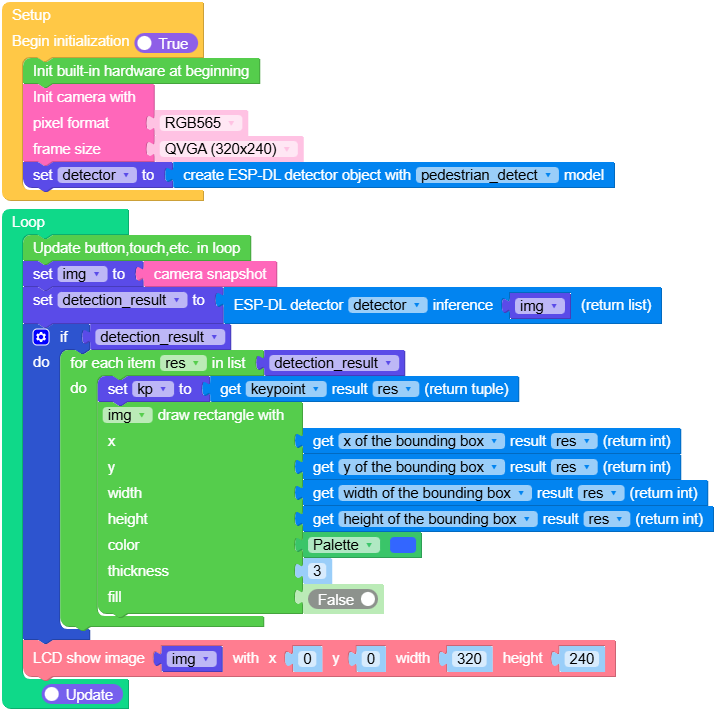
该示例使用行人检测算法从摄像头画面中实时检测行人目标。当检测到行人时,会在屏幕上绘制边界框以突出显示行人位置,从而直观展示检测结果。
UiFlow2 代码块:
示例输出:
None
人脸识别
在 UiFlow2 中打开 cores3_example_human_face_recognition.m5f2 项目。
要运行该示例,你需要 CoreS3 和 Unit Dual Button。
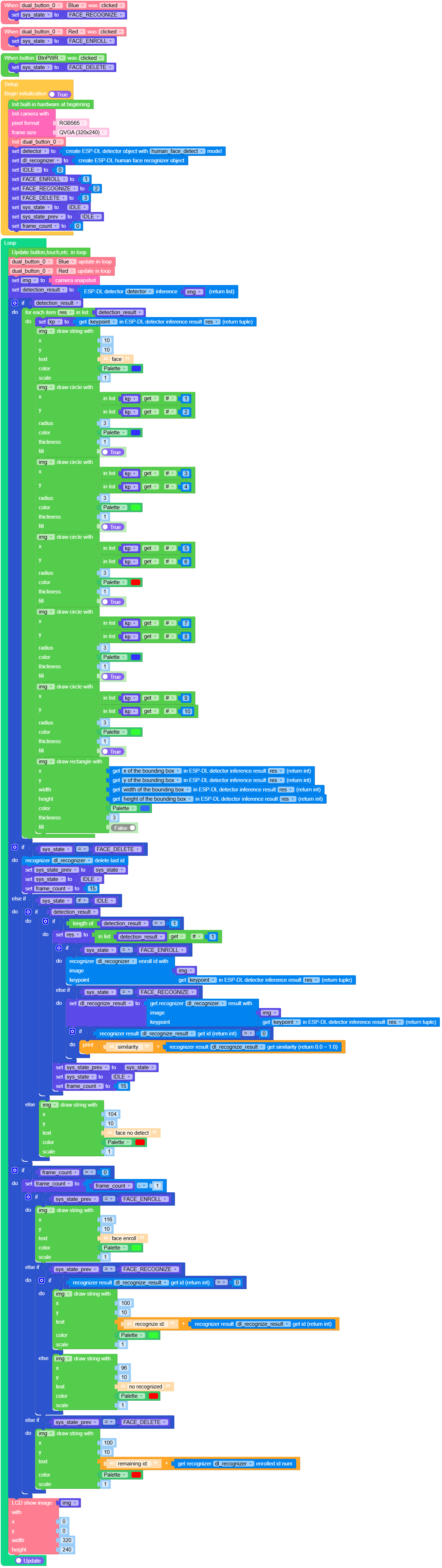
该示例使用人脸识别算法从摄像头画面中实时检测人脸。
通过按下不同的按钮,你可以录入新的人脸数据或进行人脸识别。检测到的人脸和识别结果会以边界框的形式显示在屏幕上。
UiFlow2 代码块:
示例输出:
None
Micropython 案例
人脸检测
MicroPython 代码块:
 1# SPDX-FileCopyrightText: 2024 M5Stack Technology CO LTD
 2#
 3# SPDX-License-Identifier: MIT
 4import os, sys, io
 5import M5
 6from M5 import *
 7import camera
 8import dl
 9import image
10
11
12img = None
13detector = None
14detection_result = None
15res = None
16kp = None
17
18
19def setup():
20    global img, detector, detection_result, kp
21    M5.begin()
22    Widgets.fillScreen(0x222222)
23    camera.init(pixformat=camera.RGB565, framesize=camera.QVGA)
24    detector = dl.ObjectDetector(dl.model.HUMAN_FACE_DETECT)
25
26
27def loop():
28    global img, detector, detection_result, kp
29    M5.update()
30    img = camera.snapshot()
31    detection_result = detector.infer(img)
32    if detection_result:
33        for res in detection_result:
34            kp = res.keypoint()
35            img.draw_circle(kp[0], kp[1], 3, color=0x0000FF, thickness=1, fill=True)
36            img.draw_circle(kp[2], kp[3], 3, color=0x00FF00, thickness=1, fill=True)
37            img.draw_circle(kp[4], kp[5], 3, color=0xFF0000, thickness=1, fill=True)
38            img.draw_circle(kp[6], kp[7], 3, color=0x0000FF, thickness=1, fill=True)
39            img.draw_circle(kp[8], kp[9], 3, color=0x00FF00, thickness=1, fill=True)
40            img.draw_rectangle(
41                res.x(), res.y(), res.w(), res.h(), color=0x3366FF, thickness=3, fill=False
42            )
43    M5.Lcd.show(img, 0, 0, 320, 240)
44
45
46if __name__ == "__main__":
47    try:
48        setup()
49        while True:
50            loop()
51    except (Exception, KeyboardInterrupt) as e:
52        try:
53            from utility import print_error_msg
54
55            print_error_msg(e)
56        except ImportError:
57            print("please update to latest firmware")
示例输出:
None
行人检测
MicroPython 代码块:
 1# SPDX-FileCopyrightText: 2024 M5Stack Technology CO LTD
 2#
 3# SPDX-License-Identifier: MIT
 4import os, sys, io
 5import M5
 6from M5 import *
 7import camera
 8import dl
 9import image
10
11
12img = None
13detector = None
14detection_result = None
15res = None
16kp = None
17
18
19def setup():
20    global img, detector, detection_result, kp
21    M5.begin()
22    Widgets.fillScreen(0x222222)
23    camera.init(pixformat=camera.RGB565, framesize=camera.QVGA)
24    detector = dl.ObjectDetector(dl.model.PEDESTRIAN_DETECT)
25
26
27def loop():
28    global img, detector, detection_result, kp
29    M5.update()
30    img = camera.snapshot()
31    detection_result = detector.infer(img)
32    if detection_result:
33        for res in detection_result:
34            kp = res.keypoint()
35            img.draw_rectangle(
36                res.x(), res.y(), res.w(), res.h(), color=0x3366FF, thickness=3, fill=False
37            )
38    M5.Lcd.show(img, 0, 0, 320, 240)
39
40
41if __name__ == "__main__":
42    try:
43        setup()
44        while True:
45            loop()
46    except (Exception, KeyboardInterrupt) as e:
47        try:
48            from utility import print_error_msg
49
50            print_error_msg(e)
51        except ImportError:
52            print("please update to latest firmware")
示例输出:
None
人脸识别
MicroPython 代码块:
  1# SPDX-FileCopyrightText: 2024 M5Stack Technology CO LTD
  2#
  3# SPDX-License-Identifier: MIT
  4import os, sys, io
  5import M5
  6from M5 import *
  7from unit import DualButtonUnit
  8from hardware import *
  9import camera
 10import dl
 11import image
 12
 13
 14dual_button_0_blue = None
 15dual_button_0_red = None
 16sys_state = None
 17FACE_RECOGNIZE = None
 18FACE_ENROLL = None
 19FACE_DELETE = None
 20detector = None
 21img = None
 22dl_recognizer = None
 23detection_result = None
 24IDLE = None
 25res = None
 26kp = None
 27sys_state_prev = None
 28frame_count = None
 29dl_recognize_result = None
 30
 31
 32def dual_button_0_blue_wasClicked_event(state):  # noqa: N802
 33    global \
 34        dual_button_0_blue, \
 35        dual_button_0_red, \
 36        sys_state, \
 37        FACE_RECOGNIZE, \
 38        FACE_ENROLL, \
 39        FACE_DELETE, \
 40        detector, \
 41        img, \
 42        dl_recognizer, \
 43        detection_result, \
 44        IDLE, \
 45        kp, \
 46        sys_state_prev, \
 47        frame_count, \
 48        res, \
 49        dl_recognize_result
 50    sys_state = FACE_RECOGNIZE
 51
 52
 53def dual_button_0_red_wasClicked_event(state):  # noqa: N802
 54    global \
 55        dual_button_0_blue, \
 56        dual_button_0_red, \
 57        sys_state, \
 58        FACE_RECOGNIZE, \
 59        FACE_ENROLL, \
 60        FACE_DELETE, \
 61        detector, \
 62        img, \
 63        dl_recognizer, \
 64        detection_result, \
 65        IDLE, \
 66        kp, \
 67        sys_state_prev, \
 68        frame_count, \
 69        res, \
 70        dl_recognize_result
 71    sys_state = FACE_ENROLL
 72
 73
 74def btnPWR_wasClicked_event(state):  # noqa: N802
 75    global \
 76        dual_button_0_blue, \
 77        dual_button_0_red, \
 78        sys_state, \
 79        FACE_RECOGNIZE, \
 80        FACE_ENROLL, \
 81        FACE_DELETE, \
 82        detector, \
 83        img, \
 84        dl_recognizer, \
 85        detection_result, \
 86        IDLE, \
 87        kp, \
 88        sys_state_prev, \
 89        frame_count, \
 90        res, \
 91        dl_recognize_result
 92    sys_state = FACE_DELETE
 93
 94
 95def setup():
 96    global \
 97        dual_button_0_blue, \
 98        dual_button_0_red, \
 99        sys_state, \
100        FACE_RECOGNIZE, \
101        FACE_ENROLL, \
102        FACE_DELETE, \
103        detector, \
104        img, \
105        dl_recognizer, \
106        detection_result, \
107        IDLE, \
108        kp, \
109        sys_state_prev, \
110        frame_count, \
111        res, \
112        dl_recognize_result
113    M5.begin()
114    Widgets.fillScreen(0x222222)
115    BtnPWR.setCallback(type=BtnPWR.CB_TYPE.WAS_CLICKED, cb=btnPWR_wasClicked_event)
116    camera.init(pixformat=camera.RGB565, framesize=camera.QVGA)
117    dual_button_0_blue, dual_button_0_red = DualButtonUnit((8, 9))
118    dual_button_0_blue.setCallback(
119        type=dual_button_0_blue.CB_TYPE.WAS_CLICKED, cb=dual_button_0_blue_wasClicked_event
120    )
121    dual_button_0_red.setCallback(
122        type=dual_button_0_red.CB_TYPE.WAS_CLICKED, cb=dual_button_0_red_wasClicked_event
123    )
124    detector = dl.ObjectDetector(dl.model.HUMAN_FACE_DETECT)
125    dl_recognizer = dl.HumanFaceRecognizer()
126    IDLE = 0
127    FACE_ENROLL = 1
128    FACE_RECOGNIZE = 2
129    FACE_DELETE = 3
130    sys_state = IDLE
131    sys_state_prev = IDLE
132    frame_count = 0
133
134
135def loop():
136    global \
137        dual_button_0_blue, \
138        dual_button_0_red, \
139        sys_state, \
140        FACE_RECOGNIZE, \
141        FACE_ENROLL, \
142        FACE_DELETE, \
143        detector, \
144        img, \
145        dl_recognizer, \
146        detection_result, \
147        IDLE, \
148        kp, \
149        sys_state_prev, \
150        frame_count, \
151        res, \
152        dl_recognize_result
153    M5.update()
154    dual_button_0_blue.tick(None)
155    dual_button_0_red.tick(None)
156    img = camera.snapshot()
157    detection_result = detector.infer(img)
158    if detection_result:
159        for res in detection_result:
160            kp = res.keypoint()
161            img.draw_string(10, 10, str("face"), color=0x3333FF, scale=1)
162            img.draw_circle(kp[0], kp[1], 3, color=0x3333FF, thickness=1, fill=True)
163            img.draw_circle(kp[2], kp[3], 3, color=0x33FF33, thickness=1, fill=True)
164            img.draw_circle(kp[4], kp[5], 3, color=0xFF0000, thickness=1, fill=True)
165            img.draw_circle(kp[6], kp[7], 3, color=0x3333FF, thickness=1, fill=True)
166            img.draw_circle(kp[8], kp[9], 3, color=0x33FF33, thickness=1, fill=True)
167            img.draw_rectangle(
168                res.x(), res.y(), res.w(), res.h(), color=0x3366FF, thickness=3, fill=False
169            )
170    if sys_state == FACE_DELETE:
171        dl_recognizer.delete_id()
172        sys_state_prev = sys_state
173        sys_state = IDLE
174        frame_count = 15
175    elif sys_state != IDLE:
176        if detection_result:
177            if len(detection_result) == 1:
178                res = detection_result[0]
179                if sys_state == FACE_ENROLL:
180                    dl_recognizer.enroll_id(img, res.keypoint())
181                elif sys_state == FACE_RECOGNIZE:
182                    dl_recognize_result = dl_recognizer.recognize(img, res.keypoint())
183                    if (dl_recognize_result.id()) > 0:
184                        print((str("similarity: ") + str((dl_recognize_result.similarity()))))
185                sys_state_prev = sys_state
186                sys_state = IDLE
187                frame_count = 15
188        else:
189            img.draw_string(104, 10, str("face no detect"), color=0xFF0000, scale=1)
190    if frame_count > 0:
191        frame_count = frame_count - 1
192        if sys_state_prev == FACE_ENROLL:
193            img.draw_string(116, 10, str("face enroll"), color=0x33FF33, scale=1)
194        elif sys_state_prev == FACE_RECOGNIZE:
195            if (dl_recognize_result.id()) > 0:
196                img.draw_string(
197                    100,
198                    10,
199                    str((str("recognize id: ") + str((dl_recognize_result.id())))),
200                    color=0x33FF33,
201                    scale=1,
202                )
203            else:
204                img.draw_string(96, 10, str("no recognized"), color=0xFF0000, scale=1)
205        elif sys_state_prev == FACE_DELETE:
206            img.draw_string(
207                100,
208                10,
209                str((str("remaining id: ") + str((dl_recognizer.enrolled_id_num())))),
210                color=0xFF0000,
211                scale=1,
212            )
213    M5.Lcd.show(img, 0, 0, 320, 240)
214
215
216if __name__ == "__main__":
217    try:
218        setup()
219        while True:
220            loop()
221    except (Exception, KeyboardInterrupt) as e:
222        try:
223            from utility import print_error_msg
224
225            print_error_msg(e)
226        except ImportError:
227            print("please update to latest firmware")
示例输出:
None
Funtions
- dl.ObjectDetector(model) ObjectDetector
创建一个对象检测器实例。
- 参数:
model – 参数
model仅接受以下值:
dl.model.HUMAN_FACE_DETECT人脸检测dl.model.PEDESTRIAN_DETECT行人检测
返回
ObjectDetector对象.UiFlow2 代码块:

示例:
detector = dl.ObjectDetector(dl.model.HUMAN_FACE_DETECT)
detector = dl.ObjectDetector(dl.model.PEDESTRIAN_DETECT)
- dl.HumanFaceRecognizer() HumanFaceRecognizer
创建一个人脸识别器
返回
HumanFaceRecognizer对象.UiFlow2 代码块:

class ObjectDetector
ObjectDetector 对象由 dl.ObjectDetector(model) 返回
- ObjectDetector.infer(img: image.Image) DetectionResult
返回一个
DetectionResult实例.UiFlow2 代码块:

class HumanFaceRecognizer
HumanFaceRecognizer 对象由 dl.HumanFaceRecognizer() 返回
- HumanFaceRecognizer.recognize(img: image:Image, keypoint: tuple) RecognitionResult
人脸识别
img输入图像keypoint人脸关键点数据,详情参考 DetectionResult.keypoint() 解析
返回
RecognitionResult对象。UiFlow2 代码块:

- HumanFaceRecognizer.clear_id()
清空所有 id
UiFlow2 代码块:

- HumanFaceRecognizer.enroll_id(img: image:Image, keypoint: tuple) bool
注册 ID。
img输入图像keypoint人脸关键点数据,详情参考 DetectionResult.keypoint() 解析
UiFlow2 代码块:

- HumanFaceRecognizer.delete_id([id])
删除 id。
id 是一个可选参数。如果提供此参数,则会删除指定的面部信息。默认情况下,它会删除最近记录的 id。
UiFlow2 代码块:



class DetectionResult —— DetectionResult 对象
DetectionResult 对象由 ObjectDetector.infer(img) 返回
- DetectionResult.bbox()
获取目标检测的边界框。
UiFlow2 代码块:







class RecognitionResult – RecognitionResult 对象
RecognitionResult 由 HumanFaceRecognizer.recognize(img, keypoint) 返回。

