WDT
The WDT is used to restart the system when the application crashes and ends up into a non recoverable state. Once started it cannot be stopped or reconfigured in any way. After enabling, the application must “feed” the watchdog periodically to prevent it from expiring and resetting the system.
Micropython Example:
 1# SPDX-FileCopyrightText: 2024 M5Stack Technology CO LTD
 2#
 3# SPDX-License-Identifier: MIT
 4
 5import os, sys, io
 6import M5
 7from M5 import *
 8from hardware import *
 9
10
11title0 = None
12label0 = None
13label1 = None
14label2 = None
15label3 = None
16wdt = None
17
18
19isTouch = None
20
21
22def setup():
23    global title0, label0, label1, label2, label3, wdt, isTouch
24
25    M5.begin()
26    Widgets.fillScreen(0x222222)
27    title0 = Widgets.Title("WDT CoreS3 example", 3, 0xFFFFFF, 0x0000FF, Widgets.FONTS.DejaVu18)
28    label0 = Widgets.Label("Touch State:", 2, 92, 1.0, 0xFFFFFF, 0x222222, Widgets.FONTS.DejaVu18)
29    label1 = Widgets.Label("WDT State:", 2, 155, 1.0, 0xFFFFFF, 0x222222, Widgets.FONTS.DejaVu18)
30    label2 = Widgets.Label(
31        "pls touch screen to feed the dog", 0, 27, 1.0, 0xFFCF00, 0x222222, Widgets.FONTS.DejaVu18
32    )
33    label3 = Widgets.Label("label3", -117, 96, 1.0, 0xFFFFFF, 0x222222, Widgets.FONTS.DejaVu18)
34
35    wdt = WDT(timeout=2500)
36    isTouch = 0
37
38
39def loop():
40    global title0, label0, label1, label2, label3, wdt, isTouch
41    M5.update()
42    isTouch = M5.Touch.getCount()
43    label0.setText(str((str("Touch State:") + str(isTouch))))
44    if isTouch:
45        wdt.feed()
46        label1.setText(str("WDT State: Feed!"))
47    else:
48        label1.setText(str("WDT State: Not Feed! Will crush!"))
49
50
51if __name__ == "__main__":
52    try:
53        setup()
54        while True:
55            loop()
56    except (Exception, KeyboardInterrupt) as e:
57        try:
58            from utility import print_error_msg
59
60            print_error_msg(e)
61        except ImportError:
62            print("please update to latest firmware")
UIFLOW2 Example:
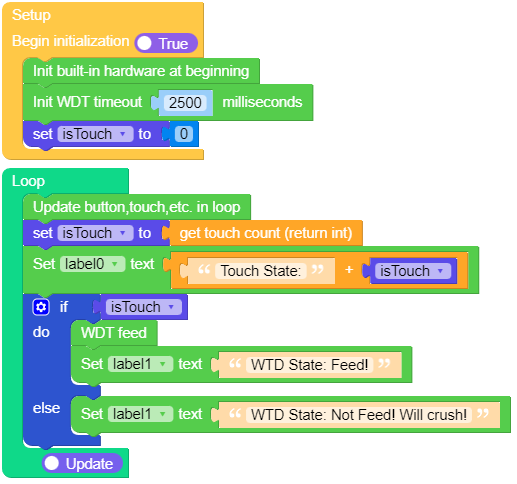
class WDT – watchdog timer
Constructors
- class WDT(id=0, timeout=5000)
Create a WDT object and start it. The timeout must be given in milliseconds. Once it is running the timeout cannot be changed and the WDT cannot be stopped either.
Notes: On the esp8266 a timeout cannot be specified, it is determined by the underlying system. On rp2040 devices, the maximum timeout is 8388 ms.
UIFLOW2:

Methods
- WDT.feed()
Feed the WDT to prevent it from resetting the system. The application should place this call in a sensible place ensuring that the WDT is only fed after verifying that everything is functioning correctly.
UIFLOW2:
