Pin
The Pin class is used to manage GPIO operations. Below is the detailed support for the Pin class:
Micropython Example:
 1# SPDX-FileCopyrightText: 2024 M5Stack Technology CO LTD
 2#
 3# SPDX-License-Identifier: MIT
 4
 5import os, sys, io
 6import M5
 7from M5 import *
 8from hardware import *
 9import time
10
11
12title0 = None
13label0 = None
14label1 = None
15pin6 = None
16pin7 = None
17
18
19def setup():
20    global title0, label0, label1, pin6, pin7
21
22    M5.begin()
23    Widgets.fillScreen(0x222222)
24    title0 = Widgets.Title("Pin example", 3, 0xFFFFFF, 0x0000FF, Widgets.FONTS.DejaVu18)
25    label0 = Widgets.Label("Pin 6 State:", 1, 83, 1.0, 0xFFFFFF, 0x222222, Widgets.FONTS.DejaVu18)
26    label1 = Widgets.Label("Pin 7 State:", 1, 132, 1.0, 0xFFFFFF, 0x222222, Widgets.FONTS.DejaVu18)
27
28    pin6 = Pin(6, mode=Pin.OUT)
29    pin7 = Pin(7, mode=Pin.IN)
30
31
32def loop():
33    global title0, label0, label1, pin6, pin7
34    M5.update()
35    pin6.value(1)
36    label0.setText(str((str("Pin 6 State:") + str((pin6.value())))))
37    time.sleep(1)
38    pin6.value(0)
39    label0.setText(str((str("Pin 6 State:") + str((pin6.value())))))
40    time.sleep(1)
41    label1.setText(str((str("Pin 7 State:") + str((pin7.value())))))
42
43
44if __name__ == "__main__":
45    try:
46        setup()
47        while True:
48            loop()
49    except (Exception, KeyboardInterrupt) as e:
50        try:
51            from utility import print_error_msg
52
53            print_error_msg(e)
54        except ImportError:
55            print("please update to latest firmware")
UIFLOW2 Example:
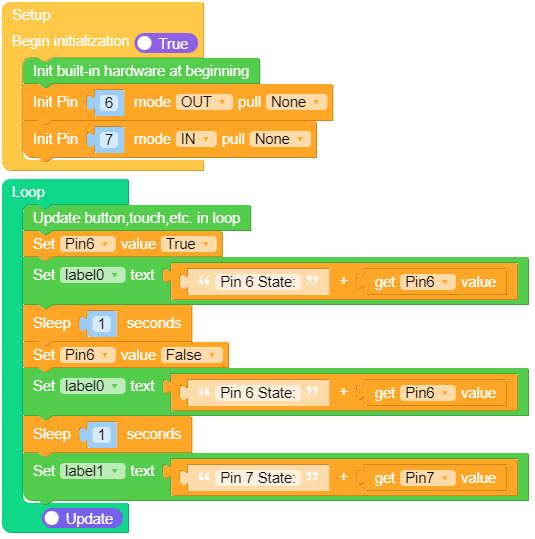
class Pin
Constructors
- class Pin(id, mode=-1, pull=-1)
Access the pin peripheral (GPIO pin) associated with the given
id.- 参数:
id (int) – is mandatory and can be an arbitrary object.
mode (int) –
specifies the pin mode.
Pin.IN- Pin is configured for input. If viewed as an output the pin is in high-impedance state.Pin.OUT- Pin is configured for (normal) output.
pull (int) –
specifies if the pin has a (weak) pull resistor attached.
None- No pull up or down resistor.Pin.PULL_UP- Pull up resistor enabled.Pin.PULL_DOWN- Pull down resistor enabled.
UIFLOW2:

Methods
- Pin.value([value])
Set the value of the pin.
The argument
valuecan be anything that converts to a boolean. If it converts toTrue, the pin is set to state ‘1’, otherwise it is set to state ‘0’.The behaviour of this method depends on the mode of the pin:
Pin.IN- The value is stored in the output buffer for the pin. The pin state does not change, it remains in the high-impedance state. The stored value will become active on the pin as soon as it is changed toPin.OUTmode.Pin.OUT- The output buffer is set to the given value immediately.
UIFLOW2:





Constants
- Pin.IN
Input mode
- Pin.OUT
Output mode
- Pin.PULL_UP
Pull-up resistor
- Pin.PULL_DOWN
Pull-down resistor