Speaker
Speaker 用于控制主机内部集成的按键。以下是主机的 Speaker 支持详细:
Controller |
NS4168 |
AW88298 |
Buzzer |
|---|---|---|---|
AirQ |
✔ |
||
Atom Echo |
✔ |
||
Atom Lite |
|||
Atom Martrix |
|||
AtomS3 |
|||
AtomS3 Lite |
|||
AtomS3U |
|||
AtomU |
|||
Basic |
|||
Capsule |
✔ |
||
Cardputer |
✔ |
||
Core2 |
✔ |
||
CoreInk |
✔ |
||
CoreS3 |
✔ |
||
Dial |
✔ |
||
DinMeter |
✔ |
||
Fire |
|||
Paper |
|||
Stamp PICO |
|||
StampS3 |
|||
Station |
|||
StickC |
✔ |
||
StickC PLUS |
✔ |
||
StickC PLUS2 |
✔ |
||
TOUGH |
✔ |
Micropython Example:
 1# SPDX-FileCopyrightText: 2024 M5Stack Technology CO LTD
 2#
 3# SPDX-License-Identifier: MIT
 4
 5import os, sys, io
 6import M5
 7from M5 import *
 8
 9
10circle0 = None
11label0 = None
12
13
14x = None
15y = None
16
17
18def setup():
19    global circle0, label0, x, y
20
21    M5.begin()
22    Widgets.fillScreen(0x222222)
23    circle0 = Widgets.Circle(160, 120, 60, 0xFFFFFF, 0xFFFFFF)
24    label0 = Widgets.Label("Play", 141, 110, 1.0, 0x222222, 0xFFFFFF, Widgets.FONTS.DejaVu18)
25
26    Speaker.begin()
27    Speaker.playWavFile("/flash/res/audio/poweron_2_5s.wav")
28
29
30def loop():
31    global circle0, label0, x, y
32    M5.update()
33    if M5.Touch.getCount():
34        x = M5.Touch.getX()
35        y = M5.Touch.getY()
36        if x >= 130 and x <= 190 and y >= 90 and y <= 150:
37            circle0.setColor(color=0xFF0000, fill_c=0xFF0000)
38            label0.setColor(0xFFFFFF, 0xFF0000)
39            label0.setText(str("Play..."))
40            Speaker.playWavFile("/flash/res/audio/poweron_2_5s.wav")
41            label0.setText(str("Play"))
42            circle0.setColor(color=0xFFFFFF, fill_c=0xFFFFFF)
43            label0.setColor(0x000000, 0xFFFFFF)
44
45
46if __name__ == "__main__":
47    try:
48        setup()
49        while True:
50            loop()
51    except (Exception, KeyboardInterrupt) as e:
52        try:
53            from utility import print_error_msg
54
55            print_error_msg(e)
56        except ImportError:
57            print("please update to latest firmware")
UIFLOW2 Example:
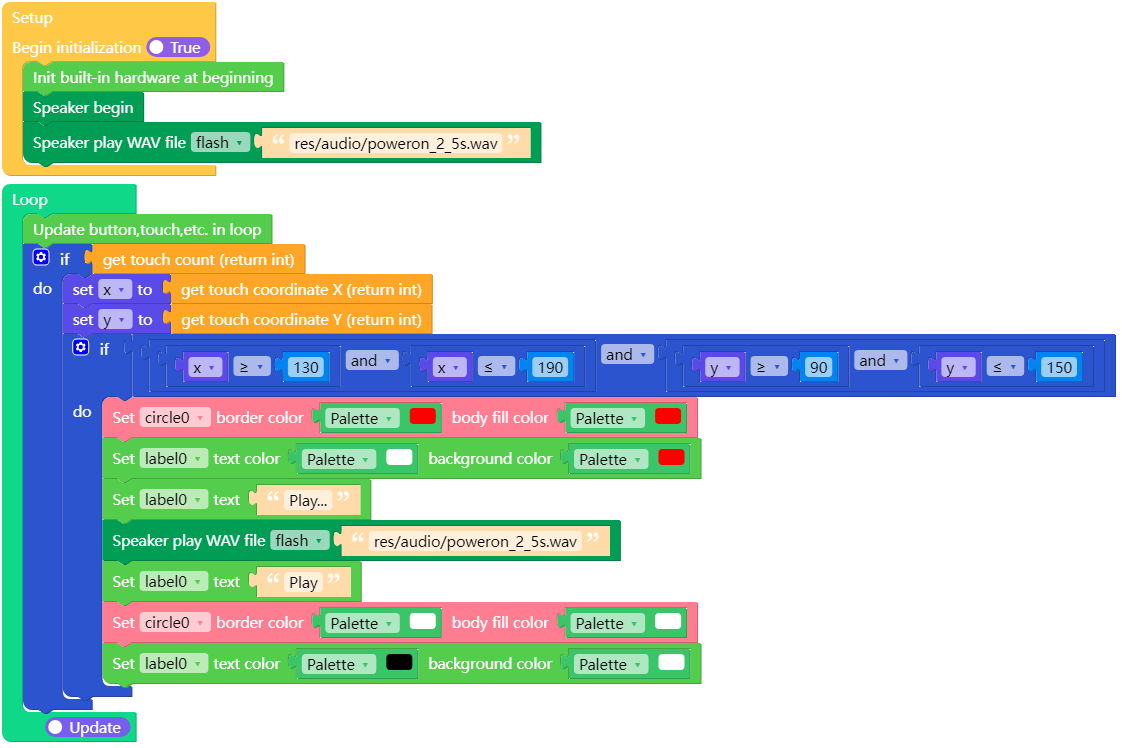
class Speaker
重要
Methods of the Speaker Class heavily rely on M5.begin()  and
and M5.update()  .
.
All calls to methods of Speaker objects should be placed after M5.begin() , and M5.update() should be called in the main loop.
Methods
- Speaker.config([cfg])
- Speaker.config('param')
- Speaker.config(param=value)
获取或者设置 Speaker 对象的参数。
UIFLOW2:
读取属性:
Parameter
Type
Description
pin_data_out
(integer)
I2S 的串行数据线,用二进制补码表示的音频数据。
pin_bck
(integer)
I2S 的串行时钟线,对应数字音频的每一位数据。
pin_ws
(integer)
I2S 的帧时钟,用于切换左右声道的数据。
sample_rate
(integer)
音频输出的采样率。
stereo
(boolean)
使用双声道输出。
buzzer
(boolean)
使用单GPIO蜂鸣器。
use_dac
(boolean)
使用DAC音箱。
dac_zero_level
(integer)
使用DAC时的零电平参考值。
magnification
(integer)
输入值的乘数。
dma_buf_len
(integer)
I2S 的DMA缓冲区长度。
dma_buf_count
(integer)
I2S 的DMA缓冲区数量。
task_priority
(integer)
后台任务优先级。
task_pinned_core
(integer)
后台任务使用的CPU。
i2s_port
(integer)
I2S端口。
Python:
Speaker.config("pin_data_in")


Set property:
Python:
Speaker.config(pin_data_in=1)






- Speaker.isPlaying([channel]) bool
获取 Speaker 是否处于声音输出状态, 返回bool类型。
传入参数
channel时,获取指定通道的播放状态。channel接受的值是 0 ~ 7 。UIFLOW2:




- Speaker.setVolumePercentage(percentage: float) None
设置声音的输出主音量百分比。
percentage是 0% ~ 100% 的音量等级。UIFLOW2:



- Speaker.setChannelVolume(channel: int, volume: int) None
设置指定虚拟通道的声音输出音量。
Parameters:
volume接受 0 ~ 255 的音量等级。channel是播放的通道,范围是 0 ~ 7 。
UIFLOW2:



- Speaker.tone(frequency, duration[, channel[, stop_current_sound]]) None
播放简单的音调声音。
Parameters:
frequency是音调的频率,单位是 Hz。duration是音调的持续时间,单位是毫秒。channel是播放的通道,范围是 0 ~ 7 ,默认填 -1 ,使用可用的通道播放。stop_current_sound用于控制是否等待之前的音频播放完成,为 True 时,无需等待当前输出完成即可开始新的输出。
UIFLOW2:

- Speaker.playRaw(wav_data: bytes|bytearray[, sample_rate: int[, stereo: bool[, repeat: int[, channel: int[, stop_current_sound: bool]]]]]) bool
播放 PCM 的数据。
Parameters:
wav_data是音频数据的 buffer。sample_rate是设置音频数据的采样率。stereo是设置音频为双声道。repeat是音频播放的次数,默认是 1 。channel是播放的通道,范围是 0 ~ 7 ,默认填 -1 ,使用可用的通道播放。stop_current_sound用于控制是否等待之前的音频播放完成,为 True 时,无需等待当前输出完成即可开始新的输出。
UIFLOW2:

- Speaker.playWav(wav_data: bytes|bytearray[, repeat: int[, channel: int[, stop_current_sound: bool]]]) None
播放 wave 格式的音频数据。要求传入整个音频文件的原始数据。
Parameters:
wav_data是音频数据的 buffer。repeat是音频播放的次数,默认是 1 。channel是播放的通道,范围是 0 ~ 7 ,默认填 -1 ,使用可用的通道播放。stop_current_sound用于控制是否等待之前的音频播放完成,为 True 时,无需等待当前输出完成即可开始新的输出。
UIFLOW2:

- Speaker.playWavFile(path: str[, repeat: int[, channel: int[, stop_current_sound: bool]]]) None
播放 wave 格式的音频数据。要求传入整个音频文件的原始数据。
Parameters:
pathis the path to the audio file.repeat是音频播放的次数,默认是 1 。channel是播放的通道,范围是 0 ~ 7 ,默认填 -1 ,使用可用的通道播放。stop_current_sound用于控制是否等待之前的音频播放完成,为 True 时,无需等待当前输出完成即可开始新的输出。
UIFLOW2:
