ADC (analog to digital conversion)
On the ESP32 chip, ADC functionality is available on pins 32-39 (ADC channel 1) and pins 0, 2, 4, 12-15 and 25-27 (ADC channel 2).
On the ESP32S3 chip, ADC functionality is available on pins 1-10 (ADC channel 1) and pins 11-14 and 17-20 (ADC block 2).
ADC channel 2 is also used by WiFi and so attempting to read analog values from channel 2 pins when WiFi is active will raise an exception.
Micropython Example:
 1# SPDX-FileCopyrightText: 2024 M5Stack Technology CO LTD
 2#
 3# SPDX-License-Identifier: MIT
 4
 5import os, sys, io
 6import M5
 7from M5 import *
 8from hardware import *
 9
10
11title0 = None
12label0 = None
13adc6 = None
14
15
16def setup():
17    global title0, label0, adc6
18
19    M5.begin()
20    Widgets.fillScreen(0x222222)
21    title0 = Widgets.Title("CoreS3 ADC Example", 3, 0xFFFFFF, 0x0000FF, Widgets.FONTS.DejaVu18)
22    label0 = Widgets.Label(
23        "Read GPIO6 ADC Value:", 4, 108, 1.0, 0xFFFFFF, 0x222222, Widgets.FONTS.DejaVu18
24    )
25
26    adc6 = ADC(Pin(6), atten=ADC.ATTN_11DB)
27
28
29def loop():
30    global title0, label0, adc6
31    M5.update()
32    label0.setText(str((str("ADC Value:") + str((adc6.read())))))
33
34
35if __name__ == "__main__":
36    try:
37        setup()
38        while True:
39            loop()
40    except (Exception, KeyboardInterrupt) as e:
41        try:
42            from utility import print_error_msg
43
44            print_error_msg(e)
45        except ImportError:
46            print("please update to latest firmware")
UIFLOW2 Example:
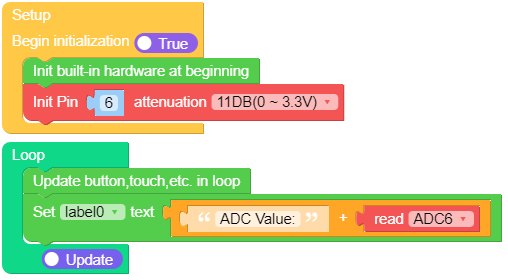
class ADC
- class ADC(pin, *, atten)
Return the ADC object for the specified pin. ESP32 does not support different timings for ADC sampling and so the
sample_nskeyword argument is not supported.To read voltages above the reference voltage, apply input attenuation with the
attenkeyword argument. Valid values (and approximate linear measurement ranges) are:ADC.ATTN_0DB: No attenuation (100mV - 950mV)ADC.ATTN_2_5DB: 2.5dB attenuation (100mV - 1250mV)ADC.ATTN_6DB: 6dB attenuation (150mV - 1750mV)ADC.ATTN_11DB: 11dB attenuation (150mV - 2450mV)
UIFLOW2:

警告
Note that the absolute maximum voltage rating for input pins is 3.6V. Going near to this boundary risks damage to the IC!
Methods
- ADC.read()
This method returns the raw ADC value ranged according to the resolution of the block, e.g., 0-4095 for 12-bit resolution.
UIFLOW2:

- ADC.read_u16()
Take an analog reading and return an integer in the range 0-65535. The return value represents the raw reading taken by the ADC, scaled such that the minimum value is 0 and the maximum value is 65535.
UIFLOW2:

- ADC.read_uv()
This method uses the known characteristics of the ADC and per-package eFuse values - set during manufacture - to return a calibrated input voltage (before attenuation) in microvolts. The returned value has only millivolt resolution (i.e., will always be a multiple of 1000 microvolts).
The calibration is only valid across the linear range of the ADC. In particular, an input tied to ground will read as a value above 0 microvolts. Within the linear range, however, more accurate and consistent results will be obtained than using read_u16() and scaling the result with a constant.
UIFLOW2:

- ADC.atten(atten)
Equivalent to
ADC.init(atten=atten).UIFLOW2:

- ADC.width(bits)
Equivalent to
ADC.block().init(bits=bits).For compatibility, the
ADCobject also provides constants matching the supported ADC resolutions:ADC.WIDTH_9BIT= 9ADC.WIDTH_10BIT= 10ADC.WIDTH_11BIT= 11ADC.WIDTH_12BIT= 12
UIFLOW2:
