PaperDIY
PaperDIY is an ESP32-S3 controller with a 4.7-inch, 960x540 monochrome e-paper display, 16MB Flash, and 8MB PSRAM.
Support the following products:
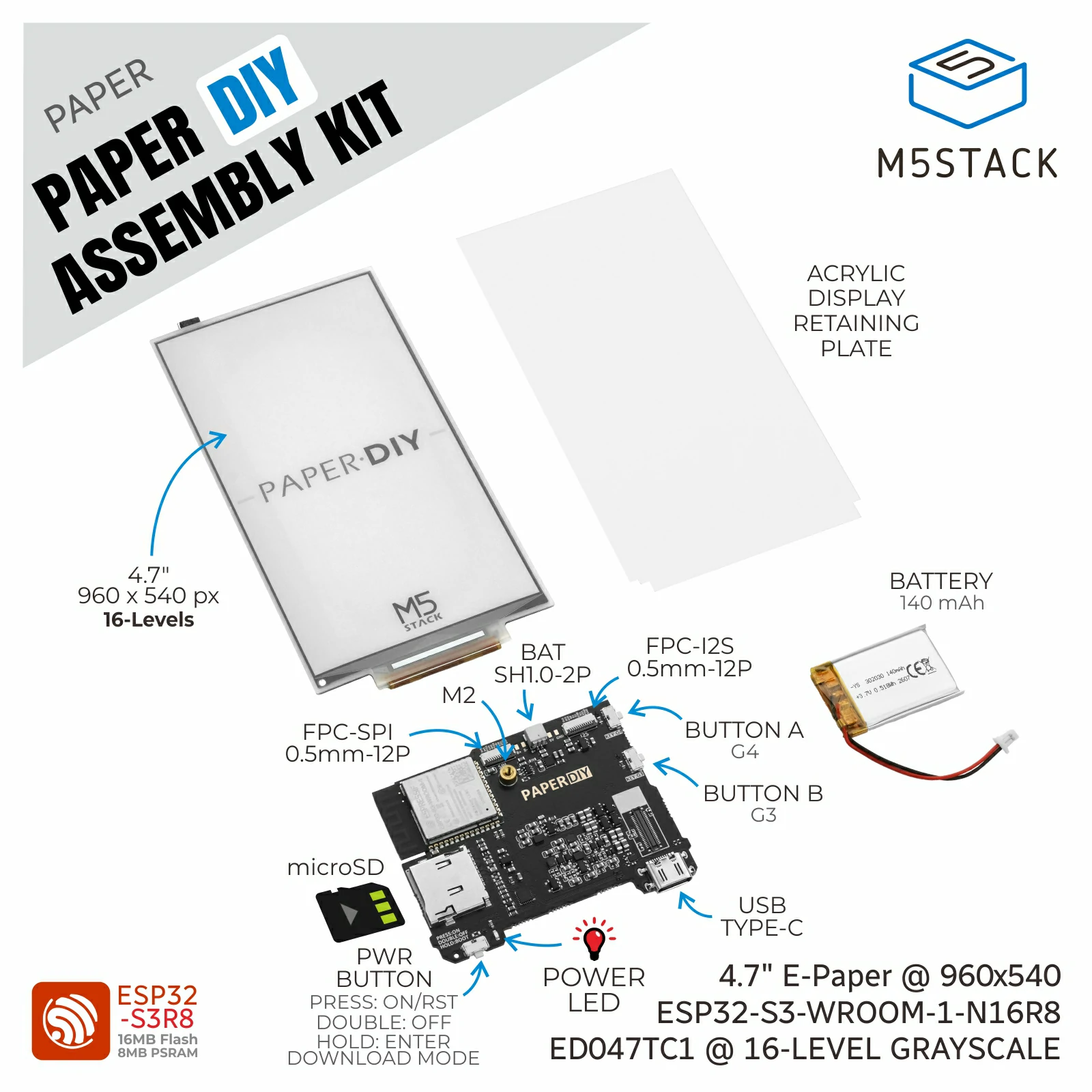
Supported Components
PaperDIY supports the following components:
Display: Screen drawing through
M5.Lcd.Widgets: Labels and basic UI components through
M5.Widgetsand thewidgetspackage.Unit: The
unitpackage containing Unit drivers.Chain: The
chainpackage for Chain devices.usb.device: USB HID keyboard and mouse support.
The PaperDIY firmware uses M5GFX for display rendering. LVGL and M5UI are not enabled in this firmware.
Supported Display Fonts
The PaperDIY firmware provides the following Montserrat fonts through M5.Lcd.FONTS and M5.Widgets.FONTS: Montserrat12, Montserrat14, Montserrat16, Montserrat18, Montserrat24, Montserrat40, Montserrat44, and Montserrat48.
The firmware also provides AlibabaPuHuiTiCN24, AlibabaSansJA24, and AlibabaSansKR24 for Chinese, Japanese, and Korean text respectively.
Board Features
PaperDIY supports the following built-in functions and peripherals:
A 4.7-inch monochrome e-paper display with portrait and landscape orientations.
Button input through
BtnAandBtnB.Power monitoring through M5PM1: USB and battery voltages, charging status, and battery-charging control.
TF (microSD) card storage.
Wi-Fi networking and native USB programming.
The e-paper display has no touch panel or backlight.
UiFlow2 Example
Button Counter
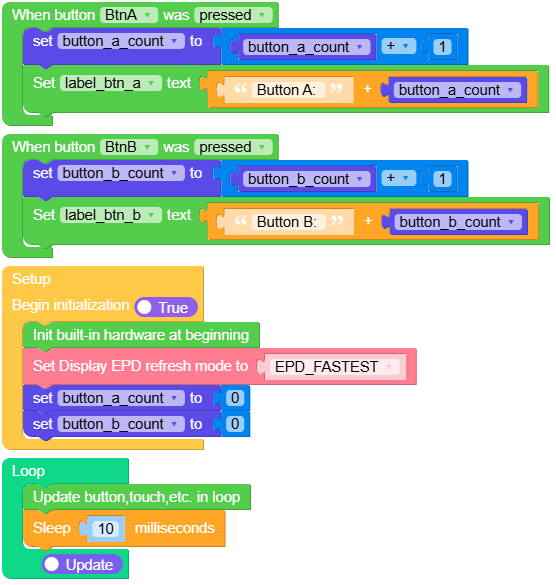
Open the paperdiy_button_counter_example.m5f2 project in UiFlow2.
This example displays two independent button counters in portrait orientation. Press BtnA or BtnB to increment its own counter. Both counters start at 0 when the example starts.
UiFlow2 Code Block:
Example output:
None
Charge Detection
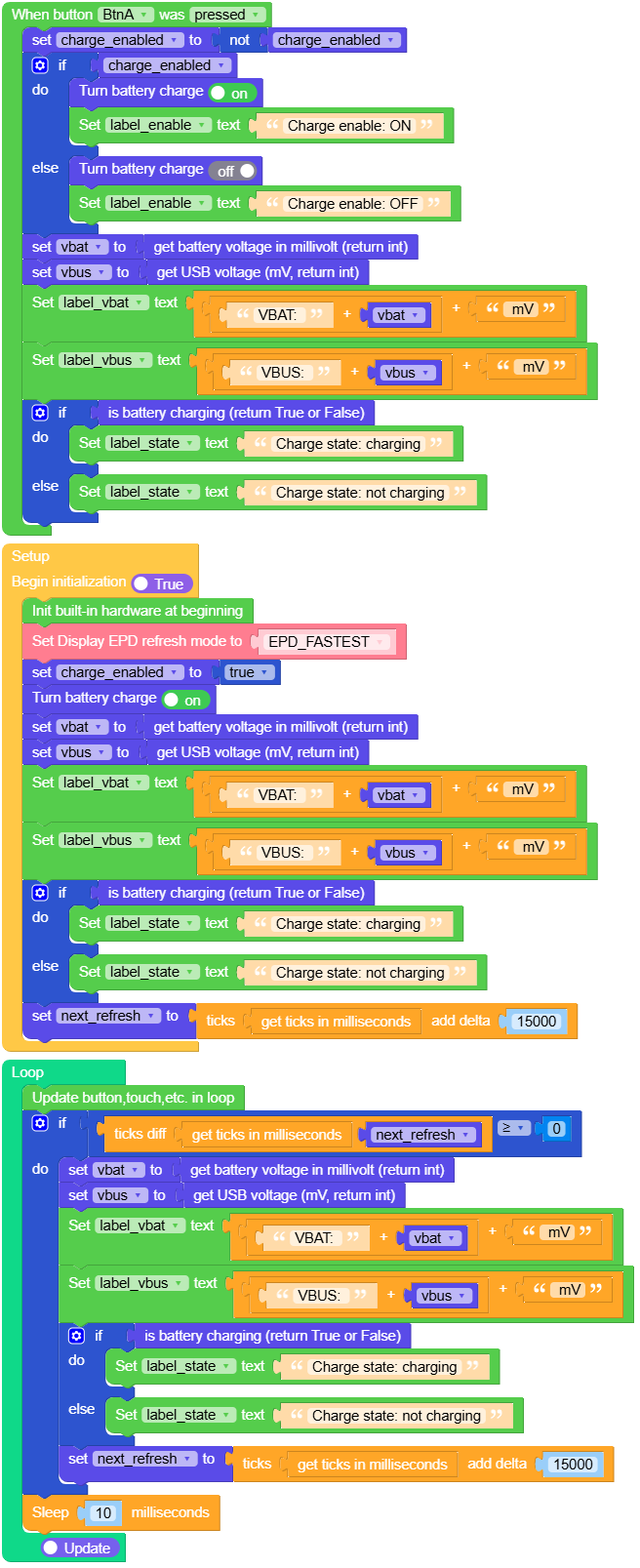
Open the paperdiy_charge_detection_example.m5f2 project in UiFlow2.
This example displays battery voltage and USB voltage in millivolts (mV), together with charging status. Battery charging starts enabled. Press BtnA to enable or disable it. The readings refresh every 15 seconds and immediately after a button press.
UiFlow2 Code Block:
Example output:
None
MicroPython Example
Button Counter
This example displays two independent button counters in portrait orientation. Press BtnA or BtnB to increment its own counter. Both counters start at 0 when the example starts.
MicroPython Code Block:
  1# SPDX-FileCopyrightText: 2026 M5Stack Technology CO LTD
  2#
  3# SPDX-License-Identifier: MIT
  4
  5import os
  6import sys
  7import io
  8import time
  9
 10import M5
 11from M5 import *
 12
 13
 14label_title = None
 15label_btn_a = None
 16label_btn_b = None
 17label_hint = None
 18
 19button_a_count = None
 20button_b_count = None
 21
 22
 23def btna_was_pressed_event(state):
 24    global button_a_count
 25
 26    button_a_count = button_a_count + 1
 27    label_btn_a.setText(str("Button A: " + str(button_a_count)))
 28
 29
 30def btnb_was_pressed_event(state):
 31    global button_b_count
 32
 33    button_b_count = button_b_count + 1
 34    label_btn_b.setText(str("Button B: " + str(button_b_count)))
 35
 36
 37def setup():
 38    global label_title, label_btn_a, label_btn_b, label_hint
 39    global button_a_count, button_b_count
 40
 41    M5.begin()
 42    Widgets.setRotation(0)
 43    Widgets.fillScreen(0xFFFFFF)
 44    label_title = Widgets.Label(
 45        "PaperDIY Button Counter",
 46        30,
 47        40,
 48        1.0,
 49        0x000000,
 50        0xFFFFFF,
 51        Widgets.FONTS.Montserrat24,
 52    )
 53    label_btn_a = Widgets.Label(
 54        "Button A: 0",
 55        30,
 56        240,
 57        1.0,
 58        0x000000,
 59        0xFFFFFF,
 60        Widgets.FONTS.Montserrat40,
 61    )
 62    label_btn_b = Widgets.Label(
 63        "Button B: 0",
 64        30,
 65        400,
 66        1.0,
 67        0x000000,
 68        0xFFFFFF,
 69        Widgets.FONTS.Montserrat40,
 70    )
 71    label_hint = Widgets.Label(
 72        "Press Button A or Button B",
 73        30,
 74        600,
 75        1.0,
 76        0x000000,
 77        0xFFFFFF,
 78        Widgets.FONTS.Montserrat24,
 79    )
 80
 81    BtnA.setCallback(type=BtnA.CB_TYPE.WAS_PRESSED, cb=btna_was_pressed_event)
 82    BtnB.setCallback(type=BtnB.CB_TYPE.WAS_PRESSED, cb=btnb_was_pressed_event)
 83
 84    M5.Display.setEpdMode(M5.Display.EPDMode.EPD_FASTEST)
 85    button_a_count = 0
 86    button_b_count = 0
 87
 88
 89def loop():
 90    M5.update()
 91    time.sleep_ms(10)
 92
 93
 94if __name__ == "__main__":
 95    try:
 96        setup()
 97        while True:
 98            loop()
 99    except (Exception, KeyboardInterrupt) as error:
100        try:
101            from utility import print_error_msg
102
103            print_error_msg(error)
104        except ImportError:
105            print(error)
Example output:
None
Charge Detection
This example displays battery voltage and USB voltage in millivolts (mV), together with charging status. Battery charging starts enabled. Press BtnA to enable or disable it. The readings refresh every 15 seconds and immediately after a button press.
MicroPython Code Block:
  1import os, sys, io
  2import M5
  3from M5 import *
  4import time
  5
  6
  7label_title = None
  8label_vbat = None
  9label_vbus = None
 10label_enable = None
 11label_state = None
 12label_hint = None
 13
 14
 15charge_enabled = None
 16vbat = None
 17vbus = None
 18next_refresh = None
 19
 20
 21def btna_was_pressed_event(state):
 22    global \
 23        label_title, \
 24        label_vbat, \
 25        label_vbus, \
 26        label_enable, \
 27        label_state, \
 28        label_hint, \
 29        charge_enabled, \
 30        vbat, \
 31        vbus, \
 32        next_refresh
 33    charge_enabled = not charge_enabled
 34    if charge_enabled:
 35        Power.setBatteryCharge(True)
 36        label_enable.setText(str("Charge enable: ON"))
 37    else:
 38        Power.setBatteryCharge(False)
 39        label_enable.setText(str("Charge enable: OFF"))
 40    vbat = Power.getBatteryVoltage()
 41    vbus = Power.getVBUSVoltage()
 42    label_vbat.setText(str((str((str("VBAT: ") + str(vbat))) + str(" mV"))))
 43    label_vbus.setText(str((str((str("VBUS: ") + str(vbus))) + str(" mV"))))
 44    if Power.isCharging():
 45        label_state.setText(str("Charge state: charging"))
 46    else:
 47        label_state.setText(str("Charge state: not charging"))
 48
 49
 50def setup():
 51    global \
 52        label_title, \
 53        label_vbat, \
 54        label_vbus, \
 55        label_enable, \
 56        label_state, \
 57        label_hint, \
 58        charge_enabled, \
 59        vbat, \
 60        vbus, \
 61        next_refresh
 62
 63    M5.begin()
 64    Widgets.setRotation(0)
 65    Widgets.fillScreen(0xFFFFFF)
 66    label_title = Widgets.Label(
 67        "PaperDIY charge detection", 30, 30, 1.0, 0x000000, 0xFFFFFF, Widgets.FONTS.Montserrat24
 68    )
 69    label_vbat = Widgets.Label(
 70        "VBAT: -- mV", 30, 240, 1.0, 0x000000, 0xFFFFFF, Widgets.FONTS.Montserrat24
 71    )
 72    label_vbus = Widgets.Label(
 73        "VBUS: -- mV", 30, 310, 1.0, 0x000000, 0xFFFFFF, Widgets.FONTS.Montserrat24
 74    )
 75    label_enable = Widgets.Label(
 76        "Charge enable: ON", 30, 390, 1.0, 0x000000, 0xFFFFFF, Widgets.FONTS.Montserrat24
 77    )
 78    label_state = Widgets.Label(
 79        "Charge state: --", 30, 470, 1.0, 0x000000, 0xFFFFFF, Widgets.FONTS.Montserrat24
 80    )
 81    label_hint = Widgets.Label(
 82        "Button A toggles battery charge",
 83        30,
 84        600,
 85        1.0,
 86        0x000000,
 87        0xFFFFFF,
 88        Widgets.FONTS.Montserrat24,
 89    )
 90
 91    BtnA.setCallback(type=BtnA.CB_TYPE.WAS_PRESSED, cb=btna_was_pressed_event)
 92
 93    M5.Display.setEpdMode(M5.Display.EPDMode.EPD_FASTEST)
 94    charge_enabled = True
 95    Power.setBatteryCharge(True)
 96    vbat = Power.getBatteryVoltage()
 97    vbus = Power.getVBUSVoltage()
 98    label_vbat.setText(str((str((str("VBAT: ") + str(vbat))) + str(" mV"))))
 99    label_vbus.setText(str((str((str("VBUS: ") + str(vbus))) + str(" mV"))))
100    if Power.isCharging():
101        label_state.setText(str("Charge state: charging"))
102    else:
103        label_state.setText(str("Charge state: not charging"))
104    next_refresh = time.ticks_add((time.ticks_ms()), 15000)
105
106
107def loop():
108    global \
109        label_title, \
110        label_vbat, \
111        label_vbus, \
112        label_enable, \
113        label_state, \
114        label_hint, \
115        charge_enabled, \
116        vbat, \
117        vbus, \
118        next_refresh
119    M5.update()
120    if (time.ticks_diff((time.ticks_ms()), next_refresh)) >= 0:
121        vbat = Power.getBatteryVoltage()
122        vbus = Power.getVBUSVoltage()
123        label_vbat.setText(str((str((str("VBAT: ") + str(vbat))) + str(" mV"))))
124        label_vbus.setText(str((str((str("VBUS: ") + str(vbus))) + str(" mV"))))
125        if Power.isCharging():
126            label_state.setText(str("Charge state: charging"))
127        else:
128            label_state.setText(str("Charge state: not charging"))
129        next_refresh = time.ticks_add((time.ticks_ms()), 15000)
130    time.sleep_ms(10)
131
132
133if __name__ == "__main__":
134    try:
135        setup()
136        while True:
137            loop()
138    except (Exception, KeyboardInterrupt) as e:
139        try:
140            from utility import print_error_msg
141
142            print_error_msg(e)
143        except ImportError:
144            print("please update to latest firmware")
Example output:
None