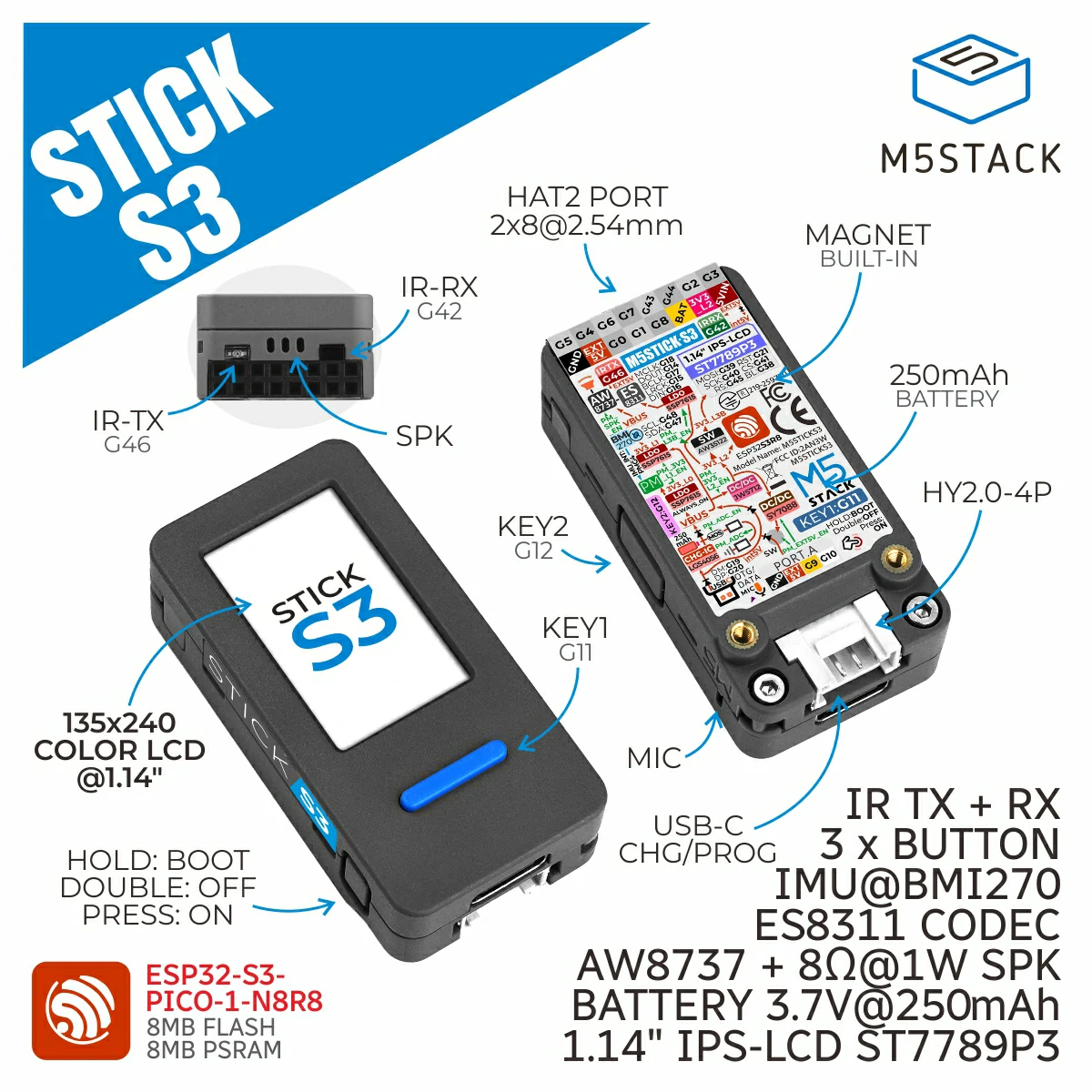
StickS3
Support the following products:
UiFlow2 Example
Button Control
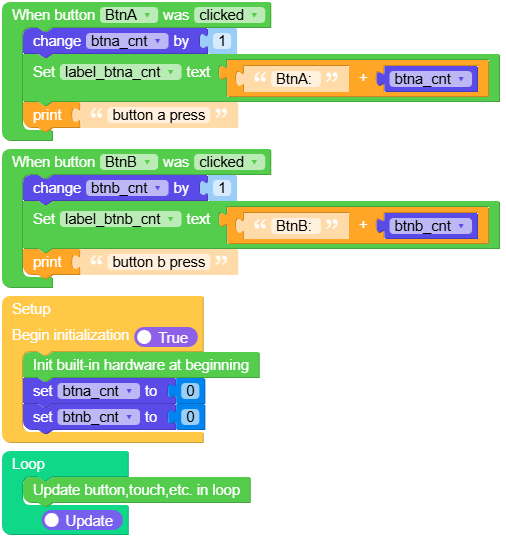
Open the sticks3_button_example.m5f2 project in UiFlow2.
This example demonstrates button callback functions. When button A (BtnA) is clicked, it increments a counter and updates the display. When button B (BtnB) is clicked, it also increments a counter and updates the display.
UiFlow2 Code Block:
Example output:
None
IMU Sensor
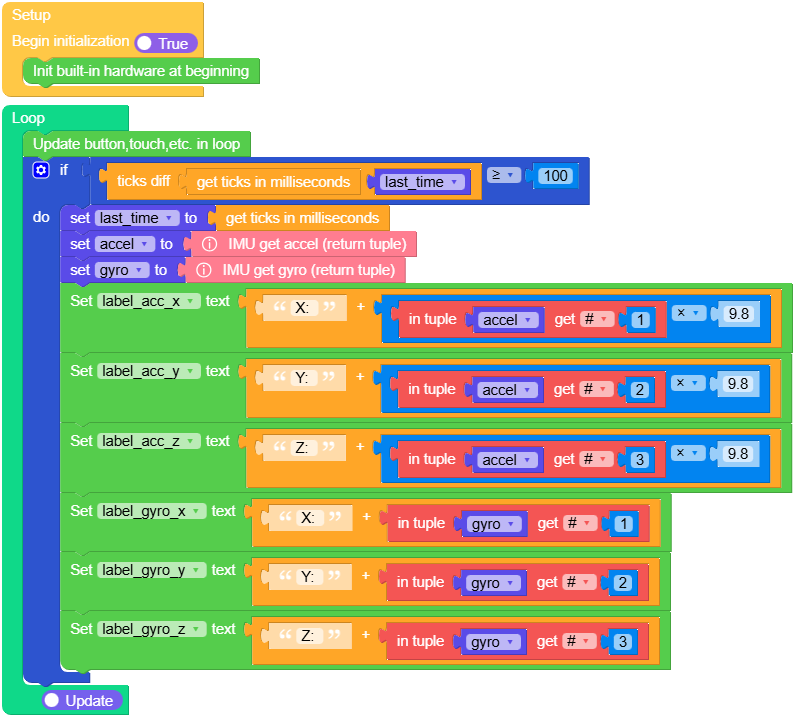
Open the sticks3_imu_example.m5f2 project in UiFlow2.
This example demonstrates the built-in IMU (Inertial Measurement Unit) sensor functionality. It reads and displays accelerometer and gyroscope data in real-time, showing acceleration values in m/s² and gyroscope values in degrees per second (dps).
UiFlow2 Code Block:
Example output:
None
Power Management
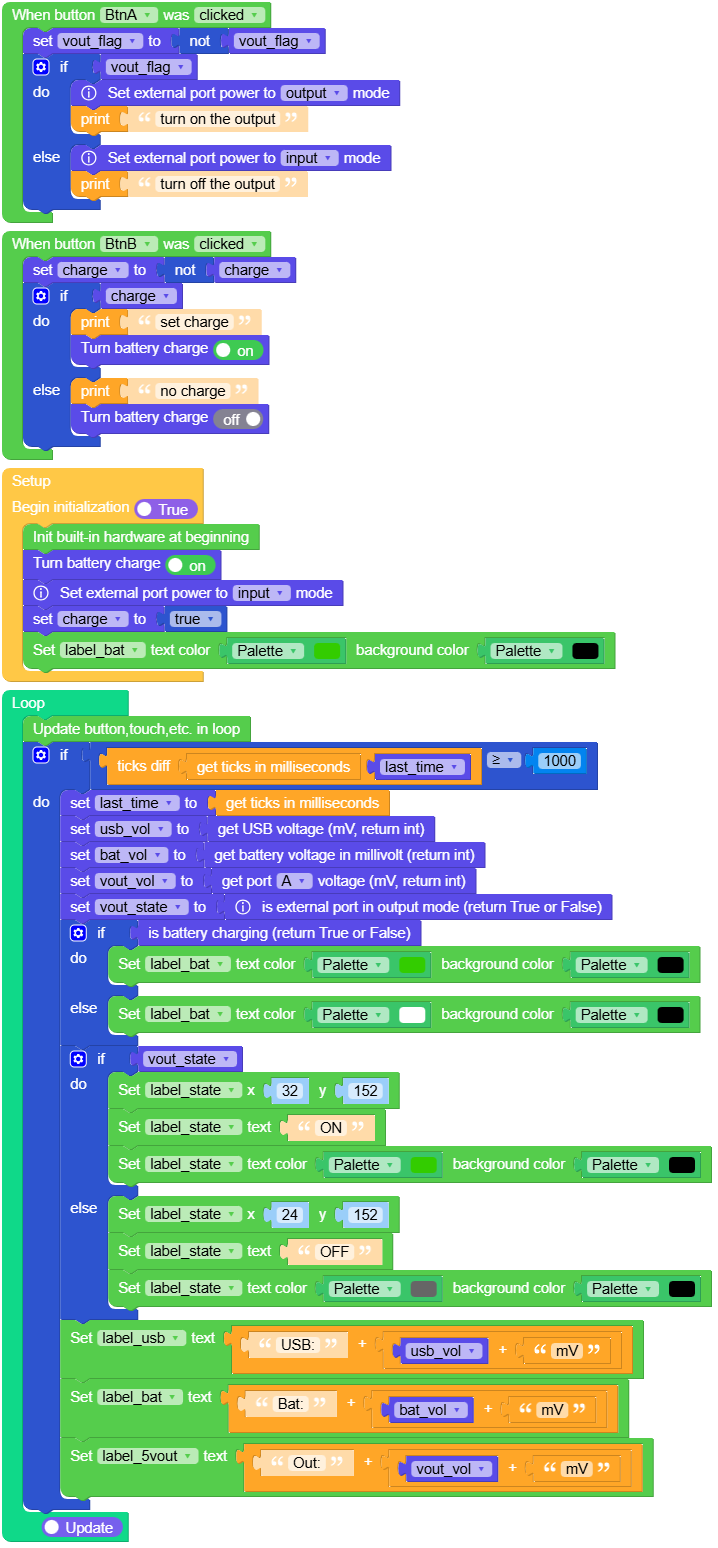
Open the sticks3_power_example.m5f2 project in UiFlow2.
This example demonstrates power management features including battery voltage monitoring, VBUS voltage reading, charging status detection, and control of battery charging and external output. Press BtnA to toggle external output (5V OUT), and press BtnB to toggle battery charging.
UiFlow2 Code Block:
Example output:
None
IR Transmission
Open the sticks3_ir_tx_example.m5f2 project in UiFlow2.
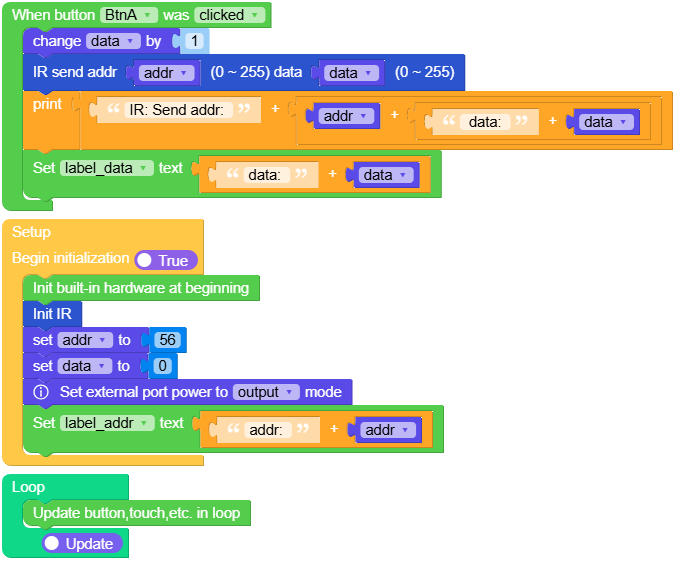
This example demonstrates infrared (IR) transmission functionality. When button A is pressed, it sends IR data with a specified address and data value. The example displays the address and data being transmitted.
Note
When using IR transmission, the external output mode should be enabled.
UiFlow2 Code Block:
Example output:
None
IR Reception
Open the sticks3_ir_rx_example.m5f2 project in UiFlow2.
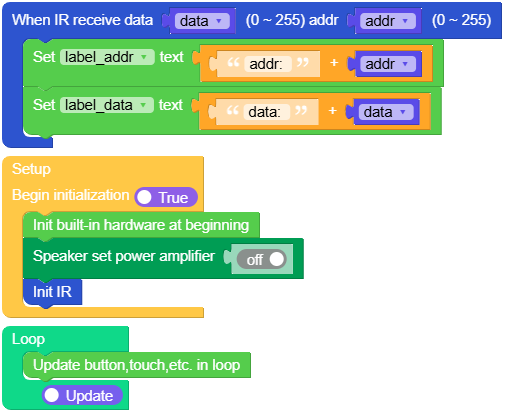
This example demonstrates infrared (IR) reception functionality using NEC decode protocol. When IR data is received, it displays the address and data values on the screen.
Note
When using IR reception, the PA (Power Amplifier) should be turned off and the external output mode should be enabled.
UiFlow2 Code Block:
Example output:
None
Audio Recording and Playback
Open the sticks3_audio_example.m5f2 project in UiFlow2.
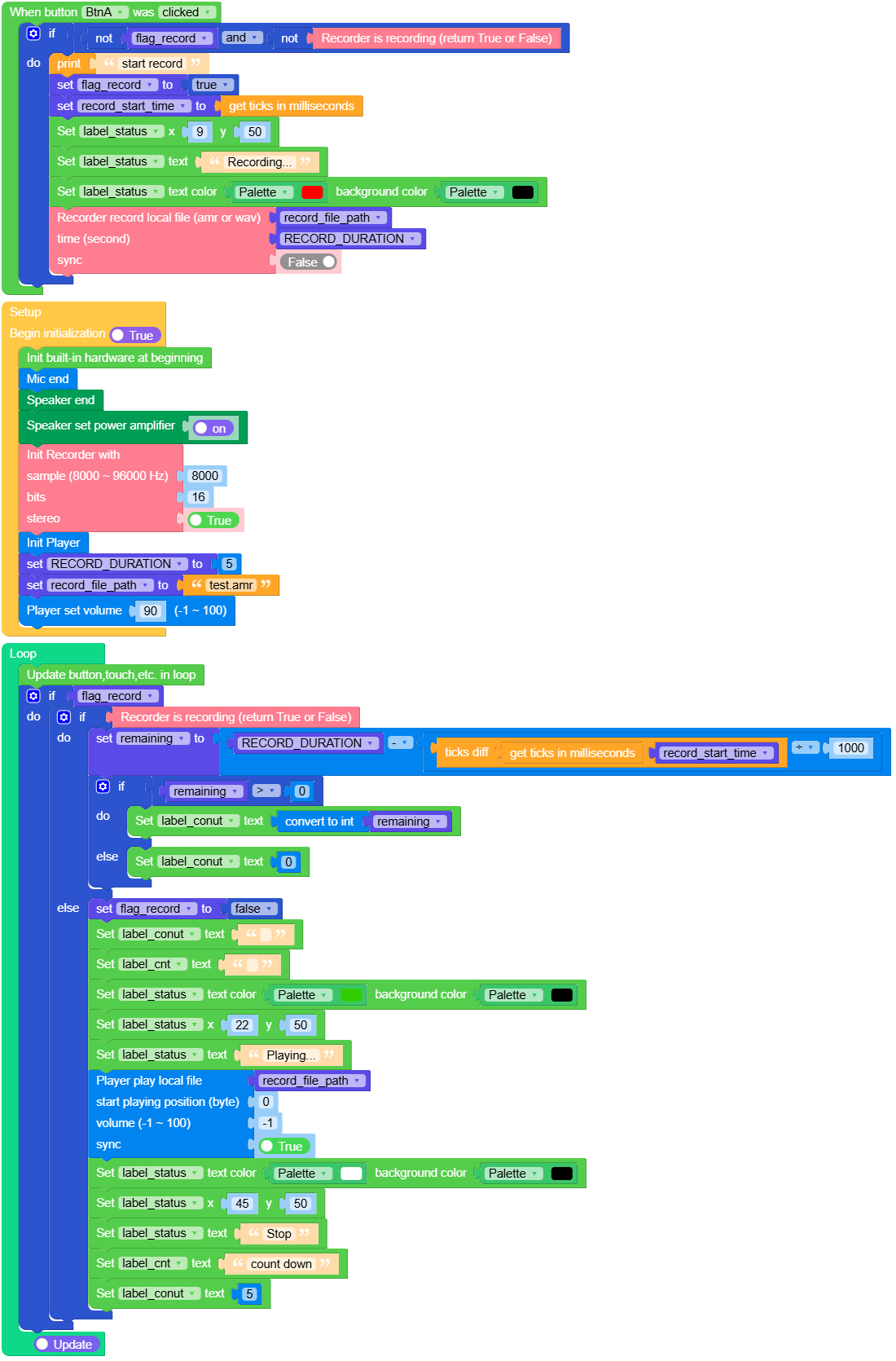
This example demonstrates audio recording and playback functionality. Press button A to start recording for 5 seconds. After recording completes, the audio will automatically play back. The example displays the recording status and countdown timer.
UiFlow2 Code Block:
Example output:
None
HAT ToF Sensor
Open the sticks3_hat_tof_example.m5f2 project in UiFlow2.
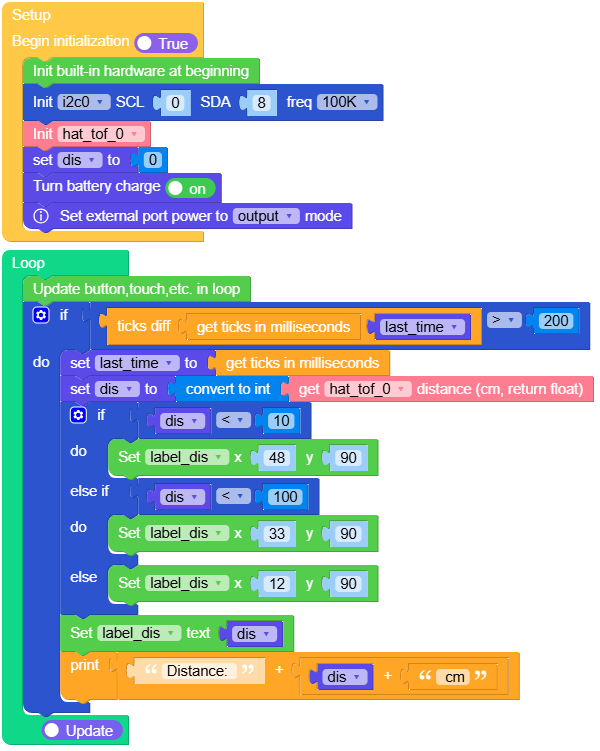
This example demonstrates how to use the ToF (Time of Flight) HAT sensor to measure distance. The example reads distance values from the sensor and displays them on the screen.
UiFlow2 Code Block:
Example output:
None
MicroPython Example
Button Control
This example demonstrates button callback functions. When button A (BtnA) is clicked, it increments a counter and updates the display. When button B (BtnB) is clicked, it also increments a counter and updates the display.
MicroPython Code Block:
 1# SPDX-FileCopyrightText: 2026 M5Stack Technology CO LTD
 2#
 3# SPDX-License-Identifier: MIT
 4import os, sys, io
 5import M5
 6from M5 import *
 7
 8
 9label_title = None
10label_btna_cnt = None
11label_btnb_cnt = None
12label_tip = None
13btna_cnt = None
14btnb_cnt = None
15
16
17def btna_click_event_cb(state):
18    global label_title, label_btna_cnt, label_btnb_cnt, label_tip, btna_cnt, btnb_cnt
19    btna_cnt = (btna_cnt if isinstance(btna_cnt, (int, float)) else 0) + 1
20    label_btna_cnt.setText(str((str("BtnA: ") + str(btna_cnt))))
21    print("button a press")
22
23
24def btnb_click_event_cb(state):
25    global label_title, label_btna_cnt, label_btnb_cnt, label_tip, btna_cnt, btnb_cnt
26    btnb_cnt = (btnb_cnt if isinstance(btnb_cnt, (int, float)) else 0) + 1
27    label_btnb_cnt.setText(str((str("BtnB: ") + str(btnb_cnt))))
28    print("button b press")
29
30
31def setup():
32    global label_title, label_btna_cnt, label_btnb_cnt, label_tip, btna_cnt, btnb_cnt
33    M5.begin()
34    Widgets.setRotation(0)
35    Widgets.fillScreen(0x000000)
36    label_title = Widgets.Label("Button", 35, 5, 1.0, 0x1A94DD, 0x000000, Widgets.FONTS.DejaVu18)
37    label_btna_cnt = Widgets.Label(
38        "BtnA: ", 5, 50, 1.0, 0xFFFFFF, 0x000000, Widgets.FONTS.DejaVu18
39    )
40    label_btnb_cnt = Widgets.Label("BtnB:", 5, 80, 1.0, 0xFFFFFF, 0x000000, Widgets.FONTS.DejaVu18)
41    label_tip = Widgets.Label(
42        "Press button", 7, 200, 1.0, 0xFFFFFF, 0x000000, Widgets.FONTS.DejaVu18
43    )
44    BtnA.setCallback(type=BtnA.CB_TYPE.WAS_CLICKED, cb=btna_click_event_cb)
45    BtnB.setCallback(type=BtnB.CB_TYPE.WAS_CLICKED, cb=btnb_click_event_cb)
46    btna_cnt = 0
47    btnb_cnt = 0
48
49
50def loop():
51    global label_title, label_btna_cnt, label_btnb_cnt, label_tip, btna_cnt, btnb_cnt
52    M5.update()
53
54
55if __name__ == "__main__":
56    try:
57        setup()
58        while True:
59            loop()
60    except (Exception, KeyboardInterrupt) as e:
61        try:
62            from utility import print_error_msg
63
64            print_error_msg(e)
65        except ImportError:
66            print("please update to latest firmware")
Example output:
None
IMU Sensor
This example demonstrates the built-in IMU (Inertial Measurement Unit) sensor functionality. It reads and displays accelerometer and gyroscope data in real-time, showing acceleration values in m/s² and gyroscope values in degrees per second (dps).
MicroPython Code Block:
 1# SPDX-FileCopyrightText: 2026 M5Stack Technology CO LTD
 2#
 3# SPDX-License-Identifier: MIT
 4import os, sys, io
 5import M5
 6from M5 import *
 7import time
 8
 9
10label_imu = None
11label_accel = None
12label_gyro = None
13label_acc_x = None
14label_acc_y = None
15label_acc_z = None
16label_gyro_y = None
17label_gyro_z = None
18label_gyro_x = None
19last_time = None
20accel = None
21gyro = None
22
23
24def setup():
25    global \
26        label_imu, \
27        label_accel, \
28        label_gyro, \
29        label_acc_x, \
30        label_acc_y, \
31        label_acc_z, \
32        label_gyro_y, \
33        label_gyro_z, \
34        label_gyro_x, \
35        last_time, \
36        accel, \
37        gyro
38    M5.begin()
39    Widgets.setRotation(0)
40    Widgets.fillScreen(0x000000)
41    label_imu = Widgets.Label("IMU", 46, 4, 1.0, 0x1BCDCD, 0x000000, Widgets.FONTS.DejaVu18)
42    label_accel = Widgets.Label(
43        "Accel(m/^2)", 5, 35, 1.0, 0xFFFFFF, 0x000000, Widgets.FONTS.DejaVu18
44    )
45    label_gyro = Widgets.Label(
46        "Gyro(dps)", 17, 138, 1.0, 0xFFFFFF, 0x000000, Widgets.FONTS.DejaVu18
47    )
48    label_acc_x = Widgets.Label("X:", 5, 60, 1.0, 0xFFFFFF, 0x000000, Widgets.FONTS.DejaVu18)
49    label_acc_y = Widgets.Label("Y:", 5, 85, 1.0, 0xFFFFFF, 0x000000, Widgets.FONTS.DejaVu18)
50    label_acc_z = Widgets.Label("Z:", 5, 110, 1.0, 0xFFFFFF, 0x000000, Widgets.FONTS.DejaVu18)
51    label_gyro_y = Widgets.Label("Y:", 5, 187, 1.0, 0xFFFFFF, 0x000000, Widgets.FONTS.DejaVu18)
52    label_gyro_z = Widgets.Label("Z:", 5, 213, 1.0, 0xFFFFFF, 0x000000, Widgets.FONTS.DejaVu18)
53    label_gyro_x = Widgets.Label("X:", 5, 163, 1.0, 0xFFFFFF, 0x000000, Widgets.FONTS.DejaVu18)
54
55
56def loop():
57    global \
58        label_imu, \
59        label_accel, \
60        label_gyro, \
61        label_acc_x, \
62        label_acc_y, \
63        label_acc_z, \
64        label_gyro_y, \
65        label_gyro_z, \
66        label_gyro_x, \
67        last_time, \
68        accel, \
69        gyro
70    M5.update()
71    if (time.ticks_diff((time.ticks_ms()), last_time)) >= 100:
72        last_time = time.ticks_ms()
73        accel = Imu.getAccel()
74        gyro = Imu.getGyro()
75        label_acc_x.setText(str((str("X: ") + str((accel[0] * 9.8)))))
76        label_acc_y.setText(str((str("Y: ") + str((accel[1] * 9.8)))))
77        label_acc_z.setText(str((str("Z: ") + str((accel[2] * 9.8)))))
78        label_gyro_x.setText(str((str("X: ") + str((gyro[0])))))
79        label_gyro_y.setText(str((str("Y: ") + str((gyro[1])))))
80        label_gyro_z.setText(str((str("Z: ") + str((gyro[2])))))
81
82
83if __name__ == "__main__":
84    try:
85        setup()
86        while True:
87            loop()
88    except (Exception, KeyboardInterrupt) as e:
89        try:
90            from utility import print_error_msg
91
92            print_error_msg(e)
93        except ImportError:
94            print("please update to latest firmware")
Example output:
None
Power Management
This example demonstrates power management features including battery voltage monitoring, VBUS voltage reading, charging status detection, and control of battery charging and external output. Press BtnA to toggle external output (5V OUT), and press BtnB to toggle battery charging.
MicroPython Code Block:
  1# SPDX-FileCopyrightText: 2025 M5Stack Technology CO LTD
  2#
  3# SPDX-License-Identifier: MIT
  4
  5import os, sys, io
  6import M5
  7from M5 import *
  8import time
  9
 10
 11label_title = None
 12label_5vout = None
 13label_usb = None
 14label_bat = None
 15label_tip = None
 16label_state = None
 17label_vout = None
 18vout_flag = None
 19charge = None
 20last_time = None
 21usb_vol = None
 22bat_vol = None
 23vout_vol = None
 24vout_state = None
 25
 26
 27def btna_click_event_cb(state):
 28    global \
 29        label_title, \
 30        label_5vout, \
 31        label_usb, \
 32        label_bat, \
 33        label_tip, \
 34        label_state, \
 35        label_vout, \
 36        vout_flag, \
 37        charge, \
 38        last_time, \
 39        usb_vol, \
 40        bat_vol, \
 41        vout_vol, \
 42        vout_state
 43    vout_flag = not vout_flag
 44    if vout_flag:
 45        Power.setExtOutput(True)
 46        print("turn on the output")
 47    else:
 48        Power.setExtOutput(False)
 49        print("turn off the output")
 50
 51
 52def btnb_click_event_cb(state):
 53    global \
 54        label_title, \
 55        label_5vout, \
 56        label_usb, \
 57        label_bat, \
 58        label_tip, \
 59        label_state, \
 60        label_vout, \
 61        vout_flag, \
 62        charge, \
 63        last_time, \
 64        usb_vol, \
 65        bat_vol, \
 66        vout_vol, \
 67        vout_state
 68    charge = not charge
 69    if charge:
 70        print("set charge")
 71        Power.setBatteryCharge(True)
 72    else:
 73        print("no charge")
 74        Power.setBatteryCharge(False)
 75
 76
 77def setup():
 78    global \
 79        label_title, \
 80        label_5vout, \
 81        label_usb, \
 82        label_bat, \
 83        label_tip, \
 84        label_state, \
 85        label_vout, \
 86        vout_flag, \
 87        charge, \
 88        last_time, \
 89        usb_vol, \
 90        bat_vol, \
 91        vout_vol, \
 92        vout_state
 93
 94    M5.begin()
 95    Widgets.setRotation(0)
 96    Widgets.fillScreen(0x000000)
 97    label_title = Widgets.Label("Power", 36, 5, 1.0, 0x13BDDE, 0x000000, Widgets.FONTS.DejaVu18)
 98    label_5vout = Widgets.Label(
 99        "OUT:----mV", 5, 85, 1.0, 0xFFFFFF, 0x000000, Widgets.FONTS.DejaVu18
100    )
101    label_usb = Widgets.Label("USB:----mV", 5, 35, 1.0, 0xFFFFFF, 0x000000, Widgets.FONTS.DejaVu18)
102    label_bat = Widgets.Label("Bat:----mV", 5, 60, 1.0, 0xFFFFFF, 0x000000, Widgets.FONTS.DejaVu18)
103    label_tip = Widgets.Label(
104        "BtnA Control", 5, 210, 1.0, 0xFFFFFF, 0x000000, Widgets.FONTS.DejaVu18
105    )
106    label_state = Widgets.Label("ON", 31, 152, 1.0, 0x00FF00, 0x000000, Widgets.FONTS.DejaVu40)
107    label_vout = Widgets.Label("5V OUT", 28, 125, 1.0, 0xFFFFFF, 0x000000, Widgets.FONTS.DejaVu18)
108
109    BtnA.setCallback(type=BtnA.CB_TYPE.WAS_CLICKED, cb=btna_click_event_cb)
110    BtnB.setCallback(type=BtnB.CB_TYPE.WAS_CLICKED, cb=btnb_click_event_cb)
111
112    Power.setBatteryCharge(True)
113    Power.setExtOutput(False)
114    charge = True
115    label_bat.setColor(0x33CC00, 0x000000)
116
117
118def loop():
119    global \
120        label_title, \
121        label_5vout, \
122        label_usb, \
123        label_bat, \
124        label_tip, \
125        label_state, \
126        label_vout, \
127        vout_flag, \
128        charge, \
129        last_time, \
130        usb_vol, \
131        bat_vol, \
132        vout_vol, \
133        vout_state
134    M5.update()
135    if (time.ticks_diff((time.ticks_ms()), last_time)) >= 1000:
136        last_time = time.ticks_ms()
137        usb_vol = Power.getVBUSVoltage()
138        bat_vol = Power.getBatteryVoltage()
139        vout_vol = Power.getExtVoltage(M5.Power.PORT.A)
140        vout_state = Power.getExtOutput()
141        if Power.isCharging():
142            label_bat.setColor(0x33CC00, 0x000000)
143        else:
144            label_bat.setColor(0xFFFFFF, 0x000000)
145        if vout_state:
146            label_state.setCursor(x=32, y=152)
147            label_state.setText(str("ON"))
148            label_state.setColor(0x33CC00, 0x000000)
149        else:
150            label_state.setCursor(x=24, y=152)
151            label_state.setText(str("OFF"))
152            label_state.setColor(0x666666, 0x000000)
153        label_usb.setText(str((str("USB:") + str((str(usb_vol) + str("mV"))))))
154        label_bat.setText(str((str("Bat:") + str((str(bat_vol) + str("mV"))))))
155        label_5vout.setText(str((str("Out:") + str((str((int(vout_vol))) + str("mV"))))))
156
157
158if __name__ == "__main__":
159    try:
160        setup()
161        while True:
162            loop()
163    except (Exception, KeyboardInterrupt) as e:
164        try:
165            from utility import print_error_msg
166
167            print_error_msg(e)
168        except ImportError:
169            print("please update to latest firmware")
Example output:
None
IR Transmission
This example demonstrates infrared (IR) transmission functionality. When button A is pressed, it sends IR data with a specified address and data value. The example displays the address and data being transmitted.
Note
When using IR transmission, the external output mode should be enabled.
MicroPython Code Block:
 1# SPDX-FileCopyrightText: 2025 M5Stack Technology CO LTD
 2#
 3# SPDX-License-Identifier: MIT
 4import os, sys, io
 5import M5
 6from M5 import *
 7from hardware import IR
 8
 9
10label_title = None
11label_addr = None
12label_data = None
13label_tip = None
14ir = None
15data = None
16addr = None
17
18
19def btna_click_event_cb(state):
20    global label_title, label_addr, label_data, label_tip, ir, data, addr
21    data = (data if isinstance(data, (int, float)) else 0) + 1
22    ir.tx(addr, data)
23    print((str("IR: Send addr: ") + str((str(addr) + str((str(" data: ") + str(data)))))))
24    label_data.setText(str((str("data: ") + str(data))))
25
26
27def setup():
28    global label_title, label_addr, label_data, label_tip, ir, data, addr
29    M5.begin()
30    Widgets.setRotation(0)
31    Widgets.fillScreen(0x000000)
32    label_title = Widgets.Label("IR", 58, 5, 1.0, 0x1AEAEB, 0x000000, Widgets.FONTS.DejaVu18)
33    label_addr = Widgets.Label("addr:", 5, 45, 1.0, 0xFFFFFF, 0x000000, Widgets.FONTS.DejaVu18)
34    label_data = Widgets.Label("data:", 5, 70, 1.0, 0xFFFFFF, 0x000000, Widgets.FONTS.DejaVu18)
35    label_tip = Widgets.Label(
36        "BtnA Send", 18, 200, 1.0, 0xFFFFFF, 0x000000, Widgets.FONTS.DejaVu18
37    )
38    BtnA.setCallback(type=BtnA.CB_TYPE.WAS_CLICKED, cb=btna_click_event_cb)
39    ir = IR()
40    ir.rx_cb(ir_rx_event)
41    addr = 56
42    data = 0
43    Power.setExtOutput(True)
44    label_addr.setText(str((str("addr: ") + str(addr))))
45
46
47def loop():
48    global label_title, label_addr, label_data, label_tip, ir, data, addr
49    M5.update()
50
51
52if __name__ == "__main__":
53    try:
54        setup()
55        while True:
56            loop()
57    except (Exception, KeyboardInterrupt) as e:
58        try:
59            from utility import print_error_msg
60
61            print_error_msg(e)
62        except ImportError:
63            print("please update to latest firmware")
Example output:
None
IR Reception
This example demonstrates infrared (IR) reception functionality using NEC decode protocol. When IR data is received, it displays the address and data values on the screen in real-time.
Note
When using IR reception, the PA (Power Amplifier) should be turned off and the external output mode should be enabled.
MicroPython Code Block:
 1# SPDX-FileCopyrightText: 2025 M5Stack Technology CO LTD
 2#
 3# SPDX-License-Identifier: MIT
 4import os, sys, io
 5import M5
 6from M5 import *
 7from hardware import IR
 8
 9
10label_title = None
11label0 = None
12label_addr = None
13label_data = None
14ir = None
15data = None
16addr = None
17
18
19def ir_rx_event(_data, _addr, _ctrl):
20    global label_title, label0, label_addr, label_data, ir, data, addr
21    data = _data
22    addr = _addr
23    label_addr.setText(str((str("addr: ") + str(addr))))
24    label_data.setText(str((str("data: ") + str(data))))
25
26
27def setup():
28    global label_title, label0, label_addr, label_data, ir, data, addr
29
30    M5.begin()
31    Widgets.setRotation(0)
32    Widgets.fillScreen(0x000000)
33    label_title = Widgets.Label("IR RX", 41, 5, 1.0, 0x0FBAE1, 0x000000, Widgets.FONTS.DejaVu18)
34    label0 = Widgets.Label("NEC Decode", 8, 50, 1.0, 0xFFFFFF, 0x000000, Widgets.FONTS.DejaVu18)
35    label_addr = Widgets.Label("addr:", 5, 115, 1.0, 0xFFFFFF, 0x000000, Widgets.FONTS.DejaVu18)
36    label_data = Widgets.Label("data:", 5, 145, 1.0, 0xFFFFFF, 0x000000, Widgets.FONTS.DejaVu18)
37
38    Speaker.setPA(False)
39    ir = IR()
40    ir.rx_cb(ir_rx_event)
41
42
43def loop():
44    global label_title, label0, label_addr, label_data, ir, data, addr
45    M5.update()
46
47
48if __name__ == "__main__":
49    try:
50        setup()
51        while True:
52            loop()
53    except (Exception, KeyboardInterrupt) as e:
54        try:
55            from utility import print_error_msg
56
57            print_error_msg(e)
58        except ImportError:
59            print("please update to latest firmware")
Example output:
None
Audio Recording and Playback
This example demonstrates audio recording and playback functionality. Press button A to start recording for 5 seconds. After recording completes, the audio will automatically play back. The example displays the recording status and countdown timer.
MicroPython Code Block:
  1# SPDX-FileCopyrightText: 2026 M5Stack Technology CO LTD
  2#
  3# SPDX-License-Identifier: MIT
  4import os, sys, io
  5import M5
  6from M5 import *
  7from audio import Recorder
  8import time
  9from audio import Player
 10
 11
 12label_title = None
 13label_tip = None
 14label_cnt = None
 15label_conut = None
 16label_status = None
 17recorder = None
 18player = None
 19flag_record = None
 20record_start_time = None
 21remaining = None
 22RECORD_DURATION = None
 23record_file_path = None
 24
 25
 26def btna_click_event_cb(state):
 27    global \
 28        label_title, \
 29        label_tip, \
 30        label_cnt, \
 31        label_conut, \
 32        label_status, \
 33        recorder, \
 34        player, \
 35        flag_record, \
 36        record_start_time, \
 37        remaining, \
 38        RECORD_DURATION, \
 39        record_file_path
 40    if not flag_record and not (recorder.is_recording()):
 41        print("start record")
 42        flag_record = True
 43        record_start_time = time.ticks_ms()
 44        label_status.setCursor(x=9, y=50)
 45        label_status.setText(str("Recording..."))
 46        label_status.setColor(0xFF0000, 0x000000)
 47        recorder.record("file://flash/res/audio/" + str(record_file_path), RECORD_DURATION, False)
 48
 49
 50def setup():
 51    global \
 52        label_title, \
 53        label_tip, \
 54        label_cnt, \
 55        label_conut, \
 56        label_status, \
 57        recorder, \
 58        player, \
 59        flag_record, \
 60        record_start_time, \
 61        remaining, \
 62        RECORD_DURATION, \
 63        record_file_path
 64
 65    M5.begin()
 66    Widgets.setRotation(0)
 67    Widgets.fillScreen(0x000000)
 68    label_title = Widgets.Label("Audio", 39, 5, 1.0, 0x19B1D7, 0x000000, Widgets.FONTS.DejaVu18)
 69    label_tip = Widgets.Label(
 70        "BtnA Record", 8, 210, 1.0, 0xFFFFFF, 0x000000, Widgets.FONTS.DejaVu18
 71    )
 72    label_cnt = Widgets.Label(
 73        "count down", 11, 88, 1.0, 0xFFFFFF, 0x000000, Widgets.FONTS.DejaVu18
 74    )
 75    label_conut = Widgets.Label("5", 48, 118, 1.0, 0xFFFFFF, 0x000000, Widgets.FONTS.DejaVu56)
 76    label_status = Widgets.Label("Stop", 45, 50, 1.0, 0xFFFFFF, 0x000000, Widgets.FONTS.DejaVu18)
 77
 78    BtnA.setCallback(type=BtnA.CB_TYPE.WAS_CLICKED, cb=btna_click_event_cb)
 79
 80    Mic.end()
 81    Speaker.end()
 82    Speaker.setPA(True)
 83    recorder = Recorder(8000, 16, True)
 84    player = Player(None)
 85    RECORD_DURATION = 5
 86    record_file_path = "test.amr"
 87    player.set_vol(90)
 88
 89
 90def loop():
 91    global \
 92        label_title, \
 93        label_tip, \
 94        label_cnt, \
 95        label_conut, \
 96        label_status, \
 97        recorder, \
 98        player, \
 99        flag_record, \
100        record_start_time, \
101        remaining, \
102        RECORD_DURATION, \
103        record_file_path
104    M5.update()
105    if flag_record:
106        if recorder.is_recording():
107            remaining = (
108                RECORD_DURATION - (time.ticks_diff((time.ticks_ms()), record_start_time)) / 1000
109            )
110            if remaining > 0:
111                label_conut.setText(str(int(remaining)))
112            else:
113                label_conut.setText(str(0))
114        else:
115            flag_record = False
116            label_conut.setText(str(""))
117            label_cnt.setText(str(""))
118            label_status.setColor(0x33CC00, 0x000000)
119            label_status.setCursor(x=22, y=50)
120            label_status.setText(str("Playing..."))
121            player.play(
122                "file://flash/res/audio/" + str(record_file_path), pos=0, volume=-1, sync=True
123            )
124            label_status.setColor(0xFFFFFF, 0x000000)
125            label_status.setCursor(x=45, y=50)
126            label_status.setText(str("Stop"))
127            label_cnt.setText(str("count down"))
128            label_conut.setText(str(5))
129
130
131if __name__ == "__main__":
132    try:
133        setup()
134        while True:
135            loop()
136    except (Exception, KeyboardInterrupt) as e:
137        try:
138            from utility import print_error_msg
139
140            print_error_msg(e)
141        except ImportError:
142            print("please update to latest firmware")
Example output:
None
HAT ToF Sensor
This example demonstrates how to use the ToF (Time of Flight) HAT sensor to measure distance. The example reads distance values from the sensor and displays them on the screen in real-time.
MicroPython Code Block:
 1# SPDX-FileCopyrightText: 2026 M5Stack Technology CO LTD
 2#
 3# SPDX-License-Identifier: MIT
 4import os, sys, io
 5import M5
 6from M5 import *
 7from hardware import Pin
 8from hardware import I2C
 9from hat import ToFHat
10import time
11
12
13label_title = None
14label_distance = None
15label_dis = None
16label_cm = None
17i2c0 = None
18hat_tof_0 = None
19last_time = None
20dis = None
21
22
23def setup():
24    global label_title, label_distance, label_dis, label_cm, i2c0, hat_tof_0, last_time, dis
25
26    M5.begin()
27    Widgets.setRotation(0)
28    Widgets.fillScreen(0x000000)
29    label_title = Widgets.Label("HAT ToF", 27, 5, 1.0, 0x1F70D7, 0x000000, Widgets.FONTS.DejaVu18)
30    label_distance = Widgets.Label(
31        "Distance", 27, 55, 1.0, 0xFFFFFF, 0x000000, Widgets.FONTS.DejaVu18
32    )
33    label_dis = Widgets.Label("---", 35, 90, 1.0, 0xFFFFFF, 0x000000, Widgets.FONTS.DejaVu56)
34    label_cm = Widgets.Label("cm", 53, 155, 1.0, 0xFFFFFF, 0x000000, Widgets.FONTS.DejaVu18)
35    i2c0 = I2C(0, scl=Pin(0), sda=Pin(8), freq=100000)
36    hat_tof_0 = ToFHat(i2c0)
37    dis = 0
38    Power.setBatteryCharge(True)
39    Power.setExtOutput(True)
40
41
42def loop():
43    global label_title, label_distance, label_dis, label_cm, i2c0, hat_tof_0, last_time, dis
44    M5.update()
45    if (time.ticks_diff((time.ticks_ms()), last_time)) > 200:
46        last_time = time.ticks_ms()
47        dis = int(hat_tof_0.get_distance())
48        if dis < 10:
49            label_dis.setCursor(x=48, y=90)
50        elif dis < 100:
51            label_dis.setCursor(x=33, y=90)
52        else:
53            label_dis.setCursor(x=12, y=90)
54        label_dis.setText(str(dis))
55        print((str("Distance: ") + str((str(dis) + str(" cm")))))
56
57
58if __name__ == "__main__":
59    try:
60        setup()
61        while True:
62            loop()
63    except (Exception, KeyboardInterrupt) as e:
64        try:
65            from utility import print_error_msg
66
67            print_error_msg(e)
68        except ImportError:
69            print("please update to latest firmware")
Example output:
None