StackChan
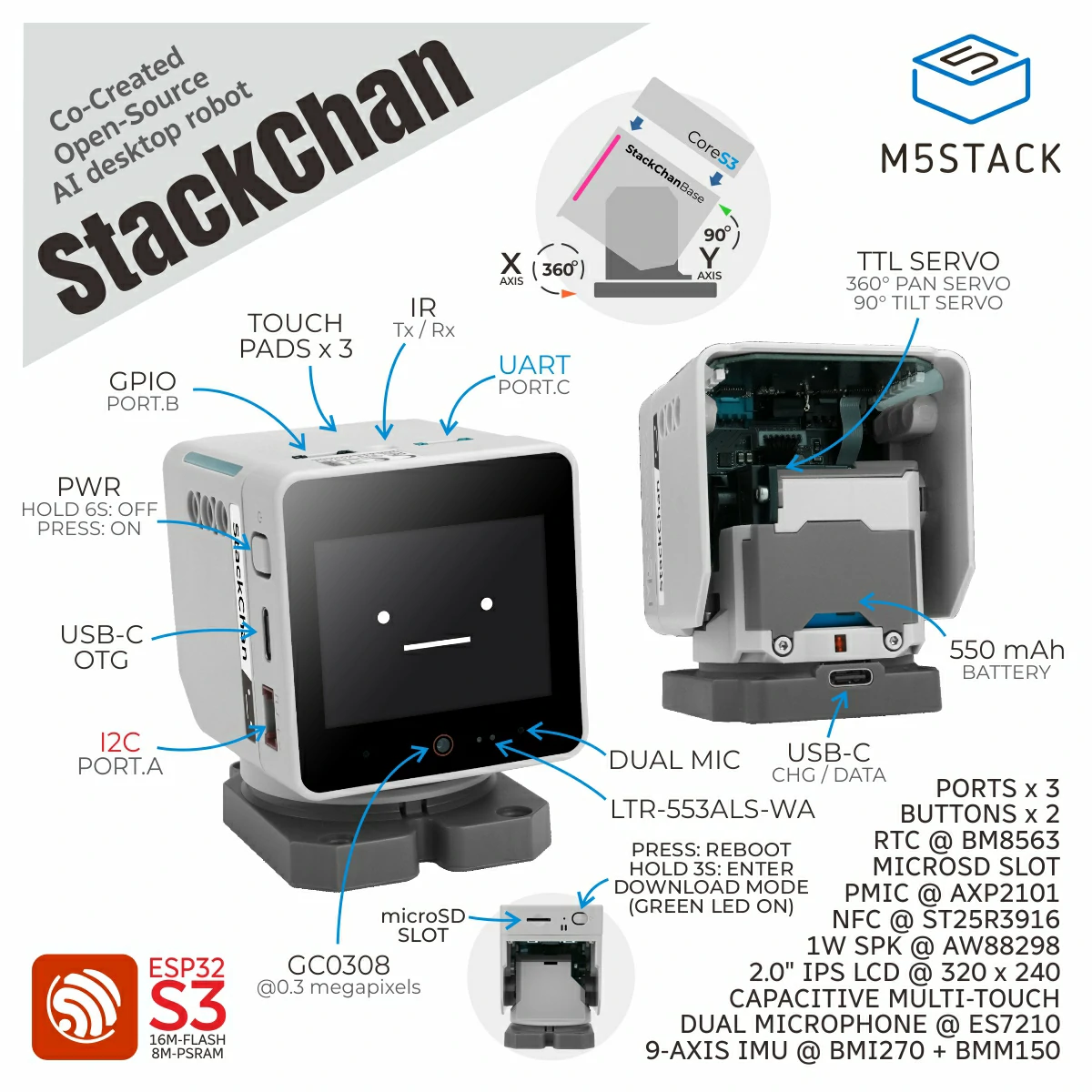
Support the following products:
UiFlow2 Example
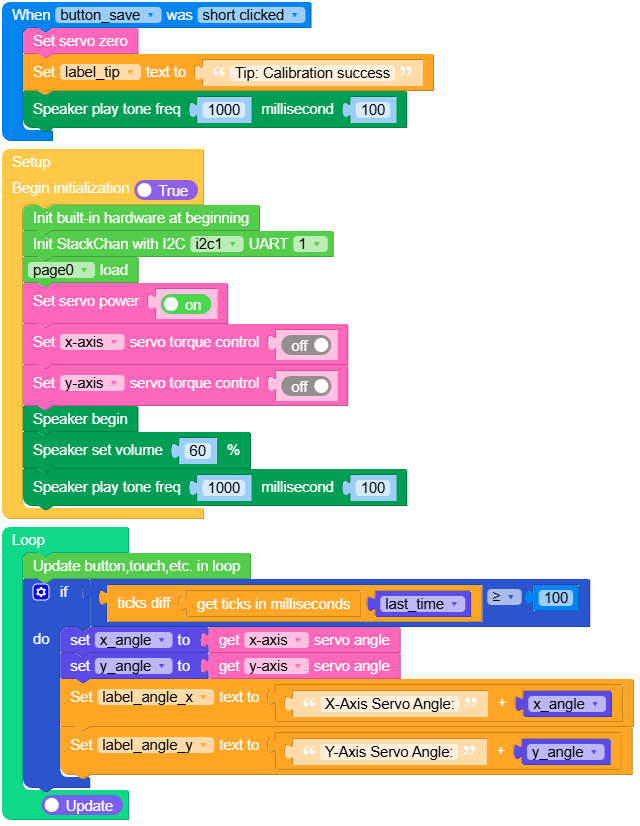
Servo zero calibration
Note
Mechanical assembly varies between units. After flashing new firmware, calibrate the servo zero reference manually.
Open the stackchan_servo_zero_calibrate.m5f2 project in UiFlow2.
Run the program.
Move the head by hand: on X, align the display with the base orientation; on Y, set the display perpendicular to the base.
Tap Save button.
UiFlow2 Code Block:
Example output:
None
Servo angle read
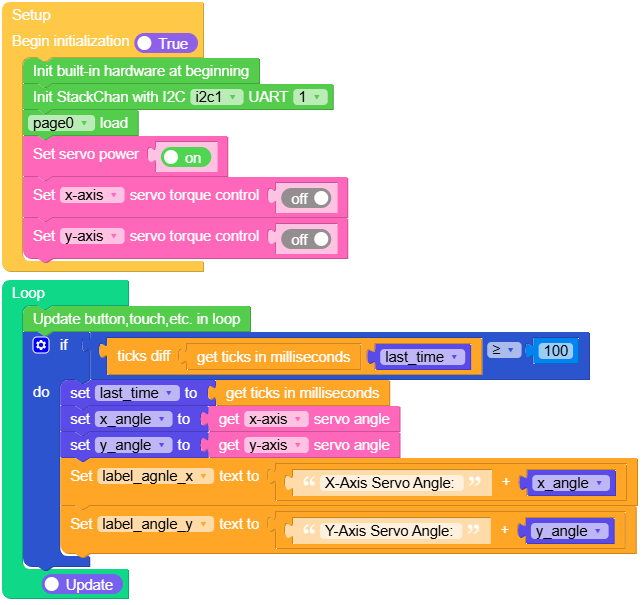
Open the stackchan_servo_read_example.m5f2 project in UiFlow2.
This example demonstrates reading X and Y servo angles in degrees with torque disabled so the head can move freely.
Note
Torque on holds the last target and resists moving by hand. Torque off lets you pose the head freely while readings update—handy for checking calibration.
UiFlow2 Code Block:
Example output:
None
Servo control
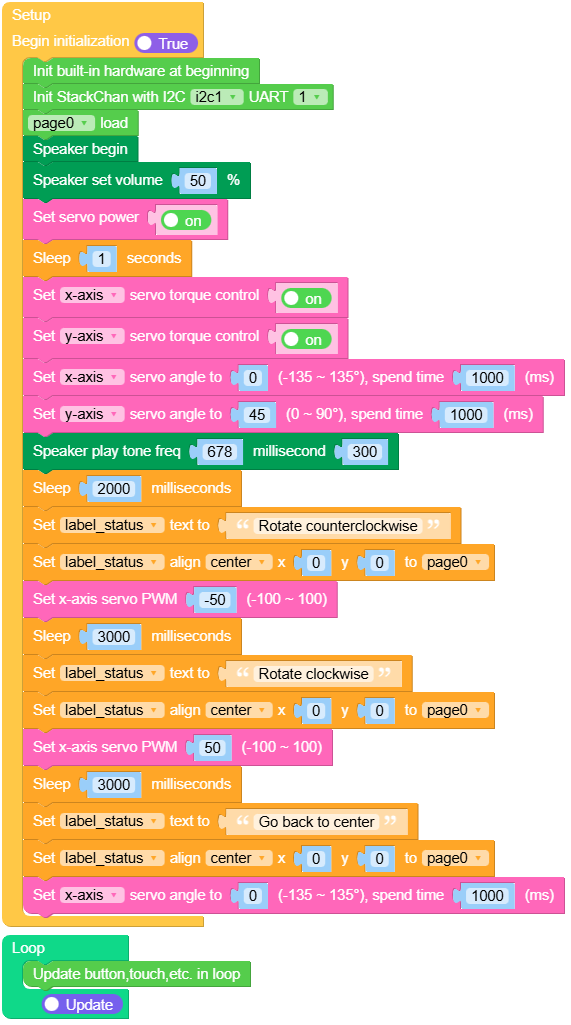
Open the stackchan_servo_control_example.m5f2 project in UiFlow2.
This example demonstrates moving the servos to commanded positions and driving the X servo in PWM mode using set_servo_angle and set_servo_x_pwm.
UiFlow2 Code Block:
Example output:
None
Face tracking
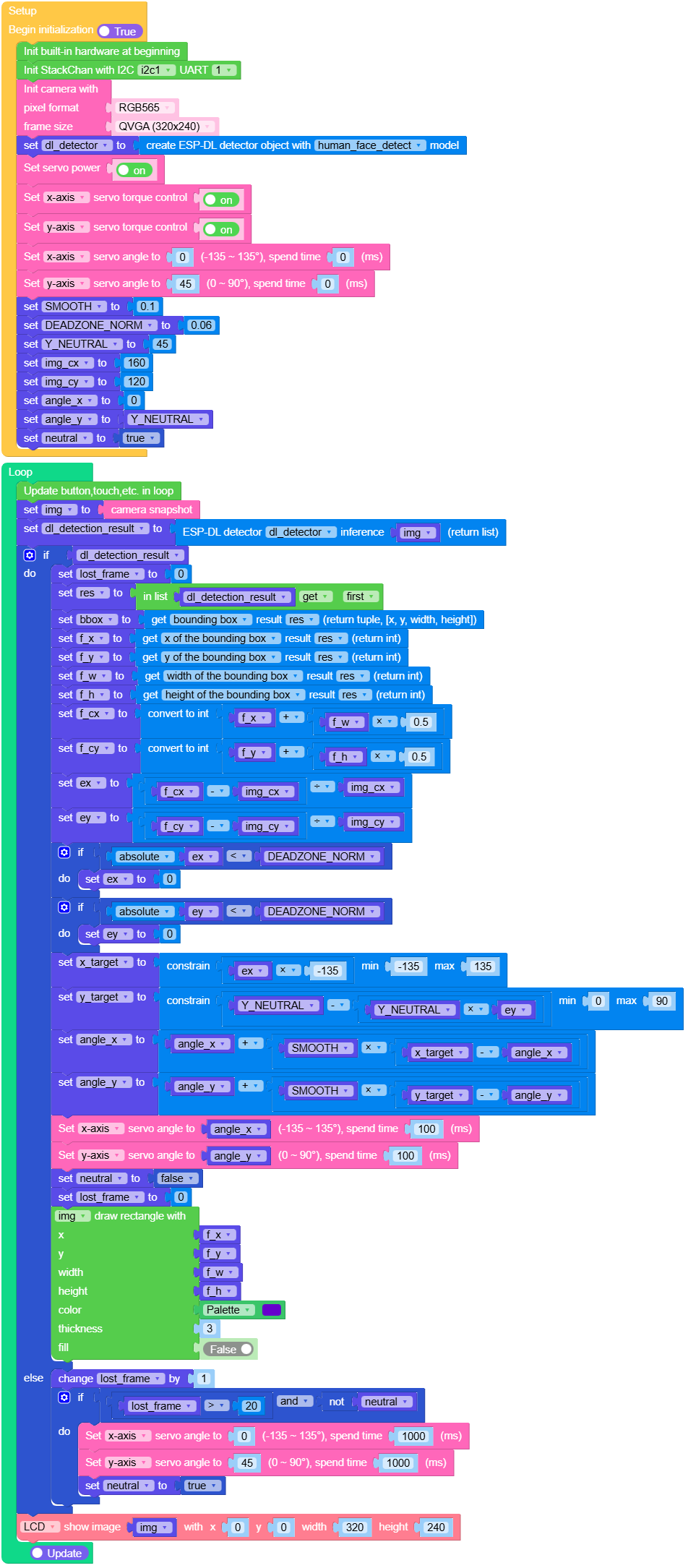
Open the stackchan_face_tracking_example.m5f2 project in UiFlow2.
This demo implements face tracking.
UiFlow2 Code Block:
Example output:
None
Servo power info
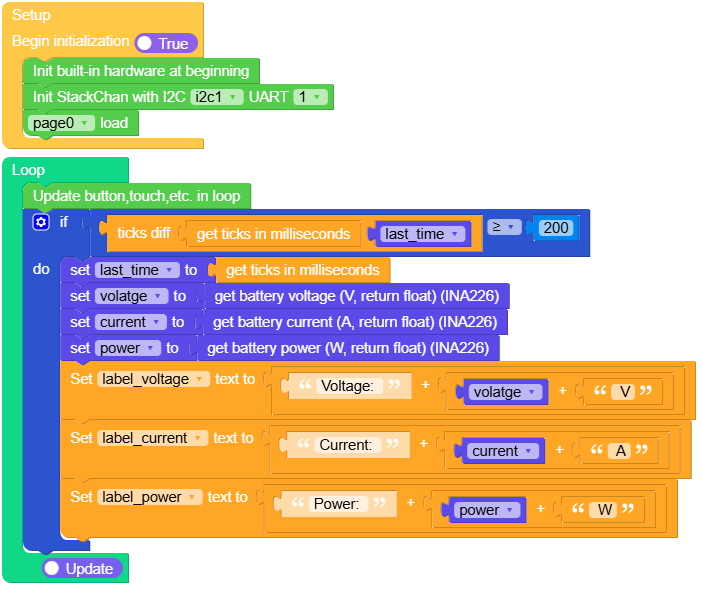
Open the stackchan_servo_power_example.m5f2 project in UiFlow2.
This example demonstrates read and display servo power information.
UiFlow2 Code Block:
Example output:
None
Touch & RGB
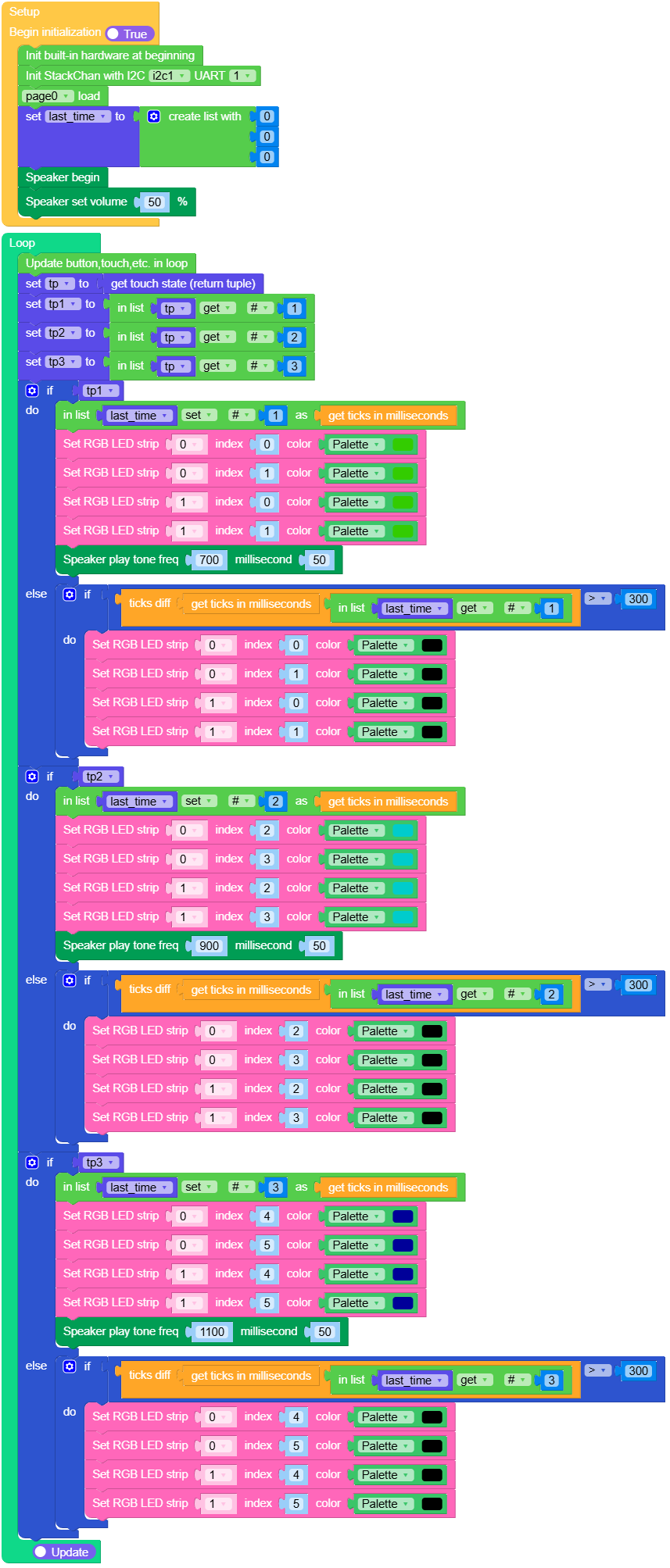
Open the stackchan_tp_rgb_example.m5f2 project in UiFlow2.
This example demonstrates mapping touch zones to RGB strip colours (three logical touch points on two strips).
UiFlow2 Code Block:
Example output:
None
NFC
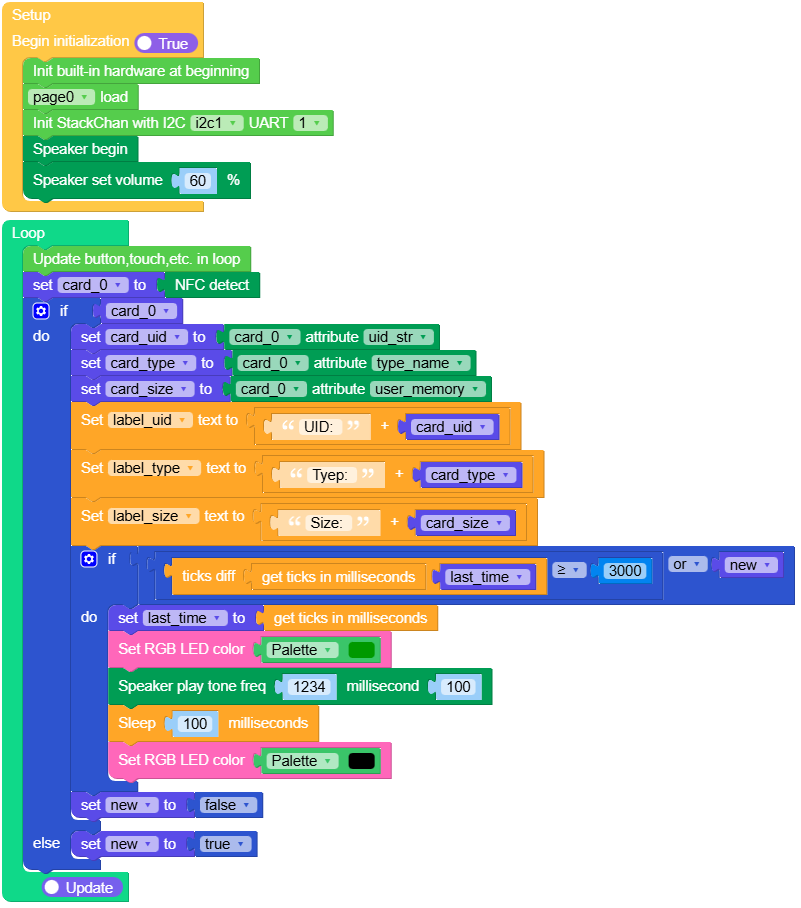
Open the stackchan_nfc_detect_example.m5f2 project in UiFlow2.
This example demonstrates detecting NFC tags and displaying UID and tag type on screen.
For the full NFC Unit API reference (detect, read/write, tag types, etc.), see NFC Unit.
UiFlow2 Code Block:
Example output:
None
Infrared (IR)
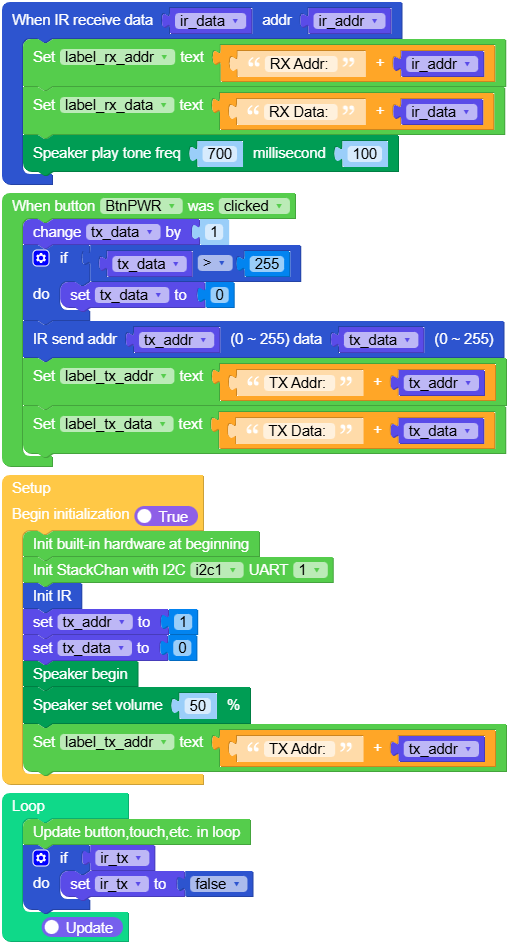
Open the stackchan_ir_tx_rx_example.m5f2 project in UiFlow2.
This example demonstrates infrared transmit and receive in NEC style.
UiFlow2 Code Block:
Example output:
None
MicroPython Example
Servo zero calibration
Note
Mechanical assembly varies between units. After flashing new firmware, calibrate the servo zero reference manually.
Run the program.
Move the head by hand: on X, align the display with the base orientation; on Y, set the display perpendicular to the base.
Tap Save button.
MicroPython Code Block:
  1# SPDX-FileCopyrightText: 2026 M5Stack Technology CO LTD
  2#
  3# SPDX-License-Identifier: MIT
  4
  5import os, sys, io
  6import M5
  7from M5 import *
  8import m5ui
  9import lvgl as lv
 10import time
 11from hardware.stackchan import StackChan
 12
 13
 14page0 = None
 15label_title = None
 16button_save = None
 17label_angle_x = None
 18label_angle_y = None
 19label_tip = None
 20stackchan = None
 21x_angle = None
 22y_angle = None
 23last_time = None
 24
 25
 26def button_save_short_clicked_event(event_struct):
 27    global \
 28        page0, \
 29        label_title, \
 30        button_save, \
 31        label_angle_x, \
 32        label_angle_y, \
 33        label_tip, \
 34        stackchan, \
 35        x_angle, \
 36        y_angle, \
 37        last_time
 38    stackchan.set_servo_zero()
 39    label_tip.set_text(str("Tip: Calibration success"))
 40    Speaker.tone(1000, 100)
 41
 42
 43def button_save_event_handler(event_struct):
 44    global \
 45        page0, \
 46        label_title, \
 47        button_save, \
 48        label_angle_x, \
 49        label_angle_y, \
 50        label_tip, \
 51        stackchan, \
 52        x_angle, \
 53        y_angle, \
 54        last_time
 55    event = event_struct.code
 56    if event == lv.EVENT.SHORT_CLICKED and True:
 57        button_save_short_clicked_event(event_struct)
 58    return
 59
 60
 61def setup():
 62    global \
 63        page0, \
 64        label_title, \
 65        button_save, \
 66        label_angle_x, \
 67        label_angle_y, \
 68        label_tip, \
 69        stackchan, \
 70        x_angle, \
 71        y_angle, \
 72        last_time
 73
 74    M5.begin()
 75    Widgets.setRotation(1)
 76    m5ui.init()
 77    page0 = m5ui.M5Page(bg_c=0x000000)
 78    label_title = m5ui.M5Label(
 79        "Servo Calibration",
 80        x=55,
 81        y=5,
 82        text_c=0x0DC9F4,
 83        bg_c=0x000000,
 84        bg_opa=0,
 85        font=lv.font_montserrat_24,
 86        parent=page0,
 87    )
 88    button_save = m5ui.M5Button(
 89        text="Save",
 90        x=128,
 91        y=195,
 92        bg_c=0x2196F3,
 93        text_c=0xFFFFFF,
 94        font=lv.font_montserrat_14,
 95        parent=page0,
 96    )
 97    label_angle_x = m5ui.M5Label(
 98        "X-Axis Servo Angle:",
 99        x=10,
100        y=130,
101        text_c=0x0DC9F4,
102        bg_c=0x000000,
103        bg_opa=0,
104        font=lv.font_montserrat_18,
105        parent=page0,
106    )
107    label_angle_y = m5ui.M5Label(
108        "Y-Axis Servo Angle:",
109        x=8,
110        y=160,
111        text_c=0x0DC9F4,
112        bg_c=0x000000,
113        bg_opa=0,
114        font=lv.font_montserrat_18,
115        parent=page0,
116    )
117    label_tip = m5ui.M5Label(
118        "Tip:Move by hand, tap Save.",
119        x=33,
120        y=70,
121        text_c=0xD2E711,
122        bg_c=0xFFFFFF,
123        bg_opa=0,
124        font=lv.font_montserrat_18,
125        parent=page0,
126    )
127
128    button_save.add_event_cb(button_save_event_handler, lv.EVENT.ALL, None)
129
130    stackchan = StackChan(i2c=1, uart=1)
131    page0.screen_load()
132    stackchan.set_servo_power(enable=True)
133    stackchan.set_servo_torque(stackchan.SERVO_ID_X, enable=False)
134    stackchan.set_servo_torque(stackchan.SERVO_ID_Y, enable=False)
135    Speaker.begin()
136    Speaker.setVolumePercentage(0.6)
137    Speaker.tone(1000, 100)
138
139
140def loop():
141    global \
142        page0, \
143        label_title, \
144        button_save, \
145        label_angle_x, \
146        label_angle_y, \
147        label_tip, \
148        stackchan, \
149        x_angle, \
150        y_angle, \
151        last_time
152    M5.update()
153    if (time.ticks_diff((time.ticks_ms()), last_time)) >= 100:
154        x_angle = stackchan.get_servo_angle(stackchan.SERVO_ID_X)
155        y_angle = stackchan.get_servo_angle(stackchan.SERVO_ID_Y)
156        label_angle_x.set_text(str((str("X-Axis Servo Angle:") + str(x_angle))))
157        label_angle_y.set_text(str((str("Y-Axis Servo Angle:") + str(y_angle))))
158
159
160if __name__ == "__main__":
161    try:
162        setup()
163        while True:
164            loop()
165    except (Exception, KeyboardInterrupt) as e:
166        try:
167            m5ui.deinit()
168            from utility import print_error_msg
169
170            print_error_msg(e)
171        except ImportError:
172            print("please update to latest firmware")
Example output:
None
Servo angle read
This example demonstrates reading X and Y servo angles in degrees with torque disabled so the head can move freely.
Note
Torque on holds the last target and resists moving by hand. Torque off lets you pose the head freely while readings update—handy for checking calibration.
MicroPython Code Block:
 1import os, sys, io
 2import M5
 3from M5 import *
 4import m5ui
 5import lvgl as lv
 6import time
 7from hardware.stackchan import StackChan
 8
 9
10page0 = None
11label_title = None
12label_agnle_x = None
13label_angle_y = None
14stackchan = None
15last_time = None
16x_angle = None
17y_angle = None
18
19
20def setup():
21    global page0, label_title, label_agnle_x, label_angle_y, stackchan, last_time, x_angle, y_angle
22
23    M5.begin()
24    Widgets.setRotation(1)
25    m5ui.init()
26    page0 = m5ui.M5Page(bg_c=0x000000)
27    label_title = m5ui.M5Label(
28        "Servo Read Example",
29        x=34,
30        y=10,
31        text_c=0x0DC9F4,
32        bg_c=0x000000,
33        bg_opa=0,
34        font=lv.font_montserrat_24,
35        parent=page0,
36    )
37    label_agnle_x = m5ui.M5Label(
38        "X-Axis Servo Angle:",
39        x=10,
40        y=80,
41        text_c=0x0DC9F4,
42        bg_c=0x000000,
43        bg_opa=0,
44        font=lv.font_montserrat_24,
45        parent=page0,
46    )
47    label_angle_y = m5ui.M5Label(
48        "Y-Axis Servo Angle:",
49        x=10,
50        y=125,
51        text_c=0x0DC9F4,
52        bg_c=0x000000,
53        bg_opa=0,
54        font=lv.font_montserrat_24,
55        parent=page0,
56    )
57
58    stackchan = StackChan(i2c=1, uart=1)
59    page0.screen_load()
60    stackchan.set_servo_power(enable=True)
61    stackchan.set_servo_torque(stackchan.SERVO_ID_X, enable=False)
62    stackchan.set_servo_torque(stackchan.SERVO_ID_Y, enable=False)
63
64
65def loop():
66    global page0, label_title, label_agnle_x, label_angle_y, stackchan, last_time, x_angle, y_angle
67    M5.update()
68    if (time.ticks_diff((time.ticks_ms()), last_time)) >= 100:
69        last_time = time.ticks_ms()
70        x_angle = stackchan.get_servo_angle(stackchan.SERVO_ID_X)
71        y_angle = stackchan.get_servo_angle(stackchan.SERVO_ID_Y)
72        label_agnle_x.set_text(str((str("X-Axis Servo Angle: ") + str(x_angle))))
73        label_angle_y.set_text(str((str("Y-Axis Servo Angle: ") + str(y_angle))))
74
75
76if __name__ == "__main__":
77    try:
78        setup()
79        while True:
80            loop()
81    except (Exception, KeyboardInterrupt) as e:
82        try:
83            m5ui.deinit()
84            from utility import print_error_msg
85
86            print_error_msg(e)
87        except ImportError:
88            print("please update to latest firmware")
Example output:
None
Servo control
This example demonstrates moving the servos to commanded positions and driving the X servo in PWM mode using set_servo_angle and set_servo_x_pwm.
MicroPython Code Block:
 1# SPDX-FileCopyrightText: 2026 M5Stack Technology CO LTD
 2#
 3# SPDX-License-Identifier: MIT
 4
 5import os, sys, io
 6import M5
 7from M5 import *
 8import m5ui
 9import lvgl as lv
10import time
11from hardware.stackchan import StackChan
12
13
14page0 = None
15label_title = None
16label_status = None
17stackchan = None
18
19
20def setup():
21    global page0, label_title, label_status, stackchan
22
23    M5.begin()
24    Widgets.setRotation(1)
25    m5ui.init()
26    page0 = m5ui.M5Page(bg_c=0x000000)
27    label_title = m5ui.M5Label(
28        "Servo Control Example",
29        x=20,
30        y=5,
31        text_c=0x0DC9F4,
32        bg_c=0x000000,
33        bg_opa=0,
34        font=lv.font_montserrat_24,
35        parent=page0,
36    )
37    label_status = m5ui.M5Label(
38        "--",
39        x=153,
40        y=115,
41        text_c=0x0DC9F4,
42        bg_c=0xFFFFFF,
43        bg_opa=0,
44        font=lv.font_montserrat_16,
45        parent=page0,
46    )
47
48    stackchan = StackChan(i2c=1, uart=1)
49    page0.screen_load()
50    Speaker.begin()
51    Speaker.setVolumePercentage(0.5)
52    stackchan.set_servo_power(enable=True)
53    stackchan.set_servo_torque(stackchan.SERVO_ID_X, enable=True)
54    stackchan.set_servo_torque(stackchan.SERVO_ID_X, enable=True)
55    stackchan.set_servo_angle(stackchan.SERVO_ID_X, 0, 1000, 0)
56    stackchan.set_servo_angle(stackchan.SERVO_ID_Y, 45, 1000, 0)
57    Speaker.tone(678, 300)
58    time.sleep_ms(2000)
59    label_status.set_text(str("Rotate counterclockwise"))
60    label_status.align_to(page0, lv.ALIGN.CENTER, 0, 0)
61    stackchan.set_servo_x_pwm(-50)
62    time.sleep_ms(3000)
63    label_status.set_text(str("Rotate clockwise"))
64    label_status.align_to(page0, lv.ALIGN.CENTER, 0, 0)
65    stackchan.set_servo_x_pwm(50)
66    time.sleep_ms(3000)
67    label_status.set_text(str("Go back to center"))
68    label_status.align_to(page0, lv.ALIGN.CENTER, 0, 0)
69    stackchan.set_servo_angle(stackchan.SERVO_ID_X, 0, 1000, 0)
70
71
72def loop():
73    global page0, label_title, label_status, stackchan
74    M5.update()
75
76
77if __name__ == "__main__":
78    try:
79        setup()
80        while True:
81            loop()
82    except (Exception, KeyboardInterrupt) as e:
83        try:
84            m5ui.deinit()
85            from utility import print_error_msg
86
87            print_error_msg(e)
88        except ImportError:
89            print("please update to latest firmware")
Example output:
None
Face tracking
This example implements face tracking.
MicroPython Code Block:
  1import os, sys, io
  2import M5
  3from M5 import *
  4import camera
  5import dl
  6import image
  7from hardware.stackchan import StackChan
  8
  9
 10stackchan = None
 11
 12
 13import math
 14
 15img = None
 16dl_detection_result = None
 17dl_detector = None
 18lost_frame = None
 19res = None
 20bbox = None
 21f_x = None
 22f_y = None
 23neutral = None
 24SMOOTH = None
 25f_w = None
 26DEADZONE_NORM = None
 27f_h = None
 28Y_NEUTRAL = None
 29f_cx = None
 30img_cx = None
 31f_cy = None
 32img_cy = None
 33ex = None
 34angle_x = None
 35ey = None
 36angle_y = None
 37x_target = None
 38y_target = None
 39
 40
 41def setup():
 42    global \
 43        stackchan, \
 44        img, \
 45        dl_detection_result, \
 46        dl_detector, \
 47        lost_frame, \
 48        res, \
 49        bbox, \
 50        f_x, \
 51        f_y, \
 52        neutral, \
 53        SMOOTH, \
 54        f_w, \
 55        DEADZONE_NORM, \
 56        f_h, \
 57        Y_NEUTRAL, \
 58        f_cx, \
 59        img_cx, \
 60        f_cy, \
 61        img_cy, \
 62        ex, \
 63        angle_x, \
 64        ey, \
 65        angle_y, \
 66        x_target, \
 67        y_target
 68
 69    M5.begin()
 70    Widgets.setRotation(1)
 71    Widgets.fillScreen(0x222222)
 72
 73    stackchan = StackChan(i2c=1, uart=1)
 74    camera.init(pixformat=camera.RGB565, framesize=camera.QVGA)
 75    dl_detector = dl.ObjectDetector(dl.model.HUMAN_FACE_DETECT)
 76    stackchan.set_servo_power(enable=True)
 77    stackchan.set_servo_torque(stackchan.SERVO_ID_X, enable=True)
 78    stackchan.set_servo_torque(stackchan.SERVO_ID_Y, enable=True)
 79    stackchan.set_servo_angle(stackchan.SERVO_ID_X, 0, 0, 0)
 80    stackchan.set_servo_angle(stackchan.SERVO_ID_Y, 45, 0, 0)
 81    SMOOTH = 0.1
 82    DEADZONE_NORM = 0.06
 83    Y_NEUTRAL = 45
 84    img_cx = 160
 85    img_cy = 120
 86    angle_x = 0
 87    angle_y = Y_NEUTRAL
 88    neutral = True
 89
 90
 91def loop():
 92    global \
 93        stackchan, \
 94        img, \
 95        dl_detection_result, \
 96        dl_detector, \
 97        lost_frame, \
 98        res, \
 99        bbox, \
100        f_x, \
101        f_y, \
102        neutral, \
103        SMOOTH, \
104        f_w, \
105        DEADZONE_NORM, \
106        f_h, \
107        Y_NEUTRAL, \
108        f_cx, \
109        img_cx, \
110        f_cy, \
111        img_cy, \
112        ex, \
113        angle_x, \
114        ey, \
115        angle_y, \
116        x_target, \
117        y_target
118    M5.update()
119    img = camera.snapshot()
120    dl_detection_result = dl_detector.infer(img)
121    if dl_detection_result:
122        lost_frame = 0
123        res = dl_detection_result[0]
124        bbox = res.bbox()
125        f_x = res.x()
126        f_y = res.y()
127        f_w = res.w()
128        f_h = res.h()
129        f_cx = int(f_x + f_w * 0.5)
130        f_cy = int(f_y + f_h * 0.5)
131        ex = (f_cx - img_cx) / img_cx
132        ey = (f_cy - img_cy) / img_cy
133        if math.fabs(ex) < DEADZONE_NORM:
134            ex = 0
135        if math.fabs(ey) < DEADZONE_NORM:
136            ey = 0
137        x_target = min(max(ex * -135, -135), 135)
138        y_target = min(max(Y_NEUTRAL - Y_NEUTRAL * ey, 0), 90)
139        angle_x = angle_x + SMOOTH * (x_target - angle_x)
140        angle_y = angle_y + SMOOTH * (y_target - angle_y)
141        stackchan.set_servo_angle(stackchan.SERVO_ID_X, angle_x, 100, 0)
142        stackchan.set_servo_angle(stackchan.SERVO_ID_Y, angle_y, 100, 0)
143        neutral = False
144        lost_frame = 0
145        img.draw_rectangle(f_x, f_y, f_w, f_h, color=0x6600CC, thickness=3, fill=False)
146    else:
147        lost_frame = (lost_frame if isinstance(lost_frame, (int, float)) else 0) + 1
148        if lost_frame > 20 and not neutral:
149            stackchan.set_servo_angle(stackchan.SERVO_ID_X, 0, 1000, 0)
150            stackchan.set_servo_angle(stackchan.SERVO_ID_Y, 45, 1000, 0)
151            neutral = True
152    M5.Lcd.show(img, 0, 0, 320, 240)
153
154
155if __name__ == "__main__":
156    try:
157        setup()
158        while True:
159            loop()
160    except (Exception, KeyboardInterrupt) as e:
161        try:
162            from utility import print_error_msg
163
164            print_error_msg(e)
165        except ImportError:
166            print("please update to latest firmware")
Example output:
None
Servo power info
This example demonstrates read and display servo power information.
MicroPython Code Block:
  1# SPDX-FileCopyrightText: 2026 M5Stack Technology CO LTD
  2#
  3# SPDX-License-Identifier: MIT
  4
  5import os, sys, io
  6import M5
  7from M5 import *
  8import m5ui
  9import lvgl as lv
 10import time
 11from hardware.stackchan import StackChan
 12
 13
 14page0 = None
 15label_title = None
 16label_voltage = None
 17label_current = None
 18label_power = None
 19stackchan = None
 20last_time = None
 21volatge = None
 22current = None
 23power = None
 24
 25
 26def setup():
 27    global \
 28        page0, \
 29        label_title, \
 30        label_voltage, \
 31        label_current, \
 32        label_power, \
 33        stackchan, \
 34        last_time, \
 35        volatge, \
 36        current, \
 37        power
 38
 39    M5.begin()
 40    Widgets.setRotation(1)
 41    m5ui.init()
 42    page0 = m5ui.M5Page(bg_c=0x000000)
 43    label_title = m5ui.M5Label(
 44        "Servo Power Info",
 45        x=56,
 46        y=5,
 47        text_c=0x0DC9F4,
 48        bg_c=0x000000,
 49        bg_opa=0,
 50        font=lv.font_montserrat_24,
 51        parent=page0,
 52    )
 53    label_voltage = m5ui.M5Label(
 54        "Voltage:",
 55        x=10,
 56        y=80,
 57        text_c=0x0DC9F4,
 58        bg_c=0x000000,
 59        bg_opa=0,
 60        font=lv.font_montserrat_24,
 61        parent=page0,
 62    )
 63    label_current = m5ui.M5Label(
 64        "Current:",
 65        x=10,
 66        y=115,
 67        text_c=0x0DC9F4,
 68        bg_c=0x000000,
 69        bg_opa=0,
 70        font=lv.font_montserrat_24,
 71        parent=page0,
 72    )
 73    label_power = m5ui.M5Label(
 74        "Power:",
 75        x=25,
 76        y=150,
 77        text_c=0x0DC9F4,
 78        bg_c=0x000000,
 79        bg_opa=0,
 80        font=lv.font_montserrat_24,
 81        parent=page0,
 82    )
 83
 84    stackchan = StackChan(i2c=1, uart=1)
 85    page0.screen_load()
 86
 87
 88def loop():
 89    global \
 90        page0, \
 91        label_title, \
 92        label_voltage, \
 93        label_current, \
 94        label_power, \
 95        stackchan, \
 96        last_time, \
 97        volatge, \
 98        current, \
 99        power
100    M5.update()
101    if (time.ticks_diff((time.ticks_ms()), last_time)) >= 200:
102        last_time = time.ticks_ms()
103        volatge = stackchan.get_battery_voltage()
104        current = stackchan.get_battery_current()
105        power = stackchan.get_battery_power()
106        label_voltage.set_text(str((str("Voltage: ") + str((str(volatge) + str(" V"))))))
107        label_current.set_text(str((str("Current: ") + str((str(current) + str(" A"))))))
108        label_power.set_text(str((str("Power: ") + str((str(power) + str(" W"))))))
109
110
111if __name__ == "__main__":
112    try:
113        setup()
114        while True:
115            loop()
116    except (Exception, KeyboardInterrupt) as e:
117        try:
118            m5ui.deinit()
119            from utility import print_error_msg
120
121            print_error_msg(e)
122        except ImportError:
123            print("please update to latest firmware")
Example output:
None
Touch & RGB
This example demonstrates mapping touch zones to RGB strip colours (three logical touch points on two strips).
MicroPython Code Block:
  1# SPDX-FileCopyrightText: 2026 M5Stack Technology CO LTD
  2#
  3# SPDX-License-Identifier: MIT
  4
  5import os, sys, io
  6import M5
  7from M5 import *
  8import m5ui
  9import lvgl as lv
 10import time
 11from hardware.stackchan import StackChan
 12
 13
 14page0 = None
 15label_title = None
 16stackchan = None
 17tp = None
 18tp1 = None
 19last_time = None
 20tp2 = None
 21tp3 = None
 22
 23
 24def setup():
 25    global page0, label_title, stackchan, tp, tp1, last_time, tp2, tp3
 26
 27    M5.begin()
 28    Widgets.setRotation(1)
 29    m5ui.init()
 30    page0 = m5ui.M5Page(bg_c=0x000000)
 31    label_title = m5ui.M5Label(
 32        "TP & RGB Strip Example",
 33        x=13,
 34        y=10,
 35        text_c=0x0DC9F4,
 36        bg_c=0x000000,
 37        bg_opa=0,
 38        font=lv.font_montserrat_24,
 39        parent=page0,
 40    )
 41
 42    stackchan = StackChan(i2c=1, uart=1)
 43    page0.screen_load()
 44    last_time = [0, 0, 0]
 45    Speaker.begin()
 46    Speaker.setVolumePercentage(0.5)
 47
 48
 49def loop():
 50    global page0, label_title, stackchan, tp, tp1, last_time, tp2, tp3
 51    M5.update()
 52    tp = stackchan.get_touch()
 53    tp1 = tp[0]
 54    tp2 = tp[1]
 55    tp3 = tp[2]
 56    if tp1:
 57        last_time[0] = time.ticks_ms()
 58        stackchan.set_rgb_color(0, 0, 0x33CC00)
 59        stackchan.set_rgb_color(0, 1, 0x33CC00)
 60        stackchan.set_rgb_color(1, 0, 0x33CC00)
 61        stackchan.set_rgb_color(1, 1, 0x33CC00)
 62        Speaker.tone(700, 50)
 63    else:
 64        if (time.ticks_diff((time.ticks_ms()), (last_time[0]))) > 300:
 65            stackchan.set_rgb_color(0, 0, 0x000000)
 66            stackchan.set_rgb_color(0, 1, 0x000000)
 67            stackchan.set_rgb_color(1, 0, 0x000000)
 68            stackchan.set_rgb_color(1, 1, 0x000000)
 69    if tp2:
 70        last_time[1] = time.ticks_ms()
 71        stackchan.set_rgb_color(0, 2, 0x00CCCC)
 72        stackchan.set_rgb_color(0, 3, 0x00CCCC)
 73        stackchan.set_rgb_color(1, 2, 0x00CCCC)
 74        stackchan.set_rgb_color(1, 3, 0x00CCCC)
 75        Speaker.tone(900, 50)
 76    else:
 77        if (time.ticks_diff((time.ticks_ms()), (last_time[1]))) > 300:
 78            stackchan.set_rgb_color(0, 2, 0x000000)
 79            stackchan.set_rgb_color(0, 3, 0x000000)
 80            stackchan.set_rgb_color(1, 2, 0x000000)
 81            stackchan.set_rgb_color(1, 3, 0x000000)
 82    if tp3:
 83        last_time[2] = time.ticks_ms()
 84        stackchan.set_rgb_color(0, 4, 0x000099)
 85        stackchan.set_rgb_color(0, 5, 0x000099)
 86        stackchan.set_rgb_color(1, 4, 0x000099)
 87        stackchan.set_rgb_color(1, 5, 0x000099)
 88        Speaker.tone(1100, 50)
 89    else:
 90        if (time.ticks_diff((time.ticks_ms()), (last_time[2]))) > 300:
 91            stackchan.set_rgb_color(0, 4, 0x000000)
 92            stackchan.set_rgb_color(0, 5, 0x000000)
 93            stackchan.set_rgb_color(1, 4, 0x000000)
 94            stackchan.set_rgb_color(1, 5, 0x000000)
 95
 96
 97if __name__ == "__main__":
 98    try:
 99        setup()
100        while True:
101            loop()
102    except (Exception, KeyboardInterrupt) as e:
103        try:
104            m5ui.deinit()
105            from utility import print_error_msg
106
107            print_error_msg(e)
108        except ImportError:
109            print("please update to latest firmware")
Example output:
None
NFC
This example demonstrates detecting NFC tags and displaying UID and tag type on screen.
For the full NFC Unit API reference (detect, read/write, tag types, etc.), see NFC Unit.
MicroPython Code Block:
  1# SPDX-FileCopyrightText: 2026 M5Stack Technology CO LTD
  2#
  3# SPDX-License-Identifier: MIT
  4
  5import os, sys, io
  6import M5
  7from M5 import *
  8import m5ui
  9import lvgl as lv
 10import time
 11from hardware.stackchan import StackChan
 12
 13
 14page0 = None
 15label_title = None
 16label_uid = None
 17label_type = None
 18label_size = None
 19stackchan = None
 20card_0 = None
 21card_uid = None
 22new = None
 23card_type = None
 24card_size = None
 25last_time = None
 26
 27
 28def setup():
 29    global \
 30        page0, \
 31        label_title, \
 32        label_uid, \
 33        label_type, \
 34        label_size, \
 35        stackchan, \
 36        card_0, \
 37        card_uid, \
 38        new, \
 39        card_type, \
 40        card_size, \
 41        last_time
 42
 43    M5.begin()
 44    Widgets.setRotation(1)
 45    m5ui.init()
 46    page0 = m5ui.M5Page(bg_c=0x000000)
 47    label_title = m5ui.M5Label(
 48        "NFC Card detect",
 49        x=58,
 50        y=5,
 51        text_c=0x13C2EB,
 52        bg_c=0xFFFFFF,
 53        bg_opa=0,
 54        font=lv.font_montserrat_24,
 55        parent=page0,
 56    )
 57    label_uid = m5ui.M5Label(
 58        "UID:",
 59        x=18,
 60        y=70,
 61        text_c=0xFFFFFF,
 62        bg_c=0xFFFFFF,
 63        bg_opa=0,
 64        font=lv.font_montserrat_16,
 65        parent=page0,
 66    )
 67    label_type = m5ui.M5Label(
 68        "Tyep:",
 69        x=10,
 70        y=100,
 71        text_c=0xFFFFFF,
 72        bg_c=0xFFFFFF,
 73        bg_opa=0,
 74        font=lv.font_montserrat_16,
 75        parent=page0,
 76    )
 77    label_size = m5ui.M5Label(
 78        "Size:",
 79        x=16,
 80        y=130,
 81        text_c=0xFFFFFF,
 82        bg_c=0xFFFFFF,
 83        bg_opa=0,
 84        font=lv.font_montserrat_16,
 85        parent=page0,
 86    )
 87
 88    page0.screen_load()
 89    stackchan = StackChan(i2c=1, uart=1)
 90    Speaker.begin()
 91    Speaker.setVolumePercentage(0.6)
 92
 93
 94def loop():
 95    global \
 96        page0, \
 97        label_title, \
 98        label_uid, \
 99        label_type, \
100        label_size, \
101        stackchan, \
102        card_0, \
103        card_uid, \
104        new, \
105        card_type, \
106        card_size, \
107        last_time
108    M5.update()
109    card_0 = stackchan.nfc.detect()
110    if card_0:
111        card_uid = card_0.uid_str
112        card_type = card_0.type_name
113        card_size = card_0.user_memory
114        label_uid.set_text(str((str("UID: ") + str(card_uid))))
115        label_type.set_text(str((str("Tyep: ") + str(card_type))))
116        label_size.set_text(str((str("Size: ") + str(card_size))))
117        if (time.ticks_diff((time.ticks_ms()), last_time)) >= 3000 or new:
118            last_time = time.ticks_ms()
119            stackchan.set_rgb_color(0x009900)
120            Speaker.tone(1234, 100)
121            time.sleep_ms(100)
122            stackchan.set_rgb_color(0x000000)
123        new = False
124    else:
125        new = True
126
127
128if __name__ == "__main__":
129    try:
130        setup()
131        while True:
132            loop()
133    except (Exception, KeyboardInterrupt) as e:
134        try:
135            m5ui.deinit()
136            from utility import print_error_msg
137
138            print_error_msg(e)
139        except ImportError:
140            print("please update to latest firmware")
Example output:
None
Infrared (IR)
This example demonstrates infrared transmit and receive in NEC style.
MicroPython Code Block:
  1# SPDX-FileCopyrightText: 2026 M5Stack Technology CO LTD
  2#
  3# SPDX-License-Identifier: MIT
  4
  5import os, sys, io
  6import M5
  7from M5 import *
  8from hardware import IR
  9from hardware.stackchan import StackChan
 10
 11
 12label_title = None
 13label_tx_addr = None
 14label_tx_data = None
 15label_rx_addr = None
 16label_rx_data = None
 17ir = None
 18stackchan = None
 19ir_data = None
 20ir_addr = None
 21tx_data = None
 22ir_tx = None
 23tx_addr = None
 24
 25
 26def ir_rx_event(_data, _addr, _ctrl):
 27    global \
 28        label_title, \
 29        label_tx_addr, \
 30        label_tx_data, \
 31        label_rx_addr, \
 32        label_rx_data, \
 33        ir, \
 34        stackchan, \
 35        ir_data, \
 36        ir_addr, \
 37        tx_data, \
 38        ir_tx, \
 39        tx_addr
 40    ir_data = _data
 41    ir_addr = _addr
 42    label_rx_addr.setText(str((str("RX Addr: ") + str(ir_addr))))
 43    label_rx_data.setText(str((str("RX Data: ") + str(ir_data))))
 44    Speaker.tone(700, 100)
 45
 46
 47def btn_pwr_was_clicked_event(state):
 48    global \
 49        label_title, \
 50        label_tx_addr, \
 51        label_tx_data, \
 52        label_rx_addr, \
 53        label_rx_data, \
 54        ir, \
 55        stackchan, \
 56        ir_data, \
 57        ir_addr, \
 58        tx_data, \
 59        ir_tx, \
 60        tx_addr
 61    tx_data = (tx_data if isinstance(tx_data, (int, float)) else 0) + 1
 62    if tx_data > 255:
 63        tx_data = 0
 64    ir.tx(tx_addr, tx_data)
 65    label_tx_addr.setText(str((str("TX Addr: ") + str(tx_addr))))
 66    label_tx_data.setText(str((str("TX Data: ") + str(tx_data))))
 67
 68
 69def setup():
 70    global \
 71        label_title, \
 72        label_tx_addr, \
 73        label_tx_data, \
 74        label_rx_addr, \
 75        label_rx_data, \
 76        ir, \
 77        stackchan, \
 78        ir_data, \
 79        ir_addr, \
 80        tx_data, \
 81        ir_tx, \
 82        tx_addr
 83
 84    M5.begin()
 85    Widgets.setRotation(1)
 86    Widgets.fillScreen(0x000000)
 87    label_title = Widgets.Label(
 88        "IR TX & RX Example", 41, 5, 1.0, 0x0DC9F4, 0x000000, Widgets.FONTS.Montserrat24
 89    )
 90    label_tx_addr = Widgets.Label(
 91        "TX Addr:", 9, 59, 1.0, 0xFFFFFF, 0x000000, Widgets.FONTS.Montserrat18
 92    )
 93    label_tx_data = Widgets.Label(
 94        "TX Data:", 170, 59, 1.0, 0xFFFFFF, 0x000000, Widgets.FONTS.Montserrat18
 95    )
 96    label_rx_addr = Widgets.Label(
 97        "RX Addr:", 10, 100, 1.0, 0xFFFFFF, 0x000000, Widgets.FONTS.Montserrat18
 98    )
 99    label_rx_data = Widgets.Label(
100        "RX Data:", 170, 100, 1.0, 0xFFFFFF, 0x000000, Widgets.FONTS.Montserrat18
101    )
102
103    BtnPWR.setCallback(type=BtnPWR.CB_TYPE.WAS_CLICKED, cb=btn_pwr_was_clicked_event)
104
105    stackchan = StackChan(i2c=1, uart=1)
106    ir = IR()
107    ir.rx_cb(ir_rx_event)
108    tx_addr = 1
109    tx_data = 0
110    Speaker.begin()
111    Speaker.setVolumePercentage(0.5)
112    label_tx_addr.setText(str((str("TX Addr: ") + str(tx_addr))))
113
114
115def loop():
116    global \
117        label_title, \
118        label_tx_addr, \
119        label_tx_data, \
120        label_rx_addr, \
121        label_rx_data, \
122        ir, \
123        stackchan, \
124        ir_data, \
125        ir_addr, \
126        tx_data, \
127        ir_tx, \
128        tx_addr
129    M5.update()
130    if ir_tx:
131        ir_tx = False
132
133
134if __name__ == "__main__":
135    try:
136        setup()
137        while True:
138            loop()
139    except (Exception, KeyboardInterrupt) as e:
140        try:
141            from utility import print_error_msg
142
143            print_error_msg(e)
144        except ImportError:
145            print("please update to latest firmware")
Example output:
None
API
StackChan
- class hardware.stackchan.StackChan
StackChan board driver: SCS serial servos on UART, RGB and servo power on M5IOE1, Si12T touch, INA226 (battery bus), and onboard NFC (
ST25R3916) asunit.nfc.NFCUnit.The class is a singleton; always construct with the same
i2canduartids.After init, the instance exposes
nfc(aunit.nfc.NFCUnit—see NFC Unit for the complete API),touch,i2c, and low-levelservo(Scsclinstance) for advanced use.Module constants include
SERVO_ID_X(1),SERVO_ID_Y(2) and related limits—also available as class attributes onStackChan.UiFlow2 Code Block:

MicroPython Code Block:
from hardware.stackchan import StackChan, SERVO_ID_X, SERVO_ID_Y

sc = StackChan(i2c=1, uart=1)
- set_servo_zero()
Save logical zero for both axes into NVS (namespace
servo, keyszero_pos_1/zero_pos_2).UiFlow2 Code Block:

MicroPython Code Block:
sc.set_servo_zero()
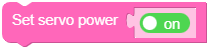
- set_servo_power(enable=True)
Enable or disable servo rail power via the IO expander.
- Parameters:
enable (bool) – Power on or off.
UiFlow2 Code Block:
MicroPython Code Block:
sc.set_servo_power(True)
- set_servo_torque(servo_id, enable=True)
Enable or disable torque on one servo.
UiFlow2 Code Block:

MicroPython Code Block:
sc.set_servo_torque(SERVO_ID_X, True)
- set_servo_angle(servo_id, angle_deg, time_ms=10, speed=0)
Move the given servo to
angle_deg(degrees). Use about -135°~135° for the X axis (SERVO_ID_X/ pan) and 0°~90° for the Y axis (SERVO_ID_Y/ tilt).- Parameters:
servo_id (int) –
SERVO_ID_XorSERVO_ID_Y.angle_deg (float) – Target angle in degrees (-135~135 for X, 0~90 for Y).
time_ms (int) – Move time (ms) passed to the controller;
0means the time parameter does not take effect.speed (int) – User speed 0~100 (mapped to the bus);
0means the speed parameter does not take effect.
UiFlow2 Code Block:


MicroPython Code Block:
sc.set_servo_angle(SERVO_ID_X, 0.0, 500, 0)
sc.set_servo_angle(SERVO_ID_X, 0.0, 0, 50)
- get_servo_angle(servo_id)
Read the servo angle in degrees.
- Parameters:
servo_id (int) –
SERVO_ID_XorSERVO_ID_Y.- Returns:
Angle in degrees, or
Noneif the read failed.
UiFlow2 Code Block:

MicroPython Code Block:
deg = sc.get_servo_angle(SERVO_ID_X)
- set_servo_x_pwm(value)
Run the X servo in PWM mode for continuous rotation. User range is -100~100; the sign selects rotation direction, and the magnitude sets drive strength.
- Parameters:
value (int) – Signed PWM strength (clamped). Positive and negative values rotate in opposite directions;
0stops output.
UiFlow2 Code Block:

MicroPython Code Block:
sc.set_servo_x_pwm(50)
- set_rgb_color(*args)
Set RGB LEDs on the strip.
One argument: fill all LEDs with
color.Two arguments:
strip(0or1) andcolorfor that logical strip.Three arguments:
strip,index,colorfor a single LED (strip1index order matches the driver).
- Returns:
Trueon success where applicable.
UiFlow2 Code Block:



MicroPython Code Block:
sc.set_rgb_color(0x00FF00)
sc.set_rgb_color(0, 0x0000FF)
sc.set_rgb_color(0, 0, 0xFF0000)
- get_rgb_color(strip, index)
Get RGB color of a single LED.
UiFlow2 Code Block:

MicroPython Code Block:
r, g, b = sc.get_rgb_color(0, 0)
- get_touch(index=None)
Read touch state (three logical slots).
- Parameters:
index (int) – If
None, return a list of three levels; if0,1, or2, return that slot’s level.- Returns:
OUTPUT_NONE…OUTPUT_HIGHstyle values, orNoneon failure.
UiFlow2 Code Block:


MicroPython Code Block:
tp = sc.get_touch()
one = sc.get_touch(0)
- get_battery_voltage()
Bus voltage from the INA226 (volts).
- Returns:
floatorNoneif unavailable.
UiFlow2 Code Block:

MicroPython Code Block:
v = sc.get_battery_voltage()
- get_battery_current()
Current from the INA226 (A).
- Returns:
floatorNone.
UiFlow2 Code Block:

MicroPython Code Block:
a = sc.get_battery_current()
- get_battery_power()
Power from the INA226 (W), when both voltage and current are valid.
- Returns:
floatorNone.
UiFlow2 Code Block:

MicroPython Code Block:
p = sc.get_battery_power()