LoRa868 Cap
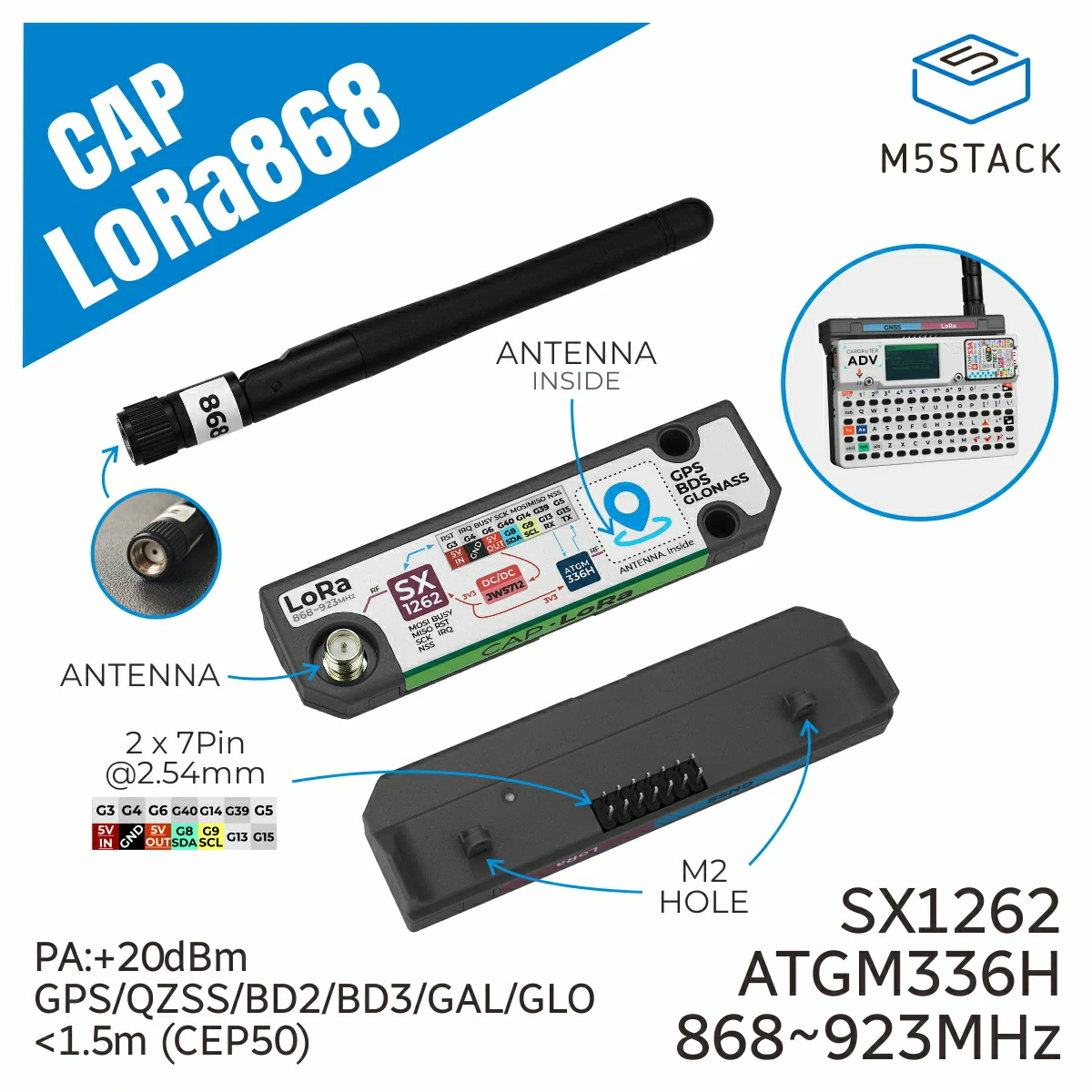
Cap LoRa868 是一款专为 Cardputer-Adv 设计的高性能 LoRa 通信和 GNSS 全球导航扩展模块。
支持以下产品:
UIFLOW2 应用示例
发送端
在 UiFlow2 中打开 cardputer_adv_lora868_cap_sender_example.m5f2 项目。
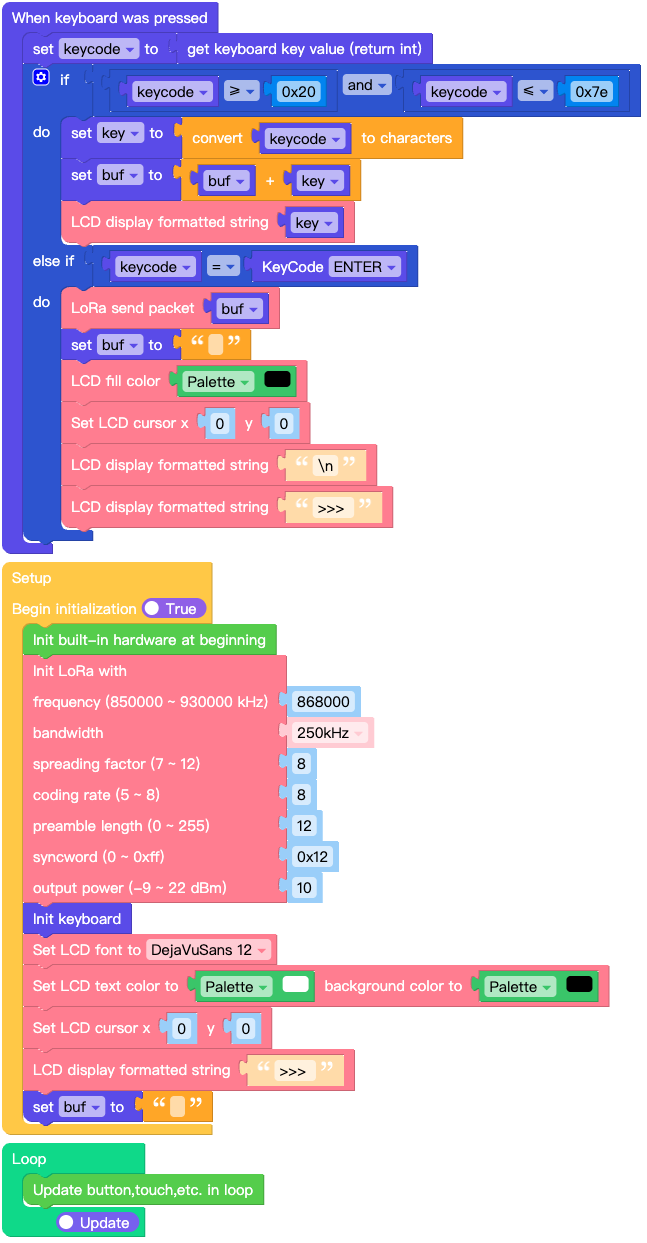
使用键盘输入要发送的文本,然后按 ENTER 键发送。
UiFlow2 代码块:
示例输出:
None
接收端
在 UiFlow2 中打开 cardputer_adv_lora868_cap_receiver_example.m5f2 项目。
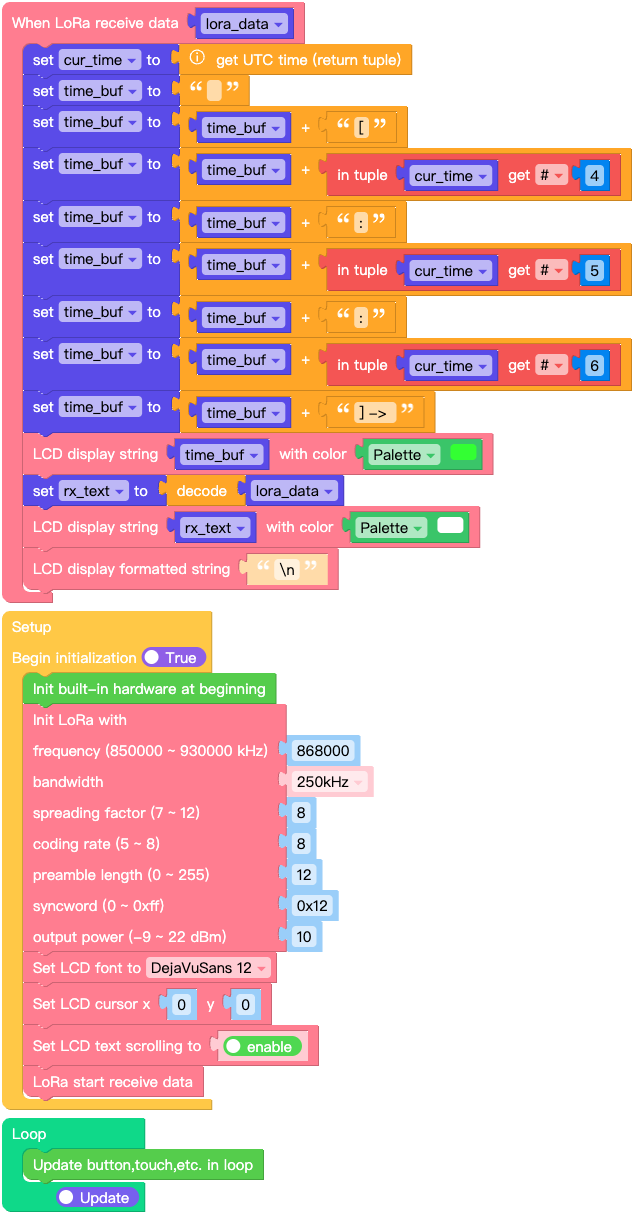
此示例接收并显示数据。
UiFlow2 代码块:
示例输出:
None
GPS 使用
在 UiFlow2 中打开 cardputer_adv_lora868_cap_gps_example.m5f2 项目。
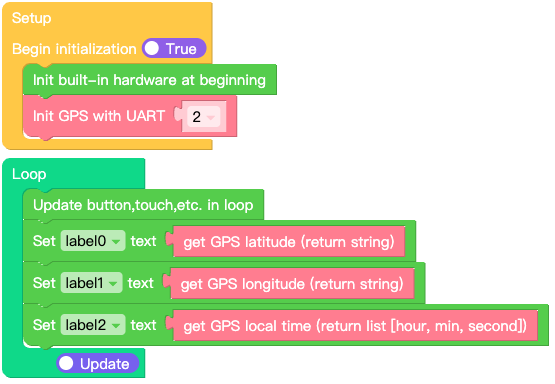
此示例演示如何使用 LoRa868 Cap 的 GPS 功能。
UiFlow2 代码块:
示例输出:
None
MicroPython 示例
发送端
使用键盘输入要发送的文本,然后按 ENTER 键发送。
MicroPython 代码块:
 1# SPDX-FileCopyrightText: 2025 M5Stack Technology CO LTD
 2#
 3# SPDX-License-Identifier: MIT
 4
 5import os, sys, io
 6import M5
 7from M5 import *
 8from hardware import MatrixKeyboard
 9from cap import LoRa868Cap
10from unit import KeyCode
11
12
13kb = None
14cap_lora868 = None
15
16
17keycode = None
18key = None
19buf = None
20
21
22def kb_pressed_event(kb_0):
23    global kb, cap_lora868, keycode, key, buf
24    keycode = kb.get_key()
25    if keycode >= 0x20 and keycode <= 0x7E:
26        key = chr(keycode)
27        buf = str(buf) + str(key)
28        M5.Lcd.printf(key)
29    elif keycode == (KeyCode.KEYCODE_ENTER):
30        cap_lora868.send(buf, None)
31        buf = ""
32        M5.Lcd.fillScreen(0x000000)
33        M5.Lcd.setCursor(0, 0)
34        M5.Lcd.printf("\n")
35        M5.Lcd.printf(">>> ")
36
37
38def setup():
39    global kb, cap_lora868, keycode, key, buf
40
41    M5.begin()
42    Widgets.fillScreen(0x000000)
43
44    cap_lora868 = LoRa868Cap(
45        freq_khz=868000,
46        bw="250",
47        sf=8,
48        coding_rate=8,
49        preamble_len=12,
50        syncword=0x12,
51        output_power=10,
52    )
53    kb = MatrixKeyboard()
54    kb.set_callback(kb_pressed_event)
55    M5.Lcd.setFont(Widgets.FONTS.DejaVu12)
56    M5.Lcd.setTextColor(0xFFFFFF, 0x000000)
57    M5.Lcd.setCursor(0, 0)
58    M5.Lcd.printf(">>> ")
59    buf = ""
60
61
62def loop():
63    global kb, cap_lora868, keycode, key, buf
64    M5.update()
65
66
67if __name__ == "__main__":
68    try:
69        setup()
70        while True:
71            loop()
72    except (Exception, KeyboardInterrupt) as e:
73        try:
74            from utility import print_error_msg
75
76            print_error_msg(e)
77        except ImportError:
78            print("please update to latest firmware")
示例输出:
None
接收端
此示例接收并显示数据。
MicroPython 代码块:
 1# SPDX-FileCopyrightText: 2025 M5Stack Technology CO LTD
 2#
 3# SPDX-License-Identifier: MIT
 4
 5import os, sys, io
 6import M5
 7from M5 import *
 8import time
 9from cap import LoRa868Cap
10
11
12cap_lora868 = None
13
14
15lora_data = None
16cur_time = None
17time_buf = None
18rx_text = None
19
20
21def cap_lora868_receive_event(received_data):
22    global cap_lora868, lora_data, cur_time, time_buf, rx_text
23    lora_data = received_data
24    cur_time = time.gmtime()
25    time_buf = ""
26    time_buf = str(time_buf) + str("[")
27    time_buf = str(time_buf) + str((cur_time[3]))
28    time_buf = str(time_buf) + str(":")
29    time_buf = str(time_buf) + str((cur_time[4]))
30    time_buf = str(time_buf) + str(":")
31    time_buf = str(time_buf) + str((cur_time[5]))
32    time_buf = str(time_buf) + str("] -> ")
33    M5.Lcd.print(time_buf, 0x33FF33)
34    rx_text = lora_data.decode()
35    M5.Lcd.print(rx_text, 0xFFFFFF)
36    M5.Lcd.printf("\n")
37
38
39def setup():
40    global cap_lora868, lora_data, cur_time, time_buf, rx_text
41
42    M5.begin()
43    Widgets.fillScreen(0x000000)
44
45    cap_lora868 = LoRa868Cap(
46        freq_khz=868000,
47        bw="250",
48        sf=8,
49        coding_rate=8,
50        preamble_len=12,
51        syncword=0x12,
52        output_power=10,
53    )
54    cap_lora868.set_irq_callback(cap_lora868_receive_event)
55    M5.Lcd.setFont(Widgets.FONTS.DejaVu12)
56    M5.Lcd.setCursor(0, 0)
57    M5.Lcd.setTextScroll(True)
58    cap_lora868.start_recv()
59
60
61def loop():
62    global cap_lora868, lora_data, cur_time, time_buf, rx_text
63    M5.update()
64
65
66if __name__ == "__main__":
67    try:
68        setup()
69        while True:
70            loop()
71    except (Exception, KeyboardInterrupt) as e:
72        try:
73            from utility import print_error_msg
74
75            print_error_msg(e)
76        except ImportError:
77            print("please update to latest firmware")
示例输出:
None
GPS 使用
此示例演示如何使用 LoRa868 Cap 的 GPS 功能。
MicroPython 代码块:
 1# SPDX-FileCopyrightText: 2025 M5Stack Technology CO LTD
 2#
 3# SPDX-License-Identifier: MIT
 4
 5import os, sys, io
 6import M5
 7from M5 import *
 8from cap import GPSCap
 9
10
11label0 = None
12label1 = None
13label2 = None
14cap_lora868 = None
15
16
17def setup():
18    global label0, label1, label2, cap_lora868
19
20    M5.begin()
21    Widgets.fillScreen(0x000000)
22    label0 = Widgets.Label("label0", 11, 16, 1.0, 0xFFFFFF, 0x222222, Widgets.FONTS.DejaVu18)
23    label1 = Widgets.Label("label1", 11, 46, 1.0, 0xFFFFFF, 0x222222, Widgets.FONTS.DejaVu18)
24    label2 = Widgets.Label("label2", 10, 77, 1.0, 0xFFFFFF, 0x222222, Widgets.FONTS.DejaVu18)
25
26    cap_lora868 = GPSCap(id=2)
27
28
29def loop():
30    global label0, label1, label2, cap_lora868
31    M5.update()
32    label0.setText(str(cap_lora868.get_latitude()))
33    label1.setText(str(cap_lora868.get_longitude()))
34    label2.setText(str(cap_lora868.get_gps_time()))
35
36
37if __name__ == "__main__":
38    try:
39        setup()
40        while True:
41            loop()
42    except (Exception, KeyboardInterrupt) as e:
43        try:
44            from utility import print_error_msg
45
46            print_error_msg(e)
47        except ImportError:
48            print("please update to latest firmware")
示例输出:
None
API参考
class LoRa868Cap
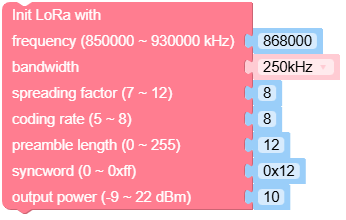
- class cap.lora868.LoRa868Cap(freq_khz=868000, bw='250', sf=8, coding_rate=8, preamble_len=12, syncword=18, output_power=10)
基类:
object创建一个 LoRa868Cap 对象。
- 参数:
pin_rst (int) – (RST) 复位引脚号。
pin_cs (int) – (NSS) 片选引脚号。
pin_irq (int) – (IRQ) 中断引脚号。
pin_busy (int) – (BUSY) 忙碌引脚号。
freq_khz (int) – LoRa 射频频率,单位为 KHz,范围为 850000 KHz 至 930000 KHz。
bw (str) – 带宽,选项包括: -
"7.8": 7.8 KHz -"10.4": 10.4 KHz -"15.6": 15.6 KHz -"20.8": 20.8 KHz -"31.25": 31.25 KHz -"41.7": 41.7 KHz -"62.5": 62.5 KHz -"125": 125 KHz -"250": 250 KHz -"500": 500 KHzsf (int) – 扩频因子,范围从 7 到 12。较高的扩频因子可以接收到更弱的信号,但数据速率较慢。
coding_rate (int) – 前向纠错 (FEC) 编码率,表示为 4/N,范围从 5 到 8。
preamble_len (int) – 前导码序列的长度,以符号为单位,范围从 0 到 255。
syncword (int) – 用于标记数据帧开始的同步字,默认为 0x12。
output_power (int) – 输出功率,单位为 dBm,范围从 -9 到 22。
UiFlow2 代码块:
MicroPython 代码块:
from cap import LoRa868Cap

cap_lora868_0 = LoRa868Cap(5, 1, 10, 2, 868000, '250', 8, 8, 12, 0x12, 10)
- set_freq(freq_khz=868000)
设置频率,单位为 kHz。
- 参数:
freq_khz (int) – 频率,单位为 kHz (850000 ~ 930000),默认为 868000。
- 返回类型:
None
UiFlow2 代码块:

MicroPython 代码块:
module_lora868v12_0.set_freq(868000)
- set_sf(sf)
设置扩频因子 (SF)。
- 参数:
sf (int) – 扩频因子 (7 ~ 12)
- 返回类型:
None
UiFlow2 代码块:

MicroPython 代码块:
module_lora868v12_0.set_sf(7)
- set_bw(bw)
设置带宽。
- 参数:
bw (str) – 带宽,单位 kHz,字符串格式。必须是 ‘7.8’、’10.4’、’15.6’、’20.8’、’31.25’、’41.7’、’62.5’、’125’、’250’、’500’ 中的一个。
- 返回类型:
None
UiFlow2 代码块:

MicroPython 代码块:
module_lora868v12_0.set_bw(bw)
- set_coding_rate(coding_rate)
设置编码率。
- 参数:
coding_rate (int) – 编码率 (5 ~ 8)
- 返回类型:
None
UiFlow2 代码块:

MicroPython 代码块:
module_lora868v12_0.set_coding_rate(coding_rate)
- set_syncword(syncword)
设置同步字。
- 参数:
syncword (int) – 同步字 (0 ~ 0xFF)
- 返回类型:
None
UiFlow2 代码块:

MicroPython 代码块:
module_lora868v12_0.set_syncword(syncword)
- set_preamble_len(preamble_len)
设置前导码长度。
- 参数:
preamble_len (int) – 前导码长度,范围:0~255。
- 返回类型:
None
UiFlow2 代码块:

MicroPython 代码块:
module_lora868v12_0.set_preamble_len(preamble_len)
- set_output_power(output_power)
设置输出功率,单位 dBm。
- 参数:
output_power (int) – 输出功率,单位 dBm (-9 ~ 22)
- 返回类型:
None
UiFlow2 代码块:

MicroPython 代码块:
module_lora868v12_0.set_output_power(output_power)
- send(packet, tx_at_ms=None)
发送数据
- 参数:
- 返回:
时间戳
- 返回类型:
发送一个数据包,并在数据包发送后返回时间戳。
UiFlow2 代码块:

MicroPython 代码块:
module_lora868v12_0.send()
- recv(timeout_ms=None, rx_length=255, rx_packet=None)
接收数据
- 参数:
- 返回:
接收到的数据包实例
- 返回类型:
尝试接收一个 LoRa 数据包。如果超时则返回 None,否则返回接收到的数据包实例。
UiFlow2 代码块:

MicroPython 代码块:
data = module_lora868v12_0.recv()
- start_recv()
开始接收数据
该方法启动开始接收数据的过程。
UiFlow2 代码块:

MicroPython 代码块:
module_lora868v12_0.start_recv()
- 返回类型:
None
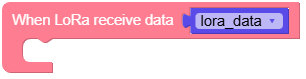
- set_irq_callback(callback)
设置在 IRQ 上执行的中断回调函数。
- 参数:
callback – 中断触发时要调用的回调函数。该回调函数不应接受任何参数,也不应返回任何内容。
- 返回类型:
None
UiFlow2 代码块:
MicroPython 代码块:
module_lora868v12_0.set_irq_callback()
- standby()
将模块设置为待机模式。
将 LoRa 模块置于待机模式,功耗更低。
UiFlow2 代码块:

MicroPython 代码块:
module_lora868v12_0.standby()
- 返回类型:
None
- sleep()
将模块设置为睡眠模式。
通过将模块置于深度睡眠模式来降低功耗。
UiFlow2 代码块:

MicroPython 代码块:
module_lora868v12_0.sleep()
- 返回类型:
None