class Recorder

录音器可以从麦克风录制音频,并将音频编码为 wav 或 amr 格式。

class audio.Recorder

构造函数
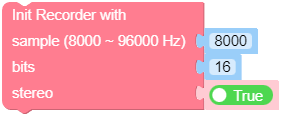
class audio.Recorder(sample=8000, bits=16, stereo=False)

创建一个 Recorder 对象。

参数:
  • sample (int) – 音频数据的采样率。范围为 8000-96000。

  • bits (int) – 音频数据的位数。

  • stereo (bool) – 音频数据是否为立体声。

UiFlow2:

init.png

Methods

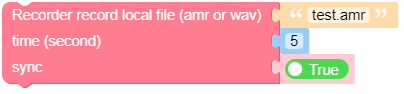
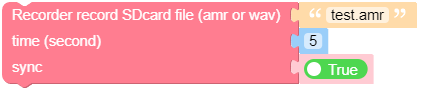
Recorder.record(uri: str, time: int, sync=True)

从麦克风录制音频到文件。

参数:

UiFlow2:

record_local_file.png

record_sdcard_file.png

Recorder.create_pcm_buf(time) bytearray

创建一个缓冲区来存储音频数据。音频数据为 PCM 格式。

数据缓冲区的长度为:\(sample * bits * time / 8\)

参数:

time (int) – 录音的持续时间,单位为秒。

返回:

用于存储音频数据的缓冲区。

UiFlow2:

create_pcm_buf.png

Recorder.record_into(buf, sample=8000, bits=16, stereo=False, sync=True)

播放原始音频数据。

参数:
  • buf (bytes) – 从麦克风读取数据到 buf 中。

  • sample (int) – 音频数据的采样率。范围为 8000-96000。

  • bits (int) – 音频数据的位数。

  • stereo (bool) – 音频数据是否为立体声。

  • sync (bool) – 是否同步录制。

UiFlow2:

record_into.png

Recorder.pause()

暂停录制器。

UiFlow2:

pause.png

Recorder.resume()

恢复录音器。

UiFlow2:

resume.png

Recorder.stop()

停止录制器。

UiFlow2:

stop.png

Recorder.rms() float

获取音频数据的均方根值。

返回:

音频数据的均方根值。单位为 dB。

UiFlow2:

rms.png

Recorder.volume() int

获取音频数据的音量。

返回:

音频数据的音量。范围为 0-100。

UiFlow2:

volume.png

Recorder.is_recording() bool

检查 Recorder 是否正在录制。

返回:

如果 Recorder 正在录制,则返回 True,否则返回 False。

UiFlow2:

is_recording.png

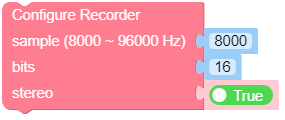
Recorder.config(sample=8000, bits=16, stereo=False) bool

配置 Recorder。

参数:
  • sample (int) – 音频数据的采样率。范围为 8000-96000。

  • bits (int) – 音频数据的位数。

  • stereo (bool) – 音频数据是否为立体声。

UiFlow2:

config.png