WLAN STA – control built-in WiFi interfaces
This class provides a driver for WiFi STA network processors.
Micropython Example:
 1# SPDX-FileCopyrightText: 2024 M5Stack Technology CO LTD
 2#
 3# SPDX-License-Identifier: MIT
 4
 5import os, sys, io
 6import M5
 7from M5 import *
 8from image_plus import ImagePlus
 9
10
11title0 = None
12image_plus0 = None
13
14
15def setup():
16    global title0, image_plus0
17
18    M5.begin()
19    Widgets.fillScreen(0x222222)
20    title0 = Widgets.Title("Image+ CoreS3 Example", 3, 0xFFFFFF, 0x0000FF, Widgets.FONTS.DejaVu18)
21    image_plus0 = ImagePlus(
22        "https://static-cdn.m5stack.com/resource/public/assets/aboutus/m5logo2022.png",
23        43,
24        51,
25        True,
26        3000,
27        default_img="res/img/default.png",
28    )
29
30    image_plus0.setVisible(True)
31    image_plus0.set_update_period(5000)
32    image_plus0.set_update_enable(True)
33
34
35def loop():
36    global title0, image_plus0
37    M5.update()
38
39
40if __name__ == "__main__":
41    try:
42        setup()
43        while True:
44            loop()
45    except (Exception, KeyboardInterrupt) as e:
46        try:
47            from utility import print_error_msg
48
49            print_error_msg(e)
50        except ImportError:
51            print("please update to latest firmware")
UIFLOW2 Example:
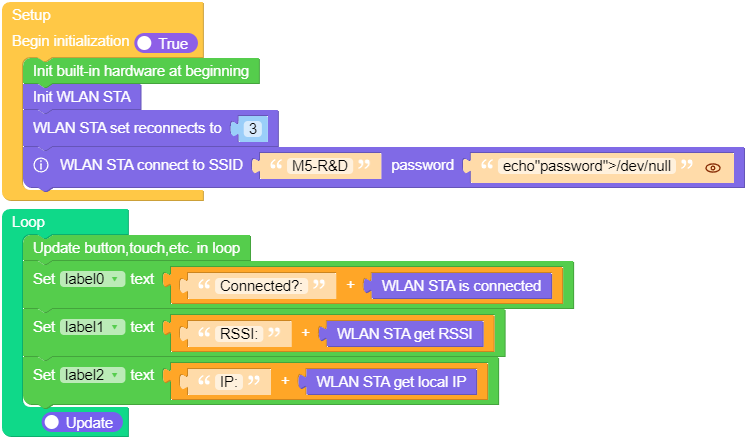
Constructors
- class network.WLAN(interface_id)
Create a WLAN network interface object. Supported interfaces are
network.STA_IF (station aka client, connects to upstream WiFi access points)
UIFLOW2:

Methods
- WLAN.status([param])
Return the current status of the wireless connection.
When called with no argument the return value describes the network link status. The possible statuses are defined as constants:
STAT_IDLE– no connection and no activity,STAT_CONNECTING– connecting in progress,STAT_WRONG_PASSWORD– failed due to incorrect password,STAT_NO_AP_FOUND– failed because no access point replied,STAT_CONNECT_FAIL– failed due to other problems,STAT_GOT_IP– connection successful.
When called with one argument param should be a string naming the status parameter to retrieve.
Supported parameters in WiFI STA mode are:
'rssi'.UIFLOW2:

- WLAN.isconnected()
In case of STA mode, returns
Trueif connected to a WiFi access point and has a valid IP address.UIFLOW2:

- WLAN.active([is_active])
Activate (“up”) or deactivate (“down”) network interface, if boolean argument is passed. Otherwise, query current state if no argument is provided. Most other methods require active interface.

- WLAN.connect(ssid=None, key=None, *, bssid=None)
Connect to the specified wireless network, using the specified key. If bssid is given then the connection will be restricted to the access-point with that MAC address (the ssid must also be specified in this case).

- WLAN.disconnect()
Disconnect from the currently connected wireless network.

- WLAN.ifconfig([(ip, subnet, gateway, dns)])
Get/set IP-level network interface parameters: IP address, subnet mask, gateway and DNS server. When called with no arguments, this method returns a 4-tuple with the above information. To set the above values, pass a 4-tuple with the required information. å




- WLAN.config('param')
- WLAN.config(param=value, ...)
Get or set general network interface parameters. These methods allow to work with additional parameters beyond standard IP configuration (as dealt with by AbstractNIC.ipconfig()). These include network-specific and hardware-specific parameters. For setting parameters, keyword argument syntax should be used, multiple parameters can be set at once. For querying, parameters name should be quoted as a string, and only one parameter can be queried at a time:
Following are commonly supported parameters (availability of a specific parameter depends on network technology type, driver, and MicroPython port).
Parameter
Description
mac
MAC address (bytes)
ssid
WiFi access point name (string)
channel
WiFi channel (integer)
hidden
Whether SSID is hidden (boolean)
security
Security protocol supported (enumeration, see module constants)
key
Access key (string)
hostname
The hostname that will be sent to DHCP (STA interfaces) and mDNS (if supported, both STA and AP). (Deprecated, use
network.hostname()instead)reconnects
Number of reconnect attempts to make (integer, 0=none, -1=unlimited)
txpower
Maximum transmit power in dBm (integer or float)
pm
WiFi Power Management setting (see below for allowed values)







- WLAN.scan()
Scan for the available wireless networks. Hidden networks – where the SSID is not broadcast – will also be scanned if the WLAN interface allows it.
Scanning is only possible on STA interface. Returns list of tuples with the information about WiFi access points:
(ssid, bssid, channel, RSSI, security, hidden)
bssid is hardware address of an access point, in binary form, returned as bytes object. You can use binascii.hexlify() to convert it to ASCII form.
There are five values for security:
0 – open
1 – WEP
2 – WPA-PSK
3 – WPA2-PSK
4 – WPA/WPA2-PSK
and two for hidden:
0 – visible
1 – hidden

