M5-ESPNOW
M5-ESPNOW is a connection-less wireless communication protocol supporting:
Direct communication between up to 20 registered peers:
Without the need for a wireless access point (AP),
Encrypted and unencrypted communication (up to 6 encrypted peers),
Message sizes up to 250 bytes,
Can operate alongside Wifi operation (network.WLAN) on ESP32 Series.
It provides simpler and more user-friendly APIs.
ESPNOW example:
import os, sys, io
import M5
from M5 import *
from m5espnow import *
import time
import random

def espnow_recv_callback(espnow_obj):
    espnow_mac, espnow_data = espnow_obj.recv_data()
    print(espnow_mac)
    print(espnow_data)

espnow_0 = M5ESPNow(0)
espnow_0.set_irq_callback(espnow_recv_callback)
espnow_0.set_add_peer('xxxxxxxxxxxx', 1, 0, False)

while True::
    espnow_0.send_data(1, random.randint(1000000, 9999999))
    time.sleep(2)
UIFLOW2 Example:
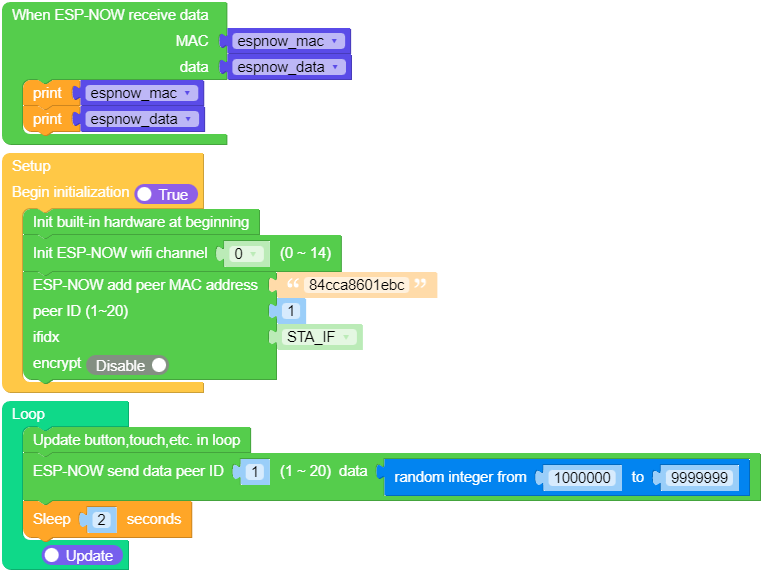
class M5ESPNow
Constructors
- class M5ESPNow(wifi_ch)
Create a M5ESPNow object
- Arguments:
wifi_ch: The wifi channel (2.4GHz) to communicate with this peer. Must be an integer from 0 to 14. If channel is set to 0 the current channel of the wifi device will be used. (default=0)
UIFLOW2:

- M5ESPNow.deinit()
De-initialise the ESP-NOW software stack, disable callbacks, deallocate the recv data buffer and deregister all peers.
UIFLOW2:

- M5ESPNow.get_mac(mode)
Get the device network MAC address.
- Arguments:
mode: 0: M5ESPNow.STA 1: M5ESPNow.AP
Return:
bytes
UIFLOW2:

- M5ESPNow.get_peer_list(encrypt)
Return the parameters for all the registered peers (as a list).
- Arguments:
encrypt: 0: normal peer MAC address 1: encrypt peer MAC address
Return:
list
UIFLOW2:

- M5ESPNow.get_remote_mac(select, ssid)
To find remote mac by remote ssid.
- Arguments:
select: 0: channel 1: MAC.ssid: WiFi access point name in string.
UIFLOW2:

- M5ESPNow.set_ap_ssid(ssid)
Set the SSID configure in AP mode.
- Arguments:
ssid: WiFi access point name in string.
UIFLOW2:

Methods
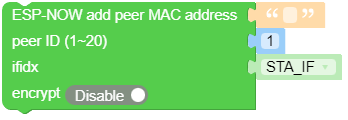
- M5ESPNow.set_add_peer(peer_mac, peer_id, ifidx, encrypt, lmk)
Add/register the provided mac address as a peer.
- Arguments:
peer_mac: The MAC address of the peer (as a Hex-string).peer_id: The MAC address is stored in the ID list. ID is must be an integer from 1 to 20ifidx: Index of the wifi interface which will be used to send data to this peer.Must be an integer set tonetwork.STA_IF(=0) ornetwork.AP_IF(=1). (default=0/network.STA_IF).encrypt: If set toTruedata exchanged with this peer will be encrypted with the PMK and LMK. (default =Falseiflmkis set to a valid key, elseFalse)lmk: The Local Master Key (LMK) key used to encrypt data transfers with this peer (unless theencryptparameter is set toFalse). Must be:a byte-string or bytearray or string of length 16 bytes.
UIFLOW2:
- M5ESPNow.set_delete_peer(peer_id)
Deregister the peer associated with the provided
peer_macaddress.- Arguments:
peer_id: The MAC address is stored in the ID list. ID is must be an integer from 1 to 20
UIFLOW2:

- M5ESPNow.set_pmk_encrypt(pmk)
Set the Primary Master Key (PMK) which is used to encrypt the Local Master Keys (LMK) for encrypting messages. If this is not set, a default PMK is used by the underlying Espressif ESP-NOW software stack.
- Arguments:
pmk: Must be a byte string, bytearray or string of length(16 bytes)
UIFLOW2:

- M5ESPNow.send_data(peer_id, msg)
Send the data in
msgto the stored peer IDpeer_idwith the given network.- Arguments:
peer_id: The MAC address is stored in the ID list. ID is must be an integer from 1 to 20msg: int, float, list, string and byte-string up to 250 bytes
UIFLOW2:



- M5ESPNow.broadcast_data(msg)
All devices will also receive messages sent to the
broadcastMAC address (b'\xff\xff\xff\xff\xff\xff')- Arguments:
msg: int, float, list, string and byte-string up to 250 bytes
UIFLOW2:



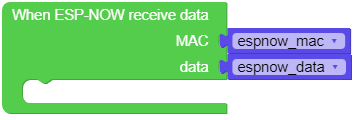
- M5ESPNow.set_irq_callback(callback)
Set a callback function to be called as soon as possible after a message has been received from another ESPNow device. The callback function will be called with the ESPNow instance object as an argument. For more reliable operation, it is recommended to read out as many messages as are available when the callback is invoked.
def espnow_recv_callback(espnow_obj):
    espnow_mac, espnow_data = espnow_obj.recv_data()
    print(espnow_mac, espnow_data)

M5ESPNow.set_irq_callback(espnow_recv_callback)
- recv_data()
Wait for an incoming message and return values:
[mac, msg].
UIFLOW2:
- M5ESPNow._bytes_to_hex_str(bytes)
To get a hex string from a bytes string
- Arguments:
bytes: bytearray
Return:
string: Hex-string
UIFLOW2:

- M5ESPNow._hex_str_to_bytes(hexstr)
To get a bytes string from a hex string
- Arguments:
hexstr: Hex-string
Return:
bytes: bytearray
UIFLOW2:

- M5ESPNow._bytes_to(bytes, format)
To get a int or float or list valuefrom a bytes string.
- Arguments:
bytes: bytearray.format: 0: int, 1: float.
Return:
int or float
UIFLOW2:

- M5ESPNow._to_bytes(variable)
To get a bytes string from a int or float or list value
- Arguments:
variable: int or float or list
Return:
bytes: bytearray
UIFLOW2:
