M5Msgbox
M5Msgbox provides a container for labels and buttons.
Use the label and button returned by add_text() and add_button()
to update their contents:
import M5
import m5ui
import lvgl as lv

M5.begin()
m5ui.init()
page0 = m5ui.M5Page()
msgbox_0 = m5ui.M5Msgbox(title="Message", w=240, h=180, parent=page0)
label_0 = msgbox_0.add_text("Ready")
label_0.set_text("Complete")
label_0.set_long_mode(lv.label.LONG_MODE.WRAP)
button_0 = msgbox_0.add_button(text="OK")
button_0.set_btn_text("Close")
page0.screen_load()
UiFlow2 Example
msgbox event
Open the msgbox_core2_example.m5f2 project in UiFlow2.
This example creates msgbox and associated with events.
UiFlow2 Code Block:
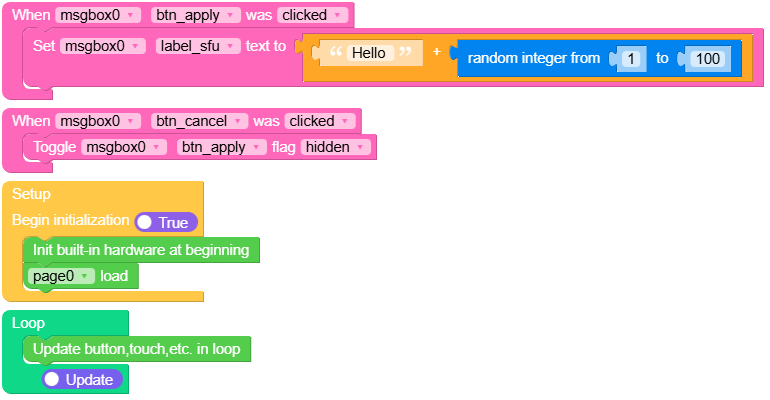
Example output:
None
MicroPython Example
msgbox event
This example creates msgbox and associated with events.
MicroPython Code Block:
 1# SPDX-FileCopyrightText: 2025 M5Stack Technology CO LTD
 2#
 3# SPDX-License-Identifier: MIT
 4
 5import os, sys, io
 6import M5
 7from M5 import *
 8import m5ui
 9import lvgl as lv
10
11
12page0 = None
13msgbox0 = None
14label_sfu = None
15btn_apply = None
16btn_cancel = None
17
18
19import random
20
21
22def btn_apply_clicked_event(event_struct):
23    global page0, msgbox0, label_sfu, btn_apply, btn_cancel
24
25    label_sfu.set_text(str((str("Hello ") + str((random.randint(1, 100))))))
26
27
28def btn_cancel_clicked_event(event_struct):
29    global page0, msgbox0, label_sfu, btn_apply, btn_cancel
30
31    btn_apply.toggle_flag(lv.obj.FLAG.HIDDEN)
32
33
34def btn_apply_event_handler(event_struct):
35    global page0, msgbox0, label_sfu, btn_apply, btn_cancel
36    event = event_struct.code
37    if event == lv.EVENT.CLICKED and True:
38        btn_apply_clicked_event(event_struct)
39    return
40
41
42def btn_cancel_event_handler(event_struct):
43    global page0, msgbox0, label_sfu, btn_apply, btn_cancel
44    event = event_struct.code
45    if event == lv.EVENT.CLICKED and True:
46        btn_cancel_clicked_event(event_struct)
47    return
48
49
50def setup():
51    global page0, msgbox0, label_sfu, btn_apply, btn_cancel
52
53    M5.begin()
54    Widgets.setRotation(0)
55    m5ui.init()
56    page0 = m5ui.M5Page(bg_c=0xFFFFFF)
57    msgbox0 = m5ui.M5Msgbox(title="Message Box", x=0, y=0, w=320, h=240, parent=page0)
58    label_sfu = msgbox0.add_text("This is label_sfu")
59    btn_apply = msgbox0.add_button(text="Apply", option="footer")
60    btn_cancel = msgbox0.add_button(text="Cancel", option="footer")
61    msgbox0.add_close_button()
62
63    btn_apply.add_event_cb(btn_apply_event_handler, lv.EVENT.ALL, None)
64    btn_cancel.add_event_cb(btn_cancel_event_handler, lv.EVENT.ALL, None)
65
66    page0.screen_load()
67
68
69def loop():
70    global page0, msgbox0, label_sfu, btn_apply, btn_cancel
71    M5.update()
72
73
74if __name__ == "__main__":
75    try:
76        setup()
77        while True:
78            loop()
79    except (Exception, KeyboardInterrupt) as e:
80        try:
81            m5ui.deinit()
82            from utility import print_error_msg
83
84            print_error_msg(e)
85        except ImportError:
86            print("please update to latest firmware")
Example output:
None
API
M5Msgbox
- class m5ui.msgbox.M5Msgbox(*args, **kwargs)
Bases:
msgboxCreate a msgbox object.
- Parameters:
title (str) – The title of the msgbox.
x (int) – The x-coordinate of the msgbox.
y (int) – The y-coordinate of the msgbox.
w (int) – The width of the msgbox.
h (int) – The height of the msgbox.
parent (lv.obj) – The parent object to attach the msgbox to. If not specified, the msgbox will be attached to the default screen.
MicroPython Code Block:
import m5ui
from m5ui import M5Msgbox
import lvgl as lv

m5ui.init()
page0 = m5ui.M5Page()
msgbox_0 = M5Msgbox(
    title="msgbox",
    x=0,
    y=0,
    w=320,
    h=240,
    parent=page0,
)
- add_close_button()
Add a close button to the msgbox header.
- Returns:
The close button.
- Return type:
lv.obj
UiFlow2 Code Block:

MicroPython Code Block:
msgbox_0.add_close_button()
- delete()
Delete the msgbox and its child widgets.
UiFlow2 Code Block:


MicroPython Code Block:
msgbox_0.delete()
- set_style_text_font(font, part)
Set the default text font for the msgbox.
- Parameters:
font (lv.lv_font_t) – The font to set.
part (int) – The part of the object to apply the style to (e.g., lv.PART.MAIN).
- Returns:
None
UiFlow2 Code Block:


MicroPython Code Block:
msgbox_0.set_style_text_font(lv.font_montserrat_14, lv.PART.MAIN | lv.STATE.DEFAULT)
- set_text_color(color, opa, part)
Set the default text color for the msgbox.
- Parameters:
- Returns:
None
UiFlow2 Code Block:


MicroPython Code Block:
msgbox_0.set_text_color(lv.color_hex(0x000000), 255, lv.PART.MAIN | lv.STATE.DEFAULT)
- set_bg_color(color, opa, part)
Set the background color of the msgbox.
- Parameters:
- Returns:
None
UiFlow2 Code Block:


MicroPython Code Block:
msgbox_0.set_bg_color(lv.color_hex(0x000000), 255, lv.PART.MAIN | lv.STATE.DEFAULT)
- set_flag(flag, value)
Set a flag on the object. If
valueis True, the flag is added; if False, the flag is removed.- Parameters:
UiFlow2 Code Block:



MicroPython Code Block:
msgbox_0.set_flag(lv.obj.FLAG.HIDDEN, True)
- set_pos(x, y)
Set the position of the msgbox.
UiFlow2 Code Block:

MicroPython Code Block:
msgbox_0.set_pos(100, 100)
- set_x(x)
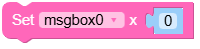
Set the x-coordinate of the msgbox.
- Parameters:
x (int) – The x-coordinate of the msgbox.
UiFlow2 Code Block:
MicroPython Code Block:
msgbox_0.set_x(100)
- set_y(y)
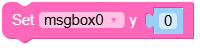
Set the y-coordinate of the msgbox.
- Parameters:
y (int) – The y-coordinate of the msgbox.
UiFlow2 Code Block:
MicroPython Code Block:
msgbox_0.set_y(100)
- set_size(width, height)
Set the size of the msgbox.
- Parameters:
- Returns:
None
UiFlow2 Code Block:

MicroPython Code Block:
msgbox_0.set_size(100, 50)
- align_to(obj, align, x, y)
Align the msgbox to another object.
- Parameters:
UiFlow2 Code Block:

MicroPython Code Block:
msgbox_0.align_to(page0, lv.ALIGN.CENTER, 0, 0)
- set_state(state, value)
Set the state of the msgbox. If
valueis True, the state is set; if False, the state is unset.- Parameters:
- Returns:
None
UiFlow2 Code Block:

MicroPython Code Block:
msgbox_0.set_state(lv.STATE.PRESSED, True)
- toggle_flag(flag)
Toggle a flag on the object. If the flag is set, it is removed; if not set, it is added.
- Parameters:
flag (int) – The flag to toggle.
- Returns:
None
UiFlow2 Code Block:

MicroPython Code Block:
msgbox_0.toggle_flag(lv.obj.FLAG.HIDDEN)
- set_style_radius(radius, part)
Set the corner radius of the msgbox.
- Parameters:
- Returns:
None
UiFlow2 Code Block:

MicroPython Code Block:
msgbox_0.set_style_radius(10, lv.PART.MAIN | lv.STATE.DEFAULT)
- toggle_state(state)
Toggle the state of the msgbox. If the state is set, it is unset; if not set, it is set.
- Parameters:
state (int) – The state to toggle.
- Returns:
None
UiFlow2 Code Block:

MicroPython Code Block:
msgbox_0.toggle_state(lv.STATE.PRESSED)
- add_event_cb(handler, event, user_data)
Add an event callback to the msgbox. The callback will be called when the specified event occurs.
- Parameters:
handler (function) – The callback function to call.
event (int) – The event to listen for.
user_data (Any) – Optional user data to pass to the callback.
- Returns:
None
UiFlow2 Code Block:

MicroPython Code Block:
def on_clicked(event):
    print("Clicked")

msgbox_0.add_event_cb(on_clicked, lv.EVENT.CLICKED, None)
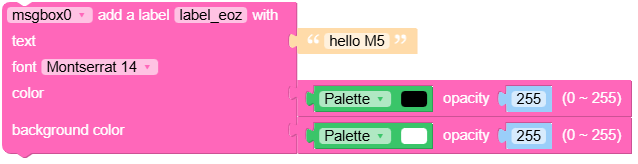
- add_text(text, text_c=2171169, text_opa=255, bg_c=16777215, bg_opa=255, font=lvgl.font_montserrat_14)
Add a text label to the msgbox.
- Parameters:
- Returns:
The created label object.
- Return type:
m5ui.M5Label
UiFlow2 Code Block:

MicroPython Code Block:
text0 = msgbox_0.add_text(
    text="Hello World",
    text_c=0x212121,
    text_opa=255,
    bg_c=0xFFFFFF,
    bg_opa=255,
    font=lv.font_montserrat_14,
)
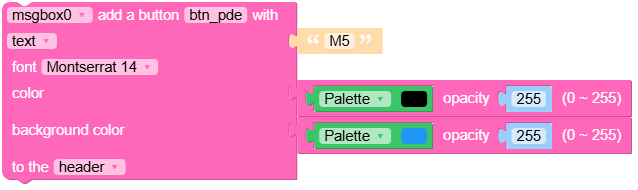
- add_button(icon=None, text='', bg_c=2201331, bg_opa=255, text_c=16777215, text_opa=255, font=lvgl.font_montserrat_14, option='footer')
Add a button to the msgbox.
- Parameters:
icon (str) – The icon to display on the button.
text (str) – The text to display on the button.
bg_c (int) – The background color in hexadecimal format.
bg_opa (int) – The background opacity (0-255).
text_c (int) – The text color in hexadecimal format.
text_opa (int) – The text opacity (0-255).
font (lv.font) – The font to use for the button text.
option (str) – The position of the button (“header” or “footer”).
- Returns:
The created button object.
- Return type:
m5ui.M5Button
UiFlow2 Code Block:

MicroPython Code Block:
button0 = msgbox_0.add_button(
    icon=None,
    text="OK",
    bg_c=0x2196F3,
    bg_opa=255,
    text_c=0xFFFFFF,
    text_opa=255,
    font=lv.font_montserrat_14,
    option="footer",
)