Chain Key
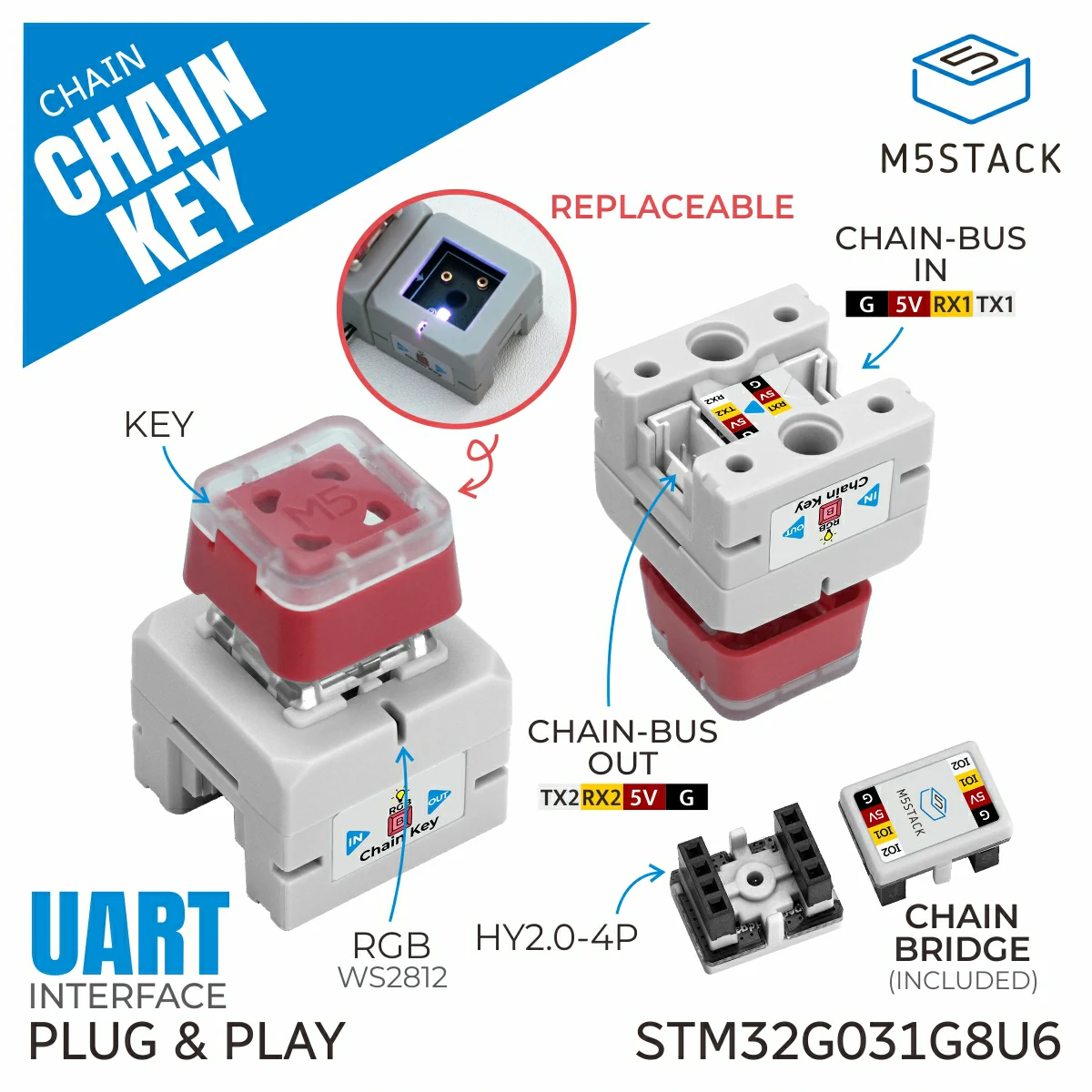
Chain Key is a key module that can be connected to the M5Chain series devices. This module provides functions to read the key states.
Support the following products:
UiFlow2 Example
USB Keyboard
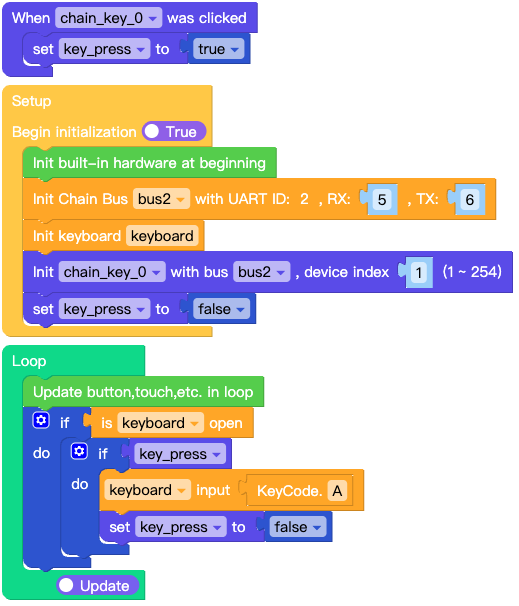
Open the chain_key_usb_keyboard_example.m5f2 project in UiFlow2.
This example demonstrates how to use the Chain Key as a USB keyboard.
UiFlow2 Code Block:
Example output:
None
MicroPython Example
USB Keyboard
This example demonstrates how to use the Chain Key as a USB keyboard.
MicroPython Code Block:
 1# SPDX-FileCopyrightText: 2025 M5Stack Technology CO LTD
 2#
 3# SPDX-License-Identifier: MIT
 4
 5import os, sys, io
 6import M5
 7from M5 import *
 8from chain import KeyChain
 9from chain import ChainBus
10from usb.device.keyboard import Keyboard
11from usb.device.hid import KeyCode
12
13
14bus2 = None
15keyboard = None
16chain_key_0 = None
17
18
19key_press = None
20
21
22def chain_key_0_click_event(args):
23    global bus2, keyboard, chain_key_0, key_press
24    key_press = True
25
26
27def setup():
28    global bus2, keyboard, chain_key_0, key_press
29
30    M5.begin()
31    bus2 = ChainBus(2, tx=6, rx=5)
32    keyboard = Keyboard()
33    chain_key_0 = KeyChain(bus2, 1)
34    chain_key_0.set_click_callback(chain_key_0_click_event)
35    key_press = False
36
37
38def loop():
39    global bus2, keyboard, chain_key_0, key_press
40    M5.update()
41    if keyboard.is_open():
42        if key_press:
43            keyboard.input(KeyCode.A)
44            key_press = False
45
46
47if __name__ == "__main__":
48    try:
49        setup()
50        while True:
51            loop()
52    except (Exception, KeyboardInterrupt) as e:
53        try:
54            from utility import print_error_msg
55
56            print_error_msg(e)
57        except ImportError:
58            print("please update to latest firmware")
Example output:
None
API
KeyChain
- class chain.key.KeyChain(bus, device_id)
Bases:
objectCreate a KeyChain object.
UiFlow2 Code Block:

MicroPython Code Block:
from chain import ChainBus
from chain import KeyChain

chainbus_0 = ChainBus(2, 32, 33, verbose=True)
keychain_0 = KeyChain(chainbus_0, 1)
- MODE_POLL = 0
Button Polling mode
- MODE_EVENT = 1
Button Event mode
- get_button_state()
get button state.
- Returns:
Button state, True if pressed, False otherwise.
- Return type:
UiFlow2 Code Block:

MicroPython Code Block:
keychain_0.get_button_state()
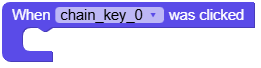
- set_click_callback(callback)
set button click callback.
- Parameters:
callback – Callback function.
- Return type:
None
Note
Chain related methods cannot be called in the callback function.
UiFlow2 Code Block:
MicroPython Code Block:
def keychain_0_click_callback(args):
    print("click")

keychain_0.set_click_callback(keychain_0_click_callback)
- set_double_click_callback(callback)
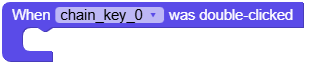
set button double click callback.
- Parameters:
callback – Callback function.
- Return type:
None
Note
Chain related methods cannot be called in the callback function.
UiFlow2 Code Block:
MicroPython Code Block:
def keychain_0_double_click_callback(args):
    print("double click")

keychain_0.set_double_click_callback(keychain_0_double_click_callback)
- set_long_press_callback(callback)
set button long press callback.
- Parameters:
callback – Callback function.
- Return type:
None
Note
Chain related methods cannot be called in the callback function.
UiFlow2 Code Block:
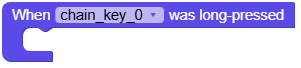
MicroPython Code Block:
def keychain_0_long_press_callback(args):
    print("long press")

keychain_0.set_long_press_callback(keychain_0_long_press_callback)
- set_button_double_click_trigger_interval(interval_ms)
set button double click trigger interval.
- Parameters:
interval_ms (int) – Interval time in milliseconds. range: 100-1000
- Returns:
True if success, False otherwise.
- Return type:
UiFlow2 Code Block:

MicroPython Code Block:
keychain_0.set_button_double_click_trigger_interval(100)
- set_button_long_press_trigger_interval(interval_ms)
set button long press trigger interval.
- Parameters:
interval_ms (int) – Interval time in milliseconds. range: 3000-30000
- Returns:
True if success, False otherwise.
- Return type:
UiFlow2 Code Block:

MicroPython Code Block:
keychain_0.set_button_long_press_trigger_interval(3000)
- get_button_double_click_trigger_interval()
get button double click trigger interval.
- Returns:
Interval time in milliseconds.
- Return type:
UiFlow2 Code Block:

MicroPython Code Block:
interval = keychain_0.get_button_double_click_trigger_interval()
- get_button_long_press_trigger_interval()
get button long press trigger interval.
- Returns:
Interval time in milliseconds.
- Return type:
UiFlow2 Code Block:

MicroPython Code Block:
interval = keychain_0.get_button_long_press_trigger_interval()
- set_button_mode(mode)
set button mode.
- Parameters:
mode (int) – Button mode. Use
KeyChain.MODE_POLLorKeyChain.MODE_EVENT.- Returns:
True if success, False otherwise.
- Return type:
UiFlow2 Code Block:

MicroPython Code Block:
keychain_0.set_button_mode(KeyChain.MODE_EVENT)
- get_button_mode()
get button mode.
- Returns:
Button mode.
KeyChain.MODE_POLLorKeyChain.MODE_EVENT.- Return type:
UiFlow2 Code Block:

MicroPython Code Block:
mode = keychain_0.get_button_mode()
- set_rgb_color(color)
set RGB color.
- Parameters:
color (int) – RGB color value.
- Returns:
True if success, False otherwise.
- Return type:
UiFlow2 Code Block:

MicroPython Code Block:
keychain_0.set_rgb_color(0xFF0000)
- get_rgb_color()
get RGB color.
- Parameters:
index – Index of the RGB LED.
- Returns:
RGB color value.
- Return type:
UiFlow2 Code Block:

MicroPython Code Block:
color = keychain_0.get_rgb_color()
- set_rgb_brightness(brightness, save=False)
set RGB brightness.
- Parameters:
- Returns:
True if success, False otherwise.
- Return type:
UiFlow2 Code Block:

MicroPython Code Block:
keychain_0.set_rgb_brightness(80)
- get_rgb_brightness()
get RGB brightness.
- Returns:
Brightness value (0-100).
- Return type:
UiFlow2 Code Block:

MicroPython Code Block:
brightness = keychain_0.get_rgb_brightness()
- get_bootloader_version()
get bootloader version.
- Returns:
Bootloader version.
- Return type:
UiFlow2 Code Block:

MicroPython Code Block:
version = keychain_0.get_bootloader_version()
- get_firmware_version()
get firmware version.
- Returns:
Firmware version.
- Return type:
UiFlow2 Code Block:

MicroPython Code Block:
version = keychain_0.get_firmware_version()
- get_device_type()
get device type.
- Returns:
Device type. Returns -1 if failed.
- Return type:
UiFlow2 Code Block:

MicroPython Code Block:
device_type = keychain_0.get_device_type()
- get_device_uid(uid_type)
get device UID.
- Parameters:
uid_type (int) – UID type, 0 for 4-byte UID, 1 for 12-byte UID.
- Returns:
Tuple of UID bytes (4 bytes or 12 bytes). Returns empty tuple on error.
- Return type:
UiFlow2 Code Block:

MicroPython Code Block:
uid = keychain_0.get_device_uid(0)  # 4-byte UID
uid = keychain_0.get_device_uid(1)  # 12-byte UID