Chain Joystick
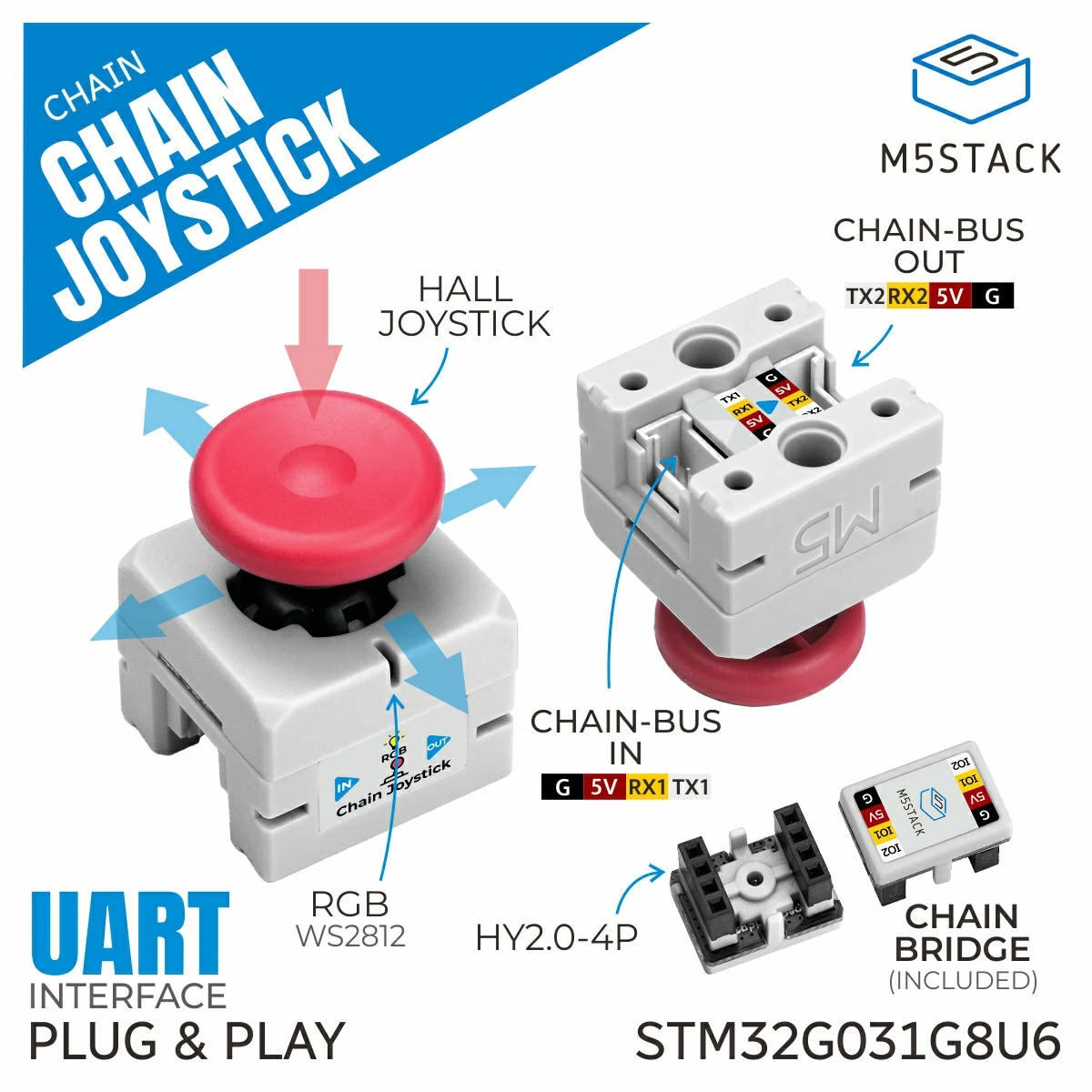
Chain Joystick is a joystick module that can be connected to the M5Chain series devices. This module provides functions to read the joystick position and button states.
Support the following products:
UiFlow2 Example
USB Mouse
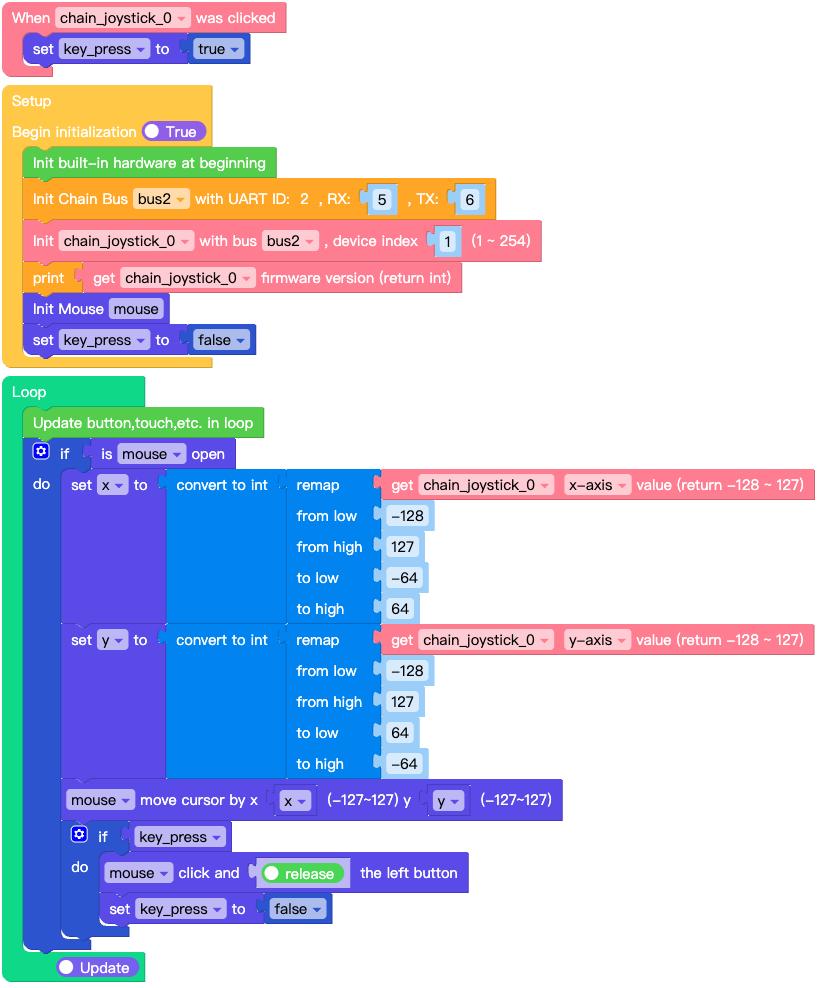
Open the chain_joystick_usb_mouse_example.m5f2 project in UiFlow2.
This example demonstrates how to use the Chain Joystick as a USB mouse.
UiFlow2 Code Block:
Example output:
None
MicroPython Example
USB Mouse
This example demonstrates how to use the Chain Joystick as a USB mouse.
MicroPython Code Block:
 1# SPDX-FileCopyrightText: 2025 M5Stack Technology CO LTD
 2#
 3# SPDX-License-Identifier: MIT
 4
 5import os, sys, io
 6import M5
 7from M5 import *
 8from chain import JoystickChain
 9from chain import ChainBus
10from usb.device.mouse import Mouse
11import m5utils
12
13
14bus2 = None
15mouse = None
16chain_joystick_0 = None
17
18
19key_press = None
20x = None
21y = None
22
23
24def chain_joystick_0_click_event(args):
25    global bus2, mouse, chain_joystick_0, key_press, x, y
26    key_press = True
27
28
29def setup():
30    global bus2, mouse, chain_joystick_0, key_press, x, y
31
32    M5.begin()
33    bus2 = ChainBus(2, tx=6, rx=5)
34    chain_joystick_0 = JoystickChain(bus2, 1)
35    chain_joystick_0.set_click_callback(chain_joystick_0_click_event)
36    print(chain_joystick_0.get_firmware_version())
37    mouse = Mouse()
38    key_press = False
39
40
41def loop():
42    global bus2, mouse, chain_joystick_0, key_press, x, y
43    M5.update()
44    if mouse.is_open():
45        x = int(m5utils.remap(chain_joystick_0.get_x(), -128, 127, -64, 64))
46        y = int(m5utils.remap(chain_joystick_0.get_y(), -128, 127, 64, -64))
47        mouse.move(x, y)
48        if key_press:
49            mouse.click_left(True)
50            key_press = False
51
52
53if __name__ == "__main__":
54    try:
55        setup()
56        while True:
57            loop()
58    except (Exception, KeyboardInterrupt) as e:
59        try:
60            from utility import print_error_msg
61
62            print_error_msg(e)
63        except ImportError:
64            print("please update to latest firmware")
Example output:
None
API
JoystickChain
- class chain.joystick.JoystickChain(bus, device_id)
Bases:
KeyChainJoystick Chain class for interacting with joystick devices over Chain bus.
- Parameters:
UiFlow2 Code Block:

MicroPython Code Block:
from chain import ChainBus
from chain import JoystickChain

chainbus_0 = ChainBus(2, 32, 33, verbose=True)
joystick_0 = JoystickChain(chainbus_0, 1)
For other button and some general methods, please refer to the
ChainKeyclass.- get_x()
Get the X position of the joystick.
- Returns:
X position (-128 to 127).
- Return type:
UiFlow2 Code Block:

MicroPython Code Block:
x = joystick_0.get_x()
- get_y()
Get the Y position of the joystick.
- Returns:
Y position (-128 to 127).
- Return type:
UiFlow2 Code Block:
MicroPython Code Block:
y = joystick_0.get_y()
- get_x_16bit()
Get the X position of the joystick in 16-bit resolution.
- Returns:
X position (-4095 to 4095).
- Return type:
UiFlow2 Code Block:

MicroPython Code Block:
x = joystick_0.get_x_16bit()
- get_y_16bit()
Get the Y position of the joystick in 16-bit resolution.
- Returns:
Y position (-4095 to 4095).
- Return type:
UiFlow2 Code Block:
MicroPython Code Block:
y = joystick_0.get_y_16bit()
- get_x_raw()
Get the raw X ADC value of the joystick.
- Returns:
Raw X ADC value (0-255).
- Return type:
UiFlow2 Code Block:

MicroPython Code Block:
x = joystick_0.get_x_raw()
- get_y_raw()
Get the raw Y ADC value of the joystick.
- Returns:
Raw Y ADC value (0-255).
- Return type:
UiFlow2 Code Block:
MicroPython Code Block:
y = joystick_0.get_y_raw()
- get_x_16bit_raw()
Get the raw X ADC value of the joystick in 16-bit resolution.
- Returns:
Raw X ADC value (0-65535).
- Return type:
UiFlow2 Code Block:

MicroPython Code Block:
x = joystick_0.get_x_16bit_raw()
- get_y_16bit_raw()
Get the raw Y ADC value of the joystick in 16-bit resolution.
- Returns:
Raw Y ADC value (0-65535).
- Return type:
UiFlow2 Code Block:
MicroPython Code Block:
y = joystick_0.get_y_16bit_raw()
- get_mapping_value()
Get the mapping values of the joystick.
- Returns:
A tuple containing the mapping values (x_negative_min, x_negative_max, x_positive_min, x_positive_max, y_negative_min, y_negative_max, y_positive_min, y_positive_max).
- Return type:
UiFlow2 Code Block:

MicroPython Code Block:
mapping = joystick_0.get_mapping_value()
- set_mapping_value(value, save=False)
Set the mapping values of the joystick.
- Parameters:
- Returns:
True if the mapping values were set successfully, False otherwise.
- Return type:
UiFlow2 Code Block:
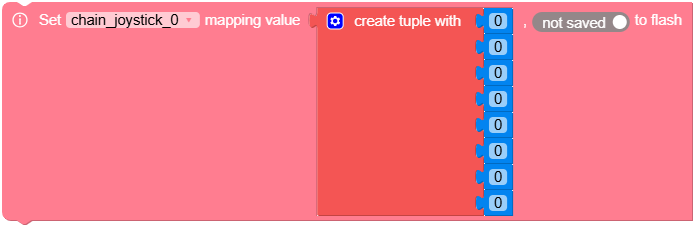
MicroPython Code Block:
success = joystick_0.set_mapping_value((100, 200, 300, 400, 100, 200, 300, 400), True)