StamPLC PoE
Supported Products:
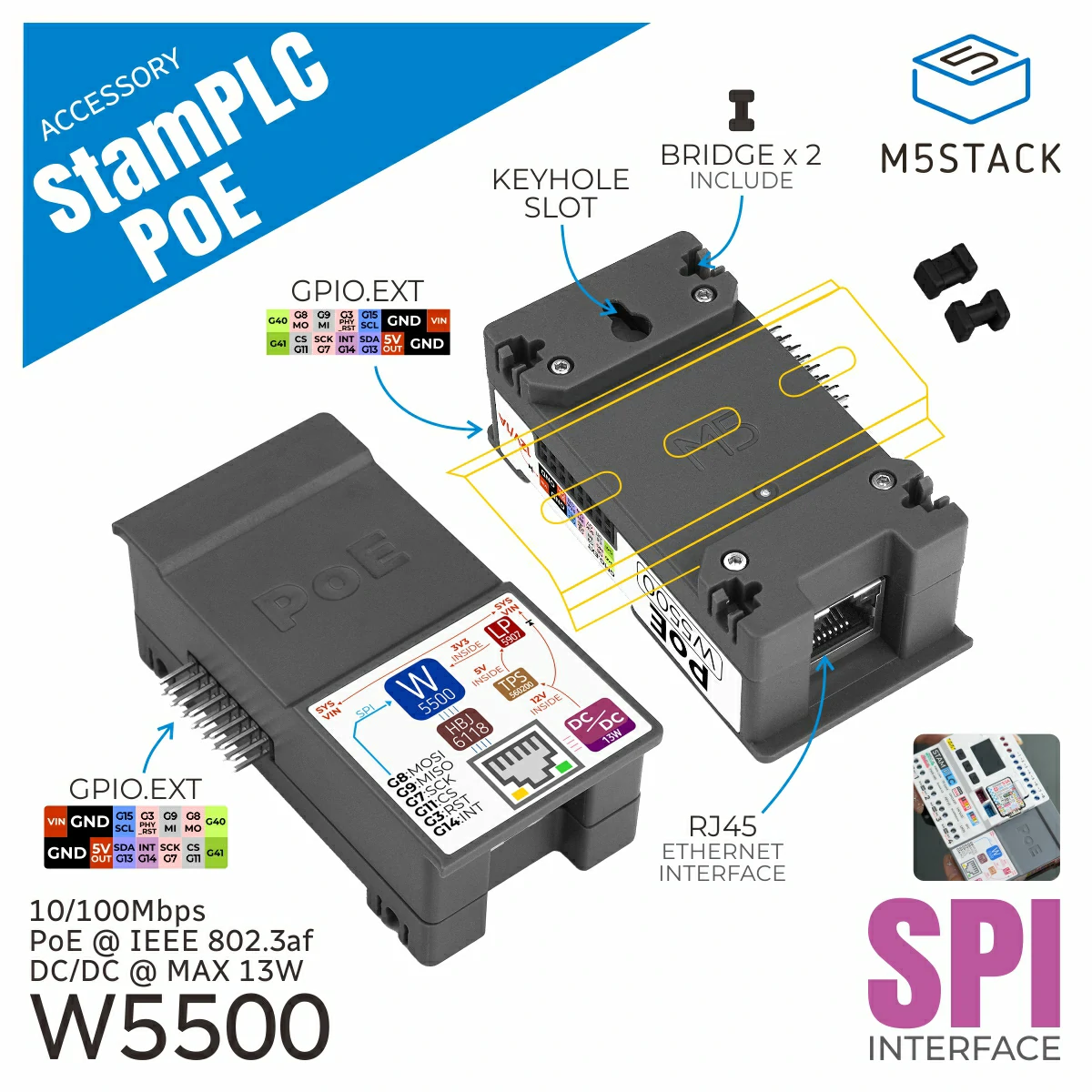
UiFlow2 Example
Get the weather
This example connects to the network using the StamPLC PoE and sends an HTTP request to query the geographical location of the current public IP address.
UiFlow2 Code Block:
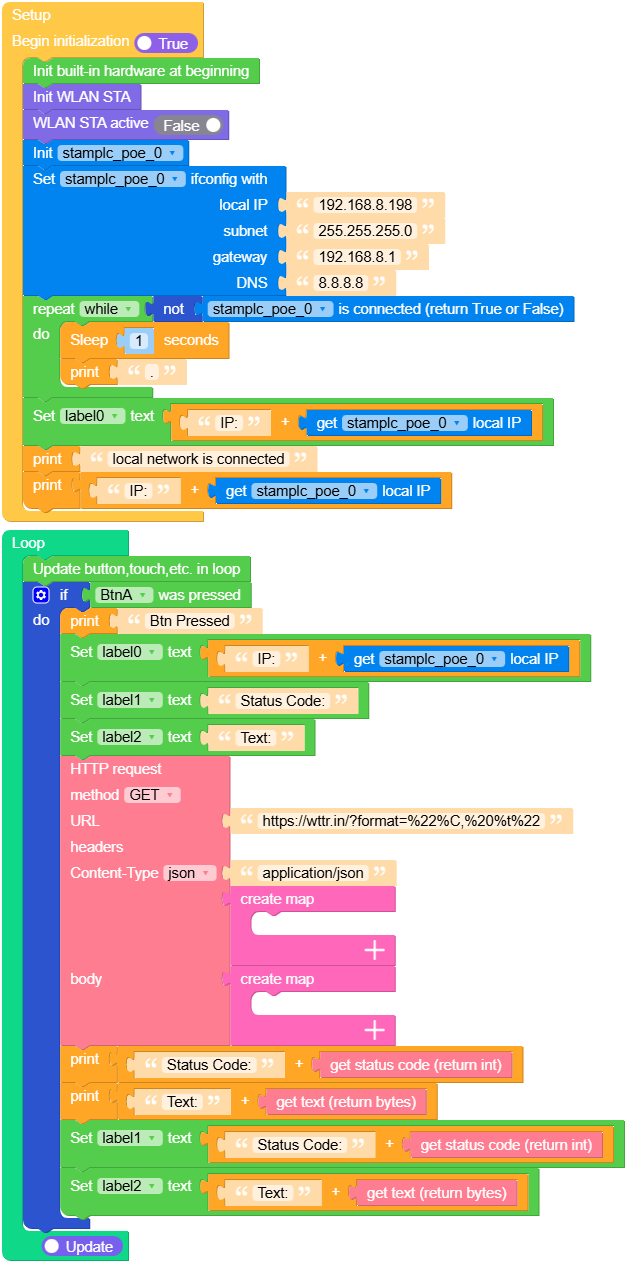
Example output:
None
MicroPython Example
Get the weather
This example connects to the network using the StamPLC PoE and sends an HTTP request to query the geographical location of the current public IP address.
MicroPython Code Block:
 1# SPDX-FileCopyrightText: 2025 M5Stack Technology CO LTD
 2#
 3# SPDX-License-Identifier: MIT
 4
 5import os, sys, io
 6import M5
 7from M5 import *
 8import network
 9from stamplc import PoEStamPLC
10import time
11import requests2
12
13
14title0 = None
15label0 = None
16label1 = None
17label2 = None
18wlan_sta = None
19stamplc_poe_0 = None
20http_req = None
21
22
23def setup():
24    global title0, label0, label1, label2, wlan_sta, stamplc_poe_0, http_req
25
26    M5.begin()
27    Widgets.fillScreen(0x000000)
28    title0 = Widgets.Title("StamPLC PoE Example", 3, 0xFFFFFF, 0x0000FF, Widgets.FONTS.DejaVu18)
29    label0 = Widgets.Label("IP:", 2, 33, 1.0, 0xFFFFFF, 0x222222, Widgets.FONTS.DejaVu18)
30    label1 = Widgets.Label("Status Code:", 2, 65, 1.0, 0xFFFFFF, 0x222222, Widgets.FONTS.DejaVu18)
31    label2 = Widgets.Label("Text:", 2, 96, 1.0, 0xFFFFFF, 0x222222, Widgets.FONTS.DejaVu18)
32
33    wlan_sta = network.WLAN(network.STA_IF)
34    wlan_sta.active(False)
35    stamplc_poe_0 = PoEStamPLC()
36    stamplc_poe_0.ifconfig(("192.168.8.198", "255.255.255.0", "192.168.8.1", "8.8.8.8"))
37    while not (stamplc_poe_0.isconnected()):
38        time.sleep(1)
39        print(".")
40    label0.setText(str((str("IP:") + str((stamplc_poe_0.ifconfig()[0])))))
41    print("local network is connected")
42    print((str("IP:") + str((stamplc_poe_0.ifconfig()[0]))))
43
44
45def loop():
46    global title0, label0, label1, label2, wlan_sta, stamplc_poe_0, http_req
47    M5.update()
48    if BtnA.wasPressed():
49        print("Btn Pressed")
50        label0.setText(str((str("IP:") + str((stamplc_poe_0.ifconfig()[0])))))
51        label1.setText(str("Status Code:"))
52        label2.setText(str("Text:"))
53        http_req = requests2.get(
54            "https://wttr.in/?format=%22%C,%20%t%22", headers={"Content-Type": "application/json"}
55        )
56        print((str("Status Code:") + str((http_req.status_code))))
57        print((str("Text:") + str((http_req.text))))
58        label1.setText(str((str("Status Code:") + str((http_req.status_code)))))
59        label2.setText(str((str("Text:") + str((http_req.text)))))
60
61
62if __name__ == "__main__":
63    try:
64        setup()
65        while True:
66            loop()
67    except (Exception, KeyboardInterrupt) as e:
68        try:
69            from utility import print_error_msg
70
71            print_error_msg(e)
72        except ImportError:
73            print("please update to latest firmware")
Example output:
None
API
StamPLC PoE
- class stamplc.poe.PoEStamPLC(cs_pin=11, rst_pin=3, int_pin=14)
Bases:
objectCreate an PoEStamPLC object
- Parameters:
UiFlow2 Code Block:

MicroPython Code Block:
from stamplc import PoEStamPLC

stamplc_poe_0 = PoEStamPLC()
See module.LAN.Methods for more APIs details.