StamPLC AC
ACStamPLC is a class that drives the relay and RGB LED on the AC extension board.
Support the following products:

UiFlow2 Example
Relay and RGB LED control
Open the stamplc_ac_example.m5f2 project in UiFlow2.
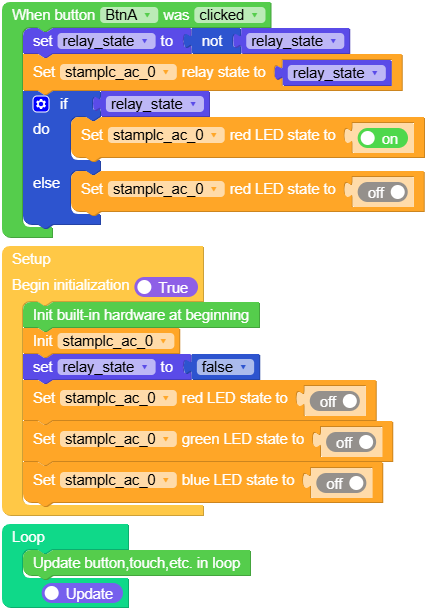
This example demonstrates interactive control of the AC relay and RGB LED. Press button A to toggle the relay state. When the relay is turned on, the red LED lights up; when turned off, the red LED turns off.
UiFlow2 Code Block:
Example output:
None
MicroPython Example
Relay and RGB LED control
This example demonstrates interactive control of the AC relay and RGB LED. Press button A to toggle the relay state. When the relay is turned on, the red LED lights up; when turned off, the red LED turns off.
MicroPython Code Block:
 1# SPDX-FileCopyrightText: 2025 M5Stack Technology CO LTD
 2#
 3# SPDX-License-Identifier: MIT
 4
 5import os, sys, io
 6import M5
 7from M5 import *
 8from stamplc import ACStamPLC
 9
10
11
12title0 = None
13label0 = None
14label1 = None
15stamplc_ac_0 = None
16relay_state = None
17
18
19def btnA_wasClicked_event(state):
20    global title0, label0, label1, stamplc_ac_0, relay_state
21    relay_state = not relay_state
22    stamplc_ac_0.set_relay(relay_state)
23    if relay_state:
24        stamplc_ac_0.set_red_led(True)
25    else:
26        stamplc_ac_0.set_red_led(False)
27
28def setup():
29    global title0, label0, label1, stamplc_ac_0, relay_state
30
31    M5.begin()
32    Widgets.fillScreen(0x000000)
33    title0 = Widgets.Title("StamPLC AC Ctrl", 3, 0xffffff, 0x0000FF, Widgets.FONTS.DejaVu24)
34    label0 = Widgets.Label("Press button A toggle", 5, 35, 1.0, 0xffffff, 0x000000, Widgets.FONTS.DejaVu18)
35    label1 = Widgets.Label("relay state", 5, 60, 1.0, 0xffffff, 0x000000, Widgets.FONTS.DejaVu18)
36
37    BtnA.setCallback(type=BtnA.CB_TYPE.WAS_CLICKED, cb=btnA_wasClicked_event)
38
39    stamplc_ac_0 = ACStamPLC()
40    relay_state = False
41    stamplc_ac_0.set_red_led(False)
42    stamplc_ac_0.set_green_led(False)
43    stamplc_ac_0.set_blue_led(False)
44
45
46def loop():
47    global title0, label0, label1, stamplc_ac_0, relay_state
48    M5.update()
49
50
51if __name__ == '__main__':
52    try:
53        setup()
54        while True:
55            loop()
56    except (Exception, KeyboardInterrupt) as e:
57        try:
58            from utility import print_error_msg
59            print_error_msg(e)
60        except ImportError:
61            print("please update to latest firmware")
Example output:
None
API
ACStamPLC
- class ACStamPLC
Create a ACStamPLC object.
UiFlow2 Code Block:

MicroPython Code Block:
from stamplc import ACStamPLC

ac = ACStamPLC()
- set_relay(state)
Switch the AC relay output.
- Parameters:
state (bool) –
Trueturns the relay on,Falsereleases it.
UiFlow2 Code Block:

MicroPython Code Block:
ac.set_relay(state)
- set_red_led(state)
Control the red channel of the RGB LED.
- Parameters:
state (bool) –
Truelights the LED,Falseturns it off.
UiFlow2 Code Block:

MicroPython Code Block:
ac.set_red_led(state)

