Cat1CN Unit
这是 Cat1CN Unit 的驱动库,用于接收和发送数据。
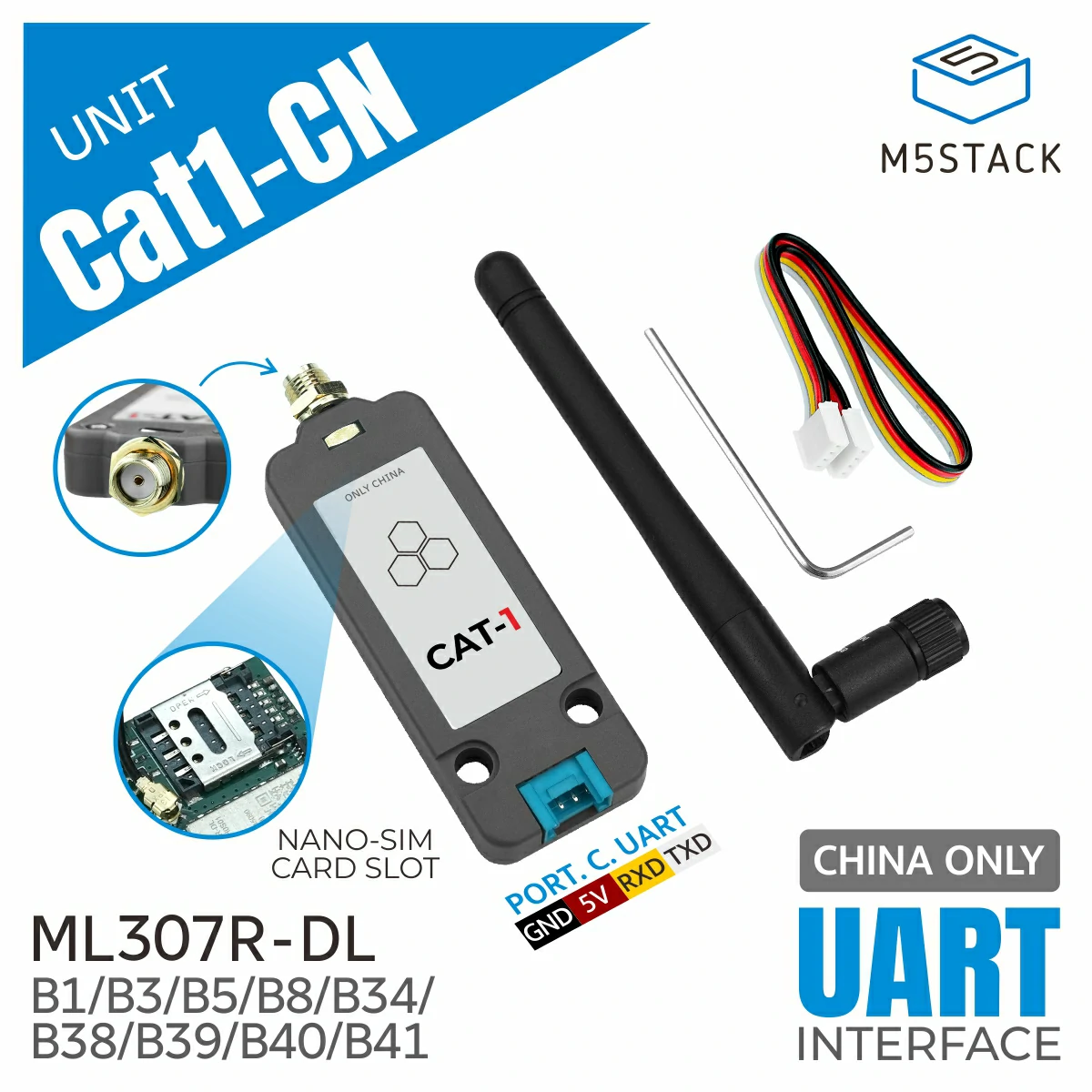
支持以下产品:
UiFlow2 应用示例
HTTP 示例
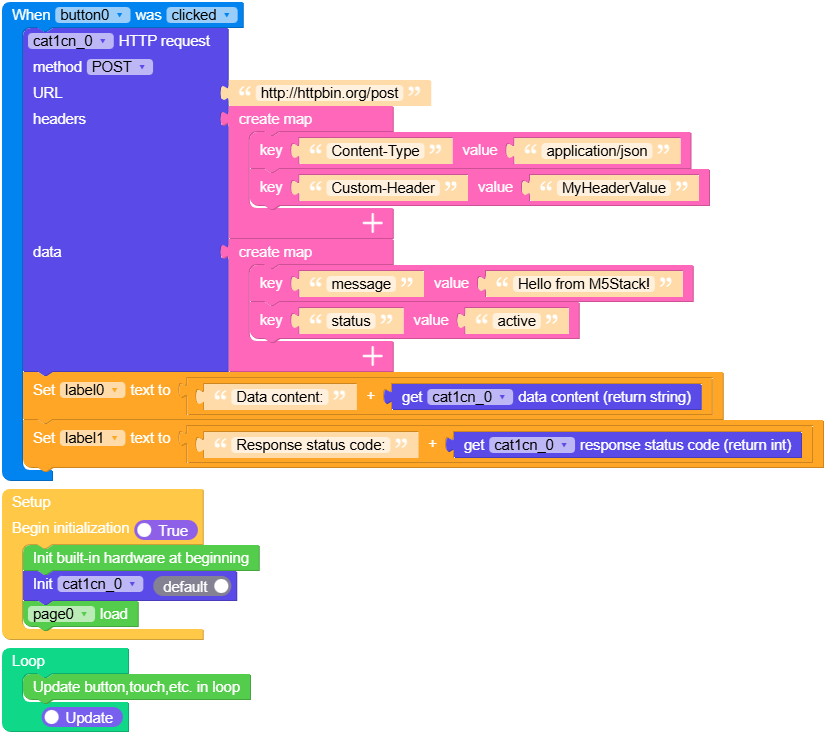
在 UiFlow2 中打开 cat1cn_core2_http_example.m5f2 项目。
该示例演示如何发送 HTTP 请求。
UiFlow2 代码块:
示例输出:
None
MicroPython 应用示例
HTTP 示例
该示例演示如何发送 HTTP 请求。
MicroPython 代码块:
  1# SPDX-FileCopyrightText: 2025 M5Stack Technology CO LTD
  2#
  3# SPDX-License-Identifier: MIT
  4
  5import os, sys, io
  6import M5
  7from M5 import *
  8import m5ui
  9import lvgl as lv
 10from unit import Cat1Unit
 11
 12
 13page0 = None
 14button0 = None
 15label0 = None
 16label1 = None
 17cat1cn_0 = None
 18
 19
 20def button0_clicked_event(event_struct):
 21    global page0, button0, label0, label1, cat1cn_0
 22    cat1cn_0.http_request(
 23        1,
 24        "http://httpbin.org/post",
 25        {"Content-Type": "application/json", "Custom-Header": "MyHeaderValue"},
 26        {"message": "Hello from M5Stack!", "status": "active"},
 27    )
 28    label0.set_text(str((str("Data content:") + str((cat1cn_0.data_content)))))
 29    label1.set_text(str((str("Response status code:") + str((cat1cn_0.response_code)))))
 30
 31
 32def button0_event_handler(event_struct):
 33    global page0, button0, label0, label1, cat1cn_0
 34    event = event_struct.code
 35    if event == lv.EVENT.CLICKED and True:
 36        button0_clicked_event(event_struct)
 37    return
 38
 39
 40def setup():
 41    global page0, button0, label0, label1, cat1cn_0
 42
 43    M5.begin()
 44    Widgets.setRotation(1)
 45    m5ui.init()
 46    page0 = m5ui.M5Page(bg_c=0xFFFFFF)
 47    button0 = m5ui.M5Button(
 48        text="Send HTTP POST",
 49        x=82,
 50        y=104,
 51        bg_c=0x2196F3,
 52        text_c=0xFFFFFF,
 53        font=lv.font_montserrat_14,
 54        parent=page0,
 55    )
 56    label0 = m5ui.M5Label(
 57        "Data content:",
 58        x=3,
 59        y=8,
 60        text_c=0x000000,
 61        bg_c=0xFFFFFF,
 62        bg_opa=0,
 63        font=lv.font_montserrat_14,
 64        parent=page0,
 65    )
 66    label1 = m5ui.M5Label(
 67        "Response status code:",
 68        x=4,
 69        y=35,
 70        text_c=0x000000,
 71        bg_c=0xFFFFFF,
 72        bg_opa=0,
 73        font=lv.font_montserrat_14,
 74        parent=page0,
 75    )
 76
 77    button0.add_event_cb(button0_event_handler, lv.EVENT.ALL, None)
 78
 79    cat1cn_0 = Cat1Unit(2, port=(33, 32))
 80    page0.screen_load()
 81
 82
 83def loop():
 84    global page0, button0, label0, label1, cat1cn_0
 85    M5.update()
 86
 87
 88if __name__ == "__main__":
 89    try:
 90        setup()
 91        while True:
 92            loop()
 93    except (Exception, KeyboardInterrupt) as e:
 94        try:
 95            m5ui.deinit()
 96            from utility import print_error_msg
 97
 98            print_error_msg(e)
 99        except ImportError:
100            print("please update to latest firmware")
示例输出:
None
MQTT 应用示例
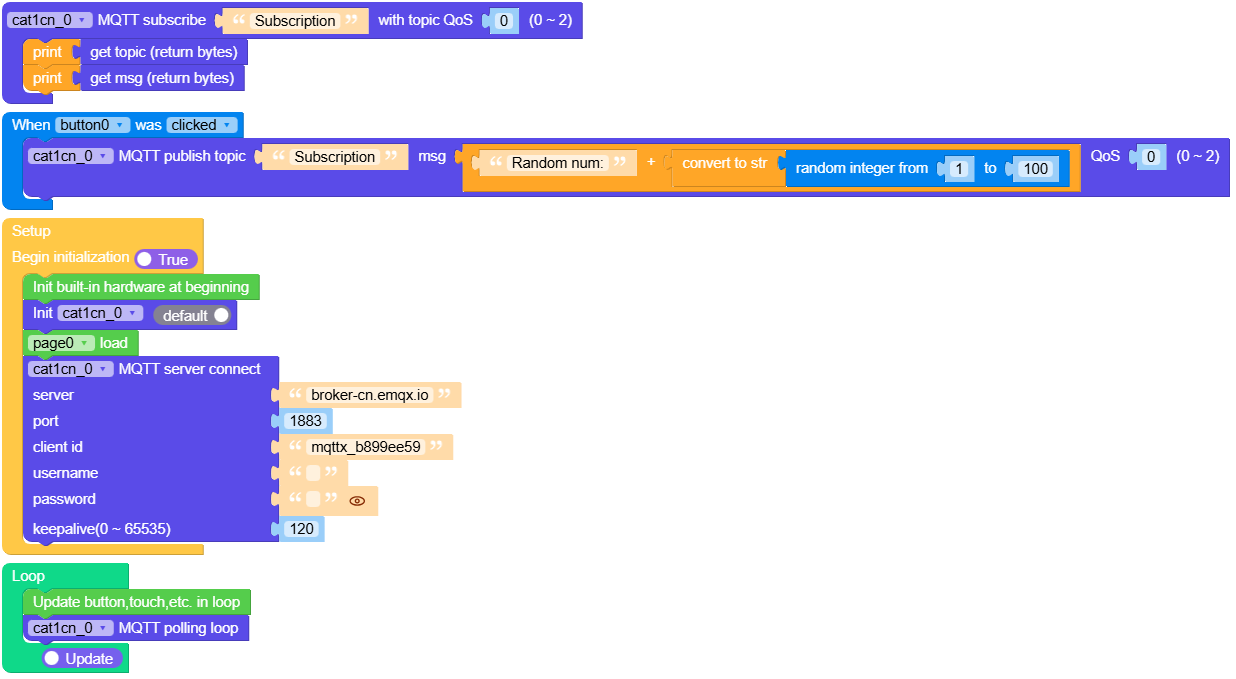
在 UiFlow2 中打开 cat1cn_core2_mqtt_example.m5f2 项目。
该示例演示如何发送 MQTT 消息。
UiFlow2 代码块:
示例输出:
None
MicroPython 应用示例
MQTT 应用示例
该示例演示如何发送 MQTT 消息。
MicroPython 代码块:
 1# SPDX-FileCopyrightText: 2025 M5Stack Technology CO LTD
 2#
 3# SPDX-License-Identifier: MIT
 4
 5import os, sys, io
 6import M5
 7from M5 import *
 8import m5ui
 9import lvgl as lv
10from unit import Cat1Unit
11
12
13page0 = None
14button0 = None
15cat1cn_0 = None
16
17
18import random
19
20
21def cat1cn_0_subscription_event(_topic, _msg):
22    global page0, button0, cat1cn_0
23    print(_topic)
24    print(_msg)
25
26
27def button0_clicked_event(event_struct):
28    global page0, button0, cat1cn_0
29    cat1cn_0.mqtt_publish_topic(
30        "Push", (str("Random num:") + str((str((random.randint(1, 100)))))), 0
31    )
32
33
34def button0_event_handler(event_struct):
35    global page0, button0, cat1cn_0
36    event = event_struct.code
37    if event == lv.EVENT.CLICKED and True:
38        button0_clicked_event(event_struct)
39    return
40
41
42def setup():
43    global page0, button0, cat1cn_0
44
45    M5.begin()
46    Widgets.setRotation(1)
47    m5ui.init()
48    page0 = m5ui.M5Page(bg_c=0xFFFFFF)
49    button0 = m5ui.M5Button(
50        text="Send Msg",
51        x=107,
52        y=100,
53        bg_c=0x2196F3,
54        text_c=0xFFFFFF,
55        font=lv.font_montserrat_14,
56        parent=page0,
57    )
58
59    button0.add_event_cb(button0_event_handler, lv.EVENT.ALL, None)
60
61    cat1cn_0 = Cat1Unit(2, port=(33, 32))
62    page0.screen_load()
63    cat1cn_0.mqtt_server_connect("broker-cn.emqx.io", 1883, "mqttx_b899ee59", "", "", 120)
64    cat1cn_0.mqtt_subscribe_topic("Subscription", cat1cn_0_subscription_event, 0)
65
66
67def loop():
68    global page0, button0, cat1cn_0
69    M5.update()
70    cat1cn_0.mqtt_polling_loop()
71
72
73if __name__ == "__main__":
74    try:
75        setup()
76        while True:
77            loop()
78    except (Exception, KeyboardInterrupt) as e:
79        try:
80            m5ui.deinit()
81            from utility import print_error_msg
82
83            print_error_msg(e)
84        except ImportError:
85            print("please update to latest firmware")
示例输出:
None
API参考
Cat1Unit
- class unit.cat1.Cat1Unit(uart_or_id, port=None, verbose=True)
基类:
ML307R,Modem创建一个 Cat1Unit 对象
- 参数:
UiFlow2 代码块:

MicroPython 代码块:
from base import Cat1Unit

cat1cn_0 = Cat1Unit(2, port=(33, 32))
更多详情请参阅 NBIOTUnit 。