Chain Key
API
KeyChain
- class chain.key.KeyChain(bus, device_id)
基类:
objectCreate a KeyChain object.
UiFlow2 Code Block:

MicroPython Code Block:
from chain import ChainBus
from chain import KeyChain

chainbus_0 = ChainBus(2, 32, 33, verbose=True)
keychain_0 = KeyChain(chainbus_0, 1)
- MODE_POLL = 0
Button Polling mode
- MODE_EVENT = 1
Button Event mode
- get_button_state()
get button state.
- 返回:
Button state, True if pressed, False otherwise.
- 返回类型:
UiFlow2 Code Block:

MicroPython Code Block:
keychain_0.get_button_state()
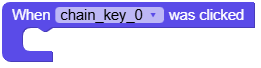
- set_click_callback(callback)
set button click callback.
- 参数:
callback – Callback function.
- 返回类型:
None
UiFlow2 Code Block:
MicroPython Code Block:
def keychain_0_click_callback(args):
    print("click")

keychain_0.set_click_callback(keychain_0_click_callback)
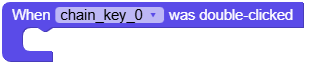
- set_double_click_callback(callback)
set button double click callback.
- 参数:
callback – Callback function.
- 返回类型:
None
UiFlow2 Code Block:
MicroPython Code Block:
def keychain_0_double_click_callback(args):
    print("double click")

keychain_0.set_double_click_callback(keychain_0_double_click_callback)
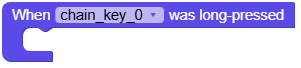
- set_long_press_callback(callback)
set button long press callback.
- 参数:
callback – Callback function.
- 返回类型:
None
UiFlow2 Code Block:
MicroPython Code Block:
def keychain_0_long_press_callback(args):
    print("long press")

keychain_0.set_long_press_callback(keychain_0_long_press_callback)
- set_button_double_click_trigger_interval(interval_ms)
set button double click trigger interval.
- 参数:
interval_ms (int) – Interval time in milliseconds. range: 100-1000
- 返回:
True if success, False otherwise.
- 返回类型:
UiFlow2 Code Block:

MicroPython Code Block:
keychain_0.set_button_double_click_trigger_interval(100)
- set_button_long_press_trigger_interval(interval_ms)
set button long press trigger interval.
- 参数:
interval_ms (int) – Interval time in milliseconds. range: 3000-30000
- 返回:
True if success, False otherwise.
- 返回类型:
UiFlow2 Code Block:

MicroPython Code Block:
keychain_0.set_button_long_press_trigger_interval(3000)
- get_button_double_click_trigger_interval()
get button double click trigger interval.
- 返回:
Interval time in milliseconds.
- 返回类型:
UiFlow2 Code Block:

MicroPython Code Block:
interval = keychain_0.get_button_double_click_trigger_interval()
- get_button_long_press_trigger_interval()
get button long press trigger interval.
- 返回:
Interval time in milliseconds.
- 返回类型:
UiFlow2 Code Block:

MicroPython Code Block:
interval = keychain_0.get_button_long_press_trigger_interval()
- set_button_mode(mode)
set button mode.
- 参数:
mode (int) – Button mode. Use
KeyChain.MODE_POLLorKeyChain.MODE_EVENT.- 返回:
True if success, False otherwise.
- 返回类型:
UiFlow2 Code Block:

MicroPython Code Block:
keychain_0.set_button_mode(KeyChain.MODE_EVENT)
- get_button_mode()
get button mode.
- 返回:
Button mode.
KeyChain.MODE_POLLorKeyChain.MODE_EVENT.- 返回类型:
UiFlow2 Code Block:

MicroPython Code Block:
mode = keychain_0.get_button_mode()
- set_rgb_color(color)
set RGB color.
UiFlow2 Code Block:

MicroPython Code Block:
keychain_0.set_rgb_color(0xFF0000)
- get_rgb_color()
get RGB color.
- 参数:
index – Index of the RGB LED.
- 返回:
RGB color value.
- 返回类型:
UiFlow2 Code Block:

MicroPython Code Block:
color = keychain_0.get_rgb_color()
- set_rgb_brightness(brightness, save=False)
set RGB brightness.
- 参数:
- 返回:
True if success, False otherwise.
- 返回类型:
UiFlow2 Code Block:

MicroPython Code Block:
keychain_0.set_rgb_brightness(80)
- get_rgb_brightness()
get RGB brightness.
- 返回:
Brightness value (0-100).
- 返回类型:
UiFlow2 Code Block:

MicroPython Code Block:
brightness = keychain_0.get_rgb_brightness()
- get_bootloader_version()
get bootloader version.
- 返回:
Bootloader version.
- 返回类型:
UiFlow2 Code Block:

MicroPython Code Block:
version = keychain_0.get_bootloader_version()
