Chain Joystick
API
JoystickChain
- class chain.joystick.JoystickChain(bus, device_id)
基类:
KeyChainJoystick Chain class for interacting with joystick devices over Chain bus.
- 参数:
UiFlow2 Code Block:

MicroPython Code Block:
from chain import ChainBus
from chain import JoystickChain

chainbus_0 = ChainBus(2, 32, 33, verbose=True)
joystick_0 = JoystickChain(chainbus_0, 1)
For other button and some general methods, please refer to the
ChainKeyclass.- get_x()
Get the X position of the joystick.
- 返回:
X position (-128 to 127).
- 返回类型:
UiFlow2 Code Block:

MicroPython Code Block:
x = joystick_0.get_x()
- get_y()
Get the Y position of the joystick.
- 返回:
Y position (-128 to 127).
- 返回类型:
UiFlow2 Code Block:
MicroPython Code Block:
y = joystick_0.get_y()
- get_x_16bit()
Get the X position of the joystick in 16-bit resolution.
- 返回:
X position (-4095 to 4095).
- 返回类型:
UiFlow2 Code Block:

MicroPython Code Block:
x = joystick_0.get_x_16bit()
- get_y_16bit()
Get the Y position of the joystick in 16-bit resolution.
- 返回:
Y position (-4095 to 4095).
- 返回类型:
UiFlow2 Code Block:
MicroPython Code Block:
y = joystick_0.get_y_16bit()
- get_x_raw()
Get the raw X ADC value of the joystick.
- 返回:
Raw X ADC value (0-255).
- 返回类型:
UiFlow2 Code Block:

MicroPython Code Block:
x = joystick_0.get_x_raw()
- get_y_raw()
Get the raw Y ADC value of the joystick.
- 返回:
Raw Y ADC value (0-255).
- 返回类型:
UiFlow2 Code Block:
MicroPython Code Block:
y = joystick_0.get_y_raw()
- get_x_16bit_raw()
Get the raw X ADC value of the joystick in 16-bit resolution.
- 返回:
Raw X ADC value (0-65535).
- 返回类型:
UiFlow2 Code Block:

MicroPython Code Block:
x = joystick_0.get_x_16bit_raw()
- get_y_16bit_raw()
Get the raw Y ADC value of the joystick in 16-bit resolution.
- 返回:
Raw Y ADC value (0-65535).
- 返回类型:
UiFlow2 Code Block:
MicroPython Code Block:
y = joystick_0.get_y_16bit_raw()
- get_mapping_value()
Get the mapping values of the joystick.
- 返回:
A tuple containing the mapping values (x_negative_min, x_negative_max, x_positive_min, x_positive_max, y_negative_min, y_negative_max, y_positive_min, y_positive_max).
- 返回类型:
UiFlow2 Code Block:

MicroPython Code Block:
mapping = joystick_0.get_mapping_value()
- set_mapping_value(value, save=False)
Set the mapping values of the joystick.
- 参数:
- 返回:
True if the mapping values were set successfully, False otherwise.
- 返回类型:
UiFlow2 Code Block:
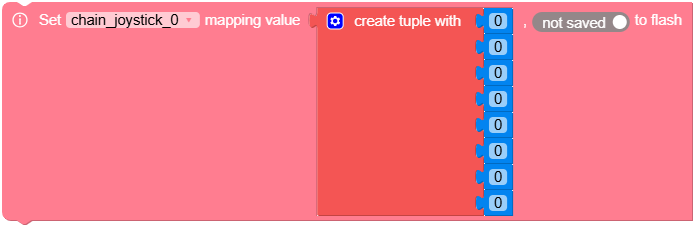
MicroPython Code Block:
success = joystick_0.set_mapping_value((100, 200, 300, 400, 100, 200, 300, 400), True)