LAN Module
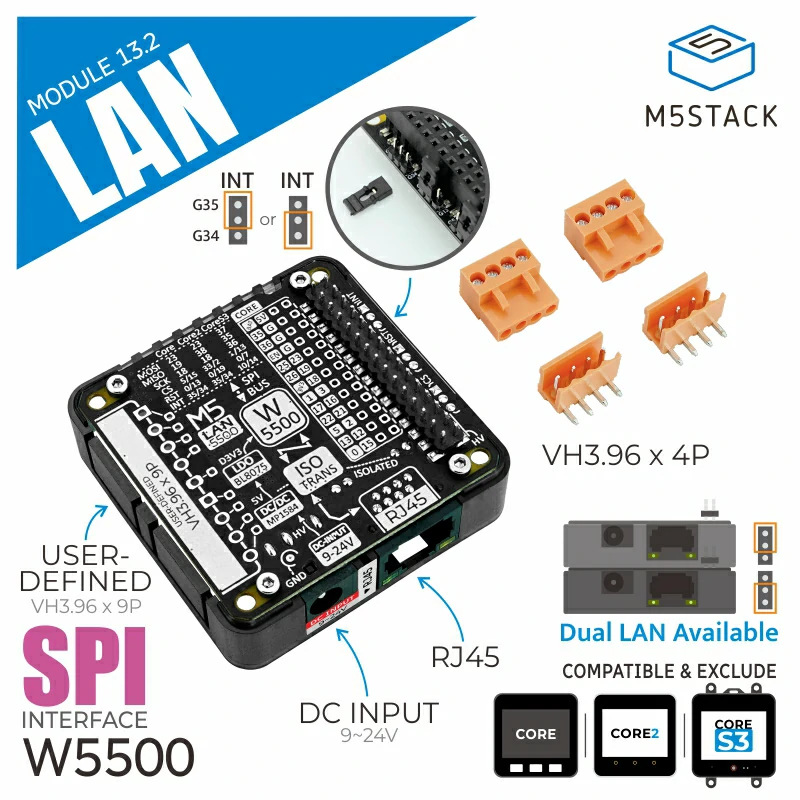
支持以下产品:
UiFlow2 应用示例
获取天气
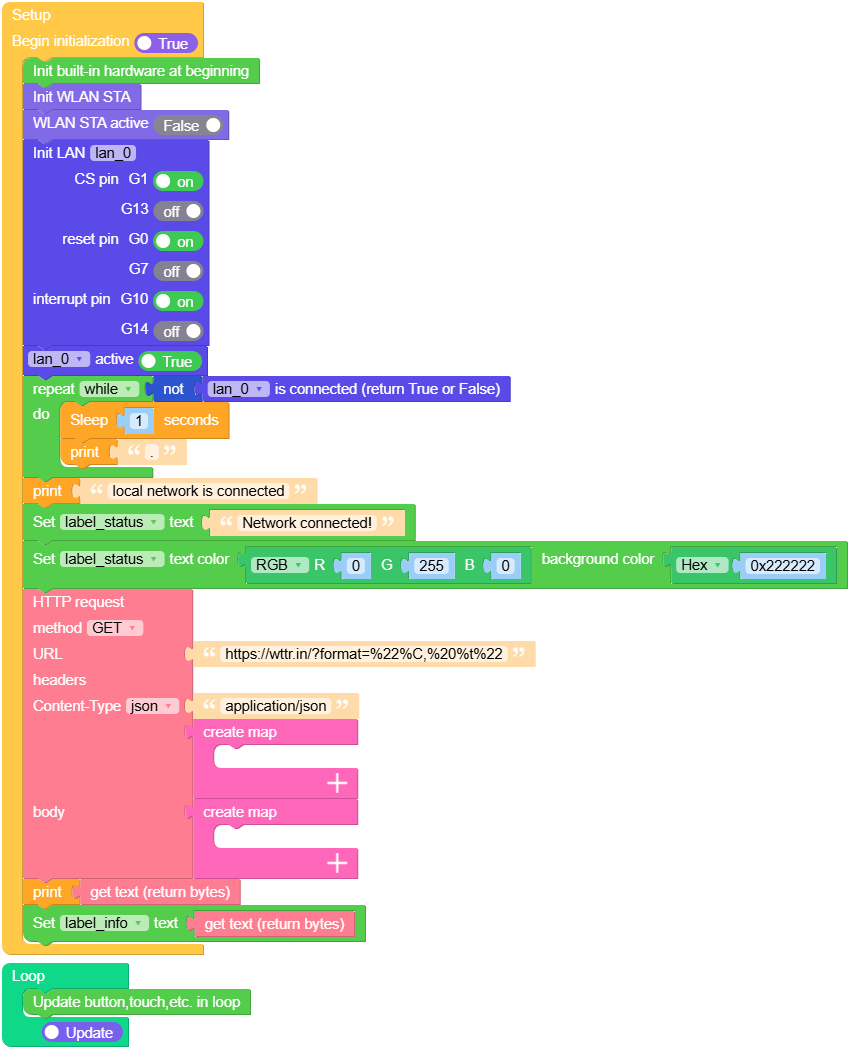
示例使用 LAN 模块接入网络,并通过 HTTP 请求获取当前公网 IP 所在的地理位置。
UiFlow2 代码块:
示例输出:
无
MicroPython 应用示例
获取天气
示例使用 LAN 模块接入网络,并通过 HTTP 请求获取当前公网 IP 所在的地理位置。
MicroPython 代码块:
 1# SPDX-FileCopyrightText: 2025 M5Stack Technology CO LTD
 2#
 3# SPDX-License-Identifier: MIT
 4
 5import os, sys, io
 6import M5
 7from M5 import *
 8import network
 9from module import LANModule
10import time
11import requests2
12
13
14label_status = None
15title0 = None
16label_info = None
17wlan = None
18lan_0 = None
19http_req = None
20
21
22def setup():
23    global label_status, title0, label_info, wlan, lan_0, http_req
24    M5.begin()
25    Widgets.fillScreen(0x222222)
26    label_status = Widgets.Label(
27        "Waiting for network connection", 5, 50, 1.0, 0xFF0000, 0x222222, Widgets.FONTS.DejaVu18
28    )
29    title0 = Widgets.Title("LANModule Example", 3, 0xFFFFFF, 0x0000FF, Widgets.FONTS.DejaVu24)
30    label_info = Widgets.Label("Get info", 5, 90, 1.0, 0xFFFFFF, 0x222222, Widgets.FONTS.DejaVu18)
31    wlan = network.WLAN(network.STA_IF)
32    wlan.active(False)
33    lan_0 = LANModule(cs=1, rst=0, int=10)
34    lan_0.active(True)
35    while not (lan_0.isconnected()):
36        time.sleep(1)
37        print(".")
38    print("local network is connected")
39    label_status.setText(str("Network connected!"))
40    label_status.setColor(0x00FF00, 0x222222)
41    http_req = requests2.get(
42        "https://wttr.in/?format=%22%C,%20%t%22", headers={"Content-Type": "application/json"}
43    )
44    print(http_req.text)
45    label_info.setText(str(http_req.text))
46
47
48def loop():
49    global label_status, title0, label_info, wlan, lan_0, http_req
50    M5.update()
51
52
53if __name__ == "__main__":
54    try:
55        setup()
56        while True:
57            loop()
58    except (Exception, KeyboardInterrupt) as e:
59        try:
60            lan_0.deinit()
61            from utility import print_error_msg
62
63            print_error_msg(e)
64        except ImportError:
65            print("please update to latest firmware")
示例输出:
无
API应用
class LANModule
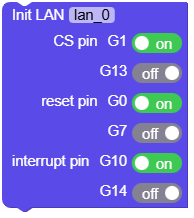
- class module.lan.LANModule(cs=-1, rst=-1, int=-1)
Create a LANModule object.
- 参数:
cs – 片选引脚
rst – 复位引脚
int – 中断引脚
UiFlow2 代码块:
MicroPython 代码块:
from module import LANModule

lan_0 = LANModule(cs=1, rst=0, int=10)
- LANModule.deinit()
反初始化 LANModule。
UiFlow2 代码块:

MicroPython 代码块:
lan_0.deinit()
- LANModule.isconnected()
检查以太网物理连接是否已激活。
- 返回:
如果以太网网线已连接且链路已建立,则为 True,否则为 False。
- 返回类型:
UiFlow2 代码块:

MicroPython 代码块:
lan_0.isconnected()
- LANModule.status()
获取 LAN 连接状态。
- 返回:
LAN 状态码,可能的取值包括
- 返回类型:
UiFlow2 代码块:

MicroPython 代码块:
lan_0.status()
- LANModule.ifconfig()[0]
获取本地 IP 地址。
- 返回:
本地 IP 地址,字符串格式,例如:”192.168.1.100”
- 返回类型:
UiFlow2 代码块:

MicroPython 代码块:
lan_0.ifconfig()[0]
- LANModule.ifconfig()[1]
获取子网掩码。
- 返回:
子网掩码,字符串格式,例如:”255.255.255.0”
- 返回类型:
UiFlow2 代码块:

MicroPython 代码块:
lan_0.ifconfig()[1]
- LANModule.ifconfig()[2]
获取网关地址。
- 返回:
网关 IP,字符串格式,例如:”192.168.1.1”
- 返回类型:
UiFlow2 代码块:

MicroPython 代码块:
lan_0.ifconfig()[2]
- LANModule.ifconfig()[3]
获取 DNS 服务地址。
- 返回:
DNS 服务器 IP,字符串格式,例如:”8.8.8.8”
- 返回类型:
UiFlow2 代码块:

MicroPython 代码块:
lan_0.ifconfig()[3]
- LANModule.config('mac')
获取 LAN module MAC 地址。
UiFlow2 代码块:

MicroPython 代码块:
mac_address = lan_0.config('mac')
- LANModule.active([state])
使能或失能 LAN 接口。
- 参数:
state (bool | None) – 可选的布尔值。若为 True,激活 LAN 接口;若为 False,则停用它。
- 返回:
如果没有提供参数,则返回接口当前的激活状态。
- 返回类型:
UiFlow2 代码块:

MicroPython 代码块:
lan_0.active([state])
- LANModule.config(mac=bytearray)
设置 LAN module MAC 地址。
- 参数:
mac (bytearray) – 要设置的 MAC 地址,格式为包含 6 个字节的 bytearray。
- 返回:
无
UiFlow2 代码块:

MicroPython 代码块:
lan_0.config(mac=bytearray([0x02, 0x00, 0x00, 0x12, 0x34, 0x56]))
- LANModule.set_default_netif()
设置默认网络接口。
UiFlow2 代码块:

MicroPython 代码块:
lan_0.set_default_netif()
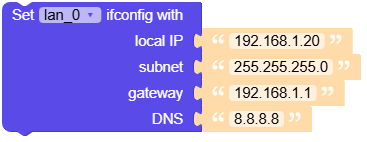
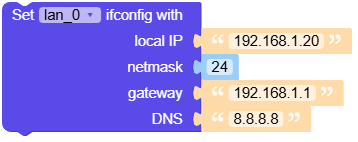
- LANModule.ifconfig([(ip, subnet, gateway, dns)])
获取或设置 LAN 接口的 IP 地址、子网掩码、网关和 DNS 服务器。
- 参数:
UiFlow2 代码块:
MicroPython 代码块:
lan_0.ifconfig([(ip, subnet, gateway, dns)])
- LANModule.ifconfig([(ip, subnet, gateway, dns)])
获取或设置 LAN 接口的 IP 地址、子网掩码、网关和 DNS 服务器。
- 参数:
UiFlow2 代码块:
MicroPython 代码块:
lan_0.ifconfig([(ip, subnet, gateway, dns)])