M5Arc
M5Arc is a widget that can be used to create arcs in the user interface. It can be used to display circular progress or other circular indicators.
UiFlow2 Example
event arc
Open the cores3_arc_event_example.m5f2 project in UiFlow2.
This example creates an arc that triggers an event when the value changes.
UiFlow2 Code Block:
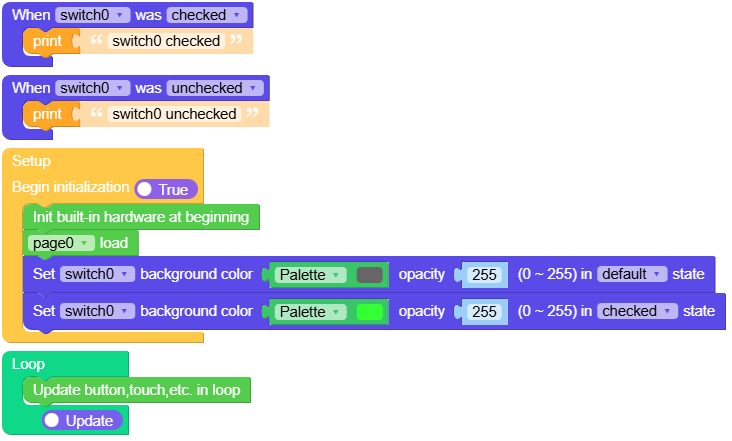
Example output:
None
MicroPython Example
event arc
This example creates an arc that triggers an event when the value changes.
MicroPython Code Block:
 1# SPDX-FileCopyrightText: 2025 M5Stack Technology CO LTD
 2#
 3# SPDX-License-Identifier: MIT
 4
 5import os, sys, io
 6import M5
 7from M5 import *
 8import m5ui
 9import lvgl as lv
10
11
12page0 = None
13switch0 = None
14
15
16def switch0_checked_event(event_struct):
17    global page0, switch0
18
19    print("switch0 checked")
20
21
22def switch0_unchecked_event(event_struct):
23    global page0, switch0
24
25    print("switch0 unchecked")
26
27
28def switch0_event_handler(event_struct):
29    global page0, switch0
30    event = event_struct.code
31    obj = event_struct.get_target_obj()
32    if event == lv.EVENT.VALUE_CHANGED:
33        if obj.has_state(lv.STATE.CHECKED):
34            switch0_checked_event(event_struct)
35        else:
36            switch0_unchecked_event(event_struct)
37    return
38
39
40def setup():
41    global page0, switch0
42
43    M5.begin()
44    Widgets.setRotation(1)
45    m5ui.init()
46    page0 = m5ui.M5Page(bg_c=0xFFFFFF)
47    switch0 = m5ui.M5Switch(
48        x=128,
49        y=91,
50        w=60,
51        h=30,
52        bg_c=0xE7E3E7,
53        bg_c_checked=0x2196F3,
54        circle_c=0xFFFFFF,
55        parent=page0,
56    )
57
58    switch0.add_event_cb(switch0_event_handler, lv.EVENT.ALL, None)
59
60    page0.screen_load()
61    switch0.set_bg_color(0x666666, 255, lv.PART.MAIN | lv.STATE.DEFAULT)
62    switch0.set_bg_color(0x33FF33, 255, lv.PART.INDICATOR | lv.STATE.CHECKED)
63
64
65def loop():
66    global page0, switch0
67    M5.update()
68
69
70if __name__ == "__main__":
71    try:
72        setup()
73        while True:
74            loop()
75    except (Exception, KeyboardInterrupt) as e:
76        try:
77            m5ui.deinit()
78            from utility import print_error_msg
79
80            print_error_msg(e)
81        except ImportError:
82            print("please update to latest firmware")
Example output:
None
API
M5Arc
- class m5ui.arc.M5Arc(*args, **kwargs)
基类:
arcCreate a arc object.
- 参数:
x (int) – The x position of the arc.
y (int) – The y position of the arc.
w (int) – The width of the arc.
h (int) – The height of the arc.
value (int) – The initial value of the arc.
min_value (int) – The minimum value of the arc.
max_value (int) – The maximum value of the arc.
rotation (int) – The rotation of the arc in degrees.
bg_c (int) – The color of the arc in the off state in hexadecimal format.
bg_c_indicator (int) – The color of the arc in the on state in hexadecimal format.
bg_c_knob (int) – The color of the knob on the arc in hexadecimal format.
parent (lv.obj) – The parent object to attach the arc to. If not specified, the arc will be attached to the default screen.
UiFlow2 Code Block:
None
MicroPython Code Block:
from m5ui import M5Arc
import lvgl as lv

m5ui.init()
arc_0 = M5Arc(
    x=0,
    y=0,
    w=100,
    h=100,
    value=10,
    min_value=0,
    max_value=100,
    rotation=0,
    mode=lv.arc.MODE.REVERSE,
    bg_c=0xE7E3E7,
    bg_c_indicator=0x0288FB,
    bg_c_knob=0xE7E3E7,
    parent=page0,
)
- set_rotation(rotation)
Set the rotation of the arc.
- 参数:
rotation (int) – The rotation angle of the arc in degrees.
UiFlow2 Code Block:

MicroPython Code Block:
arc_0.set_rotation(90)
- set_value(value)
Set the value of the arc.
- 参数:
value (int) – The value of the arc.
UiFlow2 Code Block:

MicroPython Code Block:
arc_0.set_value(90)
- get_value()
Get the value of the arc.
- 返回:
The value of the arc.
- 返回类型:
UiFlow2 Code Block:

MicroPython Code Block:
arc_0.get_value()
- set_range()
Set the range of the arc.
UiFlow2 Code Block:

MicroPython Code Block:
arc_0.set_range(0, 100)
- set_mode()
Set the mode of the arc.
- 参数:
mode (int) –
The mode of the arc.
- Option:
lv.arc.MODE.NORMAL: Normal mode.
lv.arc.MODE.REVERSE: Reverse mode.
lv.arc.MODE.SYMMETRICAL: Symmetrical mode.
UiFlow2 Code Block:

MicroPython Code Block:
arc_0.set_mode(lv.ARC.MODE.NORMAL)
- set_flag(flag, value)
Set a flag on the object. If
valueis True, the flag is added; if False, the flag is removed.- 参数:
- 返回:
None
UiFlow2 Code Block:

MicroPython Code Block:
button_0.set_flag(lv.obj.FLAG.HIDDEN, True)
- set_pos(x, y)
Set the position of the arc.
UiFlow2 Code Block:

MicroPython Code Block:
arc_0.set_pos(100, 100)
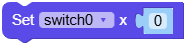
- set_x(x)
Set the x-coordinate of the arc.
- 参数:
x (int) – The x-coordinate of the arc.
UiFlow2 Code Block:
MicroPython Code Block:
arc_0.set_x(100)
- set_y(y)
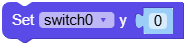
Set the y-coordinate of the arc.
- 参数:
y (int) – The y-coordinate of the arc.
UiFlow2 Code Block:
MicroPython Code Block:
arc_0.set_y(100)
- set_size(width, height)
Set the size of the arc.
UiFlow2 Code Block:

MicroPython Code Block:
arc_0.set_size(100, 50)
- set_width(width)
Set the width of the arc.
- 参数:
width (int) – The width of the arc.
UiFlow2 Code Block:

MicroPython Code Block:
arc_0.set_width(100)
- set_height(height)
Set the height of the arc.
- 参数:
height (int) – The height of the arc.
UiFlow2 Code Block:

MicroPython Code Block:
arc_0.set_height(50)
- align_to(obj, align, x, y)
Align the arc to another object.
- 参数:
UiFlow2 Code Block:

MicroPython Code Block:
arc_0.align_to(page_0, lv.ALIGN.CENTER, 0, 0)
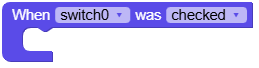
- add_event_cb(handler, event, user_data)
Add an event callback to the arc. The callback will be called when the specified event occurs.
- 参数:
handler (function) – The callback function to call.
event (int) – The event to listen for.
user_data (Any) – Optional user data to pass to the callback.
UiFlow2 Code Block:
MicroPython Code Block:
def value_changed_event(event_struct):
    global page0, arc_0
    print("value changed:", arc_0.get_value())

arc_0.add_event_cb(value_changed_event, lv.EVENT.VALUE_CHANGED, None)
- set_arc_color(color, opa, part)
Set the color of the arc.
- 参数:
UiFlow2 Code Block:

MicroPython Code Block:
label_0.set_arc_color(0x2196F3, lv.PART.MAIN | lv.STATE.DEFAULT)