NB-IoT Unit
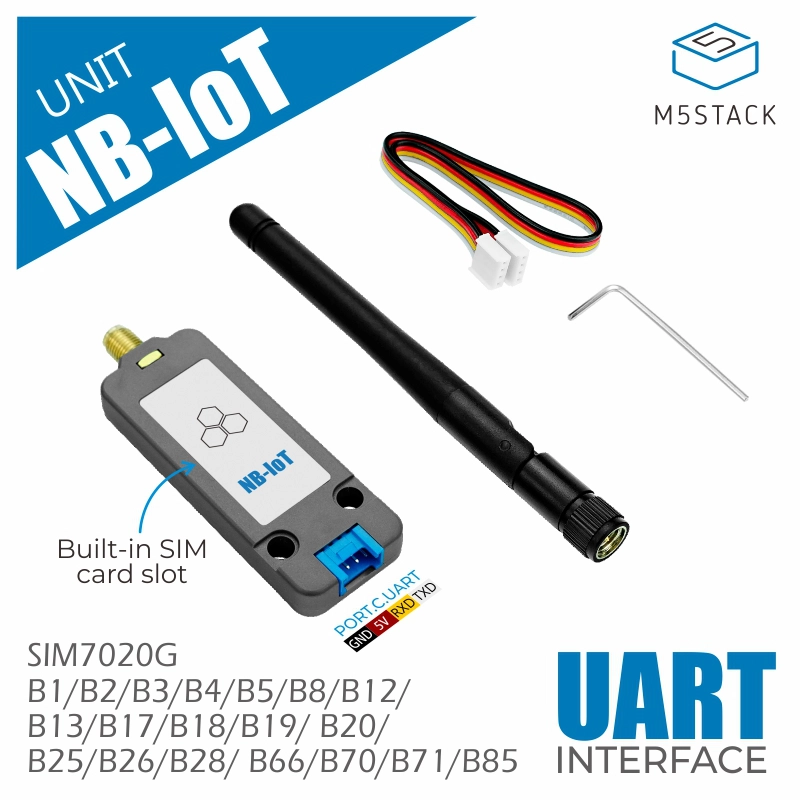
The NB-IOT Unit is a wireless communication module suitable for global wide Cat-NB frequency band . It has a built-in SIM7020G communication module, uses serial communication (AT instruction set control).
Support the following products:
Micropython Example:
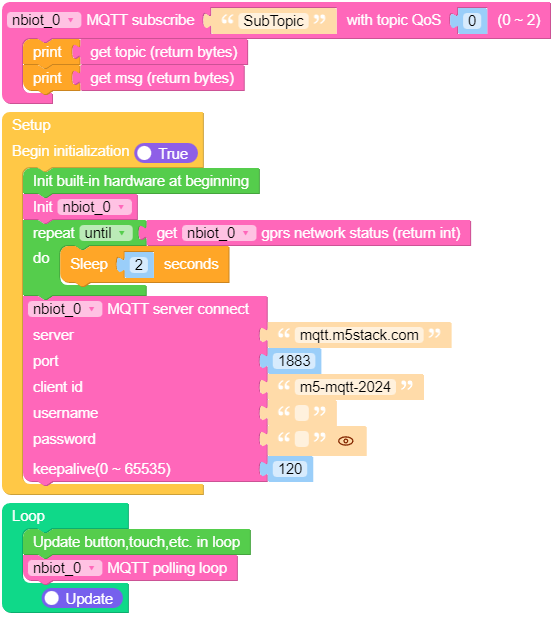
import os, sys, io
import M5
from M5 import *
from unit import NBIOTUnit
import time

def nbiot_0_SubTopic_event(_topic, _msg):
    print(_topic)
    print(_msg)

nbiot_0 = NBIOTUnit(port=(18, 17))
while not (nbiot_0.get_gprs_network_status()):
    time.sleep(2)
nbiot_0.mqtt_server_connect('mqtt.m5stack.com', 1883, 'm5-mqtt-2024', '', '', 120)
nbiot_0.mqtt_subscribe_topic('SubTopic', nbiot_0_SubTopic_event, 0)

while True:
    nbiot_0.mqtt_polling_loop()
UIFLOW2 Example:
class NBIOTUnit
Constructors
- class NBIOTUnit(port=(, ))
Create a NBIOTUnit object
- The parameters is:
portuart pin tuple, which contains:(tx_pin, rx_pin).
UIFLOW2:

Methods
- NBIOTUnit.check_modem_is_ready()
To check whether the communication with the NBIOT unit has been successful.
Return:
bool: True or False
UIFLOW2:

- NBIOTUnit.get_imei_number()
Get the International Mobile station Equipment Identity(IMEI) number.
Return:
string
UIFLOW2:

- NBIOTUnit.get_signal_strength()
Get the received signal strength indication level.
- Return:
int: Int
Rx signal strength level
0
-110 dBm or less
1
-109 dBm <=rssi< -107 dBm
2
-107 dBm <=rssi< -105 dBm
3…30
-105 dBm <=rssi< -48 dBm
31
-48 dBm <=rssi
99
Not known or not detectable
- Return:
UIFLOW2:

- NBIOTUnit.get_model_identification()
Get the product model identification.
Return:
string: SIMxxxx
UIFLOW2:

- NBIOTUnit.get_gprs_network_status()
Get the Indicates the Status of GPRS/Packet Domain Attached or Detached.
- Return:
int: 0 ~ 1 Int
Status
0
Detached
1
Attached
- Return:
UIFLOW2:

- NBIOTUnit.get_show_pdp_address_cid(cid)
Get the requests of PDP address for context identifier(1~2)
- The parameters is:
cid: 1 ~ 2
UIFLOW2:

- NBIOTUnit.get_pdp_context_status()
Get the Indicates the Status of PDP Context Activated or Deactivated.
- Return:
int: 0 ~ 1 Int
Status
0
Deactivated
1
Activated
- Return:
UIFLOW2:

- NBIOTUnit.get_pdp_context_dynamic_parameters(param)
Get the PDP Context Read Dynamic Network Parameters.
- The parameters is:
param: IP: 1, APN: 2.
UIFLOW2:

- NBIOTUnit.set_command_echo_mode(state)
Set the Command Echo Mode Off or On
- The parameters is:
state: Off: 0, On: 1.
UIFLOW2:

- NBIOTUnit.set_gprs_network_state(enable)
Set the State of GPRS/Packet Domain Attached or Detached.
- The parameters is:
enable: Detached: 0, Attached: 1.
UIFLOW2:

- NBIOTUnit.set_pdp_context_apn(apn)
Set the Default PSD Connection Settings.
- The parameters is:
apn: apn a string parameter and “cmnbiot” is default
UIFLOW2:

- NBIOTUnit.set_pdp_context(active)
Set the PDP Context Activate or Deactivate.
- The parameters is:
active: Deactivate: 0, Activate: 1.
UIFLOW2:

- NBIOTUnit.modem_debug = True/False
Set the AT Command debug print enable or disable.
- The parameters is:
modem_debug: disable: False, enable: True.
UIFLOW2:

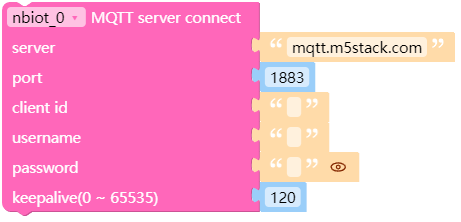
- NBIOTUnit.mqtt_server_connect(server, port, client_id, username, passwd, keepalive)
Set the MQTT Server address, port number, client id, username, password and keepalive time of the MQTT server.
- The parameters is:
server: server address is string formatport: port number is int formatclient_id: client id is string formatusername: username is string formatpasswd: password is string formatkeepalive: seconds is int format
UIFLOW2:
- NBIOTUnit.mqtt_server_disconnect()
Disconnect the MQTT Server
备注
“mqtt server connect” must be set before this block for it to work effectively.
UIFLOW2:

- NBIOTUnit.mqtt_server_is_connect()
Check the MQTT Server Connection Status
- Return:
int: 0 ~ 1 Int
Status
0
Not connected
1
Connected
- Return:
UIFLOW2:

- NBIOTUnit.mqtt_subscribe_topic(topic, cb, qos)
Specifies the subscription topic to subscribe.
- The parameters is:
topic: string formatcb: callback function is called when a message has been received on a topicqos: 0 ~ 2 (Default is 0)
备注
When using this block, the “mqtt_server_connect” block must be set after this block
UIFLOW2:

An handler showing a message has been received:
def nbiot_0_xxxxxxxx_event(_topic, _msg):
    print("topic:", _topic)
    print("msg:", _msg)
On uiflow2, you can get the topic and message of the current handler through
 and
and  .
.
- NBIOTUnit.mqtt_unsubscribe_topic(topic)
Unsubscribed topic to the MQTT server.
- The parameters is:
topic: topic is string format
UIFLOW2:

- NBIOTUnit.mqtt_publish_topic(topic, payload, quality)
Set the published topic and message to the MQTT server.
- The parameters is:
topic: topic is string formatpayload: payload is string formatquality: quality of service of 0, 1, 2
UIFLOW2:

- NBIOTUnit.mqtt_polling_loop()
The mqtt polling loop block must be used inside a loop.
UIFLOW2:

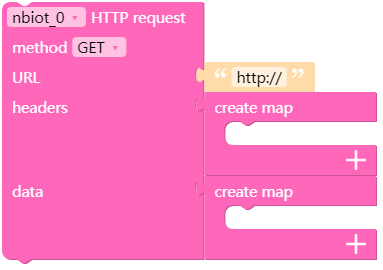
- NBIOTUnit.http_request(method, url, headers, data)
Create an HTTP or HTTPS request and set the configuration.
- The parameters is:
method: GET: 0, POST: 1, PUT: 2, DELETE: 3url: HTTP server host is string formatheaders: headers is Dictionaries typedata: data is Dictionaries type
UIFLOW2:
- NBIOTUnit.http_server_connect()
HTTP Connect to target server host
UIFLOW2:

- NBIOTUnit.http_server_disconnect()
HTTP Disconnect to target server host
备注
“http server connect” must be set before this block for it to work effectively.
UIFLOW2:

- NBIOTUnit.is_http_server_connect()
Check the HTTP Server Connection Status
- Return:
int: 0 ~ 1 Int
Status
0
Not connected
1
Connected
- Return:
UIFLOW2:

- NBIOTUnit.data_content()
Get the HTTP content data of the response from the host
Return:
string: Content data is string
UIFLOW2:

- NBIOTUnit.response_code()
Get the HTTP response code
Return:
int: 100, 101, 200 … 504, 505
UIFLOW2:
