image
备注
当前模块只适用于 CoreS3 主机
Micropython 案例
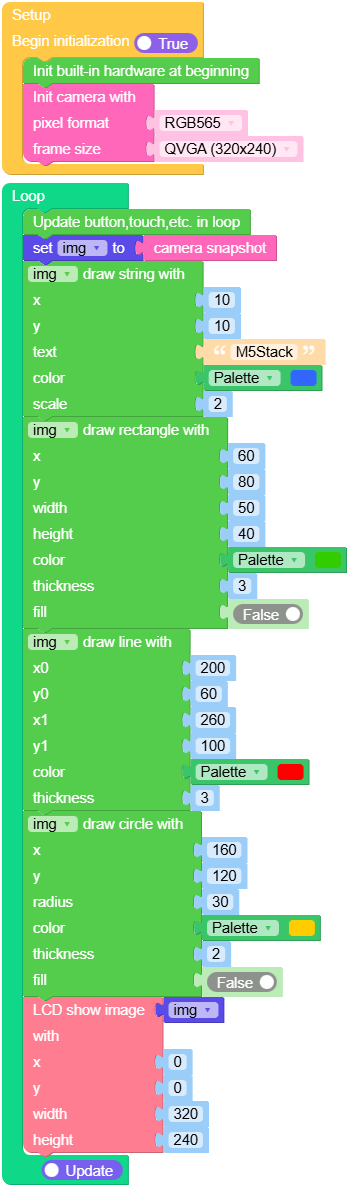
绘图测试
 1# SPDX-FileCopyrightText: 2024 M5Stack Technology CO LTD
 2#
 3# SPDX-License-Identifier: MIT
 4import os, sys, io
 5import M5
 6from M5 import *
 7import camera
 8import image
 9
10img = None
11
12def setup():
13    global img
14    M5.begin()
15    Widgets.fillScreen(0x222222)
16    camera.init(pixformat=camera.RGB565, framesize=camera.QVGA)
17
18def loop():
19    global img
20    M5.update()
21    img = camera.snapshot()
22    img.draw_string(10, 10, str('M5Stack'), color=0x3366ff, scale=2)
23    img.draw_rectangle(60, 80, 50, 40, color=0x33cc00, thickness=3, fill=False)
24    img.draw_line(200, 60, 260, 100, color=0xff0000, thickness=3)
25    img.draw_circle(160, 120, 30, color=0xffcc00, thickness=2, fill=False)
26    M5.Lcd.show(img, 0, 0, 320, 240)
27
28if __name__ == '__main__':
29    try:
30        setup()
31        while True:
32            loop()
33    except (Exception, KeyboardInterrupt) as e:
34        try:
35            from utility import print_error_msg
36            print_error_msg(e)
37        except ImportError:
38            print("please update to latest firmware")
UIFlow2.0 Example
绘图测试
class image.Image
image.Image 对象由 camera.snapshot() 返回.
Basic Methods





Drawing Methods
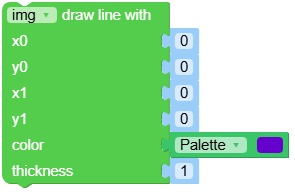
- image.draw_line(x0: int, y0: int, x1: int, y1: int, color: int | Tuple[int, int, int] | None = None, thickness=1) Image
在图像上绘制一条从 (x0, y0) 到 (x1, y1) 的线段。你可以分别传递 x0, y0, x1, y1,或者将它们作为元组 (x0, y0, x1, y1) 一起传递。
color颜色值 RGB888 格式,可以是 (r, g, b) 元组或整数。thickness控制线条的粗细(以像素为单位)。
返回
image.Image对象,以便你可以使用 . 表示法调用其他方法。UIFlow2.0
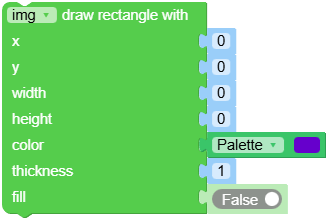
- image.draw_rectangle(x: int, y: int, w: int, h: int, color: int | Tuple[int, int, int] | None = None, thickness=1, fill=False) Image
在图像上绘制一个矩形。你可以分别传递 x, y, w, h,或者将它们作为元组 (x, y, w, h) 一起传递。
color颜色值 RGB888 格式,可以是 (r, g, b) 元组或整数。thickness控制线条的粗细(以像素为单位)。fill是否填充。
返回
image.Image对象,以便你可以使用 . 表示法调用其他方法。UIFlow2.0
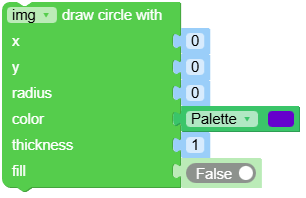
- image.draw_circle(x: int, y: int, radius: int, color: int | Tuple[int, int, int] | None = None, thickness=1, fill=False) Image
在图像上绘制一个圆形。你可以分别传递 x, y, radius,或者将它们作为元组 (x, y, radius) 一起传递。
color颜色值 RGB888 格式,可以是 (r, g, b) 元组或整数。thickness厚度”控制边缘的像素厚度。fillset to True to fill the circle.
返回
image.Image对象,以便你可以使用 . 表示法调用其他方法。UIFlow2.0
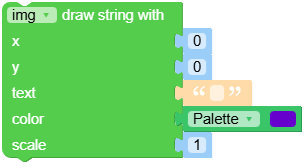
- image.draw_string(x: int, y: int, text: str, color: int | Tuple[int, int, int] | None = None, scale=1) Image
在图像上绘制从位置 (x, y) 开始的 8x16 文本。你可以分别传递 x, y,或者将它们作为元组 (x, y) 一起传递。
text是要写入图像的字符串。``、`` 和 `` `` 换行符将光标移动到下一行。color颜色值 RGB888 格式,可以是 (r, g, b) 元组或整数。scale可增加或减少图像中文本的大小。你可以传递大于 0 的整数或浮动值。
返回
image.Image对象,以便你可以使用 . 表示法调用其他方法。UIFlow2.0