dl — deep learning
备注
当前模块只适用于 CoreS3 主机
Micropython 案例
人脸检测
 1# SPDX-FileCopyrightText: 2024 M5Stack Technology CO LTD
 2#
 3# SPDX-License-Identifier: MIT
 4import os, sys, io
 5import M5
 6from M5 import *
 7import camera
 8import dl
 9import image
10
11
12
13img = None
14detector = None
15detection_result = None
16res = None
17kp = None
18
19def setup():
20    global img, detector, detection_result, kp
21    M5.begin()
22    Widgets.fillScreen(0x222222)
23    camera.init(pixformat=camera.RGB565, framesize=camera.QVGA)
24    detector = dl.ObjectDetector(dl.model.HUMAN_FACE_DETECT)
25
26def loop():
27    global img, detector, detection_result, kp
28    M5.update()
29    img = camera.snapshot()
30    detection_result = detector.infer(img)
31    if detection_result:
32        for res in detection_result:
33            kp = res.keypoint()
34            img.draw_circle(kp[0], kp[1], 3, color=0x0000ff, thickness=1, fill=True)
35            img.draw_circle(kp[2], kp[3], 3, color=0x00ff00, thickness=1, fill=True)
36            img.draw_circle(kp[4], kp[5], 3, color=0xff0000, thickness=1, fill=True)
37            img.draw_circle(kp[6], kp[7], 3, color=0x0000ff, thickness=1, fill=True)
38            img.draw_circle(kp[8], kp[9], 3, color=0x00ff00, thickness=1, fill=True)
39            img.draw_rectangle(res.x(), res.y(), res.w(), res.h(), color=0x3366ff, thickness=3, fill=False)
40    M5.Lcd.show(img, 0, 0, 320, 240)
41
42if __name__ == '__main__':
43    try:
44        setup()
45        while True:
46            loop()
47    except (Exception, KeyboardInterrupt) as e:
48        try:
49            from utility import print_error_msg
50            print_error_msg(e)
51        except ImportError:
52            print("please update to latest firmware")
53
行人检测
 1# SPDX-FileCopyrightText: 2024 M5Stack Technology CO LTD
 2#
 3# SPDX-License-Identifier: MIT
 4import os, sys, io
 5import M5
 6from M5 import *
 7import camera
 8import dl
 9import image
10
11
12img = None
13detector = None
14detection_result = None
15res = None
16kp = None
17
18def setup():
19    global img, detector, detection_result, kp
20    M5.begin()
21    Widgets.fillScreen(0x222222)
22    camera.init(pixformat=camera.RGB565, framesize=camera.QVGA)
23    detector = dl.ObjectDetector(dl.model.PEDESTRIAN_DETECT)
24
25def loop():
26    global img, detector, detection_result, kp
27    M5.update()
28    img = camera.snapshot()
29    detection_result = detector.infer(img)
30    if detection_result:
31        for res in detection_result:
32            kp = res.keypoint()
33            img.draw_rectangle(res.x(), res.y(), res.w(), res.h(), color=0x3366ff, thickness=3, fill=False)
34    M5.Lcd.show(img, 0, 0, 320, 240)
35
36if __name__ == '__main__':
37    try:
38        setup()
39        while True:
40            loop()
41    except (Exception, KeyboardInterrupt) as e:
42        try:
43            from utility import print_error_msg
44            print_error_msg(e)
45        except ImportError:
46            print("please update to latest firmware")
人脸识别
  1# SPDX-FileCopyrightText: 2024 M5Stack Technology CO LTD
  2#
  3# SPDX-License-Identifier: MIT
  4import os, sys, io
  5import M5
  6from M5 import *
  7from unit import DualButtonUnit
  8from hardware import *
  9import camera
 10import dl
 11import image
 12
 13
 14dual_button_0_blue = None
 15dual_button_0_red = None
 16sys_state = None
 17FACE_RECOGNIZE = None
 18FACE_ENROLL = None
 19FACE_DELETE = None
 20detector = None
 21img = None
 22dl_recognizer = None
 23detection_result = None
 24IDLE = None
 25res = None
 26kp = None
 27sys_state_prev = None
 28frame_count = None
 29dl_recognize_result = None
 30
 31
 32def dual_button_0_blue_wasClicked_event(state):
 33    global dual_button_0_blue, dual_button_0_red, sys_state, FACE_RECOGNIZE, FACE_ENROLL, FACE_DELETE, detector, img, dl_recognizer, detection_result, IDLE, kp, sys_state_prev, frame_count, res, dl_recognize_result
 34    sys_state = FACE_RECOGNIZE
 35
 36def dual_button_0_red_wasClicked_event(state):
 37    global dual_button_0_blue, dual_button_0_red, sys_state, FACE_RECOGNIZE, FACE_ENROLL, FACE_DELETE, detector, img, dl_recognizer, detection_result, IDLE, kp, sys_state_prev, frame_count, res, dl_recognize_result
 38    sys_state = FACE_ENROLL
 39
 40def btnPWR_wasClicked_event(state):
 41    global dual_button_0_blue, dual_button_0_red, sys_state, FACE_RECOGNIZE, FACE_ENROLL, FACE_DELETE, detector, img, dl_recognizer, detection_result, IDLE, kp, sys_state_prev, frame_count, res, dl_recognize_result
 42    sys_state = FACE_DELETE
 43
 44def setup():
 45    global dual_button_0_blue, dual_button_0_red, sys_state, FACE_RECOGNIZE, FACE_ENROLL, FACE_DELETE, detector, img, dl_recognizer, detection_result, IDLE, kp, sys_state_prev, frame_count, res, dl_recognize_result
 46    M5.begin()
 47    Widgets.fillScreen(0x222222)
 48    BtnPWR.setCallback(type=BtnPWR.CB_TYPE.WAS_CLICKED, cb=btnPWR_wasClicked_event)
 49    camera.init(pixformat=camera.RGB565, framesize=camera.QVGA)
 50    dual_button_0_blue, dual_button_0_red = DualButtonUnit((8, 9))
 51    dual_button_0_blue.setCallback(type=dual_button_0_blue.CB_TYPE.WAS_CLICKED, cb=dual_button_0_blue_wasClicked_event)
 52    dual_button_0_red.setCallback(type=dual_button_0_red.CB_TYPE.WAS_CLICKED, cb=dual_button_0_red_wasClicked_event)
 53    detector = dl.ObjectDetector(dl.model.HUMAN_FACE_DETECT)
 54    dl_recognizer = dl.HumanFaceRecognizer()
 55    IDLE = 0
 56    FACE_ENROLL = 1
 57    FACE_RECOGNIZE = 2
 58    FACE_DELETE = 3
 59    sys_state = IDLE
 60    sys_state_prev = IDLE
 61    frame_count = 0
 62
 63def loop():
 64    global dual_button_0_blue, dual_button_0_red, sys_state, FACE_RECOGNIZE, FACE_ENROLL, FACE_DELETE, detector, img, dl_recognizer, detection_result, IDLE, kp, sys_state_prev, frame_count, res, dl_recognize_result
 65    M5.update()
 66    dual_button_0_blue.tick(None)
 67    dual_button_0_red.tick(None)
 68    img = camera.snapshot()
 69    detection_result = detector.infer(img)
 70    if detection_result:
 71        for res in detection_result:
 72            kp = res.keypoint()
 73            img.draw_string(10, 10, str('face'), color=0x3333ff, scale=1)
 74            img.draw_circle(kp[0], kp[1], 3, color=0x3333ff, thickness=1, fill=True)
 75            img.draw_circle(kp[2], kp[3], 3, color=0x33ff33, thickness=1, fill=True)
 76            img.draw_circle(kp[4], kp[5], 3, color=0xff0000, thickness=1, fill=True)
 77            img.draw_circle(kp[6], kp[7], 3, color=0x3333ff, thickness=1, fill=True)
 78            img.draw_circle(kp[8], kp[9], 3, color=0x33ff33, thickness=1, fill=True)
 79            img.draw_rectangle(res.x(), res.y(), res.w(), res.h(), color=0x3366ff, thickness=3, fill=False)
 80    if sys_state == FACE_DELETE:
 81        dl_recognizer.delete_id()
 82        sys_state_prev = sys_state
 83        sys_state = IDLE
 84        frame_count = 15
 85    elif sys_state != IDLE:
 86        if detection_result:
 87            if len(detection_result) == 1:
 88                res = detection_result[0]
 89                if sys_state == FACE_ENROLL:
 90                    dl_recognizer.enroll_id(img, res.keypoint())
 91                elif sys_state == FACE_RECOGNIZE:
 92                    dl_recognize_result = dl_recognizer.recognize(img, res.keypoint())
 93                    if (dl_recognize_result.id()) > 0:
 94                        print((str('similarity: ') + str((dl_recognize_result.similarity()))))
 95                sys_state_prev = sys_state
 96                sys_state = IDLE
 97                frame_count = 15
 98        else:
 99            img.draw_string(104, 10, str('face no detect'), color=0xff0000, scale=1)
100    if frame_count > 0:
101        frame_count = frame_count - 1
102        if sys_state_prev == FACE_ENROLL:
103            img.draw_string(116, 10, str('face enroll'), color=0x33ff33, scale=1)
104        elif sys_state_prev == FACE_RECOGNIZE:
105            if (dl_recognize_result.id()) > 0:
106                img.draw_string(100, 10, str((str('recognize id: ') + str((dl_recognize_result.id())))), color=0x33ff33, scale=1)
107            else:
108                img.draw_string(96, 10, str('no recognized'), color=0xff0000, scale=1)
109        elif sys_state_prev == FACE_DELETE:
110            img.draw_string(100, 10, str((str('remaining id: ') + str((dl_recognizer.enrolled_id_num())))), color=0xff0000, scale=1)
111    M5.Lcd.show(img, 0, 0, 320, 240)
112
113if __name__ == '__main__':
114    try:
115        setup()
116        while True:
117            loop()
118    except (Exception, KeyboardInterrupt) as e:
119        try:
120            from utility import print_error_msg
121            print_error_msg(e)
122        except ImportError:
123            print("please update to latest firmware")
124
UIFlow2.0 案例
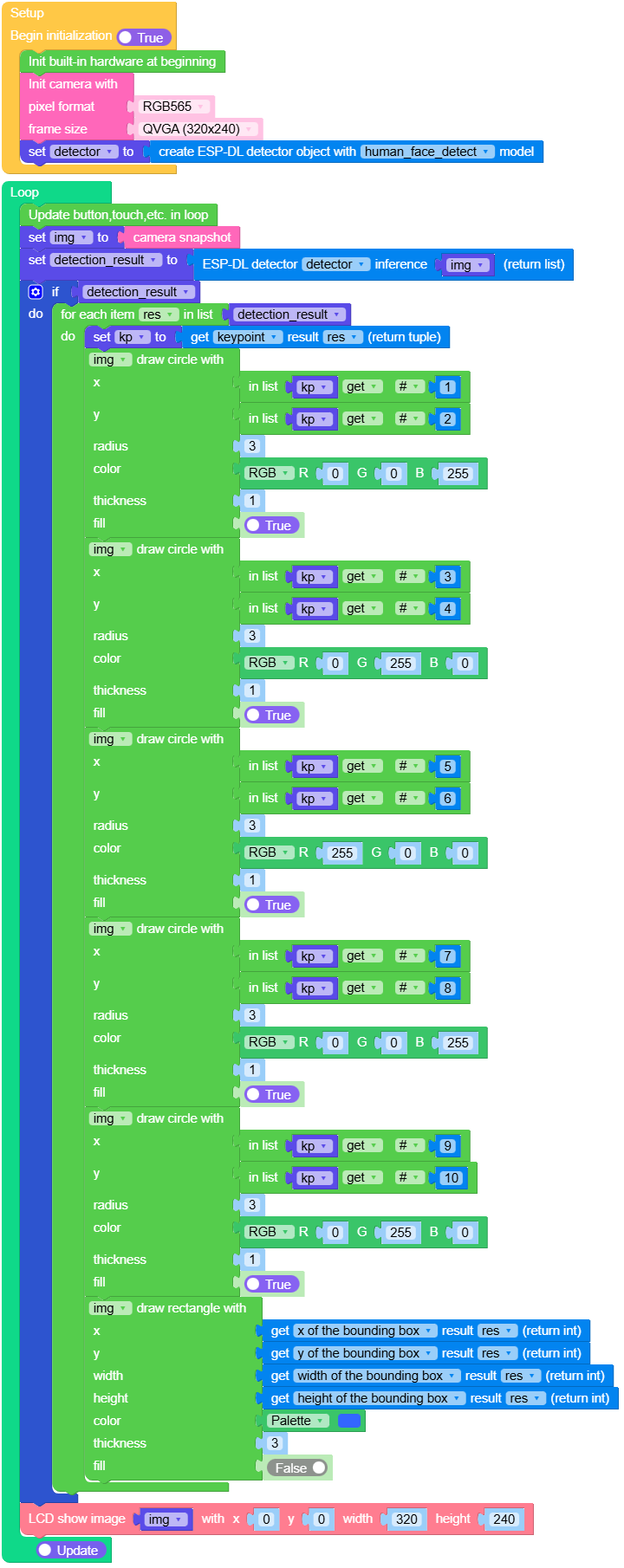
人脸检测
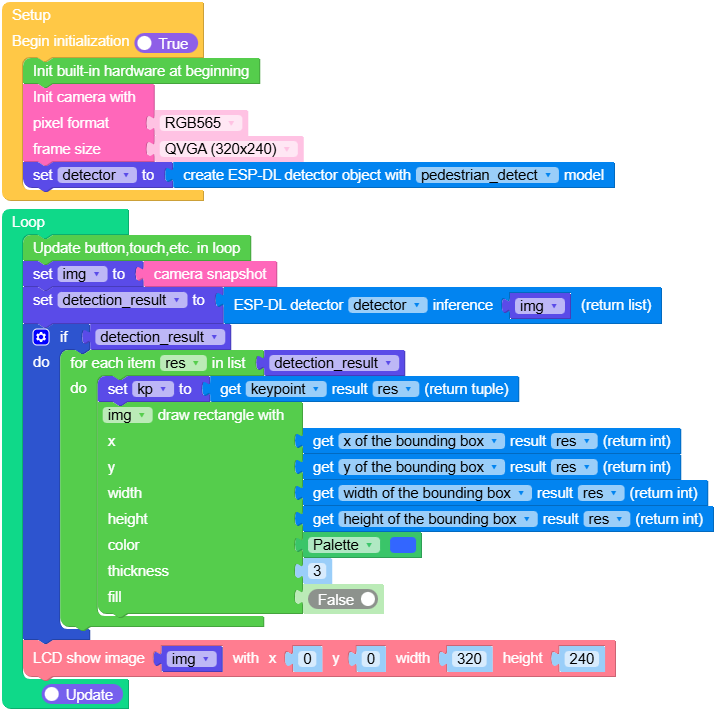
行人检测
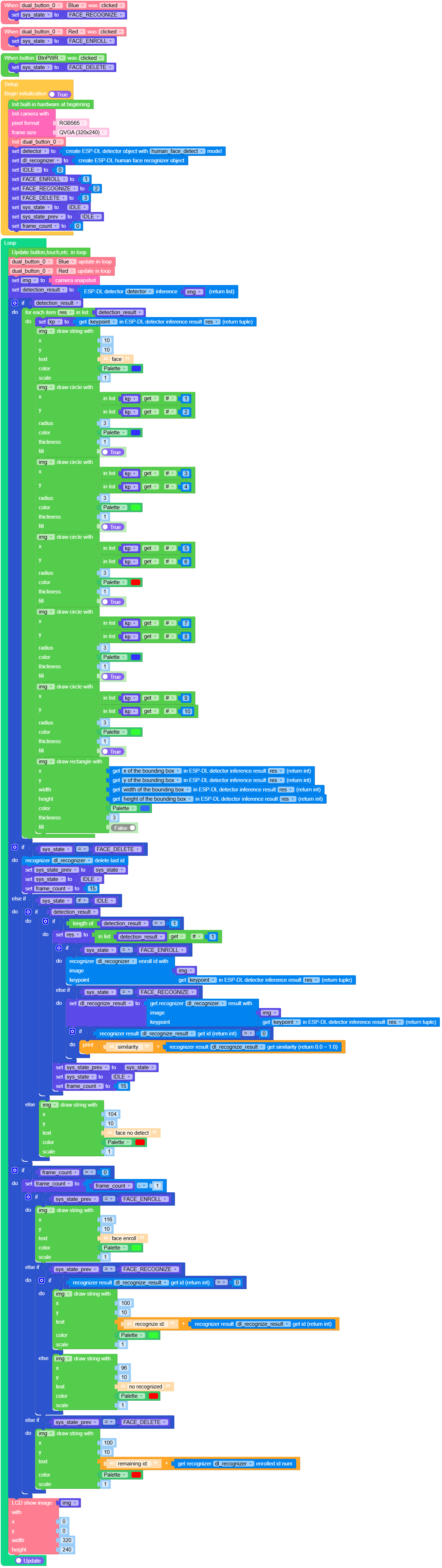
人脸识别
Funtions
- dl.ObjectDetector(model) ObjectDetector
Create an object detector instance.
- 参数:
model – 参数
model仅接受以下值:
dl.model.HUMAN_FACE_DETECT人脸检测dl.model.PEDESTRIAN_DETECT行人检测
返回
ObjectDetector对象.UIFlow2.0

Example:
detector = dl.ObjectDetector(dl.model.HUMAN_FACE_DETECT)
detector = dl.ObjectDetector(dl.model.PEDESTRIAN_DETECT)
- dl.HumanFaceRecognizer() HumanFaceRecognizer
创建一个人脸识别器
返回
HumanFaceRecognizer对象.UIFlow2.0

class ObjectDetector
ObjectDetector 对象由 dl.ObjectDetector(model) 返回
- ObjectDetector.infer(img: image.Image) DetectionResult
返回一个
DetectionResult实例.UIFlow2.0

class HumanFaceRecognizer
HumanFaceRecognizer 对象由 dl.HumanFaceRecognizer() 返回
- HumanFaceRecognizer.recognize(img: image:Image, keypoint: tuple) RecognitionResult
人脸识别
img输入图像keypoint人脸关键点数据,详情参考 DetectionResult.keypoint() 解析
返回
RecognitionResult对象。UIFlow2.0

- HumanFaceRecognizer.clear_id()
清空所有 id
UIFlow2.0

- HumanFaceRecognizer.enroll_id(img: image:Image, keypoint: tuple) bool
enroll id
img输入图像keypoint人脸关键点数据,详情参考 DetectionResult.keypoint() 解析
UIFlow2.0

- HumanFaceRecognizer.delete_id([id])
delete id
id为可选参数,输入id为删除指定的人脸信息,默认为删除最近一次录入的id。UIFlow2.0



class DetectionResult – DetectionResult object
DetectionResult 对象由 ObjectDetector.infer(img) 返回
- DetectionResult.bbox()
获取目标检测的边界框。
UIFlow2.0







class RecognitionResult – RecognitionResult object
DetectionResult 对象由 HumanFaceRecognizer.recognize(img, keypoint) 返

