SwitchC6
The SwitchC6 is a device that can be controlled using the M5Stack platform. This module provides functions to interact with the SwitchC6 device.

UiFlow2 Example
SwitchC6 Control
Open the cores3_switchc6_example.m5f2 project in UiFlow2.
This example demonstrates how to control the SwitchC6 device using UiFlow2.
UiFlow2 Code Block:

Example output:
None
MicroPython Example
SwitchC6 Control
This example demonstrates how to control the SwitchC6 device using MicroPython.
MicroPython Code Block:
  1# SPDX-FileCopyrightText: 2025 M5Stack Technology CO LTD
  2#
  3# SPDX-License-Identifier: MIT
  4
  5import os, sys, io
  6import M5
  7from M5 import *
  8import m5ui
  9import lvgl as lv
 10import switchc6
 11
 12
 13page0 = None
 14switch0 = None
 15label0 = None
 16label1 = None
 17label2 = None
 18label3 = None
 19switchc6_controller = None
 20
 21
 22switchc6_target_mac = None
 23switchc6_onoff = None
 24switchc6_voltage = None
 25
 26
 27def switch0_checked_event(event_struct):
 28    global \
 29        page0, \
 30        switch0, \
 31        label0, \
 32        label1, \
 33        label2, \
 34        label3, \
 35        switchc6_controller, \
 36        switchc6_target_mac, \
 37        switchc6_onoff, \
 38        switchc6_voltage
 39    switchc6_controller.toggle_switch("E4B3-2386-18B8", timeout=2000)
 40
 41
 42def switchc6_controller_off_event(args):
 43    global \
 44        page0, \
 45        switch0, \
 46        label0, \
 47        label1, \
 48        label2, \
 49        label3, \
 50        switchc6_controller, \
 51        switchc6_target_mac, \
 52        switchc6_onoff, \
 53        switchc6_voltage
 54    _, switchc6_target_mac, switchc6_onoff, switchc6_voltage = args
 55    label0.set_text(str(switchc6_target_mac))
 56    label1.set_text(str(switchc6_onoff))
 57    label2.set_text(str(switchc6_voltage))
 58
 59
 60def switch0_unchecked_event(event_struct):
 61    global \
 62        page0, \
 63        switch0, \
 64        label0, \
 65        label1, \
 66        label2, \
 67        label3, \
 68        switchc6_controller, \
 69        switchc6_target_mac, \
 70        switchc6_onoff, \
 71        switchc6_voltage
 72    switchc6_controller.set_switch("E4B3-2386-18B8", False, timeout=2000)
 73
 74
 75def switchc6_controller_on_event(args):
 76    global \
 77        page0, \
 78        switch0, \
 79        label0, \
 80        label1, \
 81        label2, \
 82        label3, \
 83        switchc6_controller, \
 84        switchc6_target_mac, \
 85        switchc6_onoff, \
 86        switchc6_voltage
 87    _, switchc6_target_mac, switchc6_onoff, switchc6_voltage = args
 88    label0.set_text(str(switchc6_target_mac))
 89    label1.set_text(str(switchc6_onoff))
 90    label2.set_text(str(switchc6_voltage))
 91
 92
 93def switch0_event_handler(event_struct):
 94    global \
 95        page0, \
 96        switch0, \
 97        label0, \
 98        label1, \
 99        label2, \
100        label3, \
101        switchc6_controller, \
102        switchc6_target_mac, \
103        switchc6_onoff, \
104        switchc6_voltage
105    event = event_struct.code
106    obj = event_struct.get_target_obj()
107    if event == lv.EVENT.VALUE_CHANGED:
108        if obj.has_state(lv.STATE.CHECKED):
109            switch0_checked_event(event_struct)
110        else:
111            switch0_unchecked_event(event_struct)
112    return
113
114
115def setup():
116    global \
117        page0, \
118        switch0, \
119        label0, \
120        label1, \
121        label2, \
122        label3, \
123        switchc6_controller, \
124        switchc6_target_mac, \
125        switchc6_onoff, \
126        switchc6_voltage
127
128    M5.begin()
129    Widgets.setRotation(1)
130    m5ui.init()
131    page0 = m5ui.M5Page(bg_c=0xFFFFFF)
132    switch0 = m5ui.M5Switch(
133        x=76,
134        y=49,
135        w=154,
136        h=77,
137        bg_c=0xE7E3E7,
138        bg_c_checked=0x2196F3,
139        circle_c=0xFFFFFF,
140        parent=page0,
141    )
142    label0 = m5ui.M5Label(
143        "label0",
144        x=19,
145        y=151,
146        text_c=0x000000,
147        bg_c=0xFFFFFF,
148        bg_opa=0,
149        font=lv.font_montserrat_14,
150        parent=page0,
151    )
152    label1 = m5ui.M5Label(
153        "label1",
154        x=17,
155        y=173,
156        text_c=0x000000,
157        bg_c=0xFFFFFF,
158        bg_opa=0,
159        font=lv.font_montserrat_14,
160        parent=page0,
161    )
162    label2 = m5ui.M5Label(
163        "label2",
164        x=17,
165        y=195,
166        text_c=0x000000,
167        bg_c=0xFFFFFF,
168        bg_opa=0,
169        font=lv.font_montserrat_14,
170        parent=page0,
171    )
172    label3 = m5ui.M5Label(
173        "label3",
174        x=18,
175        y=217,
176        text_c=0x000000,
177        bg_c=0xFFFFFF,
178        bg_opa=0,
179        font=lv.font_montserrat_14,
180        parent=page0,
181    )
182
183    switch0.add_event_cb(switch0_event_handler, lv.EVENT.ALL, None)
184
185    page0.screen_load()
186    switchc6_controller = switchc6.SwitchC6Controller(
187        ["E4B3-2386-18B8"], wifi_channel=0, verbose=False
188    )
189    switchc6_controller.set_callback(switchc6_controller_off_event, switchc6_controller.OFF)
190    switchc6_controller.set_callback(switchc6_controller_on_event, switchc6_controller.ON)
191    label3.set_text(str(switchc6_controller.get_firmware_version("E4B3-2386-18B8", timeout=5000)))
192    label1.set_text(str(switchc6_controller.get_capacitor_voltage("E4B3-2386-18B8", timeout=5000)))
193    label2.set_text(str(switchc6_controller.get_switch_status("E4B3-2386-18B8", timeout=5000)))
194
195
196def loop():
197    global \
198        page0, \
199        switch0, \
200        label0, \
201        label1, \
202        label2, \
203        label3, \
204        switchc6_controller, \
205        switchc6_target_mac, \
206        switchc6_onoff, \
207        switchc6_voltage
208    M5.update()
209
210
211if __name__ == "__main__":
212    try:
213        setup()
214        while True:
215            loop()
216    except (Exception, KeyboardInterrupt) as e:
217        try:
218            m5ui.deinit()
219            from utility import print_error_msg
220
221            print_error_msg(e)
222        except ImportError:
223            print("please update to latest firmware")
Example output:
None
API
SwitchC6Controller
- class iot_devices.switchc6.SwitchC6Controller(target_mac, wifi_channel=0, verbose=False)
Bases:
objectCreate a SwitchC6Controller instance to control M5Stack SwitchC6 devices.
- Parameters:
- Raises:
ValueError – If any MAC address in target_mac is not in the “XXXX-XXXX-XXXX” format.
UiFlow2 Code Block:
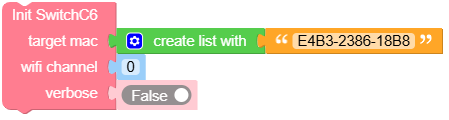
MicroPython Code Block:
import switchc6

controller = switchc6.SwitchC6Controller(
    target_mac=["1122-AABB-CCDD", "2233-BBEE-DDEE"],
    wifi_channel=0,
    verbose=True
)
- set_switch(target_mac, onoff, timeout=5000)
Set the switch state of the target device.
- Parameters:
UiFlow2 Code Block:

MicroPython Code Block:
switchc6.set_switch("1122-AABB-CCDD", True, timeout=5000)
- toggle_switch(target_mac, timeout=5000)
Toggle the switch status of the target device.
- Parameters:
UiFlow2 Code Block:

MicroPython Code Block:
switchc6.toggle_switch("1122-AABB-CCDD", timeout=5000)
- get_capacitor_voltage(target_mac, timeout=5000)
Get the capacitor voltage of the target device.
- Parameters:
- Returns:
The capacitor voltage as a float.
- Return type:
UiFlow2 Code Block:

MicroPython Code Block:
switchc6.get_capacitor_voltage("1122-AABB-CCDD", timeout=5000)
- get_switch_status(target_mac, timeout=5000)
Get the switch status of the target device.
- Parameters:
- Returns:
True if the switch is ON, False if it is OFF.
- Return type:
UiFlow2 Code Block:

MicroPython Code Block:
switchc6.get_switch_status("1122-AABB-CCDD", timeout=5000)
- set_callback(handler)
Set a callback function for the specified trigger.
- Parameters:
handler – The callback function to be called when the trigger occurs.
trigger – The trigger type (0 for OFF, 1 for ON).
- Return type:
None
UiFlow2 Code Block:
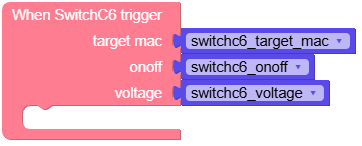
MicroPython Code Block:
switchc6.set_callback(handler, trigger)
- get_firmware_version(target_mac, timeout=5000)
Get the firmware version of the target device.
- Parameters:
- Returns:
The firmware version as a string.
- Return type:
UiFlow2 Code Block:

MicroPython Code Block:
switchc6.get_firmware_version("1122-AABB-CCDD", timeout=5000)