Faces Keyboard3 Module
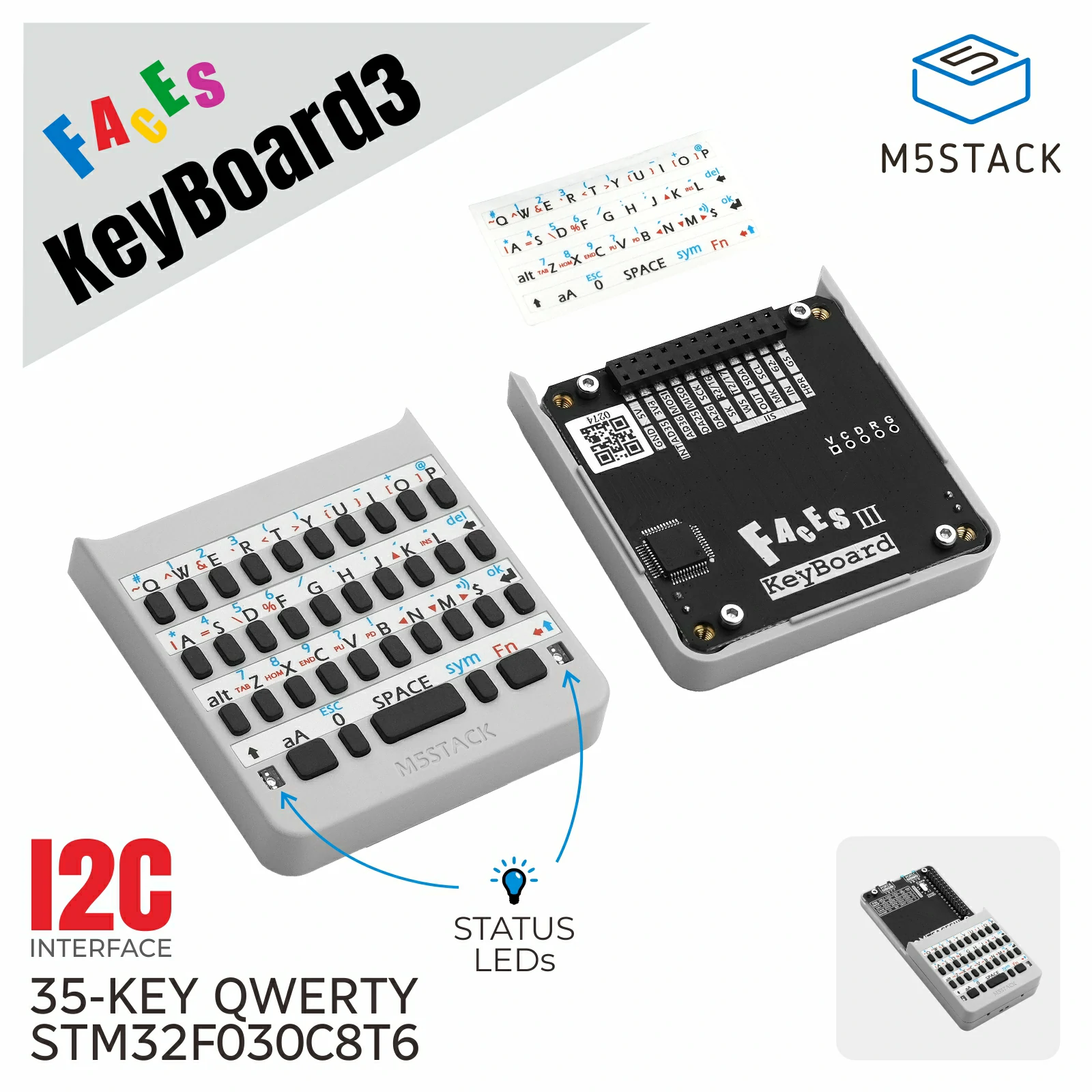
Faces Keyboard3 is a keyboard input module with mapped-character Normal mode and raw-matrix Direct mode. In Direct mode, the callback receives a tuple of currently pressed key names and the two keyboard LEDs can be controlled.
Support the following products:
UiFlow2 Example
Normal mode key events
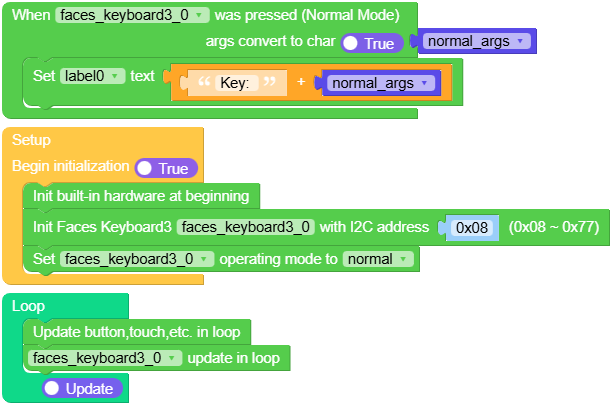
This example uses Normal mode and reports each mapped key on the CoreS3 display.
Open the faces_keyboard3_cores3_example.m5f2 project in UiFlow2.
UiFlow2 Code Block:
MicroPython Example
Normal mode key events
Normal mode maps key presses to character codes. Direct mode reports a tuple of currently pressed matrix-key names and also allows LED control.
 1# SPDX-FileCopyrightText: 2026 M5Stack Technology CO LTD
 2#
 3# SPDX-License-Identifier: MIT
 4
 5import os, sys, io
 6import M5
 7from M5 import *
 8from module import FacesKeyboard3Module
 9
10
11title0 = None
12label0 = None
13faces_keyboard3_0 = None
14
15
16normal_args = None
17
18
19def faces_keyboard3_0_normal_event(args):
20    global title0, label0, faces_keyboard3_0, normal_args
21    normal_args = chr(args)
22    label0.setText(str((str("Key: ") + str(normal_args))))
23
24
25def setup():
26    global title0, label0, faces_keyboard3_0, normal_args
27
28    M5.begin()
29    Widgets.setRotation(1)
30    Widgets.fillScreen(0x222222)
31    title0 = Widgets.Title(
32        "Faces Keyboard3 CoreS3 Example", 3, 0xFFFFFF, 0x0000FF, Widgets.FONTS.Montserrat18
33    )
34    label0 = Widgets.Label("label0", 3, 110, 1.0, 0xFFFFFF, 0x222222, Widgets.FONTS.Montserrat18)
35
36    faces_keyboard3_0 = FacesKeyboard3Module(address=0x08)
37    faces_keyboard3_0.set_callback(faces_keyboard3_0_normal_event)
38    faces_keyboard3_0.set_mode(FacesKeyboard3Module.NORMAL)
39
40
41def loop():
42    global title0, label0, faces_keyboard3_0, normal_args
43    M5.update()
44    faces_keyboard3_0.tick()
45
46
47if __name__ == "__main__":
48    try:
49        setup()
50        while True:
51            loop()
52    except (Exception, KeyboardInterrupt) as e:
53        try:
54            from utility import print_error_msg
55
56            print_error_msg(e)
57        except ImportError:
58            print("please update to latest firmware")
API
- class module.faces.FacesKeyboard3Module(address=8)
Bases:
_FacesModuleCreate a Faces Keyboard3 Module object.
- Parameters:
address (int) – I2C address. Default is
0x08.
UiFlow2 Code Block:

MicroPython Code Block:
from module import FacesKeyboard3Module

faces_keyboard3 = FacesKeyboard3Module()
- get_mode()
Get the current keyboard operating mode.
NORMAL(0x00) maps key presses to characters;DIRECT(0x01) reports matrix key names.UiFlow2 Code Block:

MicroPython Code Block:
faces_keyboard3.get_mode()
- Return type:
- set_mode(mode)
Set mapped-character or raw-matrix operating mode.
- Parameters:
mode (int) –
NORMALorDIRECT.- Return type:
None
UiFlow2 Code Block:

MicroPython Code Block:
faces_keyboard3.set_mode(faces_keyboard3.DIRECT)
- set_led_effect(effect)
Set a keyboard LED effect in Direct mode.
Effects correspond to the keyboard firmware states and LED patterns:
LED_EFFECT_1:aAsingle press; left LED stays on.LED_EFFECT_2:aAdouble-press lock; left LED blinks every 500 ms.LED_EFFECT_3:ALTactive; left LED blinks every 150 ms.LED_EFFECT_4:FNsingle press; right LED stays on.LED_EFFECT_5:FNdouble-press lock; right LED blinks every 500 ms.LED_EFFECT_6:SYMdouble-press lock; right LED blinks every 150 ms.LED_EFFECT_7:SYMsingle press; LEDs alternate every 500 ms.LED_EFFECT_8: External effect; LEDs alternate every 200 ms.
- Parameters:
effect (int) – One of the
LED_EFFECT_*constants.- Return type:
None
UiFlow2 Code Block:

MicroPython Code Block:
faces_keyboard3.set_led_effect(faces_keyboard3.LED_EFFECT_1)
- set_led(left, right)
Set the left and right LEDs directly in Direct mode.
UiFlow2 Code Block:

MicroPython Code Block:
faces_keyboard3.set_led(True, False)
- set_callback(handler)
Set the key callback.
In Normal mode, the callback receives an integer key code. In Direct mode, it receives a tuple containing the currently pressed key names. Pass
Noneto disable the callback.- Parameters:
handler – Callable accepting the key event value, or
None.- Return type:
None
- tick()
Poll once and schedule the callback for a new key event.
UiFlow2 Code Block:

MicroPython Code Block:
faces_keyboard3.tick()
- Return type:
None
- get_device_id()
Get the Faces module device type ID.
- Returns:
The device type ID.
- Return type:
UiFlow2 Code Block:

MicroPython Code Block:
device.get_device_id()
- get_firmware_version()
Get the firmware version.
- Returns:
The firmware version.
- Return type:
UiFlow2 Code Block:

MicroPython Code Block:
device.get_firmware_version()
- get_i2c_address()
Get the current 7-bit I2C address.
- Returns:
The current I2C address.
- Return type:
UiFlow2 Code Block:

MicroPython Code Block:
device.get_i2c_address()
- get_uid()
Get the 96-bit MCU unique identifier.
- Returns:
The 12-byte unique identifier.
- Return type:
UiFlow2 Code Block:

MicroPython Code Block:
device.get_uid()

Keyboard LED constants:
Constant |
Value |
Description |
|---|---|---|
|
|
Disable the preset effect |
|
|
Left LED stays on |
|
|
Left LED blinks slowly |
|
|
Left LED blinks quickly |
|
|
Right LED stays on |
|
|
Right LED blinks slowly |
|
|
Right LED blinks quickly |
|
|
Left and right LEDs alternate slowly |
|
|
Left and right LEDs alternate quickly |
In Normal mode, KEY_BACKSPACE is 0x08, KEY_ENTER is 0x0D, and
KEY_DELETE is 0x7F. LED effects and manual LED states are available
only in Direct mode.