Chain Mono
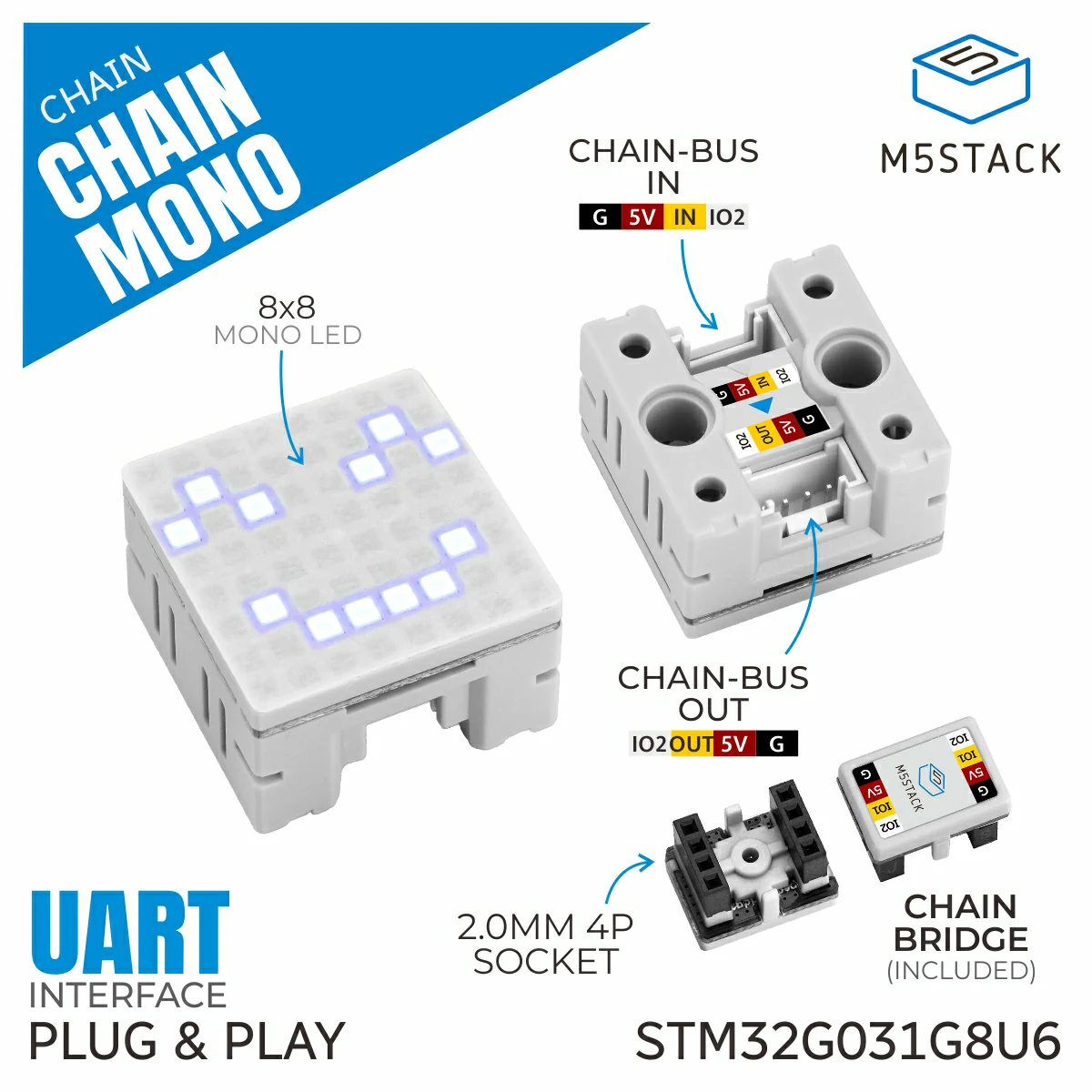
MonoChain is the helper class for Chain Mono display devices on the Chain bus. It provides methods to control an 8 x 8 monochrome display, including pixel drawing, full-screen buffer refresh, ASCII character display, scrolling text, brightness, and rotation.
Support the following products:
Constants
Display modes use MonoChain.MODE_PIXEL and MonoChain.MODE_SCROLL.
Scroll directions use MonoChain.SCROLL_DIR_LEFT,
MonoChain.SCROLL_DIR_RIGHT, MonoChain.SCROLL_DIR_UP, and
MonoChain.SCROLL_DIR_DOWN.
Scroll modes use MonoChain.SCROLL_MODE_ONCE,
MonoChain.SCROLL_MODE_LOOP, and MonoChain.SCROLL_MODE_BOUNCE.
Scroll states use MonoChain.SCROLL_STATE_START,
MonoChain.SCROLL_STATE_PAUSE, and MonoChain.SCROLL_STATE_RESET.
Display rotation uses MonoChain.ROTATION_0, MonoChain.ROTATION_90,
MonoChain.ROTATION_180, and MonoChain.ROTATION_270.
UiFlow2 Example
Scroll text, rotation, and brightness control
Open the basic_chain_mono_example.m5f2 project in UiFlow2.
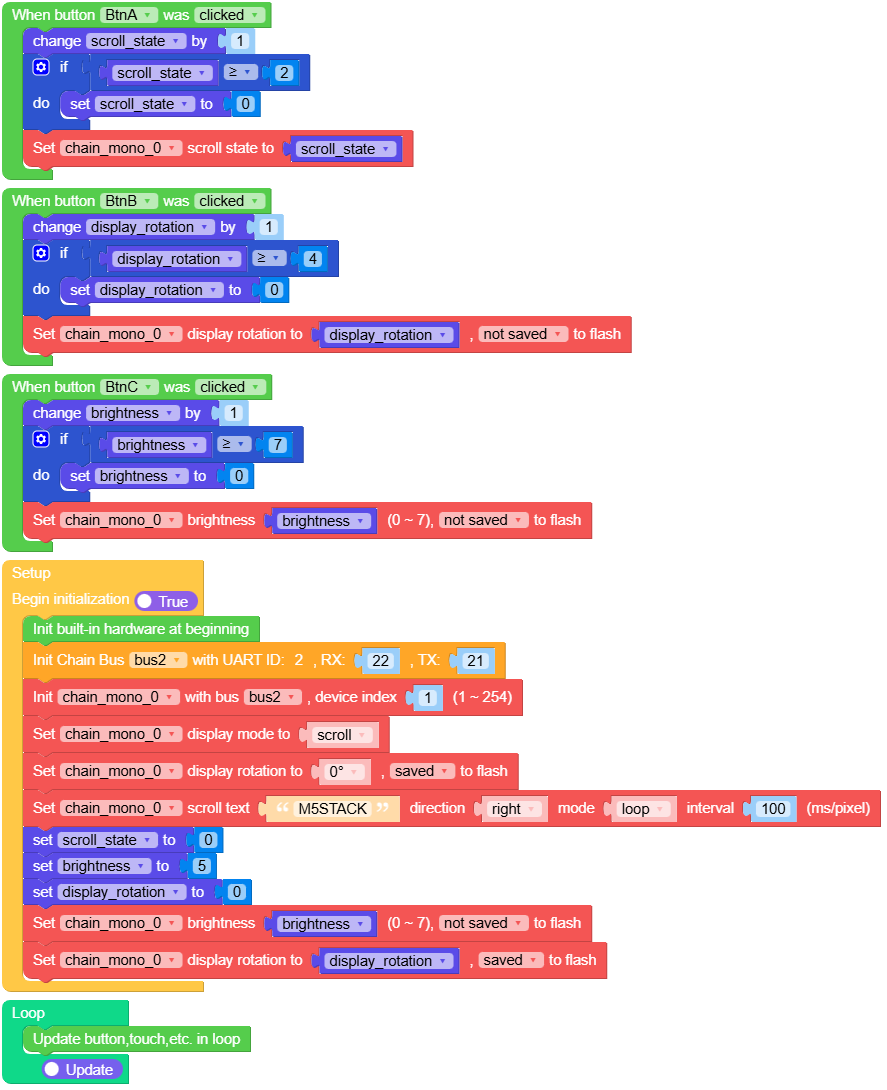
This example initializes Chain Mono in scroll mode and displays the text
M5STACK. It also shows a simple controller UI on the host display and uses
the hardware buttons to control the Chain Mono module.
BtnAtoggles the scroll state between start and pause.BtnBcycles the display rotation through 0, 90, 180, and 270 degrees.BtnCcycles the display brightness level.
UiFlow2 Code Block:
Example output:
None
MicroPython Examples
Scroll text, rotation, and brightness control
This example initializes Chain Mono in scroll mode and displays the text
M5STACK. It also shows a simple controller UI on the host display and uses
the hardware buttons to control the Chain Mono module:
BtnAtoggles the scroll state between start and pause.BtnBcycles the display rotation through 0, 90, 180, and 270 degrees.BtnCcycles the display brightness level.
MicroPython Code Block:
  1# SPDX-FileCopyrightText: 2025 M5Stack Technology CO LTD
  2#
  3# SPDX-License-Identifier: MIT
  4
  5import os, sys, io
  6import M5
  7from M5 import *
  8from chain import ChainBus
  9from chain import MonoChain
 10
 11
 12label_title = None
 13label_text = None
 14label_state = None
 15label_rotation = None
 16label_direction = None
 17bus2 = None
 18chain_mono_0 = None
 19scroll_state = None
 20display_rotation = None
 21brightness = None
 22
 23
 24def btna_was_clicked_event(state):
 25    global \
 26        label_title, \
 27        label_text, \
 28        label_state, \
 29        label_rotation, \
 30        label_direction, \
 31        bus2, \
 32        chain_mono_0, \
 33        scroll_state, \
 34        display_rotation, \
 35        brightness
 36    scroll_state = (scroll_state if isinstance(scroll_state, (int, float)) else 0) + 1
 37    if scroll_state >= 2:
 38        scroll_state = 0
 39    chain_mono_0.set_scroll_state(scroll_state)
 40
 41
 42def btnb_was_clicked_event(state):
 43    global \
 44        label_title, \
 45        label_text, \
 46        label_state, \
 47        label_rotation, \
 48        label_direction, \
 49        bus2, \
 50        chain_mono_0, \
 51        scroll_state, \
 52        display_rotation, \
 53        brightness
 54    display_rotation = (display_rotation if isinstance(display_rotation, (int, float)) else 0) + 1
 55    if display_rotation >= 4:
 56        display_rotation = 0
 57    chain_mono_0.set_display_rotation(display_rotation, save=False)
 58
 59
 60def btnc_was_clicked_event(state):
 61    global \
 62        label_title, \
 63        label_text, \
 64        label_state, \
 65        label_rotation, \
 66        label_direction, \
 67        bus2, \
 68        chain_mono_0, \
 69        scroll_state, \
 70        display_rotation, \
 71        brightness
 72    brightness = (brightness if isinstance(brightness, (int, float)) else 0) + 1
 73    if brightness >= 7:
 74        brightness = 0
 75    chain_mono_0.set_brightness(brightness, save=False)
 76
 77
 78def setup():
 79    global \
 80        label_title, \
 81        label_text, \
 82        label_state, \
 83        label_rotation, \
 84        label_direction, \
 85        bus2, \
 86        chain_mono_0, \
 87        scroll_state, \
 88        display_rotation, \
 89        brightness
 90
 91    M5.begin()
 92    Widgets.setRotation(1)
 93    Widgets.fillScreen(0x000000)
 94    label_title = Widgets.Label(
 95        "Chain Mono Control", 37, 11, 1.0, 0x0F92E8, 0x000000, Widgets.FONTS.Montserrat24
 96    )
 97    label_text = Widgets.Label(
 98        "M5STACK", 62, 80, 1.0, 0xFFFFFF, 0x000000, Widgets.FONTS.Montserrat40
 99    )
100    label_state = Widgets.Label(
101        "state", 40, 205, 1.0, 0xFFFFFF, 0x000000, Widgets.FONTS.Montserrat18
102    )
103    label_rotation = Widgets.Label(
104        "brighness", 204, 205, 1.0, 0xFFFFFF, 0x000000, Widgets.FONTS.Montserrat18
105    )
106    label_direction = Widgets.Label(
107        "rotation", 118, 205, 1.0, 0xFFFFFF, 0x000000, Widgets.FONTS.Montserrat18
108    )
109
110    BtnA.setCallback(type=BtnA.CB_TYPE.WAS_CLICKED, cb=btna_was_clicked_event)
111    BtnB.setCallback(type=BtnB.CB_TYPE.WAS_CLICKED, cb=btnb_was_clicked_event)
112    BtnC.setCallback(type=BtnC.CB_TYPE.WAS_CLICKED, cb=btnc_was_clicked_event)
113
114    bus2 = ChainBus(2, tx=21, rx=22)
115    chain_mono_0 = MonoChain(bus2, 1)
116    chain_mono_0.set_display_mode(MonoChain.MODE_SCROLL)
117    chain_mono_0.set_display_rotation(MonoChain.ROTATION_0, save=True)
118    chain_mono_0.set_scroll_text(
119        "M5STACK", MonoChain.SCROLL_DIR_RIGHT, MonoChain.SCROLL_MODE_LOOP, 100
120    )
121    scroll_state = 0
122    brightness = 5
123    display_rotation = 0
124    chain_mono_0.set_brightness(brightness, save=False)
125    chain_mono_0.set_display_rotation(display_rotation, save=True)
126
127
128def loop():
129    global \
130        label_title, \
131        label_text, \
132        label_state, \
133        label_rotation, \
134        label_direction, \
135        bus2, \
136        chain_mono_0, \
137        scroll_state, \
138        display_rotation, \
139        brightness
140    M5.update()
141
142
143if __name__ == "__main__":
144    try:
145        setup()
146        while True:
147            loop()
148    except (Exception, KeyboardInterrupt) as e:
149        try:
150            bus2.deinit()
151            from utility import print_error_msg
152
153            print_error_msg(e)
154        except ImportError:
155            print("please update to latest firmware")
Example output:
None
API
MonoChain
- class chain.mono.MonoChain(bus, device_id)
Bases:
KeyChainMono Chain class for interacting with 8x8 monochrome display devices over Chain bus.
- Parameters:
UiFlow2 Code Block:

MicroPython Code Block:
from chain import ChainBus
from chain import MonoChain

bus2 = ChainBus(2, tx=21, rx=22)
chain_mono_0 = MonoChain(bus2, 1)
For general Chain device methods, please refer to the
ChainKeyclass.- set_display_mode(mode=0)
Set the display mode.
- Parameters:
mode (int) – Display mode. Use
MonoChain.MODE_PIXEL(0) for pixel mode orMonoChain.MODE_SCROLL(1) for scrolling string mode.- Returns:
True if the operation was successful, False otherwise.
- Return type:
UiFlow2 Code Block:

MicroPython Code Block:
success = chain_mono_0.set_display_mode(MonoChain.MODE_PIXEL)
- get_display_mode()
Get the display mode.
- Returns:
Display mode. 0 means pixel mode, 1 means scrolling string mode. Returns None if failed.
- Return type:
UiFlow2 Code Block:

MicroPython Code Block:
mode = chain_mono_0.get_display_mode()
- set_pixel(x, y, state=True)
Set one pixel state on the 8x8 display.
- Parameters:
- Returns:
True if the operation was successful, False otherwise.
- Return type:
UiFlow2 Code Block:

MicroPython Code Block:
success = chain_mono_0.set_pixel(0, 0, True)
- set_pixels(coordinates=None)
Set multiple pixel states on the 8x8 display.
- Parameters:
coordinates – Iterable of
(x, y, state)or(x, y)values. Supports 1-64 pixels.- Returns:
True if the operation was successful, False otherwise.
- Return type:
UiFlow2 Code Block:

MicroPython Code Block:
success = chain_mono_0.set_pixels(((0, 0, True), (1, 0, False)))
- get_pixel(x, y)
Get one pixel state from the 8x8 display.
- Parameters:
- Returns:
Pixel state. True means on, False means off. Returns None if failed.
- Return type:
UiFlow2 Code Block:

MicroPython Code Block:
state = chain_mono_0.get_pixel(0, 0)
- get_pixels(coordinates)
Get multiple pixel states from the 8x8 display.
- Parameters:
coordinates – Iterable of
(x, y)coordinates. Supports 1-64 pixels.- Returns:
Tuple of 0/1 pixel states, or None if failed.
- Return type:
UiFlow2 Code Block:

MicroPython Code Block:
states = chain_mono_0.get_pixels(((0, 0), (1, 0)))
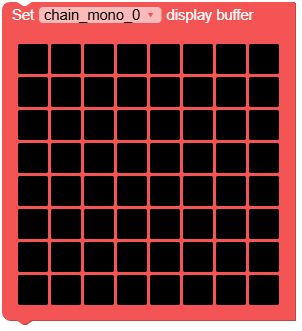
- set_display_buffer(buffer)
Refresh the full 8x8 display buffer.
- Parameters:
buffer – 8 row bytes. Row 0 is Y=0, bit7 maps to X=0 and bit0 maps to X=7.
- Returns:
True if the operation was successful, False otherwise.
- Return type:
UiFlow2 Code Block:
MicroPython Code Block:
success = chain_mono_0.set_display_buffer((0xFF, 0x81, 0x81, 0x81, 0x81, 0x81, 0x81, 0xFF))
- get_display_buffer()
Get the full 8-byte display buffer.
- Returns:
Tuple of 8 row bytes, or None if failed.
- Return type:
UiFlow2 Code Block:

MicroPython Code Block:
buffer = chain_mono_0.get_display_buffer()
- set_display_char(char, x_offset=0, y_offset=0)
Set one ASCII character in pixel mode.
- Parameters:
- Returns:
True if the operation was successful, False otherwise.
- Return type:
UiFlow2 Code Block:

MicroPython Code Block:
success = chain_mono_0.set_display_char("A", 1, 0)
- set_scroll_text(text, direction=0, mode=1, speed=100)
Set the scrolling ASCII text.
- Parameters:
text – ASCII string or bytes to display. Supports ASCII characters 32-127.
direction (int) – Scroll direction. Use
MonoChain.SCROLL_DIR_RIGHT(0),MonoChain.SCROLL_DIR_LEFT(1),MonoChain.SCROLL_DIR_UP(2), orMonoChain.SCROLL_DIR_DOWN(3).mode (int) – Scroll mode. Use
MonoChain.SCROLL_MODE_ONCE(0),MonoChain.SCROLL_MODE_LOOP(1), orMonoChain.SCROLL_MODE_BOUNCE(3).speed (int) – Scroll speed in milliseconds per pixel. Range: 0-65535.
- Returns:
True if the operation was successful, False otherwise.
- Return type:
UiFlow2 Code Block:

MicroPython Code Block:
success = chain_mono_0.set_scroll_text("M5Stack", MonoChain.SCROLL_DIR_LEFT, MonoChain.SCROLL_MODE_LOOP, 100)
- set_scroll_state(state=0)
Set the scrolling text state.
- Parameters:
state (int) – Scroll state. Use
MonoChain.SCROLL_STATE_START(0),MonoChain.SCROLL_STATE_PAUSE(1), orMonoChain.SCROLL_STATE_RESET(2).- Returns:
True if the operation was successful, False otherwise.
- Return type:
UiFlow2 Code Block:

MicroPython Code Block:
success = chain_mono_0.set_scroll_state(MonoChain.SCROLL_STATE_START)
- get_scroll_state()
Get the scrolling text state.
- Returns:
Scroll state. 0 means scrolling, 1 means paused, 2 means reset/idle. Returns None if failed.
- Return type:
UiFlow2 Code Block:

MicroPython Code Block:
state = chain_mono_0.get_scroll_state()
- set_display_rotation(rotation=0, save=False)
Set the display rotation.
- Parameters:
- Returns:
True if the operation was successful, False otherwise.
- Return type:
UiFlow2 Code Block:

MicroPython Code Block:
success = chain_mono_0.set_display_rotation(MonoChain.ROTATION_0, save=False)
- get_display_rotation()
Get the display rotation.
- Returns:
Display rotation. 0 default, 1 clockwise 90 degrees, 2 clockwise 180 degrees, 3 clockwise 270 degrees. Returns None if failed.
- Return type:
UiFlow2 Code Block:

MicroPython Code Block:
rotation = chain_mono_0.get_display_rotation()
- set_brightness(brightness=7, save=False)
Set the screen brightness level.
- Parameters:
- Returns:
True if the operation was successful, False otherwise.
- Return type:
UiFlow2 Code Block:

MicroPython Code Block:
success = chain_mono_0.set_brightness(7, save=False)
