Chain Buzzer
BuzzerChain is the helper class for buzzer devices on the Chain bus. It provides methods to control buzzer frequency, duty cycle, play modes (auto play, manual play, note play), and play musical notes.
Support the following products:
UiFlow2 Example
Button tone playback
Open the m5core_chain_buzzer_basic_example.m5f2 project in UiFlow2.
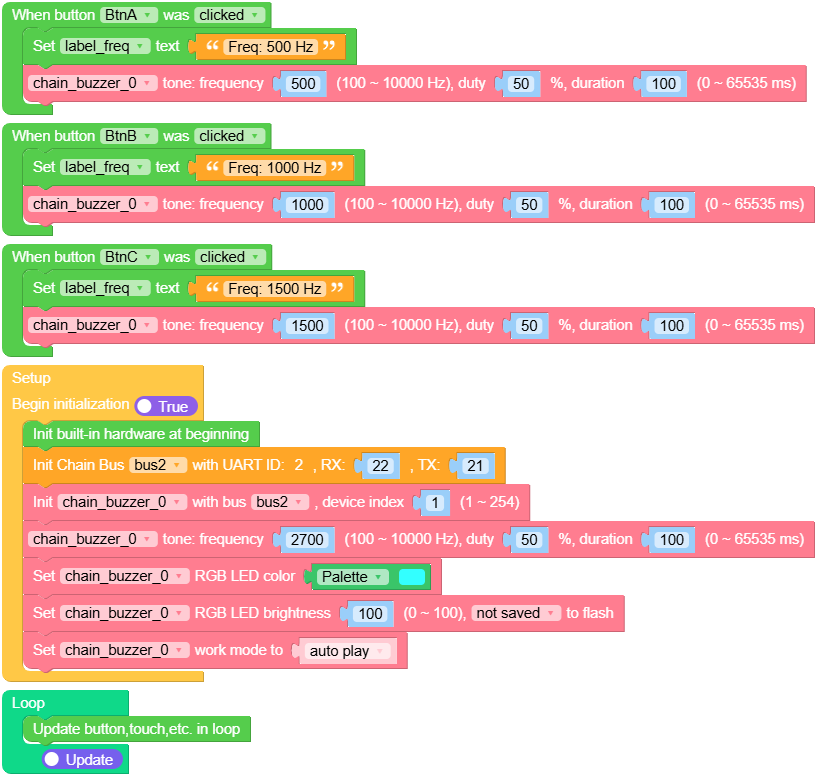
This example demonstrates how to use the Chain Buzzer in auto play mode. It initializes the buzzer RGB indicator, then plays 500 Hz, 1000 Hz, or 1500 Hz tones when button A, B, or C is clicked.
UiFlow2 Code Block:
Example output:
None
MicroPython Example
Button tone playback
This example demonstrates how to use the Chain Buzzer in auto play mode. It initializes the buzzer RGB indicator, then plays 500 Hz, 1000 Hz, or 1500 Hz tones when button A, B, or C is clicked.
MicroPython Code Block:
 1# SPDX-FileCopyrightText: 2026 M5Stack Technology CO LTD
 2#
 3# SPDX-License-Identifier: MIT
 4
 5import os, sys, io
 6import M5
 7from M5 import *
 8from chain import BuzzerChain
 9from chain import ChainBus
10
11
12title0 = None
13label_freq = None
14label_tip = None
15bus2 = None
16chain_buzzer_0 = None
17
18
19def btna_was_clicked_event(state):
20    global title0, label_freq, label_tip, bus2, chain_buzzer_0
21    label_freq.setText(str("Freq: 500 Hz"))
22    chain_buzzer_0.tone(500, 50, 100)
23
24
25def btnb_was_clicked_event(state):
26    global title0, label_freq, label_tip, bus2, chain_buzzer_0
27    label_freq.setText(str("Freq: 1000 Hz"))
28    chain_buzzer_0.tone(1000, 50, 100)
29
30
31def btnc_was_clicked_event(state):
32    global title0, label_freq, label_tip, bus2, chain_buzzer_0
33    label_freq.setText(str("Freq: 1500 Hz"))
34    chain_buzzer_0.tone(1500, 50, 100)
35
36
37def setup():
38    global title0, label_freq, label_tip, bus2, chain_buzzer_0
39
40    M5.begin()
41    Widgets.setRotation(1)
42    Widgets.fillScreen(0x000000)
43    title0 = Widgets.Title(
44        "Chain Buzzer Example", 3, 0xFFFFFF, 0x0000FF, Widgets.FONTS.Montserrat18
45    )
46    label_freq = Widgets.Label(
47        "Freq: -- Hz", 107, 90, 1.0, 0xFFFFFF, 0x000000, Widgets.FONTS.Montserrat18
48    )
49    label_tip = Widgets.Label(
50        "Press button tone", 78, 205, 1.0, 0xFFFFFF, 0x000000, Widgets.FONTS.Montserrat18
51    )
52
53    BtnA.setCallback(type=BtnA.CB_TYPE.WAS_CLICKED, cb=btna_was_clicked_event)
54    BtnB.setCallback(type=BtnB.CB_TYPE.WAS_CLICKED, cb=btnb_was_clicked_event)
55    BtnC.setCallback(type=BtnC.CB_TYPE.WAS_CLICKED, cb=btnc_was_clicked_event)
56
57    bus2 = ChainBus(2, tx=21, rx=22)
58    chain_buzzer_0 = BuzzerChain(bus2, 1)
59    chain_buzzer_0.tone(2700, 50, 100)
60    chain_buzzer_0.set_rgb_color(0x33FFFF)
61    chain_buzzer_0.set_rgb_brightness(100, save=False)
62    chain_buzzer_0.set_mode(BuzzerChain.MODE_AUTO_PLAY)
63
64
65def loop():
66    global title0, label_freq, label_tip, bus2, chain_buzzer_0
67    M5.update()
68
69
70if __name__ == "__main__":
71    try:
72        setup()
73        while True:
74            loop()
75    except (Exception, KeyboardInterrupt) as e:
76        try:
77            bus2.deinit()
78            from utility import print_error_msg
79
80            print_error_msg(e)
81        except ImportError:
82            print("please update to latest firmware")
Example output:
None
API
BuzzerChain
- class chain.buzzer.BuzzerChain(bus, device_id)
Bases:
KeyChainBuzzer Chain class for interacting with buzzer devices over Chain bus.
- Parameters:
UiFlow2 Code Block:

MicroPython Code Block:
from chain import ChainBus
from chain import BuzzerChain

bus2 = ChainBus(2, tx=21, rx=22)
chain_buzzer_0 = BuzzerChain(bus2, 1)
For other button and some general methods, please refer to the
ChainKeyclass.- set_mode(mode)
Set the buzzer mode.
- Parameters:
mode (int) – Buzzer mode. Use
BuzzerChain.MODE_AUTO_PLAY(0),BuzzerChain.MODE_MANUAL_PLAY(1), orBuzzerChain.MODE_NOTE_PLAY(2).- Returns:
True if the operation was successful, False otherwise.
- Return type:
UiFlow2 Code Block:

MicroPython Code Block:
success = chain_buzzer_0.set_mode(BuzzerChain.MODE_AUTO_PLAY)
- get_mode()
Get the buzzer mode.
- Returns:
Buzzer mode.
BuzzerChain.MODE_AUTO_PLAY(0),BuzzerChain.MODE_MANUAL_PLAY(1), orBuzzerChain.MODE_NOTE_PLAY(2). Returns None if failed.- Return type:
UiFlow2 Code Block:

MicroPython Code Block:
mode = chain_buzzer_0.get_mode()
- tone(freq=2700, duty=50, duration_ms=100)
Play tone (only works in AUTO_PLAY mode).
- Parameters:
- Returns:
True if the operation was successful, False otherwise.
- Return type:
UiFlow2 Code Block:

MicroPython Code Block:
success = chain_buzzer_0.tone(2700, 50, 1000)
success = chain_buzzer_0.tone()  # Use default values: 2700Hz, 50% duty, 100ms
- set_freq(freq=2700)
Set the buzzer frequency.
- Parameters:
freq (int) – Frequency in Hz. Range: 100-10000. Default: 2700.
- Returns:
True if the operation was successful, False otherwise.
- Return type:
UiFlow2 Code Block:

MicroPython Code Block:
success = chain_buzzer_0.set_freq(2700)
success = chain_buzzer_0.set_freq()  # Use default: 2700Hz
- get_freq()
Get the buzzer frequency.
- Returns:
Frequency in Hz, or None if failed.
- Return type:
UiFlow2 Code Block:

MicroPython Code Block:
freq = chain_buzzer_0.get_freq()
- set_duty(duty=50)
Set the buzzer duty cycle.
- Parameters:
duty (int) – Duty cycle (0-100). Default: 50.
- Returns:
True if the operation was successful, False otherwise.
- Return type:
UiFlow2 Code Block:

MicroPython Code Block:
success = chain_buzzer_0.set_duty(50)
success = chain_buzzer_0.set_duty()  # Use default: 50%
- get_duty()
Get the buzzer duty cycle.
- Returns:
Duty cycle (0-100), or None if failed.
- Return type:
UiFlow2 Code Block:

MicroPython Code Block:
duty = chain_buzzer_0.get_duty()
- set_status(status)
Set the buzzer status (only works in MANUAL_PLAY mode).
- Parameters:
status (int) – Buzzer status. Use
BuzzerChain.STATUS_OFF(0) orBuzzerChain.STATUS_ON(1).- Returns:
True if the operation was successful, False otherwise.
- Return type:
UiFlow2 Code Block:

MicroPython Code Block:
success = chain_buzzer_0.set_status(BuzzerChain.STATUS_ON)
- get_status()
Get the buzzer status.
- Returns:
Buzzer status.
BuzzerChain.STATUS_OFF(0) orBuzzerChain.STATUS_ON(1). Returns None if failed.- Return type:
UiFlow2 Code Block:

MicroPython Code Block:
status = chain_buzzer_0.get_status()
- note(note_index, duration_ms=100)
Play note (only works in NOTE_PLAY mode).
- Parameters:
- Returns:
True if the operation was successful, False otherwise.
- Return type:
UiFlow2 Code Block:

MicroPython Code Block:
success = chain_buzzer_0.note(25, 500)  # Play C5 for 500ms
success = chain_buzzer_0.note(25)  # Play C5 for 100ms (default duration)