keyboard
usb device keyboard
Note
This module is only applicable to the CoreS3 Controller
Micropython Example
USB keyboard
 1# SPDX-FileCopyrightText: 2025 M5Stack Technology CO LTD
 2#
 3# SPDX-License-Identifier: MIT
 4import os, sys, io
 5import M5
 6from M5 import *
 7from unit import CardKBUnit
 8from usb.device.keyboard import Keyboard
 9from hardware import I2C
10from hardware import Pin
11
12
13label = None
14keyboard = None
15i2c0 = None
16cardkb_0 = None
17key = None
18update = None
19
20
21def cardkb_0_pressed_event(kb):
22    global label, keyboard, i2c0, cardkb_0, key, update
23    key = cardkb_0.get_key()
24    update = True
25
26
27def setup():
28    global label, keyboard, i2c0, cardkb_0, key, update
29    M5.begin()
30    Widgets.fillScreen(0x222222)
31    label = Widgets.Label("USB Keyboard", 73, 6, 1.0, 0x3CC7F1, 0x222222, Widgets.FONTS.DejaVu24)
32    keyboard = Keyboard()
33    i2c0 = I2C(0, scl=Pin(1), sda=Pin(2), freq=100000)
34    cardkb_0 = CardKBUnit(i2c0)
35    cardkb_0.set_callback(cardkb_0_pressed_event)
36    update = False
37
38
39def loop():
40    global label, keyboard, i2c0, cardkb_0, key, update
41    M5.update()
42    cardkb_0.tick()
43    if keyboard.is_open():
44        if update:
45            keyboard.input(str(chr(key)))
46            update = False
47
48
49if __name__ == "__main__":
50    try:
51        setup()
52        while True:
53            loop()
54    except (Exception, KeyboardInterrupt) as e:
55        try:
56            from utility import print_error_msg
57
58            print_error_msg(e)
59        except ImportError:
60            print("please update to latest firmware")
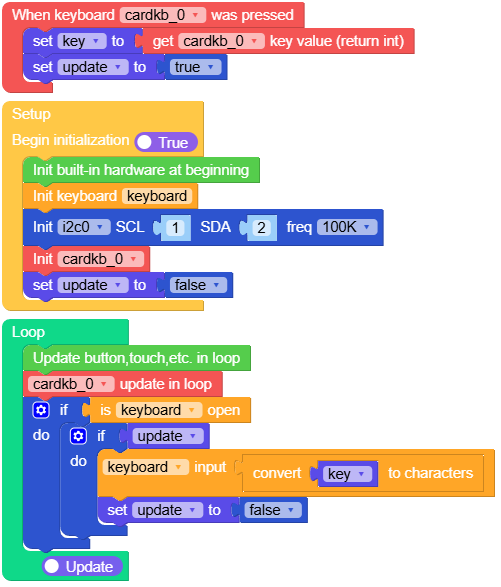
UIFlow2.0 Example
USB keyboard
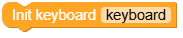
class Keyboard
- class usb.device.keyboard.Keyboard
Create Keyboard object
UIFlow2.0
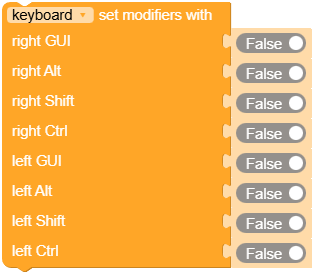
- Keyboard.set_modifiers(right_gui: bool = False, right_alt: bool = False, right_shift: bool = False, right_ctrl: bool = False, left_gui: bool = False, left_alt: bool = False, left_shift: bool = False, left_ctrl: bool = False)
Set modifier keys
right_guiThe state of the right-side GUI key. True indicates that the key is pressed.right_altThe state of the right-side Alt key. True indicates that the key is pressed.right_shiftThe state of the right-side Shift key. True indicates that the key is pressed.right_ctrlThe state of the right-side Ctrl key. True indicates that the key is pressed.left_guiThe state of the left-side GUI key. True indicates that the key is pressed.left_altThe state of the left-side Alt key. True indicates that the key is pressed.left_shiftThe state of the left-side Shift key. True indicates that the key is pressed.left_ctrlThe state of the left-side Ctrl key. True indicates that the key is pressed.
- Note:
Changes will take effect after calling Keyboard.send_report().
UIFlow2.0
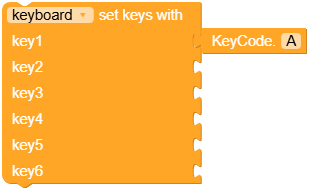
- Keyboard.set_keys(k0: int = 0, k1: int = 0, k2: int = 0, k3: int = 0, k4: int = 0, k5: int = 0)
Press specified keys (up to 6 key values at a time)
k0~k5The input is a standard HID key value. For details, refer to the KeyCode() class.
- Note:
Changes will take effect after calling Keyboard.send_report().
example: Press the lowercase ‘a’
Keyboard.set_keys(k0=KeyCode.A)
Keyboard.send_report()
Keyboard.set_keys(k0=0)
Keyboard.send_report()
example: Press the uppercase ‘A’
Keyboard.set_modifiers(right_shift=True)
Keyboard.set_keys(k0=KeyCode.A)
Keyboard.send_report()
Keyboard.set_modifiers(right_shift=False)
Keyboard.set_keys(k0=0)
Keyboard.send_report()
UIFlow2.0
- Keyboard.send_report()
Send keyboard status report
UIFlow2.0

- Keyboard.input(key)
input key
keyThe input can be a string within the ASCII range or a value from KeyCode.
example:
Keyboard.input("Hello M5")
Keyboard.input(KeyCode.A)
UIFlow2.0
