image
Note
This module is only applicable to the CoreS3 Controller
UiFlow2 Example
draw test
Open the cores3_example_draw_test.m5f2 project in UiFlow2.
This example captures an image from the camera and demonstrates how to draw text and basic shapes on it.
UiFlow2 Code Block:
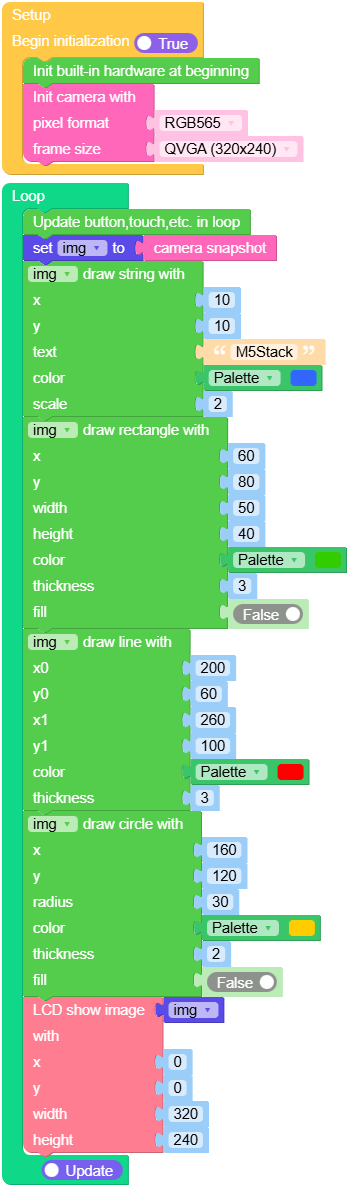
Example output:
None
find qrcode
Open the cores3_image_find_qrcode_example.m5f2 project in UiFlow2.
This example captures images from the camera, detects QR codes, and draws their bounding boxes and decoded payload text on the LCD.
UiFlow2 Code Block:
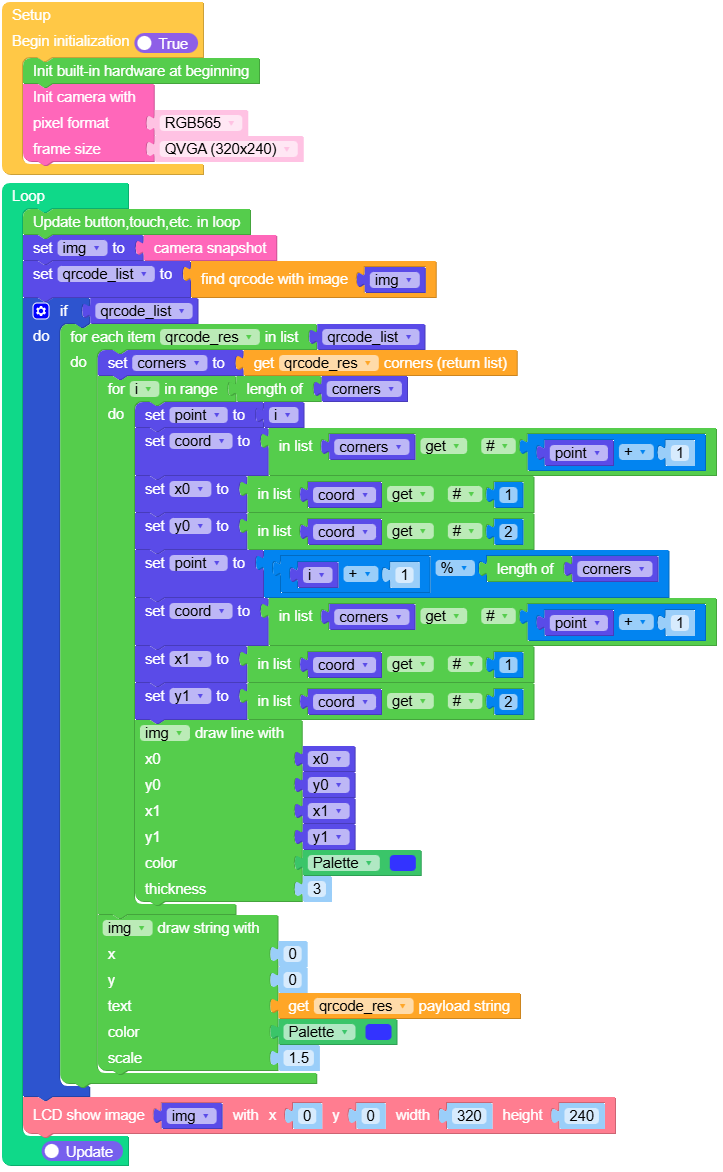
Example output:
None
MicroPython Example
draw test
 1# SPDX-FileCopyrightText: 2024 M5Stack Technology CO LTD
 2#
 3# SPDX-License-Identifier: MIT
 4import os, sys, io
 5import M5
 6from M5 import *
 7import camera
 8import image
 9
10img = None
11
12
13def setup():
14    global img
15    M5.begin()
16    Widgets.fillScreen(0x222222)
17    camera.init(pixformat=camera.RGB565, framesize=camera.QVGA)
18
19
20def loop():
21    global img
22    M5.update()
23    img = camera.snapshot()
24    img.draw_string(10, 10, str("M5Stack"), color=0x3366FF, scale=2)
25    img.draw_rectangle(60, 80, 50, 40, color=0x33CC00, thickness=3, fill=False)
26    img.draw_line(200, 60, 260, 100, color=0xFF0000, thickness=3)
27    img.draw_circle(160, 120, 30, color=0xFFCC00, thickness=2, fill=False)
28    M5.Lcd.show(img, 0, 0, 320, 240)
29
30
31if __name__ == "__main__":
32    try:
33        setup()
34        while True:
35            loop()
36    except (Exception, KeyboardInterrupt) as e:
37        try:
38            from utility import print_error_msg
39
40            print_error_msg(e)
41        except ImportError:
42            print("please update to latest firmware")
find qrcode
 1# SPDX-FileCopyrightText: 2025 M5Stack Technology CO LTD
 2#
 3# SPDX-License-Identifier: MIT
 4import os, sys, io
 5import M5
 6from M5 import *
 7import camera
 8import image
 9
10
11img = None
12qrcode_list = None
13qrcode_res = None
14corners = None
15i = None
16point = None
17coord = None
18x0 = None
19y0 = None
20x1 = None
21y1 = None
22
23
24def setup():
25    global img, qrcode_list, corners, point, i, coord, x0, y0, x1, y1
26    M5.begin()
27    Widgets.setRotation(1)
28    Widgets.fillScreen(0x222222)
29    camera.init(pixformat=camera.RGB565, framesize=camera.QVGA)
30
31
32def loop():
33    global img, qrcode_list, corners, point, i, coord, x0, y0, x1, y1
34    M5.update()
35    img = camera.snapshot()
36    qrcode_list = img.find_qrcodes()
37    if qrcode_list:
38        for qrcode_res in qrcode_list:
39            corners = qrcode_res.corners()
40            for i in range(len(corners)):
41                point = i
42                coord = corners[int((point + 1) - 1)]
43                x0 = coord[0]
44                y0 = coord[1]
45                point = (i + 1) % len(corners)
46                coord = corners[int((point + 1) - 1)]
47                x1 = coord[0]
48                y1 = coord[1]
49                img.draw_line(x0, y0, x1, y1, color=0x3333FF, thickness=3)
50            img.draw_string(0, 0, str(qrcode_res.payload()), color=0x3333FF, scale=1.5)
51    M5.Lcd.show(img, 0, 0, 320, 240)
52
53
54if __name__ == "__main__":
55    try:
56        setup()
57        while True:
58            loop()
59    except (Exception, KeyboardInterrupt) as e:
60        try:
61            from utility import print_error_msg
62
63            print_error_msg(e)
64        except ImportError:
65            print("please update to latest firmware")
API
- class image.Image
The image.Image object is returned by camera.snapshot().
- width()
Returns the image width in pixels.
- Returns width:
image width.
- Return type:
int
UiFlow2 Code Block:

MicroPython Code Block:
width()
- height()
Returns the image height in pixels.
- Returns height:
image height.
- Return type:
int
UiFlow2 Code Block:

MicroPython Code Block:
height()
- format()
Returns the image format.
Returns image.GRAYSCALE for grayscale images, image.RGB565 for RGB565 images, image.BAYER for bayer pattern images, and image.JPEG for JPEG images.
- Returns format:
image format.
- Return type:
int
UiFlow2 Code Block:

MicroPython Code Block:
format()
- size()
Returns the image size in bytes.
- Returns size:
image size in bytes.
- Return type:
int
UiFlow2 Code Block:

MicroPython Code Block:
size()
- bytearray()
Returns a bytearray object that points to the image data for byte-level read/write access.
- Returns data:
image data buffer.
- Return type:
bytearray
UiFlow2 Code Block:

MicroPython Code Block:
bytearray()
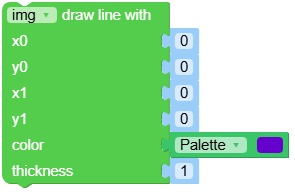
- draw_line(x0, y0, x1, y1, color, thickness)
Draws a line from (x0, y0) to (x1, y1) on the image. You may either pass x0, y0, x1, y1 separately or as a tuple (x0, y0, x1, y1).
- Parameters:
- Returns self:
the image object for method chaining.
- Return type:
Image
UiFlow2 Code Block:
MicroPython Code Block:
img.draw_line(10, 10, 100, 100, color=(255,0,0), thickness=2)
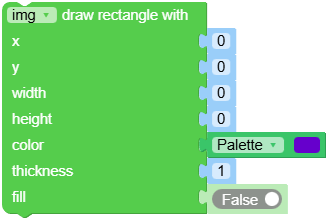
- draw_rectangle(x, y, w, h, color, thickness, fill)
Draws a rectangle on the image. You may either pass x, y, w, h separately or as a tuple (x, y, w, h).
- Parameters:
x (int) – top-left x coordinate.
y (int) – top-left y coordinate.
w (int) – rectangle width.
h (int) – rectangle height.
color – RGB888 tuple, grayscale value (0-255), or RGB565 value. Defaults to white.
thickness (int) – border thickness in pixels. Defaults to 1.
fill (bool) – set True to fill the rectangle. Defaults to False.
- Returns self:
the image object for method chaining.
- Return type:
Image
UiFlow2 Code Block:
MicroPython Code Block:
img.draw_rectangle(20, 20, 80, 60, color=(0,255,0), thickness=2, fill=True)
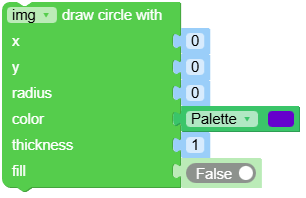
- draw_circle(x, y, radius, color, thickness, fill)
Draws a circle on the image. You may either pass x, y, radius separately or as a tuple (x, y, radius).
- Parameters:
x (int) – circle center x coordinate.
y (int) – circle center y coordinate.
radius (int) – circle radius.
color – RGB888 tuple, grayscale value (0-255), or RGB565 value. Defaults to white.
thickness (int) – border thickness in pixels. Defaults to 1.
fill (bool) – set True to fill the circle. Defaults to False.
- Returns self:
the image object for method chaining.
- Return type:
Image
UiFlow2 Code Block:
MicroPython Code Block:
img.draw_circle(50, 50, 30, color=(0,0,255), thickness=3, fill=False)
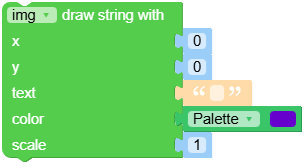
- draw_string(x, y, text, color, scale)
Draws 8x16 text starting at location (x, y) in the image. You may either pass x, y separately or as a tuple (x, y).
- Parameters:
- Returns self:
the image object for method chaining.
- Return type:
Image
UiFlow2 Code Block:
MicroPython Code Block:
img.draw_string(10, 10, "Hello", color=(255,255,0), scale=2)
- find_qrcodes()
Finds all QR codes returns a list of
image.qrcodeobjects. Please see the image.qrcode object for more details.- Returns qrcodes:
list of detected QR codes.
- Return type:
List[image.qrcode]
UiFlow2 Code Block:

MicroPython Code Block:
qrcodes = img.find_qrcodes()
- class image.qrcode
Please call
Image.find_qrcodes()to create this object.- corners()
Get the 4 corners of the QR code in clockwise order starting from the top-left.
- Returns corners:
list of 4 (x, y) tuples.
- Return type:
List[Tuple[int, int]]
UiFlow2 Code Block:

MicroPython Code Block:
q.corners()
- rect()
Get the bounding box of the QR code.
- Returns rect:
(x, y, w, h) tuple.
- Return type:
Tuple[int, int, int, int]
UiFlow2 Code Block:

MicroPython Code Block:
q.rect()
- x()
Get the bounding box x coordinate.
- Returns x:
the x coordinate.
- Return type:
int
UiFlow2 Code Block:

MicroPython Code Block:
q.x()
- y()
Get the bounding box y coordinate.
- Returns y:
the y coordinate.
- Return type:
int
UiFlow2 Code Block:

MicroPython Code Block:
q.y()
- w()
Get the bounding box width.
- Returns w:
the width of the QR code.
- Return type:
int
UiFlow2 Code Block:

MicroPython Code Block:
q.w()
- h()
Get the bounding box height.
- Returns h:
the height of the QR code.
- Return type:
int
UiFlow2 Code Block:

MicroPython Code Block:
q.h()
- payload()
Get the decoded payload string (e.g. URL) from the QR code.
- Returns payload:
decoded string.
- Return type:
str
UiFlow2 Code Block:

MicroPython Code Block:
q.payload()
- version()
Get the QR code version number.
- Returns version:
QR code version.
- Return type:
int
UiFlow2 Code Block:

MicroPython Code Block:
q.version()
- ecc_level()
Get the QR code ECC (error correction) level.
ECC levels: L, M, Q, H. Higher levels allow more damage tolerance but reduce data capacity.
- Returns ecc:
ECC level (0~3).
- Return type:
int
UiFlow2 Code Block:

MicroPython Code Block:
q.ecc_level()
- mask()
Get the QR code mask pattern (0~7).
Mask is used to improve QR readability.
- Returns mask:
mask pattern ID.
- Return type:
int
UiFlow2 Code Block:

MicroPython Code Block:
q.mask()
- eci()
Get the QR code ECI (Extended Channel Interpretation) value.
ECI indicates the text encoding (e.g. UTF-8, Shift-JIS).
0means ECI not used.- Returns eci:
ECI value.
- Return type:
int
UiFlow2 Code Block:

MicroPython Code Block:
q.eci()
Constants
- RGB565
- Type:
RGB565 pixel format. Each pixel is 16-bits, 2-bytes. 5-bits are used for red, 6-bits are used for green, and 5-bits are used for blue.
- YUV422
- Type:
A pixel format that is very easy to jpeg compress. Each pixel is stored as a grayscale 8-bit Y value followed by alternating 8-bit U/V color values that are shared between two Y values (8-bits Y1, 8-bits U, 8-bits Y2, 8-bits V, etc.). Only some image processing methods work with YUV422.
UiFlow2 Code Block:
