StackChan
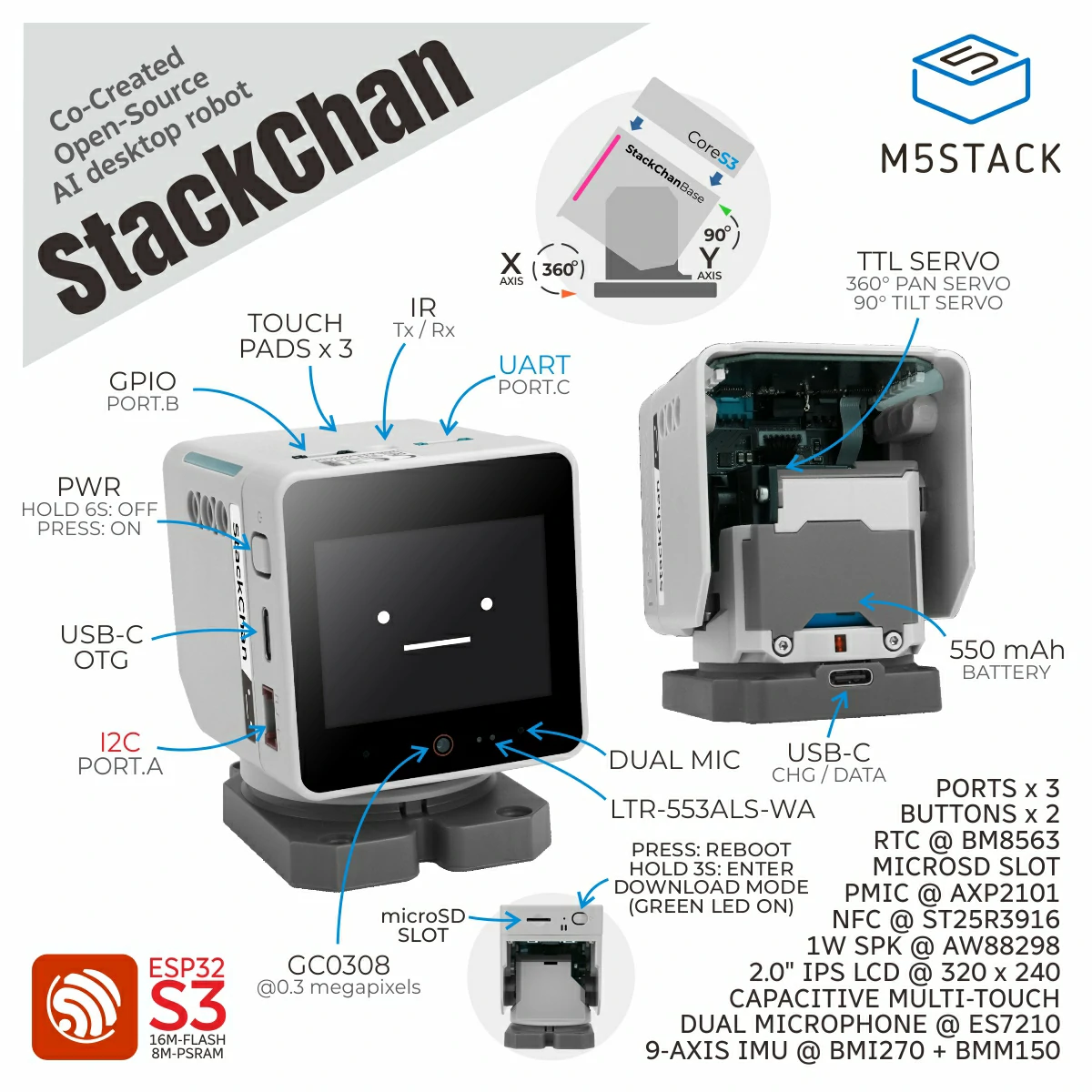
支持以下产品:
UiFlow2 应用示例
舵机零点校准
备注
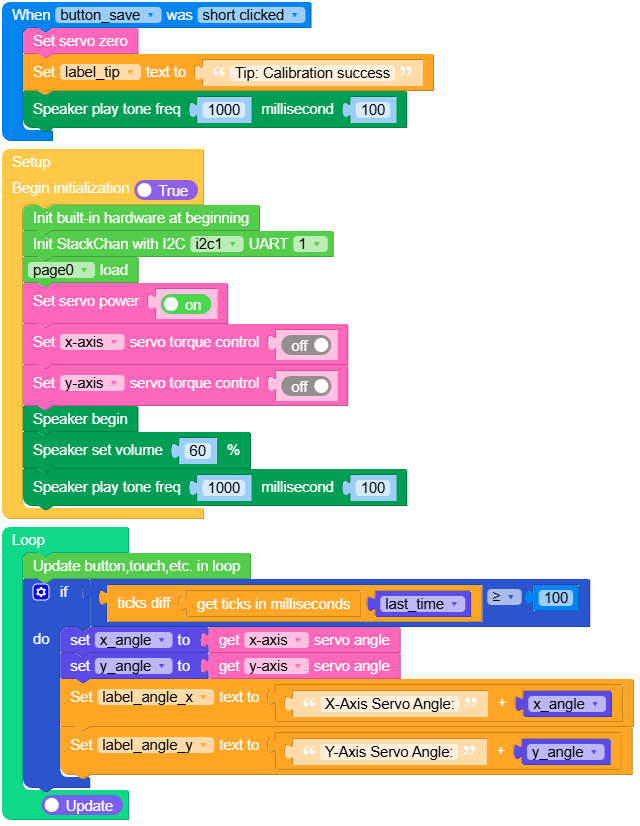
不同设备之间的机械装配会有差异。刷入新固件后,需要手动校准舵机零点参考。
在 UiFlow2 中打开 stackchan_servo_zero_calibrate.m5f2 项目。
运行程序。
手动转动头部:在 X 方向上,使显示屏与底座朝向一致;在 Y 方向上,使显示屏与底座垂直。
点击 Save 按钮。
UiFlow2 代码块:
示例输出:
None
舵机角度读取
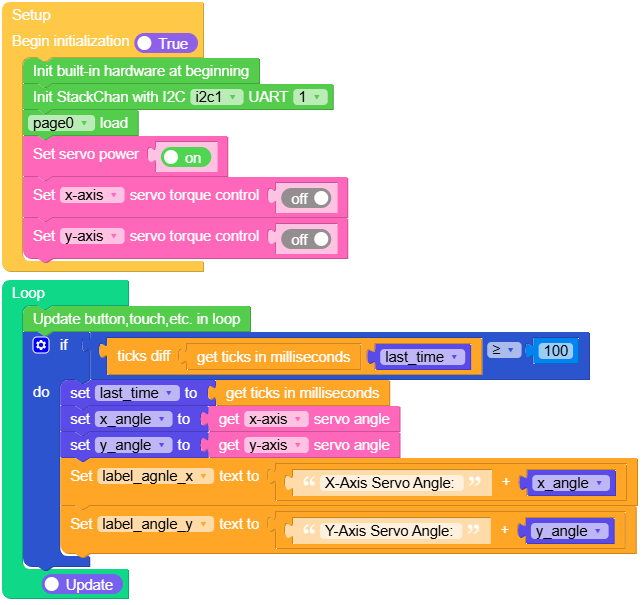
在 UiFlow2 中打开 stackchan_servo_read_example.m5f2 项目。
此示例演示在关闭力矩的情况下读取 X 和 Y 舵机角度(单位:度),使头部可以自由转动。
备注
开启力矩控制时会保持上次目标位置,并阻碍手动转动。关闭力矩控制后可在角度实时更新时自由调整头部姿态,便于检查校准结果。
UiFlow2 代码块:
示例输出:
None
舵机控制
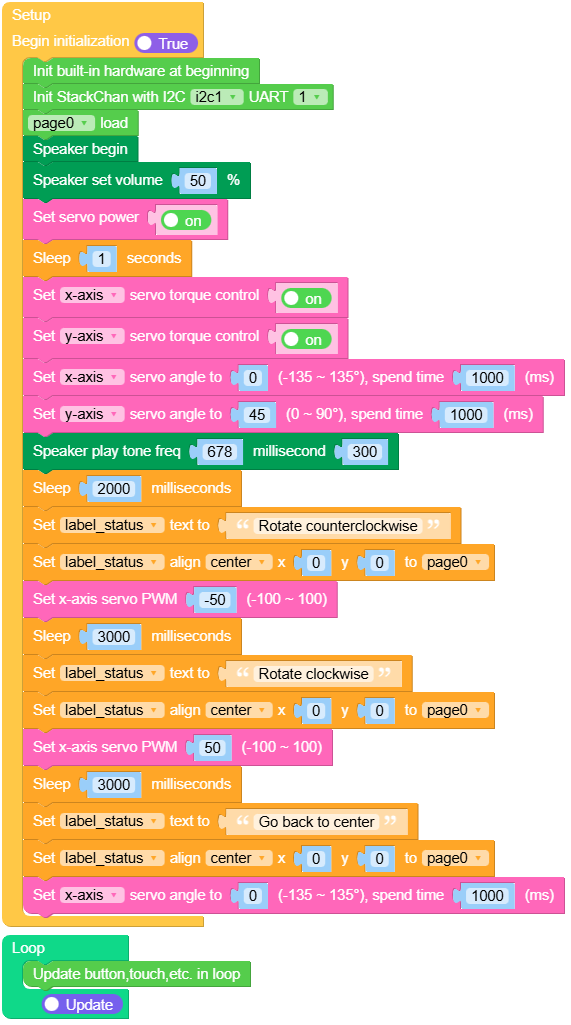
在 UiFlow2 中打开 stackchan_servo_control_example.m5f2 项目。
此示例演示使用 set_servo_angle 和 set_servo_x_pwm 控制舵机移动到指定位置,并以 PWM 模式驱动 X 轴舵机。
UiFlow2 代码块:
示例输出:
None
人脸跟踪
在 UiFlow2 中打开 stackchan_face_tracking_example.m5f2 项目。
此示例实现人脸跟踪。
UiFlow2 代码块:
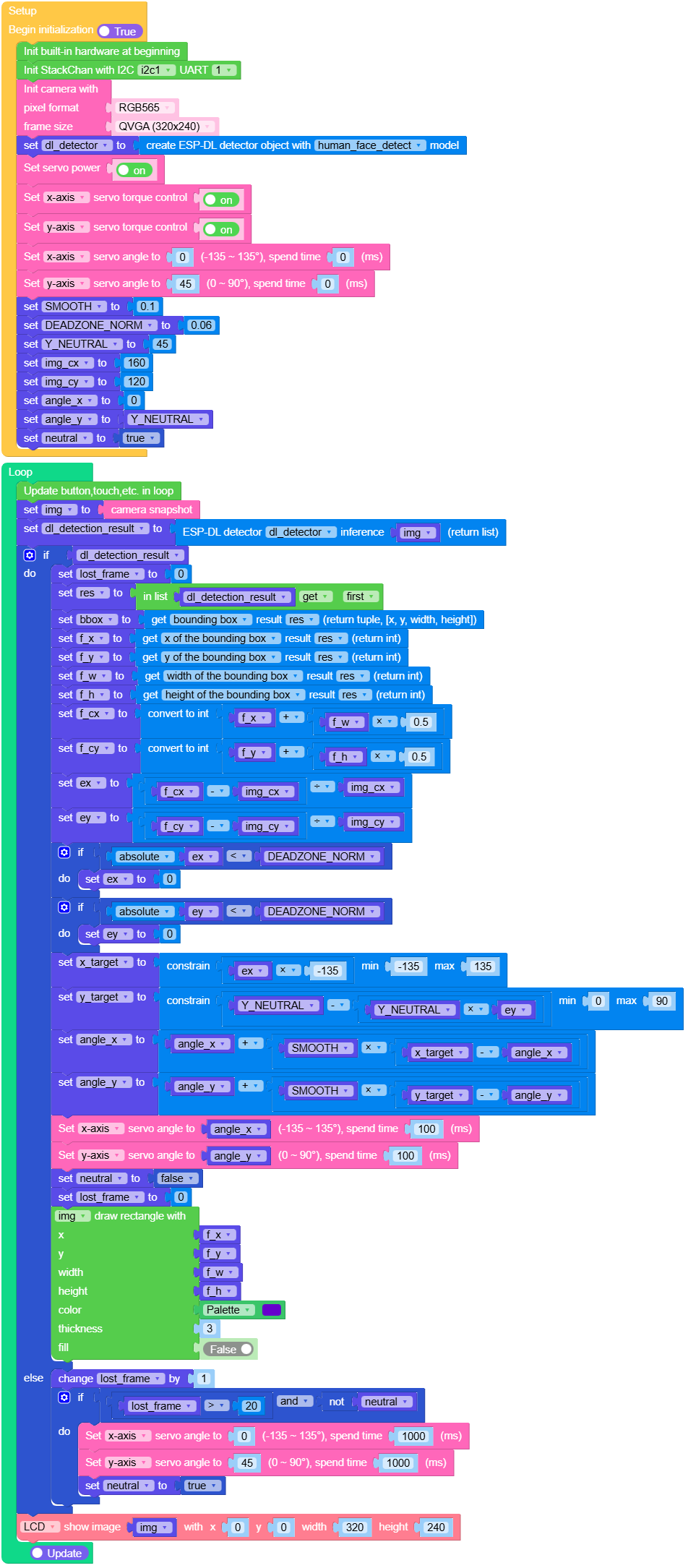
示例输出:
None
舵机电源信息
在 UiFlow2 中打开 stackchan_servo_power_example.m5f2 项目。
此示例演示读取并显示舵机电源信息。
UiFlow2 代码块:
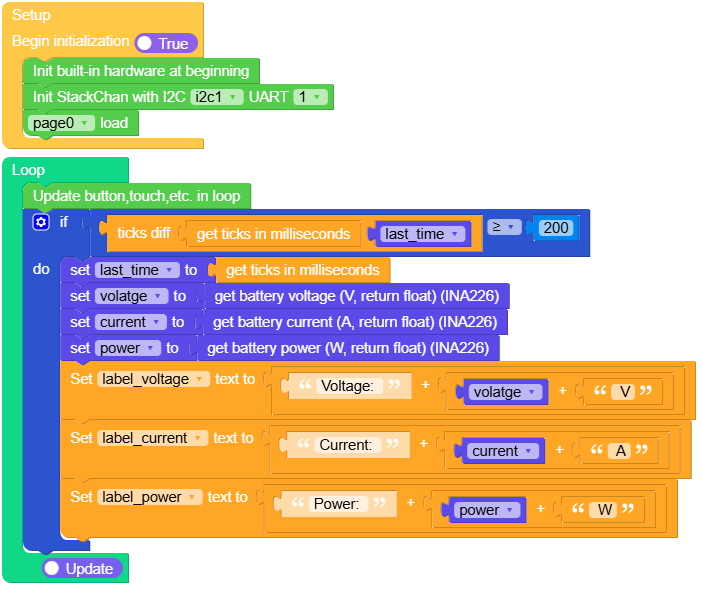
示例输出:
None
触摸与 RGB
在 UiFlow2 中打开 stackchan_tp_rgb_example.m5f2 项目。
此示例演示将触摸区域映射到 RGB 灯带颜色(两条灯带上的三个逻辑触摸点)。
UiFlow2 代码块:
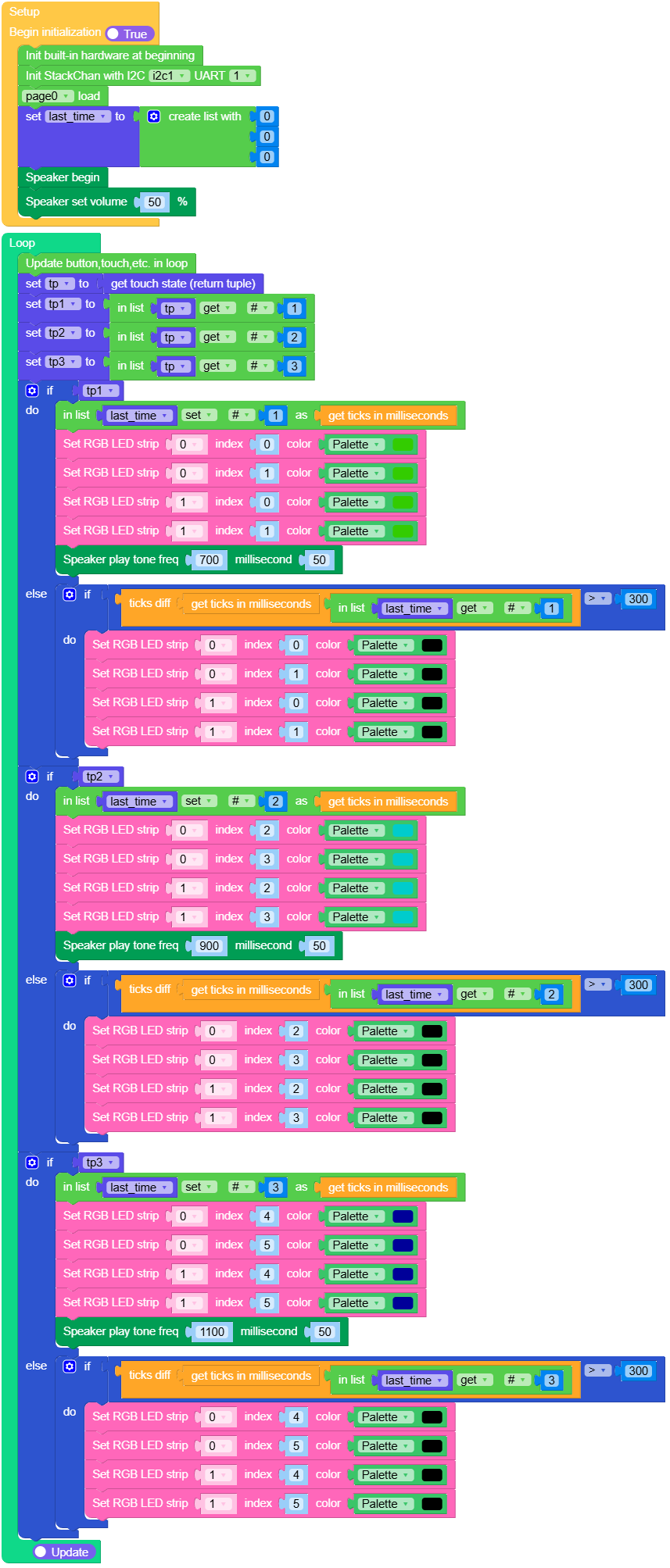
示例输出:
None
NFC
在 UiFlow2 中打开 stackchan_nfc_detect_example.m5f2 项目。
此示例演示检测 NFC 标签,并在屏幕上显示 UID 和标签类型。完整的 NFC Unit API 参考(detect、读写、标签类型等)请参见 NFC Unit。
UiFlow2 代码块:
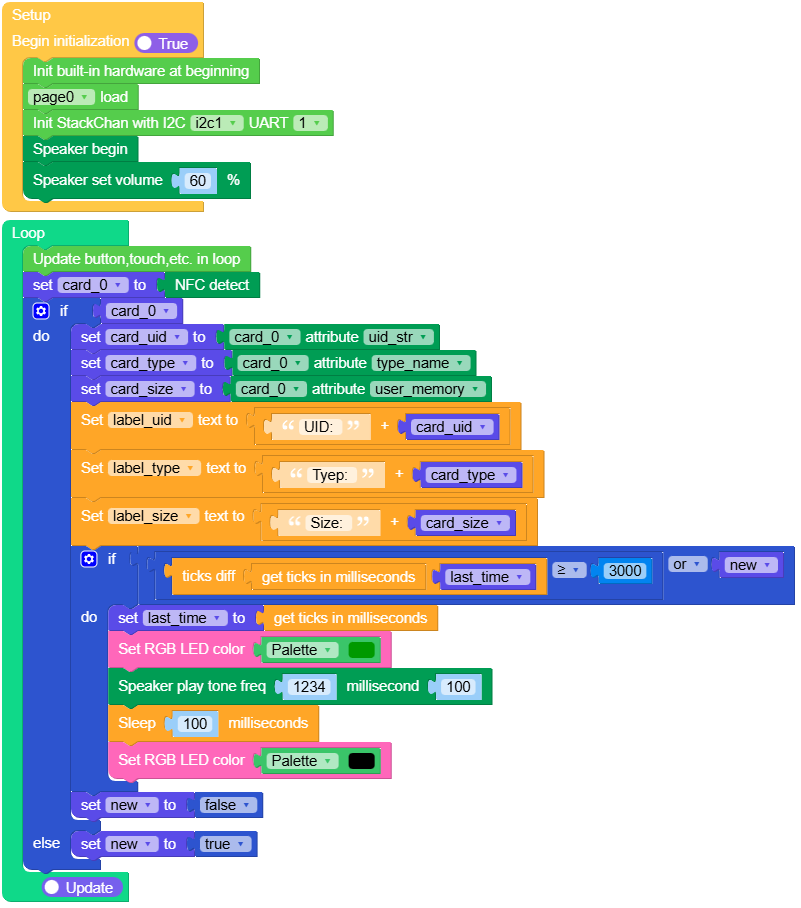
示例输出:
None
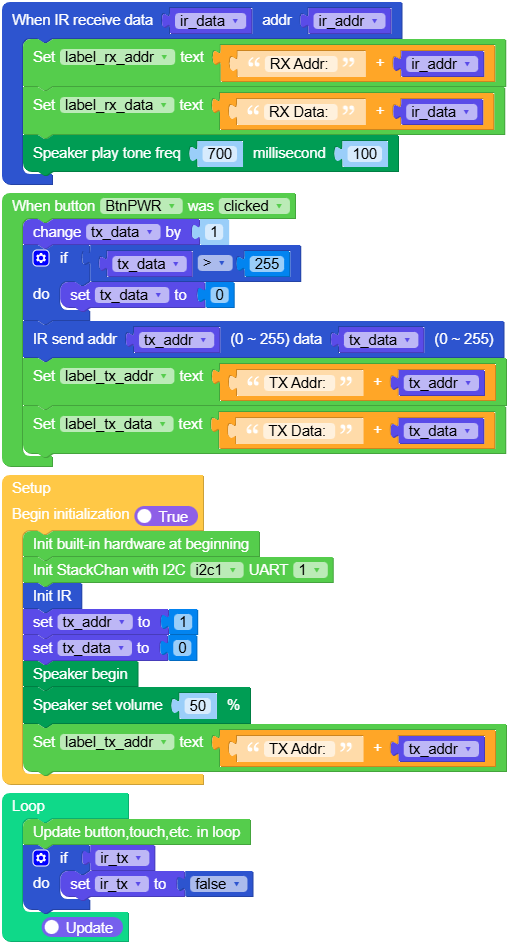
红外(IR)
在 UiFlow2 中打开 stackchan_ir_tx_rx_example.m5f2 项目。
此示例演示 NEC 风格的红外发送与接收。
UiFlow2 代码块:
示例输出:
None
MicroPython 应用示例
舵机零点校准
备注
不同设备之间的机械装配会有差异。刷入新固件后,需要手动校准舵机零点参考。
运行程序。
手动转动头部:在 X 方向上,使显示屏与底座朝向一致;在 Y 方向上,使显示屏与底座垂直。
点击 Save 按钮。
MicroPython 代码块:
  1# SPDX-FileCopyrightText: 2026 M5Stack Technology CO LTD
  2#
  3# SPDX-License-Identifier: MIT
  4
  5import os, sys, io
  6import M5
  7from M5 import *
  8import m5ui
  9import lvgl as lv
 10import time
 11from hardware.stackchan import StackChan
 12
 13
 14page0 = None
 15label_title = None
 16button_save = None
 17label_angle_x = None
 18label_angle_y = None
 19label_tip = None
 20stackchan = None
 21x_angle = None
 22y_angle = None
 23last_time = None
 24
 25
 26def button_save_short_clicked_event(event_struct):
 27    global \
 28        page0, \
 29        label_title, \
 30        button_save, \
 31        label_angle_x, \
 32        label_angle_y, \
 33        label_tip, \
 34        stackchan, \
 35        x_angle, \
 36        y_angle, \
 37        last_time
 38    stackchan.set_servo_zero()
 39    label_tip.set_text(str("Tip: Calibration success"))
 40    Speaker.tone(1000, 100)
 41    last_time = time.ticks_ms()
 42
 43
 44def button_save_event_handler(event_struct):
 45    global \
 46        page0, \
 47        label_title, \
 48        button_save, \
 49        label_angle_x, \
 50        label_angle_y, \
 51        label_tip, \
 52        stackchan, \
 53        x_angle, \
 54        y_angle, \
 55        last_time
 56    event = event_struct.code
 57    if event == lv.EVENT.SHORT_CLICKED and True:
 58        button_save_short_clicked_event(event_struct)
 59    return
 60
 61
 62def setup():
 63    global \
 64        page0, \
 65        label_title, \
 66        button_save, \
 67        label_angle_x, \
 68        label_angle_y, \
 69        label_tip, \
 70        stackchan, \
 71        x_angle, \
 72        y_angle, \
 73        last_time
 74
 75    M5.begin()
 76    Widgets.setRotation(1)
 77    m5ui.init()
 78    page0 = m5ui.M5Page(bg_c=0x000000)
 79    label_title = m5ui.M5Label(
 80        "Servo Calibration",
 81        x=55,
 82        y=5,
 83        text_c=0x0DC9F4,
 84        bg_c=0x000000,
 85        bg_opa=0,
 86        font=lv.font_montserrat_24,
 87        parent=page0,
 88    )
 89    button_save = m5ui.M5Button(
 90        text="Save",
 91        x=128,
 92        y=195,
 93        bg_c=0x2196F3,
 94        text_c=0xFFFFFF,
 95        font=lv.font_montserrat_14,
 96        parent=page0,
 97    )
 98    label_angle_x = m5ui.M5Label(
 99        "X-Axis Servo Angle:",
100        x=10,
101        y=130,
102        text_c=0x0DC9F4,
103        bg_c=0x000000,
104        bg_opa=0,
105        font=lv.font_montserrat_18,
106        parent=page0,
107    )
108    label_angle_y = m5ui.M5Label(
109        "Y-Axis Servo Angle:",
110        x=8,
111        y=160,
112        text_c=0x0DC9F4,
113        bg_c=0x000000,
114        bg_opa=0,
115        font=lv.font_montserrat_18,
116        parent=page0,
117    )
118    label_tip = m5ui.M5Label(
119        "Tip:Move by hand, tap Save.",
120        x=33,
121        y=70,
122        text_c=0xD2E711,
123        bg_c=0xFFFFFF,
124        bg_opa=0,
125        font=lv.font_montserrat_18,
126        parent=page0,
127    )
128
129    button_save.add_event_cb(button_save_event_handler, lv.EVENT.ALL, None)
130
131    stackchan = StackChan(i2c=1, uart=1)
132    page0.screen_load()
133    stackchan.set_servo_power(enable=True, settle_ms=500)
134    stackchan.set_servo_torque(stackchan.SERVO_ID_X, enable=False)
135    stackchan.set_servo_torque(stackchan.SERVO_ID_Y, enable=False)
136    Speaker.begin()
137    Speaker.setVolumePercentage(0.6)
138    Speaker.tone(1000, 100)
139    last_time = time.ticks_ms()
140
141
142def loop():
143    global \
144        page0, \
145        label_title, \
146        button_save, \
147        label_angle_x, \
148        label_angle_y, \
149        label_tip, \
150        stackchan, \
151        x_angle, \
152        y_angle, \
153        last_time
154    M5.update()
155    if (time.ticks_diff((time.ticks_ms()), last_time)) >= 100:
156        last_time = time.ticks_ms()
157        x_angle = stackchan.get_servo_angle(stackchan.SERVO_ID_X)
158        y_angle = stackchan.get_servo_angle(stackchan.SERVO_ID_Y)
159        label_angle_x.set_text(str((str("X-Axis Servo Angle:") + str(x_angle))))
160        label_angle_y.set_text(str((str("Y-Axis Servo Angle:") + str(y_angle))))
161
162
163if __name__ == "__main__":
164    try:
165        setup()
166        while True:
167            loop()
168    except (Exception, KeyboardInterrupt) as e:
169        try:
170            m5ui.deinit()
171            from utility import print_error_msg
172
173            print_error_msg(e)
174        except ImportError:
175            print("please update to latest firmware")
示例输出:
None
舵机角度读取
此示例演示在关闭力矩的情况下读取 X 和 Y 舵机角度(单位:度),使头部可以自由转动。
备注
开启力矩控制时会保持上次目标位置,并阻碍手动转动。关闭力矩控制后可在角度实时更新时自由调整头部姿态,便于检查校准结果。
MicroPython 代码块:
 1import os, sys, io
 2import M5
 3from M5 import *
 4import m5ui
 5import lvgl as lv
 6import time
 7from hardware.stackchan import StackChan
 8
 9
10page0 = None
11label_title = None
12label_agnle_x = None
13label_angle_y = None
14stackchan = None
15last_time = None
16x_angle = None
17y_angle = None
18
19
20def setup():
21    global page0, label_title, label_agnle_x, label_angle_y, stackchan, last_time, x_angle, y_angle
22
23    M5.begin()
24    Widgets.setRotation(1)
25    m5ui.init()
26    page0 = m5ui.M5Page(bg_c=0x000000)
27    label_title = m5ui.M5Label(
28        "Servo Read Example",
29        x=34,
30        y=10,
31        text_c=0x0DC9F4,
32        bg_c=0x000000,
33        bg_opa=0,
34        font=lv.font_montserrat_24,
35        parent=page0,
36    )
37    label_agnle_x = m5ui.M5Label(
38        "X-Axis Servo Angle:",
39        x=10,
40        y=80,
41        text_c=0x0DC9F4,
42        bg_c=0x000000,
43        bg_opa=0,
44        font=lv.font_montserrat_24,
45        parent=page0,
46    )
47    label_angle_y = m5ui.M5Label(
48        "Y-Axis Servo Angle:",
49        x=10,
50        y=125,
51        text_c=0x0DC9F4,
52        bg_c=0x000000,
53        bg_opa=0,
54        font=lv.font_montserrat_24,
55        parent=page0,
56    )
57
58    stackchan = StackChan(i2c=1, uart=1)
59    page0.screen_load()
60    stackchan.set_servo_power(enable=True, settle_ms=500)
61    stackchan.set_servo_torque(stackchan.SERVO_ID_X, enable=False)
62    stackchan.set_servo_torque(stackchan.SERVO_ID_Y, enable=False)
63    last_time = time.ticks_ms()
64
65
66def loop():
67    global page0, label_title, label_agnle_x, label_angle_y, stackchan, last_time, x_angle, y_angle
68    M5.update()
69    if (time.ticks_diff((time.ticks_ms()), last_time)) >= 100:
70        last_time = time.ticks_ms()
71        x_angle = stackchan.get_servo_angle(stackchan.SERVO_ID_X)
72        y_angle = stackchan.get_servo_angle(stackchan.SERVO_ID_Y)
73        label_agnle_x.set_text(str((str("X-Axis Servo Angle: ") + str(x_angle))))
74        label_angle_y.set_text(str((str("Y-Axis Servo Angle: ") + str(y_angle))))
75
76
77if __name__ == "__main__":
78    try:
79        setup()
80        while True:
81            loop()
82    except (Exception, KeyboardInterrupt) as e:
83        try:
84            m5ui.deinit()
85            from utility import print_error_msg
86
87            print_error_msg(e)
88        except ImportError:
89            print("please update to latest firmware")
示例输出:
None
舵机控制
此示例演示使用 set_servo_angle 和 set_servo_x_pwm 控制舵机移动到指定位置,并以 PWM 模式驱动 X 轴舵机。
MicroPython 代码块:
  1# SPDX-FileCopyrightText: 2026 M5Stack Technology CO LTD
  2#
  3# SPDX-License-Identifier: MIT
  4
  5import os, sys, io
  6import M5
  7from M5 import *
  8import m5ui
  9import lvgl as lv
 10import time
 11from hardware.stackchan import StackChan
 12
 13
 14page0 = None
 15label_title = None
 16label_status = None
 17stackchan = None
 18
 19
 20def cleanup():
 21    global stackchan
 22    if stackchan is None:
 23        return
 24    try:
 25        stackchan.set_servo_x_pwm(0)
 26        time.sleep_ms(100)
 27        stackchan.set_servo_angle(stackchan.SERVO_ID_X, 0, 500, 0)
 28        stackchan.set_servo_angle(stackchan.SERVO_ID_Y, 45, 500, 0)
 29        time.sleep_ms(600)
 30        stackchan.set_servo_torque(stackchan.SERVO_ID_X, enable=False)
 31        stackchan.set_servo_torque(stackchan.SERVO_ID_Y, enable=False)
 32        stackchan.set_servo_power(enable=False)
 33    except Exception as e:
 34        print("StackChan cleanup failed:", e)
 35
 36
 37def setup():
 38    global page0, label_title, label_status, stackchan
 39
 40    M5.begin()
 41    Widgets.setRotation(1)
 42    m5ui.init()
 43    page0 = m5ui.M5Page(bg_c=0x000000)
 44    label_title = m5ui.M5Label(
 45        "Servo Control Example",
 46        x=20,
 47        y=5,
 48        text_c=0x0DC9F4,
 49        bg_c=0x000000,
 50        bg_opa=0,
 51        font=lv.font_montserrat_24,
 52        parent=page0,
 53    )
 54    label_status = m5ui.M5Label(
 55        "--",
 56        x=153,
 57        y=115,
 58        text_c=0x0DC9F4,
 59        bg_c=0xFFFFFF,
 60        bg_opa=0,
 61        font=lv.font_montserrat_16,
 62        parent=page0,
 63    )
 64
 65    stackchan = StackChan(i2c=1, uart=1)
 66    page0.screen_load()
 67    Speaker.begin()
 68    Speaker.setVolumePercentage(0.5)
 69    # A previous run may have been interrupted while X was in PWM mode.
 70    # Power-cycle the servo rail before enabling torque to recover cleanly.
 71    stackchan.set_servo_power(enable=False, settle_ms=300)
 72    stackchan.set_servo_power(enable=True)
 73    stackchan.set_servo_torque(stackchan.SERVO_ID_X, enable=True)
 74    stackchan.set_servo_torque(stackchan.SERVO_ID_Y, enable=True)
 75
 76    label_status.set_text(str("Center X/Y"))
 77    label_status.align_to(page0, lv.ALIGN.CENTER, 0, 0)
 78    stackchan.set_servo_angle(stackchan.SERVO_ID_X, 0, 1000, 0)
 79    stackchan.set_servo_angle(stackchan.SERVO_ID_Y, 45, 1000, 0)
 80    Speaker.tone(678, 300)
 81    time.sleep_ms(2000)
 82
 83    label_status.set_text(str("Y tilt up"))
 84    label_status.align_to(page0, lv.ALIGN.CENTER, 0, 0)
 85    stackchan.set_servo_angle(stackchan.SERVO_ID_Y, 20, 1000, 0)
 86    time.sleep_ms(1800)
 87
 88    label_status.set_text(str("Y tilt down"))
 89    label_status.align_to(page0, lv.ALIGN.CENTER, 0, 0)
 90    stackchan.set_servo_angle(stackchan.SERVO_ID_Y, 70, 1000, 0)
 91    time.sleep_ms(1800)
 92
 93    label_status.set_text(str("Y back to center"))
 94    label_status.align_to(page0, lv.ALIGN.CENTER, 0, 0)
 95    stackchan.set_servo_angle(stackchan.SERVO_ID_Y, 45, 1000, 0)
 96    time.sleep_ms(1500)
 97
 98    label_status.set_text(str("X rotate counterclockwise"))
 99    label_status.align_to(page0, lv.ALIGN.CENTER, 0, 0)
100    stackchan.set_servo_x_pwm(-50)
101    time.sleep_ms(3000)
102
103    label_status.set_text(str("X rotate clockwise"))
104    label_status.align_to(page0, lv.ALIGN.CENTER, 0, 0)
105    stackchan.set_servo_x_pwm(50)
106    time.sleep_ms(3000)
107
108    label_status.set_text(str("X/Y back to center"))
109    label_status.align_to(page0, lv.ALIGN.CENTER, 0, 0)
110    stackchan.set_servo_x_pwm(0)
111    time.sleep_ms(100)
112    stackchan.set_servo_angle(stackchan.SERVO_ID_X, 0, 1000, 0)
113    stackchan.set_servo_angle(stackchan.SERVO_ID_Y, 45, 1000, 0)
114
115
116def loop():
117    global page0, label_title, label_status, stackchan
118    M5.update()
119
120
121if __name__ == "__main__":
122    try:
123        setup()
124        while True:
125            loop()
126    except (Exception, KeyboardInterrupt) as e:
127        cleanup()
128        try:
129            m5ui.deinit()
130            from utility import print_error_msg
131
132            print_error_msg(e)
133        except ImportError:
134            print("please update to latest firmware")
示例输出:
None
人脸跟踪
案例实现人脸跟踪功能
MicroPython 代码块:
  1import os, sys, io
  2import M5
  3from M5 import *
  4import camera
  5import dl
  6import image
  7from hardware.stackchan import StackChan
  8
  9
 10stackchan = None
 11
 12
 13import math
 14
 15img = None
 16dl_detection_result = None
 17dl_detector = None
 18lost_frame = None
 19res = None
 20bbox = None
 21f_x = None
 22f_y = None
 23neutral = None
 24SMOOTH = None
 25f_w = None
 26DEADZONE_NORM = None
 27f_h = None
 28Y_NEUTRAL = None
 29f_cx = None
 30img_cx = None
 31f_cy = None
 32img_cy = None
 33ex = None
 34angle_x = None
 35ey = None
 36angle_y = None
 37x_target = None
 38y_target = None
 39
 40
 41def setup():
 42    global \
 43        stackchan, \
 44        img, \
 45        dl_detection_result, \
 46        dl_detector, \
 47        lost_frame, \
 48        res, \
 49        bbox, \
 50        f_x, \
 51        f_y, \
 52        neutral, \
 53        SMOOTH, \
 54        f_w, \
 55        DEADZONE_NORM, \
 56        f_h, \
 57        Y_NEUTRAL, \
 58        f_cx, \
 59        img_cx, \
 60        f_cy, \
 61        img_cy, \
 62        ex, \
 63        angle_x, \
 64        ey, \
 65        angle_y, \
 66        x_target, \
 67        y_target
 68
 69    M5.begin()
 70    Widgets.setRotation(1)
 71    Widgets.fillScreen(0x222222)
 72
 73    stackchan = StackChan(i2c=1, uart=1)
 74    camera.init(pixformat=camera.RGB565, framesize=camera.QVGA)
 75    dl_detector = dl.ObjectDetector(dl.model.HUMAN_FACE_DETECT)
 76    stackchan.set_servo_power(enable=True)
 77    stackchan.set_servo_torque(stackchan.SERVO_ID_X, enable=True)
 78    stackchan.set_servo_torque(stackchan.SERVO_ID_Y, enable=True)
 79    stackchan.set_servo_angle(stackchan.SERVO_ID_X, 0, 0, 0)
 80    stackchan.set_servo_angle(stackchan.SERVO_ID_Y, 45, 0, 0)
 81    SMOOTH = 0.1
 82    DEADZONE_NORM = 0.06
 83    Y_NEUTRAL = 45
 84    img_cx = 160
 85    img_cy = 120
 86    angle_x = 0
 87    angle_y = Y_NEUTRAL
 88    neutral = True
 89
 90
 91def loop():
 92    global \
 93        stackchan, \
 94        img, \
 95        dl_detection_result, \
 96        dl_detector, \
 97        lost_frame, \
 98        res, \
 99        bbox, \
100        f_x, \
101        f_y, \
102        neutral, \
103        SMOOTH, \
104        f_w, \
105        DEADZONE_NORM, \
106        f_h, \
107        Y_NEUTRAL, \
108        f_cx, \
109        img_cx, \
110        f_cy, \
111        img_cy, \
112        ex, \
113        angle_x, \
114        ey, \
115        angle_y, \
116        x_target, \
117        y_target
118    M5.update()
119    img = camera.snapshot()
120    dl_detection_result = dl_detector.infer(img)
121    if dl_detection_result:
122        lost_frame = 0
123        res = dl_detection_result[0]
124        bbox = res.bbox()
125        f_x = res.x()
126        f_y = res.y()
127        f_w = res.w()
128        f_h = res.h()
129        f_cx = int(f_x + f_w * 0.5)
130        f_cy = int(f_y + f_h * 0.5)
131        ex = (f_cx - img_cx) / img_cx
132        ey = (f_cy - img_cy) / img_cy
133        if math.fabs(ex) < DEADZONE_NORM:
134            ex = 0
135        if math.fabs(ey) < DEADZONE_NORM:
136            ey = 0
137        x_target = min(max(ex * -135, -135), 135)
138        y_target = min(max(Y_NEUTRAL - Y_NEUTRAL * ey, 0), 90)
139        angle_x = angle_x + SMOOTH * (x_target - angle_x)
140        angle_y = angle_y + SMOOTH * (y_target - angle_y)
141        stackchan.set_servo_angle(stackchan.SERVO_ID_X, angle_x, 100, 0)
142        stackchan.set_servo_angle(stackchan.SERVO_ID_Y, angle_y, 100, 0)
143        neutral = False
144        lost_frame = 0
145        img.draw_rectangle(f_x, f_y, f_w, f_h, color=0x6600CC, thickness=3, fill=False)
146    else:
147        lost_frame = (lost_frame if isinstance(lost_frame, (int, float)) else 0) + 1
148        if lost_frame > 20 and not neutral:
149            stackchan.set_servo_angle(stackchan.SERVO_ID_X, 0, 1000, 0)
150            stackchan.set_servo_angle(stackchan.SERVO_ID_Y, 45, 1000, 0)
151            neutral = True
152    M5.Lcd.show(img, 0, 0, 320, 240)
153
154
155if __name__ == "__main__":
156    try:
157        setup()
158        while True:
159            loop()
160    except (Exception, KeyboardInterrupt) as e:
161        try:
162            from utility import print_error_msg
163
164            print_error_msg(e)
165        except ImportError:
166            print("please update to latest firmware")
示例输出:
None
舵机电源信息
此示例演示读取并显示舵机电源信息。
MicroPython 代码块:
  1# SPDX-FileCopyrightText: 2026 M5Stack Technology CO LTD
  2#
  3# SPDX-License-Identifier: MIT
  4
  5import os, sys, io
  6import M5
  7from M5 import *
  8import m5ui
  9import lvgl as lv
 10import time
 11from hardware.stackchan import StackChan
 12
 13
 14page0 = None
 15label_title = None
 16label_voltage = None
 17label_current = None
 18label_power = None
 19stackchan = None
 20last_time = None
 21volatge = None
 22current = None
 23power = None
 24
 25
 26def setup():
 27    global \
 28        page0, \
 29        label_title, \
 30        label_voltage, \
 31        label_current, \
 32        label_power, \
 33        stackchan, \
 34        last_time, \
 35        volatge, \
 36        current, \
 37        power
 38
 39    M5.begin()
 40    Widgets.setRotation(1)
 41    m5ui.init()
 42    page0 = m5ui.M5Page(bg_c=0x000000)
 43    label_title = m5ui.M5Label(
 44        "Servo Power Info",
 45        x=56,
 46        y=5,
 47        text_c=0x0DC9F4,
 48        bg_c=0x000000,
 49        bg_opa=0,
 50        font=lv.font_montserrat_24,
 51        parent=page0,
 52    )
 53    label_voltage = m5ui.M5Label(
 54        "Voltage:",
 55        x=10,
 56        y=80,
 57        text_c=0x0DC9F4,
 58        bg_c=0x000000,
 59        bg_opa=0,
 60        font=lv.font_montserrat_24,
 61        parent=page0,
 62    )
 63    label_current = m5ui.M5Label(
 64        "Current:",
 65        x=10,
 66        y=115,
 67        text_c=0x0DC9F4,
 68        bg_c=0x000000,
 69        bg_opa=0,
 70        font=lv.font_montserrat_24,
 71        parent=page0,
 72    )
 73    label_power = m5ui.M5Label(
 74        "Power:",
 75        x=25,
 76        y=150,
 77        text_c=0x0DC9F4,
 78        bg_c=0x000000,
 79        bg_opa=0,
 80        font=lv.font_montserrat_24,
 81        parent=page0,
 82    )
 83
 84    stackchan = StackChan(i2c=1, uart=1)
 85    page0.screen_load()
 86    last_time = time.ticks_ms()
 87
 88
 89def loop():
 90    global \
 91        page0, \
 92        label_title, \
 93        label_voltage, \
 94        label_current, \
 95        label_power, \
 96        stackchan, \
 97        last_time, \
 98        volatge, \
 99        current, \
100        power
101    M5.update()
102    if (time.ticks_diff((time.ticks_ms()), last_time)) >= 200:
103        last_time = time.ticks_ms()
104        volatge = stackchan.get_battery_voltage()
105        current = stackchan.get_battery_current()
106        power = stackchan.get_battery_power()
107        label_voltage.set_text(str((str("Voltage: ") + str((str(volatge) + str(" V"))))))
108        label_current.set_text(str((str("Current: ") + str((str(current) + str(" A"))))))
109        label_power.set_text(str((str("Power: ") + str((str(power) + str(" W"))))))
110
111
112if __name__ == "__main__":
113    try:
114        setup()
115        while True:
116            loop()
117    except (Exception, KeyboardInterrupt) as e:
118        try:
119            m5ui.deinit()
120            from utility import print_error_msg
121
122            print_error_msg(e)
123        except ImportError:
124            print("please update to latest firmware")
示例输出:
None
触摸与 RGB
此示例演示将触摸区域映射到 RGB 灯带颜色(两条灯带上的三个逻辑触摸点)。
MicroPython 代码块:
 1# SPDX-FileCopyrightText: 2026 M5Stack Technology CO LTD
 2#
 3# SPDX-License-Identifier: MIT
 4
 5import os, sys, io
 6import M5
 7from M5 import *
 8import m5ui
 9import lvgl as lv
10import time
11from hardware.stackchan import StackChan
12
13
14HOLD_MS = 300
15TOUCH_COLORS = (0x33CC00, 0x00CCCC, 0x000099)
16TOUCH_TONES = (700, 900, 1100)
17TOUCH_LEDS = (
18    ((0, 0), (0, 1), (1, 0), (1, 1)),
19    ((0, 2), (0, 3), (1, 2), (1, 3)),
20    ((0, 4), (0, 5), (1, 4), (1, 5)),
21)
22
23page0 = None
24label_title = None
25stackchan = None
26tp = None
27last_time = None
28active = None
29
30
31def set_touch_group(index, color):
32    for strip, led in TOUCH_LEDS[index]:
33        stackchan.set_rgb_color(strip, led, color)
34
35
36def setup():
37    global page0, label_title, stackchan, tp, last_time, active
38
39    M5.begin()
40    Widgets.setRotation(1)
41    m5ui.init()
42    page0 = m5ui.M5Page(bg_c=0x000000)
43    label_title = m5ui.M5Label(
44        "TP & RGB Strip Example",
45        x=13,
46        y=10,
47        text_c=0x0DC9F4,
48        bg_c=0x000000,
49        bg_opa=0,
50        font=lv.font_montserrat_24,
51        parent=page0,
52    )
53
54    stackchan = StackChan(i2c=1, uart=1)
55    page0.screen_load()
56    now = time.ticks_ms()
57    last_time = [now, now, now]
58    active = [False, False, False]
59    Speaker.begin()
60    Speaker.setVolumePercentage(0.5)
61    stackchan.set_rgb_color(0x000000)
62
63
64def loop():
65    global page0, label_title, stackchan, tp, last_time, active
66    M5.update()
67    now = time.ticks_ms()
68    tp = stackchan.get_touch()
69    if tp is None:
70        tp = [0, 0, 0]
71
72    for index in range(3):
73        if tp[index]:
74            last_time[index] = now
75            if not active[index]:
76                active[index] = True
77                set_touch_group(index, TOUCH_COLORS[index])
78                Speaker.tone(TOUCH_TONES[index], 50)
79        elif active[index] and time.ticks_diff(now, last_time[index]) > HOLD_MS:
80            active[index] = False
81            set_touch_group(index, 0x000000)
82
83
84if __name__ == "__main__":
85    try:
86        setup()
87        while True:
88            loop()
89    except (Exception, KeyboardInterrupt) as e:
90        try:
91            m5ui.deinit()
92            from utility import print_error_msg
93
94            print_error_msg(e)
95        except ImportError:
96            print("please update to latest firmware")
示例输出:
None
NFC
此示例演示检测 NFC 标签,并在屏幕上显示 UID 和标签类型。完整的 NFC Unit API 参考(detect、读写、标签类型等)请参见 NFC Unit。
MicroPython 代码块:
  1# SPDX-FileCopyrightText: 2026 M5Stack Technology CO LTD
  2#
  3# SPDX-License-Identifier: MIT
  4
  5import os, sys, io
  6import M5
  7from M5 import *
  8import m5ui
  9import lvgl as lv
 10import time
 11from hardware.stackchan import StackChan
 12
 13
 14page0 = None
 15label_title = None
 16label_uid = None
 17label_type = None
 18label_size = None
 19stackchan = None
 20card_0 = None
 21card_uid = None
 22new = None
 23card_type = None
 24card_size = None
 25last_time = None
 26
 27
 28def setup():
 29    global \
 30        page0, \
 31        label_title, \
 32        label_uid, \
 33        label_type, \
 34        label_size, \
 35        stackchan, \
 36        card_0, \
 37        card_uid, \
 38        new, \
 39        card_type, \
 40        card_size, \
 41        last_time
 42
 43    M5.begin()
 44    Widgets.setRotation(1)
 45    m5ui.init()
 46    page0 = m5ui.M5Page(bg_c=0x000000)
 47    label_title = m5ui.M5Label(
 48        "NFC Card detect",
 49        x=58,
 50        y=5,
 51        text_c=0x13C2EB,
 52        bg_c=0xFFFFFF,
 53        bg_opa=0,
 54        font=lv.font_montserrat_24,
 55        parent=page0,
 56    )
 57    label_uid = m5ui.M5Label(
 58        "UID:",
 59        x=18,
 60        y=70,
 61        text_c=0xFFFFFF,
 62        bg_c=0xFFFFFF,
 63        bg_opa=0,
 64        font=lv.font_montserrat_16,
 65        parent=page0,
 66    )
 67    label_type = m5ui.M5Label(
 68        "Tyep:",
 69        x=10,
 70        y=100,
 71        text_c=0xFFFFFF,
 72        bg_c=0xFFFFFF,
 73        bg_opa=0,
 74        font=lv.font_montserrat_16,
 75        parent=page0,
 76    )
 77    label_size = m5ui.M5Label(
 78        "Size:",
 79        x=16,
 80        y=130,
 81        text_c=0xFFFFFF,
 82        bg_c=0xFFFFFF,
 83        bg_opa=0,
 84        font=lv.font_montserrat_16,
 85        parent=page0,
 86    )
 87
 88    page0.screen_load()
 89    stackchan = StackChan(i2c=1, uart=1)
 90    Speaker.begin()
 91    Speaker.setVolumePercentage(0.6)
 92
 93
 94def loop():
 95    global \
 96        page0, \
 97        label_title, \
 98        label_uid, \
 99        label_type, \
100        label_size, \
101        stackchan, \
102        card_0, \
103        card_uid, \
104        new, \
105        card_type, \
106        card_size, \
107        last_time
108    M5.update()
109    card_0 = stackchan.nfc.detect()
110    if card_0:
111        card_uid = card_0.uid_str
112        card_type = card_0.type_name
113        card_size = card_0.user_memory
114        label_uid.set_text(str((str("UID: ") + str(card_uid))))
115        label_type.set_text(str((str("Tyep: ") + str(card_type))))
116        label_size.set_text(str((str("Size: ") + str(card_size))))
117        if (time.ticks_diff((time.ticks_ms()), last_time)) >= 3000 or new:
118            last_time = time.ticks_ms()
119            stackchan.set_rgb_color(0x009900)
120            Speaker.tone(1234, 100)
121            time.sleep_ms(100)
122            stackchan.set_rgb_color(0x000000)
123        new = False
124    else:
125        new = True
126
127
128if __name__ == "__main__":
129    try:
130        setup()
131        while True:
132            loop()
133    except (Exception, KeyboardInterrupt) as e:
134        try:
135            m5ui.deinit()
136            from utility import print_error_msg
137
138            print_error_msg(e)
139        except ImportError:
140            print("please update to latest firmware")
示例输出:
None
红外(IR)
此示例演示 NEC 风格的红外发送与接收。
MicroPython 代码块:
  1# SPDX-FileCopyrightText: 2026 M5Stack Technology CO LTD
  2#
  3# SPDX-License-Identifier: MIT
  4
  5import os, sys, io
  6import M5
  7from M5 import *
  8from hardware import IR
  9from hardware.stackchan import StackChan
 10
 11
 12label_title = None
 13label_tx_addr = None
 14label_tx_data = None
 15label_rx_addr = None
 16label_rx_data = None
 17ir = None
 18stackchan = None
 19ir_data = None
 20ir_addr = None
 21tx_data = None
 22ir_tx = None
 23tx_addr = None
 24
 25
 26def ir_rx_event(_data, _addr, _ctrl):
 27    global \
 28        label_title, \
 29        label_tx_addr, \
 30        label_tx_data, \
 31        label_rx_addr, \
 32        label_rx_data, \
 33        ir, \
 34        stackchan, \
 35        ir_data, \
 36        ir_addr, \
 37        tx_data, \
 38        ir_tx, \
 39        tx_addr
 40    ir_data = _data
 41    ir_addr = _addr
 42    label_rx_addr.setText(str((str("RX Addr: ") + str(ir_addr))))
 43    label_rx_data.setText(str((str("RX Data: ") + str(ir_data))))
 44    Speaker.tone(700, 100)
 45
 46
 47def btn_pwr_was_clicked_event(state):
 48    global \
 49        label_title, \
 50        label_tx_addr, \
 51        label_tx_data, \
 52        label_rx_addr, \
 53        label_rx_data, \
 54        ir, \
 55        stackchan, \
 56        ir_data, \
 57        ir_addr, \
 58        tx_data, \
 59        ir_tx, \
 60        tx_addr
 61    tx_data = (tx_data if isinstance(tx_data, (int, float)) else 0) + 1
 62    if tx_data > 255:
 63        tx_data = 0
 64    ir.tx(tx_addr, tx_data)
 65    label_tx_addr.setText(str((str("TX Addr: ") + str(tx_addr))))
 66    label_tx_data.setText(str((str("TX Data: ") + str(tx_data))))
 67
 68
 69def setup():
 70    global \
 71        label_title, \
 72        label_tx_addr, \
 73        label_tx_data, \
 74        label_rx_addr, \
 75        label_rx_data, \
 76        ir, \
 77        stackchan, \
 78        ir_data, \
 79        ir_addr, \
 80        tx_data, \
 81        ir_tx, \
 82        tx_addr
 83
 84    M5.begin()
 85    Widgets.setRotation(1)
 86    Widgets.fillScreen(0x000000)
 87    label_title = Widgets.Label(
 88        "IR TX & RX Example", 41, 5, 1.0, 0x0DC9F4, 0x000000, Widgets.FONTS.Montserrat24
 89    )
 90    label_tx_addr = Widgets.Label(
 91        "TX Addr:", 9, 59, 1.0, 0xFFFFFF, 0x000000, Widgets.FONTS.Montserrat18
 92    )
 93    label_tx_data = Widgets.Label(
 94        "TX Data:", 170, 59, 1.0, 0xFFFFFF, 0x000000, Widgets.FONTS.Montserrat18
 95    )
 96    label_rx_addr = Widgets.Label(
 97        "RX Addr:", 10, 100, 1.0, 0xFFFFFF, 0x000000, Widgets.FONTS.Montserrat18
 98    )
 99    label_rx_data = Widgets.Label(
100        "RX Data:", 170, 100, 1.0, 0xFFFFFF, 0x000000, Widgets.FONTS.Montserrat18
101    )
102
103    BtnPWR.setCallback(type=BtnPWR.CB_TYPE.WAS_CLICKED, cb=btn_pwr_was_clicked_event)
104
105    stackchan = StackChan(i2c=1, uart=1)
106    ir = IR()
107    ir.rx_cb(ir_rx_event)
108    tx_addr = 1
109    tx_data = 0
110    Speaker.begin()
111    Speaker.setVolumePercentage(0.5)
112    label_tx_addr.setText(str((str("TX Addr: ") + str(tx_addr))))
113
114
115def loop():
116    global \
117        label_title, \
118        label_tx_addr, \
119        label_tx_data, \
120        label_rx_addr, \
121        label_rx_data, \
122        ir, \
123        stackchan, \
124        ir_data, \
125        ir_addr, \
126        tx_data, \
127        ir_tx, \
128        tx_addr
129    M5.update()
130    if ir_tx:
131        ir_tx = False
132
133
134if __name__ == "__main__":
135    try:
136        setup()
137        while True:
138            loop()
139    except (Exception, KeyboardInterrupt) as e:
140        try:
141            from utility import print_error_msg
142
143            print_error_msg(e)
144        except ImportError:
145            print("please update to latest firmware")
示例输出:
None
API 参考
StackChan
- class hardware.stackchan.StackChan
StackChan 板级驱动:包括 UART 上的 SCS 串口舵机、M5IOE1 上的 RGB 和舵机供电、Si12T 触摸、INA226(电池总线),以及作为
unit.nfc.NFCUnit的板载 NFC(ST25R3916)。该类是**单例**;请始终使用相同的
i2c和uartid 进行构造。After init, the instance exposes
nfc(aunit.nfc.NFCUnit—see NFC Unit for the complete API),touch,i2c, and low-levelservo(Scsclinstance) for advanced use.模块常量包括
SERVO_ID_X``(``1)、SERVO_ID_Y``(``2)及相关限制值;这些也可作为StackChan的类属性使用。UiFlow2 代码块:

MicroPython 代码块:
from hardware.stackchan import StackChan, SERVO_ID_X, SERVO_ID_Y

sc = StackChan(i2c=1, uart=1)
- set_servo_zero()
将两个轴的逻辑**零点**保存到 NVS 中(命名空间
servo,键名zero_pos_1/zero_pos_2)。UiFlow2 代码块:

MicroPython 代码块:
sc.set_servo_zero()
- set_servo_power(enable=True, settle_ms=None)
通过 IO 扩展器启用或关闭舵机供电。
- 参数:
UiFlow2 代码块:

MicroPython 代码块:
sc.set_servo_power(True)
- set_servo_torque(servo_id, enable=True)
启用或禁用单个舵机的力矩。
UiFlow2 代码块:

MicroPython 代码块:
sc.set_servo_torque(SERVO_ID_X, True)
- set_servo_angle(servo_id, angle_deg, time_ms=10, speed=0)
将指定舵机移动到
angle_deg``(度)。X 轴(``SERVO_ID_X/ 平移)建议范围约为 -135°~135°,Y 轴(SERVO_ID_Y/ 俯仰)建议范围为 0°~90°。- 参数:
UiFlow2 代码块:


MicroPython 代码块:
sc.set_servo_angle(SERVO_ID_X, 0.0, 500, 0)
sc.set_servo_angle(SERVO_ID_X, 0.0, 0, 50)
- get_servo_angle(servo_id)
读取舵机角度(单位:度)。
- 参数:
servo_id (int) –
SERVO_ID_X或SERVO_ID_Y。- 返回:
Angle in degrees, or
Noneif the read failed.
UiFlow2 代码块:

MicroPython 代码块:
deg = sc.get_servo_angle(SERVO_ID_X)
- set_servo_x_pwm(value)
以 PWM 模式驱动 X 轴舵机进行连续转动。用户范围为 -100~100;符号表示旋转方向,绝对值表示驱动力大小。
- 参数:
value (int) – 带符号的 PWM 强度(会被限制在范围内)。正负值表示相反的旋转方向;
0表示停止输出。
UiFlow2 代码块:

MicroPython 代码块:
sc.set_servo_x_pwm(50)
- set_rgb_color(*args)
设置灯带上的 RGB LED。
一个参数:将所有 LED 填充为
color。两个参数:
strip``(``0或1)和该逻辑灯带对应的color。三个参数:
strip、index、color,用于设置单颗 LED(strip为1时,index顺序与驱动一致)。
- 返回:
Trueon success where applicable.
UiFlow2 代码块:



MicroPython 代码块:
sc.set_rgb_color(0x00FF00)
sc.set_rgb_color(0, 0x0000FF)
sc.set_rgb_color(0, 0, 0xFF0000)
- get_rgb_color(strip, index)
获取单颗 LED 的 RGB 颜色。
UiFlow2 代码块:

MicroPython 代码块:
r, g, b = sc.get_rgb_color(0, 0)
- get_touch(index=None)
读取触摸状态(三个逻辑槽位)。
- 参数:
index (int) – If
None, return a list of three levels; if0,1, or2, return that slot’s level.- 返回:
OUTPUT_NONE…``OUTPUT_HIGH`` style values. A read failure returnsOUTPUT_NONEvalues so examples can safely index the result.
UiFlow2 代码块:


MicroPython 代码块:
tp = sc.get_touch()
one = sc.get_touch(0)
- get_battery_voltage()
来自 INA226 的总线电压(伏特)。
- 返回:
floatorNoneif unavailable.
UiFlow2 代码块:

MicroPython 代码块:
v = sc.get_battery_voltage()
- get_battery_current()
来自 INA226 的电流(安培)。
- 返回:
floatorNone.
UiFlow2 代码块:

MicroPython 代码块:
a = sc.get_battery_current()
- get_battery_power()
当电压和电流都有效时,返回 INA226 的功率(瓦特)。
- 返回:
floatorNone.
UiFlow2 代码块:

MicroPython 代码块:
p = sc.get_battery_power()