Chain PIR
PIRChain 是链式总线上 PIR(被动红外)传感器设备的辅助类。它提供了读取红外感应值、配置触发延迟以及监控 PIR 触发事件的方法。
支持以下产品:

UiFlow2 应用示例
PIR 运动检测
在 UiFlow2 中打开 m5core_chain_pir_basic_example.m5f2 项目。
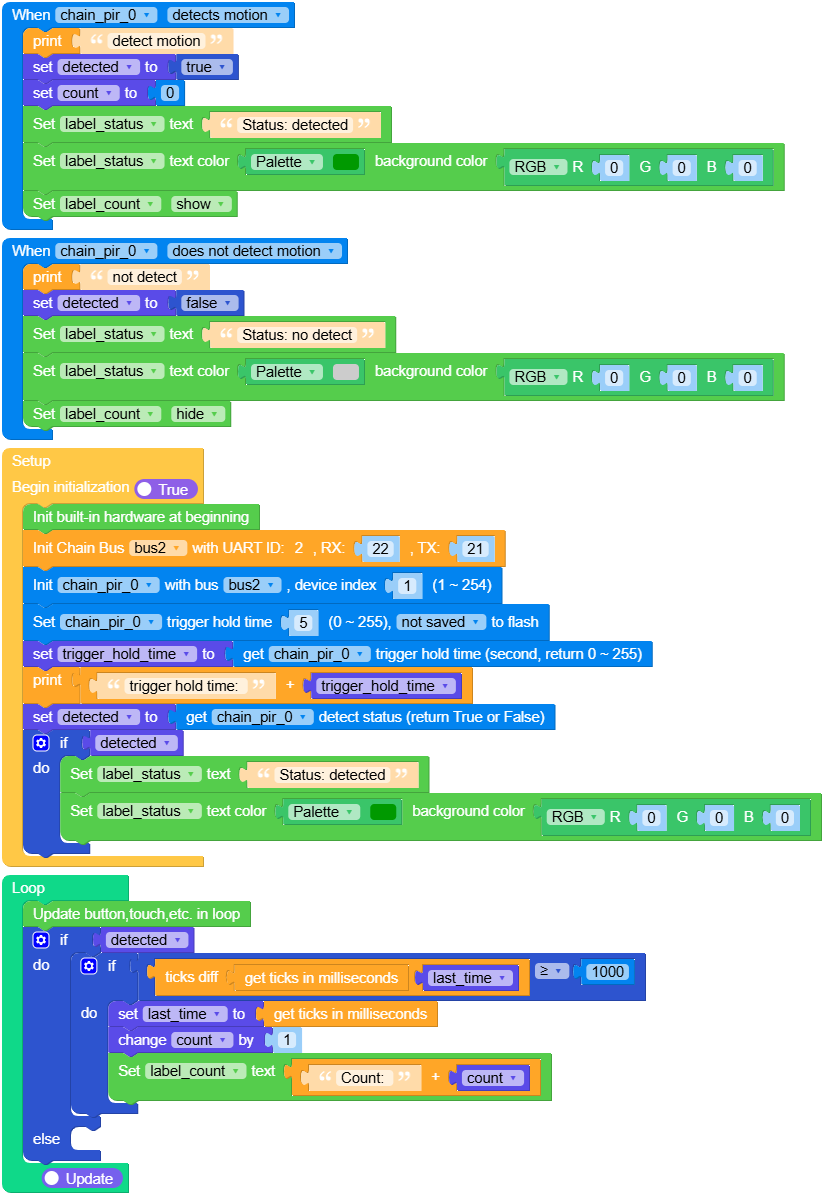
本示例演示如何使用 Chain PIR 传感器的触发回调来更新屏幕上的运动状态。它启用触发自动发送、配置触发保持时间,并在运动激活时统计检测持续时间。
UiFlow2 代码块:
示例输出:
None
MicroPython 应用示例
PIR 运动检测
本示例演示如何使用 Chain PIR 传感器的触发回调来更新屏幕上的运动状态。它启用触发自动发送、配置触发保持时间,并在运动激活时统计检测持续时间。
MicroPython 代码块:
  1# SPDX-FileCopyrightText: 2026 M5Stack Technology CO LTD
  2#
  3# SPDX-License-Identifier: MIT
  4
  5import os, sys, io
  6import M5
  7from M5 import *
  8from chain import PIRChain
  9from chain import ChainBus
 10import time
 11
 12
 13title0 = None
 14label_status = None
 15label_count = None
 16bus2 = None
 17chain_pir_0 = None
 18detected = None
 19count = None
 20last_time = None
 21trigger_hold_time = None
 22
 23
 24def chain_pir_0_motion_detected_event(args):
 25    global \
 26        title0, \
 27        label_status, \
 28        label_count, \
 29        bus2, \
 30        chain_pir_0, \
 31        detected, \
 32        count, \
 33        last_time, \
 34        trigger_hold_time
 35    print("detect motion")
 36    detected = True
 37    count = 0
 38    label_status.setText(str("Status: detected"))
 39    label_status.setColor(0x009900, 0x000000)
 40    label_count.setVisible(True)
 41
 42
 43def chain_pir_0_motion_ended_event(args):
 44    global \
 45        title0, \
 46        label_status, \
 47        label_count, \
 48        bus2, \
 49        chain_pir_0, \
 50        detected, \
 51        count, \
 52        last_time, \
 53        trigger_hold_time
 54    print("not detect")
 55    detected = False
 56    label_status.setText(str("Status: no detect"))
 57    label_status.setColor(0xCCCCCC, 0x000000)
 58    label_count.setVisible(False)
 59
 60
 61def setup():
 62    global \
 63        title0, \
 64        label_status, \
 65        label_count, \
 66        bus2, \
 67        chain_pir_0, \
 68        detected, \
 69        count, \
 70        last_time, \
 71        trigger_hold_time
 72
 73    M5.begin()
 74    Widgets.setRotation(1)
 75    Widgets.fillScreen(0x000000)
 76    title0 = Widgets.Title("Chain PIR Example", 3, 0xFFFFFF, 0x0000FF, Widgets.FONTS.DejaVu24)
 77    label_status = Widgets.Label(
 78        "Status: --", 20, 70, 1.0, 0xFFFFFF, 0x000000, Widgets.FONTS.DejaVu24
 79    )
 80    label_count = Widgets.Label(
 81        "Count: --", 20, 165, 1.0, 0xFFFFFF, 0x000000, Widgets.FONTS.DejaVu24
 82    )
 83
 84    bus2 = ChainBus(2, tx=21, rx=22)
 85    chain_pir_0 = PIRChain(bus2, 1)
 86    chain_pir_0.set_trigger_callback(
 87        PIRChain.TRIGGER_MOTION_DETECTED, chain_pir_0_motion_detected_event
 88    )
 89    chain_pir_0.set_trigger_callback(PIRChain.TRIGGER_MOTION_ENDED, chain_pir_0_motion_ended_event)
 90    chain_pir_0.set_trigger(True)
 91    chain_pir_0.set_trigger_hold_time(5, save=False)
 92    trigger_hold_time = chain_pir_0.get_trigger_hold_time()
 93    print((str("trigger hold time: ") + str(trigger_hold_time)))
 94    detected = chain_pir_0.get_detect_status()
 95    if detected:
 96        label_status.setText(str("Status: detected"))
 97        label_status.setColor(0x009900, 0x000000)
 98
 99
100def loop():
101    global \
102        title0, \
103        label_status, \
104        label_count, \
105        bus2, \
106        chain_pir_0, \
107        detected, \
108        count, \
109        last_time, \
110        trigger_hold_time
111    M5.update()
112    if detected:
113        if (time.ticks_diff((time.ticks_ms()), last_time)) >= 1000:
114            last_time = time.ticks_ms()
115            count = (count if isinstance(count, (int, float)) else 0) + 1
116            label_count.setText(str((str("Count: ") + str(count))))
117    else:
118        pass
119
120
121if __name__ == "__main__":
122    try:
123        setup()
124        while True:
125            loop()
126    except (Exception, KeyboardInterrupt) as e:
127        try:
128            bus2.deinit()
129            from utility import print_error_msg
130
131            print_error_msg(e)
132        except ImportError:
133            print("please update to latest firmware")
示例输出:
None
API 参考
PIRChain
- class chain.pir.PIRChain(bus, device_id)
基类:
KeyChain用于通过链式总线与 PIR(被动红外)传感器设备交互的 PIR Chain 类。
UiFlow2 代码块:

MicroPython 代码块:
from chain import ChainBus
from chain import PIRChain

bus2 = ChainBus(2, tx=21, rx=22)
chain_pir_0 = PIRChain(bus2, 1)
其他按钮和一些通用方法,请参考
ChainKey类。- get_detect_status()
获取运动检测状态。
- 返回:
运动检测状态。True 表示检测到运动,False 表示运动结束。失败时返回 False。
- 返回类型:
UiFlow2 代码块:

MicroPython 代码块:
status = chain_pir_0.get_detect_status()
- set_trigger(enable)
启用或禁用 PIR 检测报告。
UiFlow2 代码块:

MicroPython 代码块:
success = chain_pir_0.set_trigger(True)
- get_trigger()
获取是否启用 PIR 检测报告。
- 返回:
启用 PIR 检测报告返回 True,禁用返回 False。失败时返回 False。
- 返回类型:
UiFlow2 代码块:

MicroPython 代码块:
enabled = chain_pir_0.get_trigger()
- set_trigger_hold_time(seconds, save=False)
设置触发运动结束状态前的保持时间。
- 参数:
- 返回:
操作成功返回 True,否则返回 False。
- 返回类型:
UiFlow2 代码块:

MicroPython 代码块:
success = chain_pir_0.set_trigger_hold_time(5, False)
- get_trigger_hold_time()
获取触发运动结束状态前的保持时间。
- 返回:
保持时间(秒),失败时返回 None。
- 返回类型:
UiFlow2 代码块:

MicroPython 代码块:
hold_time = chain_pir_0.get_trigger_hold_time()
- set_trigger_callback(trigger_type, callback)
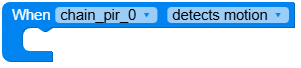
设置 PIR 运动检测事件的回调。
- 参数:
trigger_type (int) – 要监听的触发类型。使用
PIRChain.TRIGGER_MOTION_DETECTED(1) 表示检测到运动,或PIRChain.TRIGGER_MOTION_ENDED(0) 表示运动结束。callback – 当 PIR 运动检测状态变化时将被调用的回调函数。
- 返回类型:
None
备注
在回调函数中不能调用链式相关方法。
UiFlow2 代码块:
MicroPython 代码块:
def motion_detected_callback(args):
    print("Motion detected")

def motion_ended_callback(args):
    print("Motion ended")

# Listen for motion detected only
chain_pir_0.set_trigger_callback(PIRChain.TRIGGER_MOTION_DETECTED, motion_detected_callback)

# Listen for motion ended only
chain_pir_0.set_trigger_callback(PIRChain.TRIGGER_MOTION_ENDED, motion_ended_callback)