Atomic RS232 Base
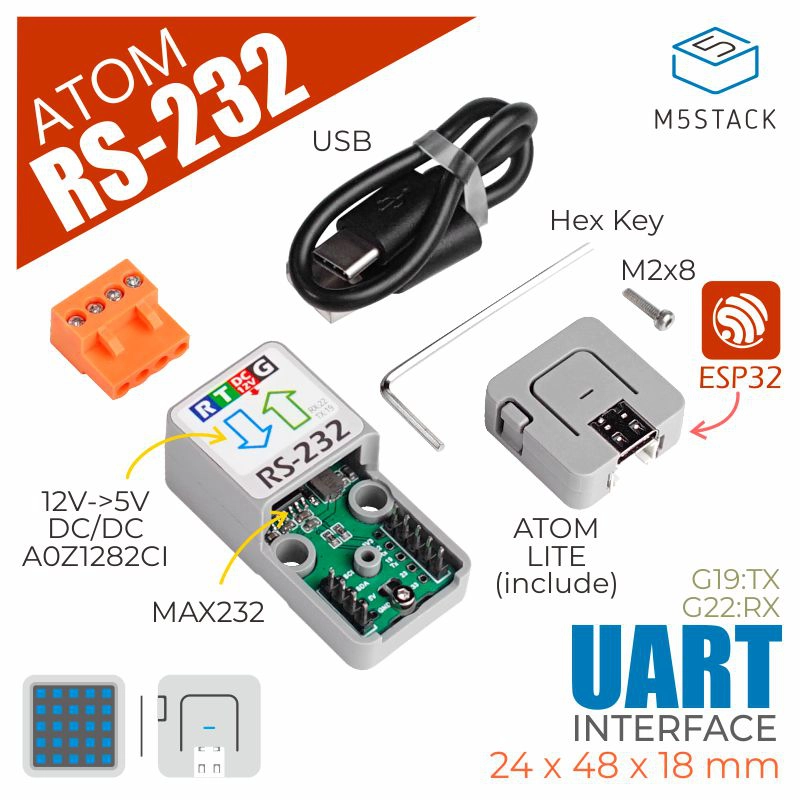
AtomRS232 类提供了一套控制 RS232 模块的方法。通过 UART 接口,模块可以发送和接收数据,支持各种波特率和流量控制配置。
支持以下产品:

UiFlow2 应用示例
RS232 应用示例
在 UiFlow2 中打开 atoms3r_rs232_example.m5f2 项目。
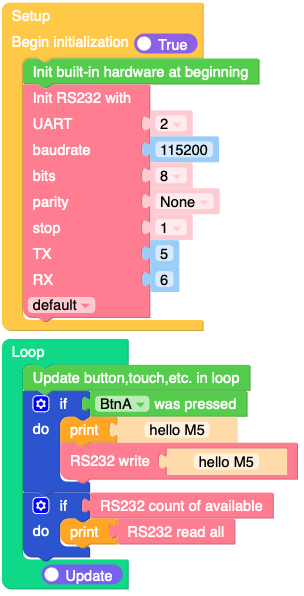
本示例演示如何使用 RS232 模块通过 UART 接口发送/接收数据。
UiFlow2 代码块:
示例输出:
None
MicroPython 应用示例
RS232 应用示例
本示例演示如何使用 RS232 模块通过 UART 接口发送/接收数据。
MicroPython 代码块:
 1# SPDX-FileCopyrightText: 2025 M5Stack Technology CO LTD
 2#
 3# SPDX-License-Identifier: MIT
 4
 5import os, sys, io
 6import M5
 7from M5 import *
 8from base import AtomRS232
 9
10
11base_rs232 = None
12
13
14def setup():
15    global base_rs232
16
17    M5.begin()
18    base_rs232 = AtomRS232(
19        2,
20        baudrate=115200,
21        bits=8,
22        parity=None,
23        stop=1,
24        tx=5,
25        rx=6,
26        txbuf=256,
27        rxbuf=256,
28        timeout=0,
29        timeout_char=0,
30        invert=0,
31        flow=0,
32    )
33
34
35def loop():
36    global base_rs232
37    M5.update()
38    if BtnA.wasPressed():
39        print("hello M5")
40        base_rs232.write("hello M5")
41    if base_rs232.any():
42        print(base_rs232.read())
43
44
45if __name__ == "__main__":
46    try:
47        setup()
48        while True:
49            loop()
50    except (Exception, KeyboardInterrupt) as e:
51        try:
52            from utility import print_error_msg
53
54            print_error_msg(e)
55        except ImportError:
56            print("please update to latest firmware")
示例输出:
None
API参考
AtomRS232
- class base.rs232.AtomRS232(id, **kwargs)
基类:
object- init(baudrate=9600, bits=8, parity=None, stop=1, *, ...)
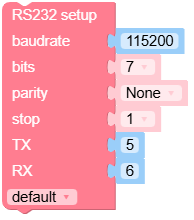
使用给定参数初始化 UART 总线。
- 参数:
UiFlow2 代码块:
MicroPython 代码块:
rs232_0.init(baudrate=115200, bits=8, parity=None, stop=1)
- deinit()
关闭 UART 总线。
UiFlow2 代码块:

MicroPython 代码块:
rs232_0.deinit()
- read([nbytes])
从 UART 缓冲器读取字符。
UiFlow2 代码块:



MicroPython 代码块:
data = rs232_0.read()
- readinto(buf[, nbytes])
向
buf中读取字节。如果指定了nbytes字节,则最多读取这么多字节;否则,最多读取len(buf)字节。如果超时,可能会提前返回。超时可在构造函数中配置。- 参数:
- 返回:
读取并存储到
buf中的字节数,如果超时则为None。- 返回类型:
int or None
UiFlow2 代码块:

MicroPython 代码块:
data = bytearray(10)
num_bytes = rs232_0.readinto(data)
num_bytes = rs232_0.readinto(data, 5)
- readline()
读取以换行符结束的一行。如果超时,可能会提前返回。超时可在构造函数中配置。
- 返回:
读取的行以字节为单位,如果超时则返回
无。- 返回类型:
bytes or None
UiFlow2 代码块:

MicroPython 代码块:
line = rs232_0.readline()
- sendbreak()
在总线上发送中断条件。这将使总线处于低电平,持续时间长于正常传输一个字符所需的时间。
- 返回:
None
UiFlow2 代码块:

MicroPython 代码块:
rs232_0.sendbreak()
- flush()
等待所有数据发送完毕。如果超时,则会出现异常。超时持续时间取决于发送缓冲区大小和波特率。除非启用了流量控制,否则不应发生超时。
- 返回:
None
UiFlow2 代码块:

MicroPython 代码块:
rs232_0.flush()