NB-IoT Unit
NB-IOT Unit 是一款适用于全球 Cat-NB 频段的无线通信模块。它内置 SIM7020G 通信模块,采用串口通信(AT 指令集控制)。
支持以下产品:
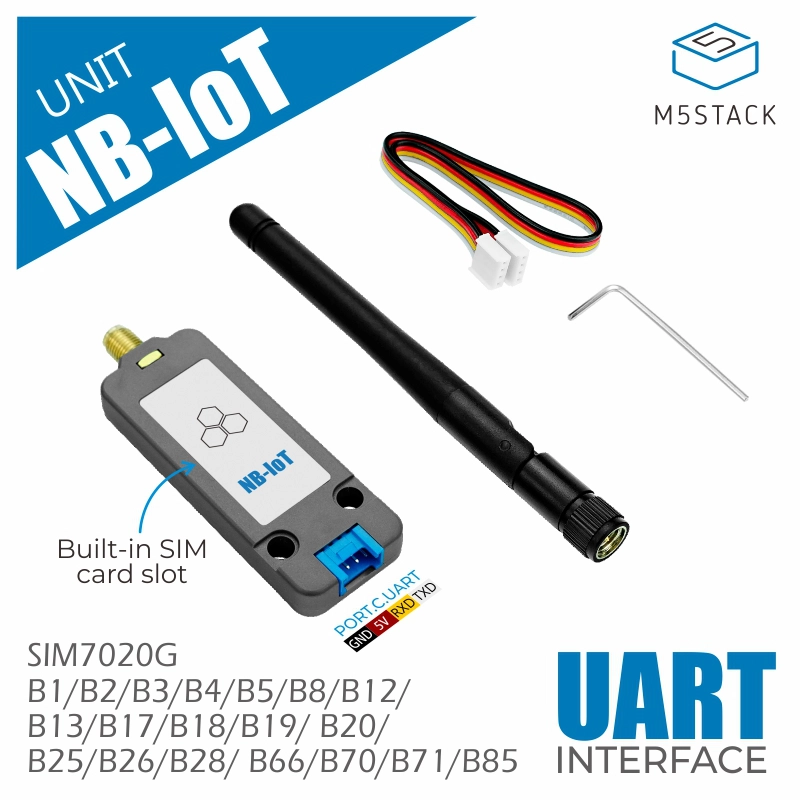
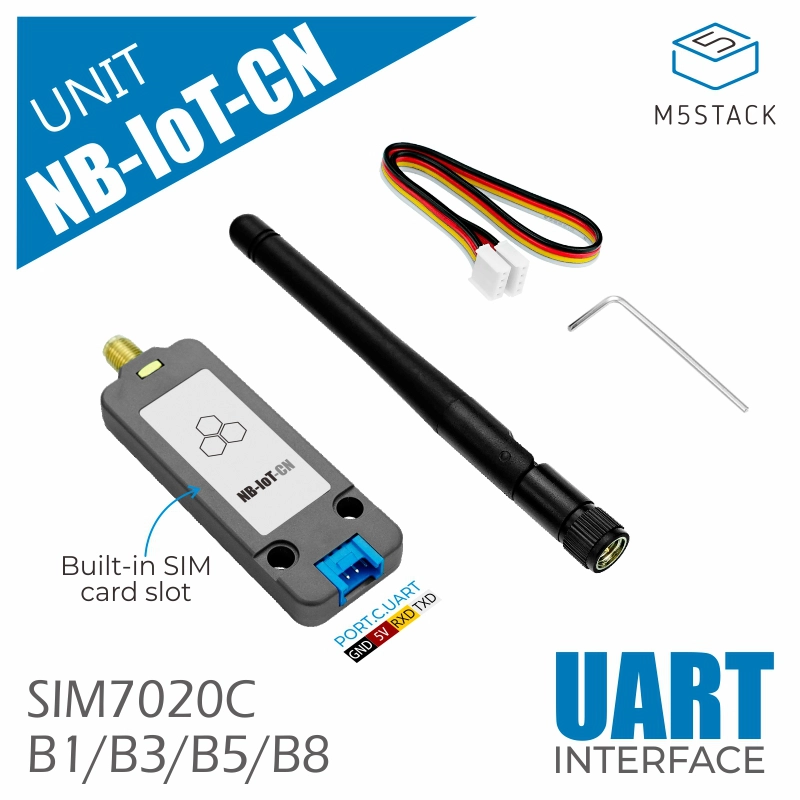
备注
Please ensure that the device supports the NB-IoT frequency bands in your area before use.
备注
Please ensure that the firmware version of SIM7020 is greater than or equal to 1752B12SIM7020C.
 can be used to check the firmware version.
UiFlow2 示例
NBIoT HTTP 示例
Open the cores3_unit_nbiot_http_example.m5f2 project in UiFlow2.
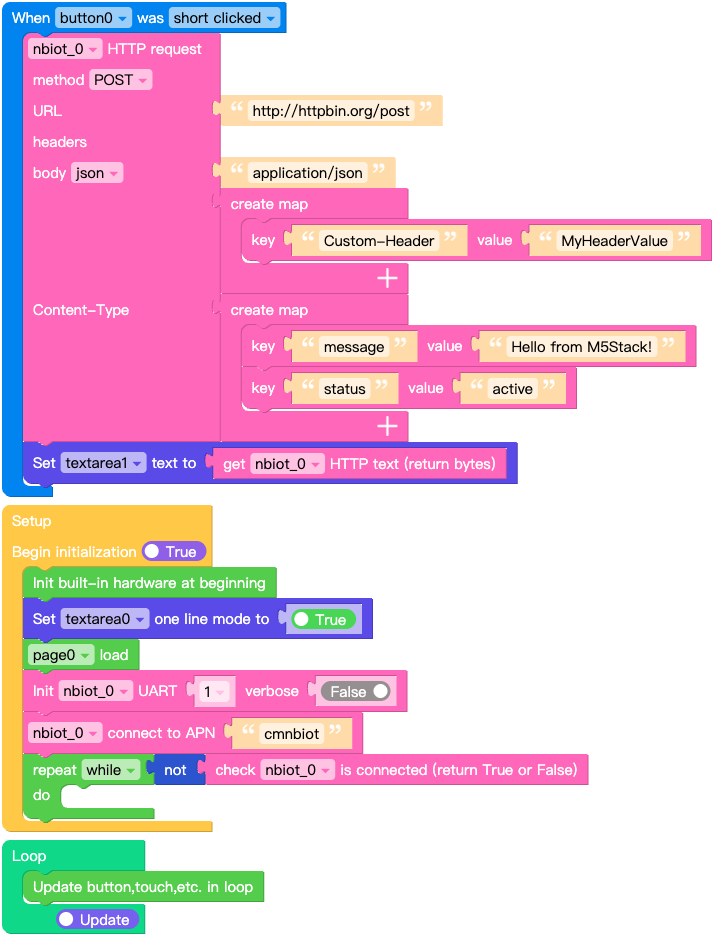
This example shows how to send HTTP request using the NBIoT Unit.
click Send button to send HTTP request. Response data will be printed in the textarea.
UiFlow2 代码块:
示例输出:
Output of received NBIoT message data on screen.
MQTT 示例
Open the cores3_unit_nbiot_mqtt_example.m5f2 project in UiFlow2.
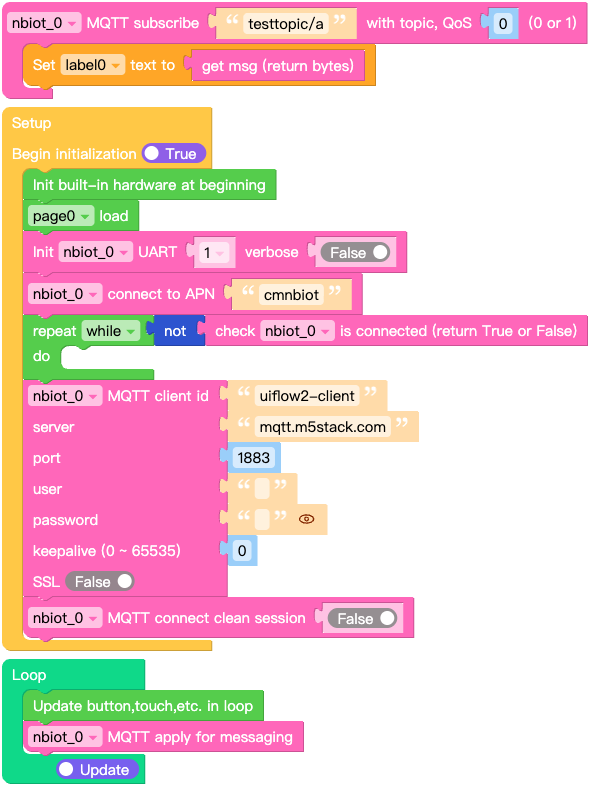
This example shows how to send MQTT message using the NBIoT Unit.
UiFlow2 代码块:
示例输出:
Output of received NBIoT message data on screen.
MicroPython 示例
NBIoT HTTP 示例
This example shows how to send HTTP request using the NBIoT Unit.
click Send button to send HTTP request. Response data will be printed in the textarea.
MicroPython 代码块:
  1# SPDX-FileCopyrightText: 2026 M5Stack Technology CO LTD
  2#
  3# SPDX-License-Identifier: MIT
  4
  5import os, sys, io
  6import M5
  7from M5 import *
  8import m5ui
  9import lvgl as lv
 10from unit import NBIOTUnit
 11
 12
 13page0 = None
 14label0 = None
 15label1 = None
 16button0 = None
 17textarea0 = None
 18textarea1 = None
 19nbiot_0_http_req = None
 20nbiot_0 = None
 21
 22
 23def button0_short_clicked_event(event_struct):
 24    global page0, label0, label1, button0, textarea0, textarea1, nbiot_0_http_req, nbiot_0
 25    nbiot_0_http_req = nbiot_0.post(
 26        "http://httpbin.org/post",
 27        json={"message": "Hello from M5Stack!", "status": "active"},
 28        headers={
 29            "Content-Type": "application/json",
 30            "Custom-Header": "MyHeaderValue",
 31        },
 32    )
 33    textarea1.set_text(str(nbiot_0_http_req.text))
 34
 35
 36def button0_event_handler(event_struct):
 37    global page0, label0, label1, button0, textarea0, textarea1, nbiot_0_http_req, nbiot_0
 38    event = event_struct.code
 39    if event == lv.EVENT.SHORT_CLICKED and True:
 40        button0_short_clicked_event(event_struct)
 41    return
 42
 43
 44def setup():
 45    global page0, label0, label1, button0, textarea0, textarea1, nbiot_0_http_req, nbiot_0
 46
 47    M5.begin()
 48    Widgets.setRotation(1)
 49    m5ui.init()
 50    page0 = m5ui.M5Page(bg_c=0xFFFFFF)
 51    textarea0 = m5ui.M5TextArea(
 52        text="http://httpbin.org/post",
 53        placeholder="Placeholder...",
 54        x=46,
 55        y=10,
 56        w=195,
 57        h=21,
 58        font=lv.font_montserrat_14,
 59        bg_c=0xFFFFFF,
 60        border_c=0xE0E0E0,
 61        text_c=0x212121,
 62        parent=page0,
 63    )
 64    textarea1 = m5ui.M5TextArea(
 65        text="textarea1",
 66        placeholder="Placeholder...",
 67        x=10,
 68        y=68,
 69        w=300,
 70        h=162,
 71        font=lv.font_montserrat_14,
 72        bg_c=0xFFFFFF,
 73        border_c=0xE0E0E0,
 74        text_c=0x212121,
 75        parent=page0,
 76    )
 77    label0 = m5ui.M5Label(
 78        "url:",
 79        x=10,
 80        y=10,
 81        text_c=0x000000,
 82        bg_c=0xFFFFFF,
 83        bg_opa=0,
 84        font=lv.font_montserrat_16,
 85        parent=page0,
 86    )
 87    label1 = m5ui.M5Label(
 88        "Response",
 89        x=10,
 90        y=44,
 91        text_c=0x000000,
 92        bg_c=0xFFFFFF,
 93        bg_opa=0,
 94        font=lv.font_montserrat_14,
 95        parent=page0,
 96    )
 97    button0 = m5ui.M5Button(
 98        text="Send",
 99        x=251,
100        y=10,
101        bg_c=0x2196F3,
102        text_c=0xFFFFFF,
103        font=lv.font_montserrat_14,
104        parent=page0,
105    )
106
107    button0.add_event_cb(button0_event_handler, lv.EVENT.ALL, None)
108
109    textarea0.set_one_line(True)
110    page0.screen_load()
111    nbiot_0 = NBIOTUnit(1, port=(18, 17), verbose=False)
112    nbiot_0.connect(apn="cmnbiot")
113    while not (nbiot_0.isconnected()):
114        pass
115
116
117def loop():
118    global page0, label0, label1, button0, textarea0, textarea1, nbiot_0_http_req, nbiot_0
119    M5.update()
120
121
122if __name__ == "__main__":
123    try:
124        setup()
125        while True:
126            loop()
127    except (Exception, KeyboardInterrupt) as e:
128        try:
129            m5ui.deinit()
130            from utility import print_error_msg
131
132            print_error_msg(e)
133        except ImportError:
134            print("please update to latest firmware")
示例输出:
Output of received NBIoT message data on screen.
MQTT 示例
This example shows how to send MQTT message using the NBIoT Unit.
MicroPython 代码块:
 1# SPDX-FileCopyrightText: 2026 M5Stack Technology CO LTD
 2#
 3# SPDX-License-Identifier: MIT
 4
 5import os, sys, io
 6import M5
 7from M5 import *
 8import m5ui
 9import lvgl as lv
10from unit import NBIOTUnit
11
12
13page0 = None
14label0 = None
15nbiot_0_mqtt = None
16nbiot_0 = None
17
18
19def nbiot_0__testtopic_a_event(data):
20    global page0, label0, nbiot_0_mqtt, nbiot_0
21    label0.set_text(str(data[1]))
22
23
24def setup():
25    global page0, label0, nbiot_0_mqtt, nbiot_0
26
27    M5.begin()
28    Widgets.setRotation(1)
29    m5ui.init()
30    page0 = m5ui.M5Page(bg_c=0xFFFFFF)
31    label0 = m5ui.M5Label(
32        "label0",
33        x=130,
34        y=105,
35        text_c=0x000000,
36        bg_c=0xFFFFFF,
37        bg_opa=0,
38        font=lv.font_montserrat_14,
39        parent=page0,
40    )
41
42    page0.screen_load()
43    nbiot_0 = NBIOTUnit(1, port=(18, 17), verbose=False)
44    nbiot_0.connect(apn="cmnbiot")
45    while not (nbiot_0.isconnected()):
46        pass
47    nbiot_0_mqtt = nbiot_0.MQTTClient(
48        "uiflow2-client", "mqtt.m5stack.com", port=1883, user="", password="", keepalive=0
49    )
50    nbiot_0_mqtt.connect(clean_session=False)
51    nbiot_0_mqtt.subscribe("testtopic/a", nbiot_0__testtopic_a_event, qos=0)
52
53
54def loop():
55    global page0, label0, nbiot_0_mqtt, nbiot_0
56    M5.update()
57    nbiot_0_mqtt.check_msg()
58
59
60if __name__ == "__main__":
61    try:
62        setup()
63        while True:
64            loop()
65    except (Exception, KeyboardInterrupt) as e:
66        try:
67            m5ui.deinit()
68            from utility import print_error_msg
69
70            print_error_msg(e)
71        except ImportError:
72            print("please update to latest firmware")
示例输出:
Output of received NBIoT message data on screen.
API参考
- class unit.nbiot.NBIOTUnit(uart_or_id, port=None, verbose=False)
基类:
SIM7020创建 NBIOTUnit 对象。
- 参数:
uart_or_id (machine.UART | int) – UART 对象或 UART ID。
port (list | tuple) – 包含 RX 和 TX 引脚号的列表或元组。如果 uart_or_id 是 ID,则此项为必填。
verbose (bool) – 是否打印调试信息。
UiFlow2 代码块:

MicroPython 代码块:
from unit import NBIOTUnit
import machine

# Using UART ID and pins (rx, tx)
nbiot = NBIOTUnit(1, (16, 17))

# Or using UART object
uart = machine.UART(1, tx=17, rx=16)
nbiot = NBIOTUnit(uart)
- connect(apn='cmnbiot')
连接到 NB-IoT 网络。
- 参数:
apn (str) – NB-IoT 网络的 APN。默认为 “cmnbiot”。
UiFlow2 代码块:

MicroPython 代码块:
nbiot.connect("cmnbiot")
- isconnected()
检查 NB-IoT 单元是否已连接到网络。
- 返回:
已连接则返回 True,否则返回 False。
- 返回类型:
UiFlow2 代码块:

MicroPython 代码块:
if nbiot.isconnected():
    print("NB-IoT unit is connected")
else:
    print("NB-IoT unit is not connected")
- active(en)
激活或禁用 NB-IoT 单元。禁用将进入低功耗模式。
- 参数:
en (bool) – True 为激活,False 为禁用。
UiFlow2 代码块:

MicroPython 代码块:
nbiot.active(True)
- status([param])
获取 NB-IoT 单元的状态。
以下是常用的支持参数。
Parameter
Description
rssi
信号强度
pin
SIM 卡状态
station
基站注册状态
UiFlow2 代码块:



MicroPython 代码块:
# get signal strength
print(nbiot.status("rssi"))

# get SIM Card status
print(nbiot.status("pin"))

# get station registration status
print(nbiot.status("station"))
- ifconfig()
获取 IP 层网络接口参数:IP 地址、子网掩码、网关和 DNS 服务器。
- 返回:
包含网络接口参数的元组。
- 返回类型:
UiFlow2 代码块:




MicroPython 代码块:
# Get IP address
print(nbiot.ifconfig()[0])
# Get subnet mask
print(nbiot.ifconfig()[1])
# Get gateway
print(nbiot.ifconfig()[2])
# Get DNS server
print(nbiot.ifconfig()[3])
- config('param')
- config(param=value)
获取或设置 NB-IoT 单元的配置参数。
以下是常用的支持参数。
Parameter
permissions
Description
apn
R
接入点名称
mode
R
网络模式(仅支持 NB-IoT)
band
R/W
频段
ccid
R
SIM 卡 CCID
imei
R
设备 IMEI
imsi
R
SIM 卡 IMSI
mfr
R
制造商
model
R
模块型号
version
R
固件版本
UiFlow2 代码块:







MicroPython 代码块:
# Get apn
print(nbiot.config('apn'))

# Get network mode
nbiot.config('mode')

# Get Frequency Band
nbiot.config('band')

# Set Frequency Band
nbiot.config(band=(1, 3, 5, 8))

# Get CCID
nbiot.config('ccid')

# Get IMEI
nbiot.config('imei')

# Get IMSI
nbiot.config('imsi')

# Get Manufacturer
nbiot.config('mfr')

# Get Module Model
nbiot.config('model')

# Get Firmware Version
nbiot.config('version')
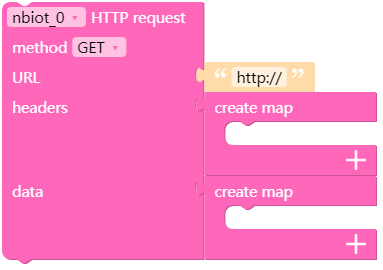
- request(method, url, data=None, json=None, headers={}, stream=None, auth=None, timeout=None, parse_headers=True)
- head(url, **kw)
- get(url, **kw)
- post(url, **kw)
- put(url, **kw)
- patch(url, **kw)
- delete(url, **kw)
发送 HTTP 请求。
- 参数:
method (str) – 使用的 HTTP 方法(例如 “GET”, “POST”)。
url (str) – 发送请求的 URL。
data – (可选) 要在请求体中发送的字典、元组列表、字节或类文件对象。
json – (可选) 要在请求体中发送的 JSON序列化的 Python 对象。
headers (dict) – (可选) 随请求发送的 HTTP 头字典。
stream (bool) – (可选) 如果为 False,响应内容将被立即下载。
auth (tuple) – (可选) 用于启用 Basic/Digest/Custom HTTP 认证的元组。
timeout (float) – (可选) 等待服务器发送数据的秒数。
parse_headers (bool) – (可选) 是否解析响应头。
- 返回:
Response 对象。
备注
更多详细信息请参阅
requests2。UiFlow2 代码块:
MicroPython 代码块:
# GET request
response = nbiot.get("http://httpbin.org/get")
print(response.status_code)
print(response.text)
response.close()

# POST request with JSON data
response = nbiot.post("http://httpbin.org/post", json={"key": "value"})
print(response.json())
response.close()
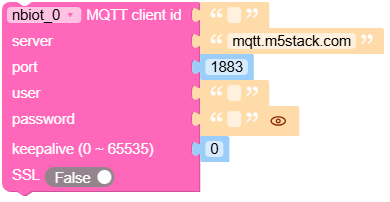
- MQTTClient(client_id, server, port=0, user=None, password=None, keepalive=0, ssl=False, ssl_params={})
创建 MQTT 客户端。
- 参数:
- 返回:
MQTTClient 对象。
备注
更多详细信息请参阅
MQTTClient。UiFlow2 代码块:
MicroPython 代码块:
mqtt = nbiot.MQTTClient("client_id", "mqtt.m5stack.com", port=1883, user="user", password="password")
mqtt.connect()
mqtt.publish("topic", "message")
mqtt.subscribe("topic", lambda topic, msg: print(topic, msg))
mqtt.check_msg()