GatewayH2 Module
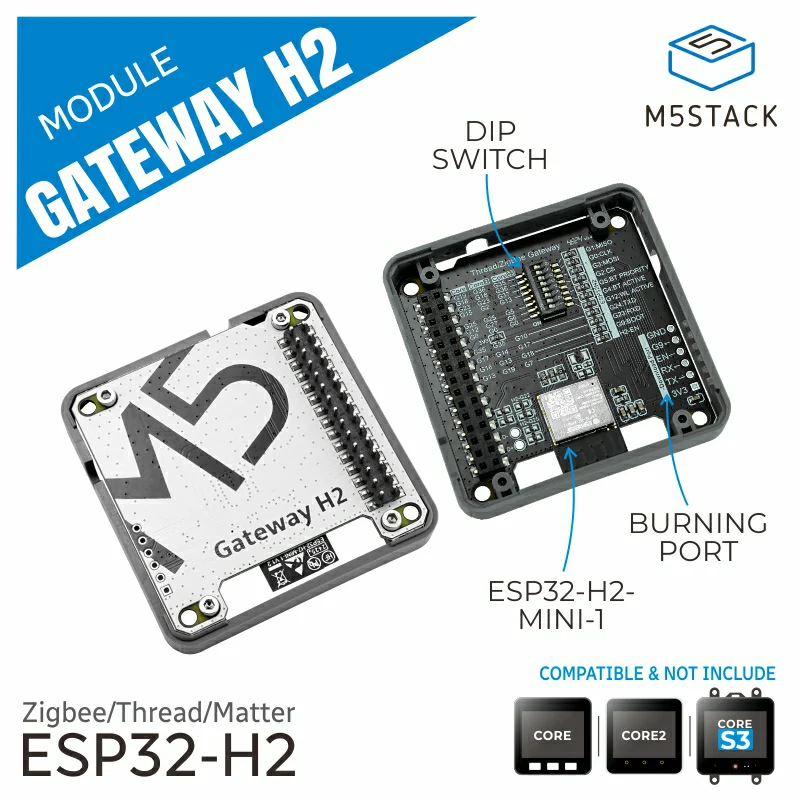
这个库是 Module Gateway H2 的驱动,该模块使用 UART 通信。
支持以下产品:
备注
When using this module, you need to flash the NCP firmware to the module. For details, refer to the ESP Zigbee NCP documentation.
UiFlow2 Example
开关控制
备注
要使用此示例,您还需要 ESP32C6 或类似模块,作为灯节点设备。详情请查看 HA_on_off_light
在 UiFlow2 上打开 cores3_switch_endpoint_example.m5f2 项目。
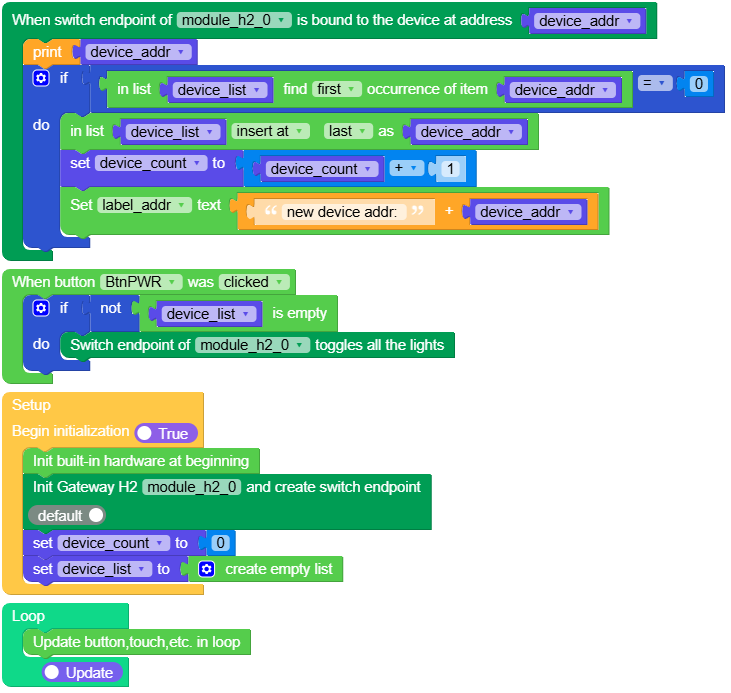
示例程序演示通过 Gateway H2 模块的 SwitchEndpoint 对灯节点进开关控制。
UiFlow2 代码块:
示例输出:
无
MicroPython Example
开关控制
示例程序演示通过 Gateway H2 模块的 SwitchEndpoint 对灯节点进开关控制。
MicroPython 代码块:
  1# SPDX-FileCopyrightText: 2025 M5Stack Technology CO LTD
  2#
  3# SPDX-License-Identifier: MIT
  4
  5import os, sys, io
  6import M5
  7from M5 import *
  8from module import GatewayH2Module
  9
 10
 11title0 = None
 12label0 = None
 13label1 = None
 14label2 = None
 15label_addr = None
 16module_h2_0 = None
 17module_h2_0_ep = None
 18device_addr = None
 19device_count = None
 20device_list = None
 21
 22
 23def first_index(my_list, elem):
 24    try:
 25        index = my_list.index(elem) + 1
 26    except:
 27        index = 0
 28    return index
 29
 30
 31def module_h2_0_ep_bind_event(addr):
 32    global \
 33        title0, \
 34        label0, \
 35        label1, \
 36        label2, \
 37        label_addr, \
 38        module_h2_0, \
 39        module_h2_0_ep, \
 40        device_addr, \
 41        device_count, \
 42        device_list
 43    device_addr = addr
 44    print(device_addr)
 45    if first_index(device_list, device_addr) == 0:
 46        device_list.append(device_addr)
 47        device_count = device_count + 1
 48        label_addr.setText(str((str("new device addr: ") + str(device_addr))))
 49
 50
 51def btn_pwr_was_clicked_event(state):
 52    global \
 53        title0, \
 54        label0, \
 55        label1, \
 56        label2, \
 57        label_addr, \
 58        module_h2_0, \
 59        module_h2_0_ep, \
 60        device_addr, \
 61        device_count, \
 62        device_list
 63    if not not len(device_list):
 64        module_h2_0_ep.toggle()
 65
 66
 67def setup():
 68    global \
 69        title0, \
 70        label0, \
 71        label1, \
 72        label2, \
 73        label_addr, \
 74        module_h2_0, \
 75        module_h2_0_ep, \
 76        device_addr, \
 77        device_count, \
 78        device_list
 79
 80    M5.begin()
 81    Widgets.fillScreen(0x222222)
 82    title0 = Widgets.Title(
 83        "Switch Endpoint Example", 3, 0xFFFFFF, 0x0000FF, Widgets.FONTS.DejaVu18
 84    )
 85    label0 = Widgets.Label(
 86        "press the power button toggle", 2, 50, 1.0, 0xFFFFFF, 0x222222, Widgets.FONTS.DejaVu18
 87    )
 88    label1 = Widgets.Label(
 89        "if has device connect", 2, 26, 1.0, 0xFFFFFF, 0x222222, Widgets.FONTS.DejaVu18
 90    )
 91    label2 = Widgets.Label(
 92        "connect device: ", 2, 90, 1.0, 0xFFFFFF, 0x222222, Widgets.FONTS.DejaVu18
 93    )
 94    label_addr = Widgets.Label("None", 5, 115, 1.0, 0x00FF00, 0x222222, Widgets.FONTS.DejaVu18)
 95    BtnPWR.setCallback(type=BtnPWR.CB_TYPE.WAS_CLICKED, cb=btn_pwr_was_clicked_event)
 96    module_h2_0 = GatewayH2Module(2, 17, 10)
 97    module_h2_0_ep = module_h2_0.create_switch_ep()
 98    module_h2_0_ep.set_bind_callback(module_h2_0_ep_bind_event)
 99    device_count = 0
100    device_list = []
101
102
103def loop():
104    global \
105        title0, \
106        label0, \
107        label1, \
108        label2, \
109        label_addr, \
110        module_h2_0, \
111        module_h2_0_ep, \
112        device_addr, \
113        device_count, \
114        device_list
115    M5.update()
116
117
118if __name__ == "__main__":
119    try:
120        setup()
121        while True:
122            loop()
123    except (Exception, KeyboardInterrupt) as e:
124        try:
125            from utility import print_error_msg
126
127            print_error_msg(e)
128        except ImportError:
129            print("please update to latest firmware")
示例输出:
无
API应用
GatewayH2Module
- class module.gateway_h2.GatewayH2Module
创建一个 GatewayH2Module 对象。
UiFlow2 代码块:

MicroPython 代码块:
from module import GatewayH2Module

module_gateway_h2 = GatewayH2Module(id = 1, tx = 10, rx = 17)
- create_switch_endpoint()
创建 Switch Endpoint。
- Returns SwitchEndpoint:
zigbee switch endpoint object.
- Return type:
SwitchEndpoint
UiFlow2 代码块:
MicroPython 代码块:
h2_switch_endpoint = module_gateway_h2.create_switch_endpoint()
SwitchEndpoint
- class SwitchEndpoint
由 GatewayH2Module.create_switch_endpoint() 或者 GatewayH2Unit.create_switch_endpoint() 返回
- on([addr])
开灯
- 参数:
addr – 设备地址(可选)
调用
on()打开所有设备。调用
on(addr)打开地址为 addr 的设备。
UiFlow2 代码块:


MicroPython 代码块:
h2_switch_endpoint.on(addr)
h2_switch_endpoint.on()
- off([addr])
关灯
- 参数:
addr – 设备地址(可选)
调用
off()关闭所有设备。调用
off(addr)关闭地址为 addr 的设备。
UiFlow2 代码块:


MicroPython 代码块:
h2_switch_endpoint.off(addr)
h2_switch_endpoint.off()
- toggle([addr])
翻转灯状态
- 参数:
addr – 设备地址(可选)
调用
toggle()翻转所有设备的状态。调用
toggle(addr)翻转地址为 addr 的设备的状态。
UiFlow2 代码块:


MicroPython 代码块:
h2_switch_endpoint.toggle(addr)
h2_switch_endpoint.toggle()