Power
class Power
重要
Methods of the Power Class depend on M5.begin()  .
.
All methods calling the Power object need to be placed after M5.begin() .
Methods
- Power.setExtOutput(enable: bool, port: int = 0xFF) None
Set power output of the external ports.
When
enableis True, the power output of the external ports is in output mode. Whenenableis False, the power output of the external ports is in input mode.portis the port number, optional values are available in class PORT, only valid for M5Stack Station.UIFLOW2:


- Power.getExtOutput() bool
Get power output of the external ports.
Returns
Trueif the power output of the external ports is in output mode. ReturnsFalseif the power output of the external ports is in input mode.UIFLOW2:

- Power.setUsbOutput(enable: bool) None
Set power output of the main USB port.
When
enableis True, the power output of the main USB port is in output mode. Whenenableis False, the power output of the main USB port is in input mode.UIFLOW2:

- Power.getUsbOutput() bool
Get power output of the main USB port.
Returns
Trueif the power output of the main USB port is in output mode. ReturnsFalseif the power output of the main USB port is in input mode.UIFLOW2:

- Power.setLed(brightness=255) None
Turn on/off the power LED.
brightnessis the brightness value, ranging from 0 to 255. 0 is off, 255 is the maximum brightness.UIFLOW2:

- Power.powerOff()
Turn off all power.
UIFLOW2:

- Power.timerSleep(seconds) None
- Power.timerSleep(minutes, hours) None
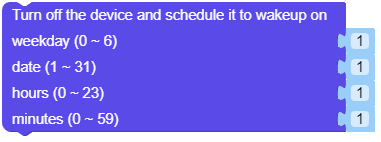
- Power.timerSleep(minutes, hours, date, weekDay) None
sleep and timer boot. The boot condition can be specified by the argument.
seconds: Range is 1 - 15300, in seconds.minutes: Range is 0 - 59, in minutes.hours: Range is 0 - 23, in hours.date: Range is 1 - 31, in days.weekDay: Range is 0 - 6.UIFLOW2:


- Power.deepSleep(micro_seconds: int = 0, wakeup: bool = True)
ESP32 deepsleep.
micro_seconds: Number of micro seconds to wakeup.wakeup: Whether to wake up.UIFLOW2:

- Power.lightSleep(micro_seconds: int = 0, wakeup: bool = True)
ESP32 lightsleep.
micro_seconds: Number of micro seconds to wakeup.wakeup: Whether to wake up.UIFLOW2:

- Power.getBatteryLevel() int
Get the remaining battery power percentage. Returns a value between 0-100.
UIFLOW2:


- Power.setChargeCurrent(max_mA: int) None
Set battery charge current.
max_mA: Range is 0-2000, in milliamps.UIFLOW2:







class PORT
Constants
- PORT.A
Port A.
- PORT.B1
Port B1.
- PORT.B2
Port B2.
- PORT.C1
Port C1.
- PORT.C2
Port C2.
- PORT.USB
USB Port.
- PORT.HAT
HAT Port.
- PORT.ALL
All Ports.