Button
Button用于控制主机内部集成的按键。以下是主机的Button支持详细:
BtnA |
BtnB |
BtnC |
BtnPWR |
BtnEXT |
|
|---|---|---|---|---|---|
AtomS3 |
✔ |
||||
AtomS3 Lite |
✔ |
||||
AtomS3U |
✔ |
||||
StampS3 |
✔ |
||||
CoreS3 |
✔ |
||||
Core2 |
✔ |
✔ |
✔ |
||
TOUGH |
Micropython Example:
import os, sys, io
import M5
from M5 import *

def btnPWR_wasClicked_event(state):
    global label0
    label0.setText('clicked')

def btnPWR_wasHold_event(state):
    global label0
    label0.setText('hold')

M5.begin()
Widgets.fillScreen(0x222222)
label0 = Widgets.Label("Text", 58, 43, 1.0, 0xffffff, 0x222222, Widgets.FONTS.DejaVu24)

BtnPWR.setCallback(type=BtnPWR.CB_TYPE.WAS_CLICKED, cb=btnPWR_wasClicked_event)
BtnPWR.setCallback(type=BtnPWR.CB_TYPE.WAS_HOLD, cb=btnPWR_wasHold_event)

while True:
    M5.update()
UIFLOW2 Example:
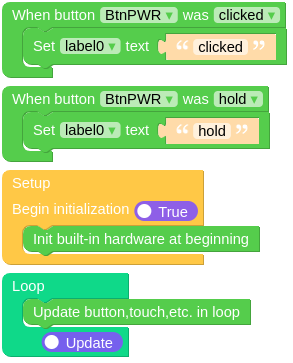
class Button
重要
Methods of Button Class heavily rely on M5.begin()  and
and M5.update()  .
.
All calls to methods of Button objects should be placed after M5.begin() and M5.update() should be called in the main loop.
Methods
- Button.isHolding()
返回 Button 对象是否处于长按状态。
UIFLOW2:

- Button.isPressed()
返回 Button 对象是否处于按下状态。
UIFLOW2:

- Button.isReleased()
返回 Button 对象是否处于松开状态。
UIFLOW2:

- Button.wasClicked()
当 Button 对象被短暂按下并释放时返回 True。
UIFLOW2:

- Button.wasDoubleClicked()
当 Button 对象被双击后经过一段时间后返回 True。
UIFLOW2:

- Button.wasHold()
当 Button 对象被按住一段时间时返回 True。
UIFLOW2:

- Button.wasPressed()
当 Button 对象被按下时返回 True。
UIFLOW2:

- Button.wasReleased()
当 Button 对象被松开时返回 True。
UIFLOW2:

- Button.wasSingleClicked()
当 Button 对象被单击后经过一段时间后返回 True。
UIFLOW2:

Event Handling
- Button.setCallback(type: Callback_Type, cb)
设置事件回调函数
UIFLOW2:
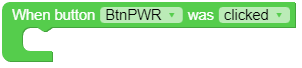
Constants
- Button.CB_TYPE
A Callback_Type object.
一个 Callback_Type 对象。
Constants
- Callback_Type.WAS_CLICKED
单击事件类型。
- Callback_Type.WAS_DOUBLECLICKED
双击事件类型。
- Callback_Type.WAS_HOLD
长按事件类型。
- Callback_Type.WAS_PRESSED
按下事件类型。
- Callback_Type.WAS_RELEASED
Release event type