dl — deep learning
备注
当前模块只适用于 CoreS3 主机
UiFlow2 Example
人脸检测
Open the cores3_example_human_face_detect.m5f2 project in UiFlow2.
This example uses a face detection algorithm to detect faces in real time from the camera feed. When a face is detected, a bounding box is drawn on the screen to mark the face’s position, providing an intuitive visualization of the detection results.
UiFlow2 Code Block:
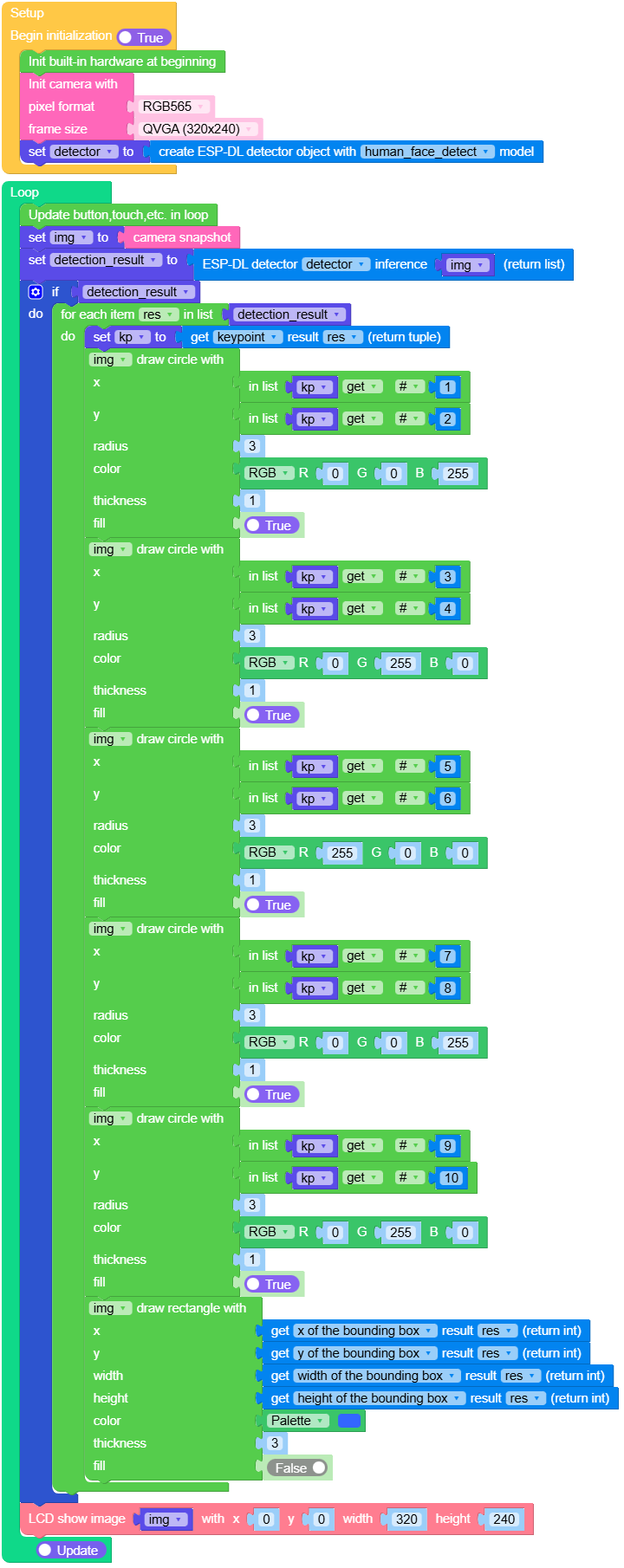
Example output:
None
行人检测
Open the cores3_example_pedestrian_detect.m5f2 project in UiFlow2.
This example uses a pedestrian detection algorithm to detect pedestrian targets in real time from the camera feed. When a pedestrian is detected, a bounding box is drawn on the screen to highlight the pedestrian’s position, providing an intuitive demonstration of the detection results.
UiFlow2 Code Block:
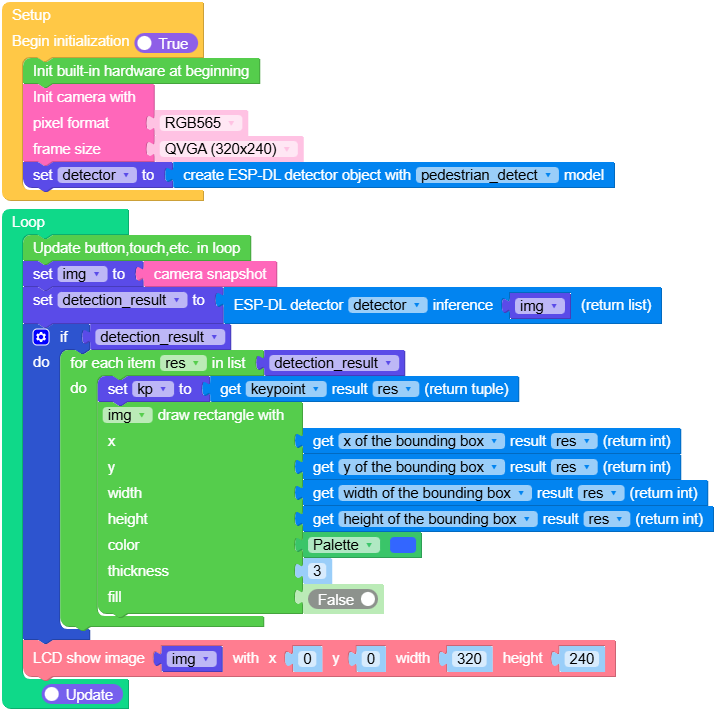
Example output:
None
人脸识别
Open the cores3_example_human_face_recognition.m5f2 project in UiFlow2.
To run this example, you will need the CoreS3 and the Unit Dual Button.
This example uses a face recognition algorithm to detect faces in real time from the camera feed.
By pressing different buttons, you can either enroll new face data or perform face recognition. The detected faces and recognition results are displayed on the screen with bounding boxes.
UiFlow2 Code Block:
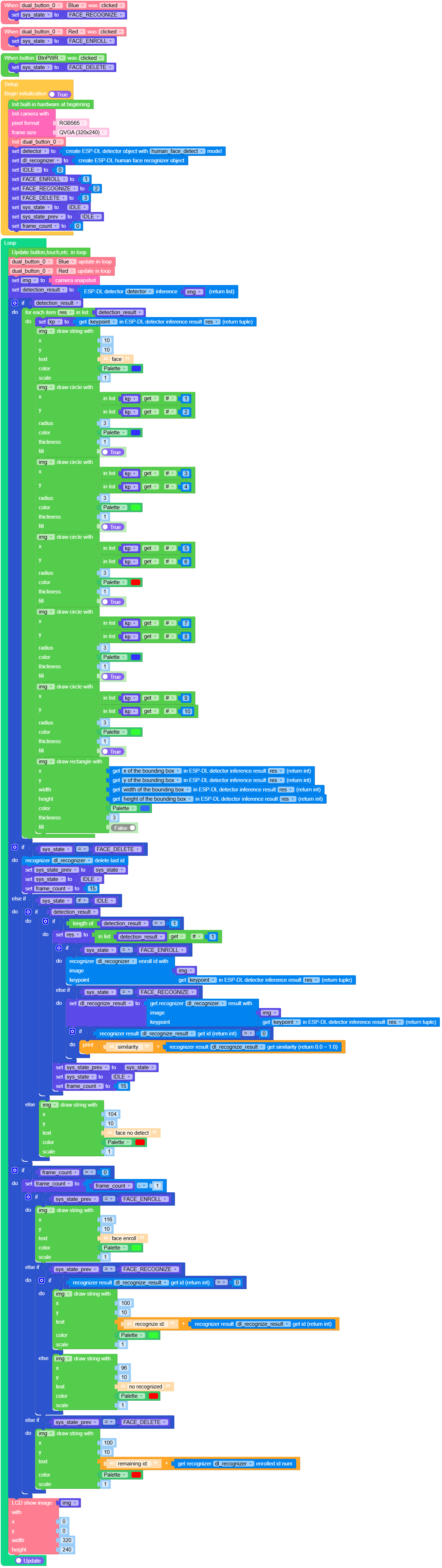
Example output:
None
Micropython 案例
人脸检测
MicroPython Code Block:
 1# SPDX-FileCopyrightText: 2024 M5Stack Technology CO LTD
 2#
 3# SPDX-License-Identifier: MIT
 4import os, sys, io
 5import M5
 6from M5 import *
 7import camera
 8import dl
 9import image
10
11
12img = None
13detector = None
14detection_result = None
15res = None
16kp = None
17
18
19def setup():
20    global img, detector, detection_result, kp
21    M5.begin()
22    Widgets.fillScreen(0x222222)
23    camera.init(pixformat=camera.RGB565, framesize=camera.QVGA)
24    detector = dl.ObjectDetector(dl.model.HUMAN_FACE_DETECT)
25
26
27def loop():
28    global img, detector, detection_result, kp
29    M5.update()
30    img = camera.snapshot()
31    detection_result = detector.infer(img)
32    if detection_result:
33        for res in detection_result:
34            kp = res.keypoint()
35            img.draw_circle(kp[0], kp[1], 3, color=0x0000FF, thickness=1, fill=True)
36            img.draw_circle(kp[2], kp[3], 3, color=0x00FF00, thickness=1, fill=True)
37            img.draw_circle(kp[4], kp[5], 3, color=0xFF0000, thickness=1, fill=True)
38            img.draw_circle(kp[6], kp[7], 3, color=0x0000FF, thickness=1, fill=True)
39            img.draw_circle(kp[8], kp[9], 3, color=0x00FF00, thickness=1, fill=True)
40            img.draw_rectangle(
41                res.x(), res.y(), res.w(), res.h(), color=0x3366FF, thickness=3, fill=False
42            )
43    M5.Lcd.show(img, 0, 0, 320, 240)
44
45
46if __name__ == "__main__":
47    try:
48        setup()
49        while True:
50            loop()
51    except (Exception, KeyboardInterrupt) as e:
52        try:
53            from utility import print_error_msg
54
55            print_error_msg(e)
56        except ImportError:
57            print("please update to latest firmware")
Example output:
None
行人检测
MicroPython Code Block:
 1# SPDX-FileCopyrightText: 2024 M5Stack Technology CO LTD
 2#
 3# SPDX-License-Identifier: MIT
 4import os, sys, io
 5import M5
 6from M5 import *
 7import camera
 8import dl
 9import image
10
11
12img = None
13detector = None
14detection_result = None
15res = None
16kp = None
17
18
19def setup():
20    global img, detector, detection_result, kp
21    M5.begin()
22    Widgets.fillScreen(0x222222)
23    camera.init(pixformat=camera.RGB565, framesize=camera.QVGA)
24    detector = dl.ObjectDetector(dl.model.PEDESTRIAN_DETECT)
25
26
27def loop():
28    global img, detector, detection_result, kp
29    M5.update()
30    img = camera.snapshot()
31    detection_result = detector.infer(img)
32    if detection_result:
33        for res in detection_result:
34            kp = res.keypoint()
35            img.draw_rectangle(
36                res.x(), res.y(), res.w(), res.h(), color=0x3366FF, thickness=3, fill=False
37            )
38    M5.Lcd.show(img, 0, 0, 320, 240)
39
40
41if __name__ == "__main__":
42    try:
43        setup()
44        while True:
45            loop()
46    except (Exception, KeyboardInterrupt) as e:
47        try:
48            from utility import print_error_msg
49
50            print_error_msg(e)
51        except ImportError:
52            print("please update to latest firmware")
Example output:
None
人脸识别
MicroPython Code Block:
  1# SPDX-FileCopyrightText: 2024 M5Stack Technology CO LTD
  2#
  3# SPDX-License-Identifier: MIT
  4import os, sys, io
  5import M5
  6from M5 import *
  7from unit import DualButtonUnit
  8from hardware import *
  9import camera
 10import dl
 11import image
 12
 13
 14dual_button_0_blue = None
 15dual_button_0_red = None
 16sys_state = None
 17FACE_RECOGNIZE = None
 18FACE_ENROLL = None
 19FACE_DELETE = None
 20detector = None
 21img = None
 22dl_recognizer = None
 23detection_result = None
 24IDLE = None
 25res = None
 26kp = None
 27sys_state_prev = None
 28frame_count = None
 29dl_recognize_result = None
 30
 31
 32def dual_button_0_blue_wasClicked_event(state):  # noqa: N802
 33    global \
 34        dual_button_0_blue, \
 35        dual_button_0_red, \
 36        sys_state, \
 37        FACE_RECOGNIZE, \
 38        FACE_ENROLL, \
 39        FACE_DELETE, \
 40        detector, \
 41        img, \
 42        dl_recognizer, \
 43        detection_result, \
 44        IDLE, \
 45        kp, \
 46        sys_state_prev, \
 47        frame_count, \
 48        res, \
 49        dl_recognize_result
 50    sys_state = FACE_RECOGNIZE
 51
 52
 53def dual_button_0_red_wasClicked_event(state):  # noqa: N802
 54    global \
 55        dual_button_0_blue, \
 56        dual_button_0_red, \
 57        sys_state, \
 58        FACE_RECOGNIZE, \
 59        FACE_ENROLL, \
 60        FACE_DELETE, \
 61        detector, \
 62        img, \
 63        dl_recognizer, \
 64        detection_result, \
 65        IDLE, \
 66        kp, \
 67        sys_state_prev, \
 68        frame_count, \
 69        res, \
 70        dl_recognize_result
 71    sys_state = FACE_ENROLL
 72
 73
 74def btnPWR_wasClicked_event(state):  # noqa: N802
 75    global \
 76        dual_button_0_blue, \
 77        dual_button_0_red, \
 78        sys_state, \
 79        FACE_RECOGNIZE, \
 80        FACE_ENROLL, \
 81        FACE_DELETE, \
 82        detector, \
 83        img, \
 84        dl_recognizer, \
 85        detection_result, \
 86        IDLE, \
 87        kp, \
 88        sys_state_prev, \
 89        frame_count, \
 90        res, \
 91        dl_recognize_result
 92    sys_state = FACE_DELETE
 93
 94
 95def setup():
 96    global \
 97        dual_button_0_blue, \
 98        dual_button_0_red, \
 99        sys_state, \
100        FACE_RECOGNIZE, \
101        FACE_ENROLL, \
102        FACE_DELETE, \
103        detector, \
104        img, \
105        dl_recognizer, \
106        detection_result, \
107        IDLE, \
108        kp, \
109        sys_state_prev, \
110        frame_count, \
111        res, \
112        dl_recognize_result
113    M5.begin()
114    Widgets.fillScreen(0x222222)
115    BtnPWR.setCallback(type=BtnPWR.CB_TYPE.WAS_CLICKED, cb=btnPWR_wasClicked_event)
116    camera.init(pixformat=camera.RGB565, framesize=camera.QVGA)
117    dual_button_0_blue, dual_button_0_red = DualButtonUnit((8, 9))
118    dual_button_0_blue.setCallback(
119        type=dual_button_0_blue.CB_TYPE.WAS_CLICKED, cb=dual_button_0_blue_wasClicked_event
120    )
121    dual_button_0_red.setCallback(
122        type=dual_button_0_red.CB_TYPE.WAS_CLICKED, cb=dual_button_0_red_wasClicked_event
123    )
124    detector = dl.ObjectDetector(dl.model.HUMAN_FACE_DETECT)
125    dl_recognizer = dl.HumanFaceRecognizer()
126    IDLE = 0
127    FACE_ENROLL = 1
128    FACE_RECOGNIZE = 2
129    FACE_DELETE = 3
130    sys_state = IDLE
131    sys_state_prev = IDLE
132    frame_count = 0
133
134
135def loop():
136    global \
137        dual_button_0_blue, \
138        dual_button_0_red, \
139        sys_state, \
140        FACE_RECOGNIZE, \
141        FACE_ENROLL, \
142        FACE_DELETE, \
143        detector, \
144        img, \
145        dl_recognizer, \
146        detection_result, \
147        IDLE, \
148        kp, \
149        sys_state_prev, \
150        frame_count, \
151        res, \
152        dl_recognize_result
153    M5.update()
154    dual_button_0_blue.tick(None)
155    dual_button_0_red.tick(None)
156    img = camera.snapshot()
157    detection_result = detector.infer(img)
158    if detection_result:
159        for res in detection_result:
160            kp = res.keypoint()
161            img.draw_string(10, 10, str("face"), color=0x3333FF, scale=1)
162            img.draw_circle(kp[0], kp[1], 3, color=0x3333FF, thickness=1, fill=True)
163            img.draw_circle(kp[2], kp[3], 3, color=0x33FF33, thickness=1, fill=True)
164            img.draw_circle(kp[4], kp[5], 3, color=0xFF0000, thickness=1, fill=True)
165            img.draw_circle(kp[6], kp[7], 3, color=0x3333FF, thickness=1, fill=True)
166            img.draw_circle(kp[8], kp[9], 3, color=0x33FF33, thickness=1, fill=True)
167            img.draw_rectangle(
168                res.x(), res.y(), res.w(), res.h(), color=0x3366FF, thickness=3, fill=False
169            )
170    if sys_state == FACE_DELETE:
171        dl_recognizer.delete_id()
172        sys_state_prev = sys_state
173        sys_state = IDLE
174        frame_count = 15
175    elif sys_state != IDLE:
176        if detection_result:
177            if len(detection_result) == 1:
178                res = detection_result[0]
179                if sys_state == FACE_ENROLL:
180                    dl_recognizer.enroll_id(img, res.keypoint())
181                elif sys_state == FACE_RECOGNIZE:
182                    dl_recognize_result = dl_recognizer.recognize(img, res.keypoint())
183                    if (dl_recognize_result.id()) > 0:
184                        print((str("similarity: ") + str((dl_recognize_result.similarity()))))
185                sys_state_prev = sys_state
186                sys_state = IDLE
187                frame_count = 15
188        else:
189            img.draw_string(104, 10, str("face no detect"), color=0xFF0000, scale=1)
190    if frame_count > 0:
191        frame_count = frame_count - 1
192        if sys_state_prev == FACE_ENROLL:
193            img.draw_string(116, 10, str("face enroll"), color=0x33FF33, scale=1)
194        elif sys_state_prev == FACE_RECOGNIZE:
195            if (dl_recognize_result.id()) > 0:
196                img.draw_string(
197                    100,
198                    10,
199                    str((str("recognize id: ") + str((dl_recognize_result.id())))),
200                    color=0x33FF33,
201                    scale=1,
202                )
203            else:
204                img.draw_string(96, 10, str("no recognized"), color=0xFF0000, scale=1)
205        elif sys_state_prev == FACE_DELETE:
206            img.draw_string(
207                100,
208                10,
209                str((str("remaining id: ") + str((dl_recognizer.enrolled_id_num())))),
210                color=0xFF0000,
211                scale=1,
212            )
213    M5.Lcd.show(img, 0, 0, 320, 240)
214
215
216if __name__ == "__main__":
217    try:
218        setup()
219        while True:
220            loop()
221    except (Exception, KeyboardInterrupt) as e:
222        try:
223            from utility import print_error_msg
224
225            print_error_msg(e)
226        except ImportError:
227            print("please update to latest firmware")
Example output:
None
Funtions
- dl.ObjectDetector(model) ObjectDetector
Create an object detector instance.
- 参数:
model – 参数
model仅接受以下值:
dl.model.HUMAN_FACE_DETECT人脸检测dl.model.PEDESTRIAN_DETECT行人检测
返回
ObjectDetector对象.UiFlow2 Code Block:

Example:
detector = dl.ObjectDetector(dl.model.HUMAN_FACE_DETECT)
detector = dl.ObjectDetector(dl.model.PEDESTRIAN_DETECT)
- dl.HumanFaceRecognizer() HumanFaceRecognizer
创建一个人脸识别器
返回
HumanFaceRecognizer对象.UiFlow2 Code Block:

class ObjectDetector
ObjectDetector 对象由 dl.ObjectDetector(model) 返回
- ObjectDetector.infer(img: image.Image) DetectionResult
返回一个
DetectionResult实例.UiFlow2 Code Block:

class HumanFaceRecognizer
HumanFaceRecognizer 对象由 dl.HumanFaceRecognizer() 返回
- HumanFaceRecognizer.recognize(img: image:Image, keypoint: tuple) RecognitionResult
人脸识别
img输入图像keypoint人脸关键点数据,详情参考 DetectionResult.keypoint() 解析
返回
RecognitionResult对象。UiFlow2 Code Block:

- HumanFaceRecognizer.clear_id()
清空所有 id
UiFlow2 Code Block:

- HumanFaceRecognizer.enroll_id(img: image:Image, keypoint: tuple) bool
enroll id
img输入图像keypoint人脸关键点数据,详情参考 DetectionResult.keypoint() 解析
UiFlow2 Code Block:

- HumanFaceRecognizer.delete_id([id])
delete id
id为可选参数,输入id为删除指定的人脸信息,默认为删除最近一次录入的id。UiFlow2 Code Block:



class DetectionResult – DetectionResult object
DetectionResult 对象由 ObjectDetector.infer(img) 返回
- DetectionResult.bbox()
获取目标检测的边界框。
UiFlow2 Code Block:







class RecognitionResult – RecognitionResult object
DetectionResult 对象由 HumanFaceRecognizer.recognize(img, keypoint) 返

