umqtt.default
umqtt.default 重写了 subscribe() 方法并支持 ca 文件。
Micropython Example:
 1# SPDX-FileCopyrightText: 2024 M5Stack Technology CO LTD
 2#
 3# SPDX-License-Identifier: MIT
 4
 5import os, sys, io
 6import M5
 7from M5 import *
 8from umqtt import *
 9
10
11label0 = None
12mqtt_client = None
13
14
15def mqtt_testtopic_event(data):
16    global label0, mqtt_client
17    label0.setText(str(data[1]))
18
19
20def setup():
21    global label0, mqtt_client
22
23    M5.begin()
24    Widgets.fillScreen(0x222222)
25    label0 = Widgets.Label("Text", 25, 20, 1.0, 0xFFFFFF, 0x222222, Widgets.FONTS.DejaVu18)
26
27    mqtt_client = MQTTClient(
28        "umqtt-client",
29        "emqxsl.cn",
30        port=8883,
31        user="test",
32        password="test",
33        keepalive=60,
34        ssl=True,
35        ssl_params={"server_hostname": "emqxsl.cn"},
36    )
37    mqtt_client.connect(clean_session=True)
38    mqtt_client.subscribe("testtopic", mqtt_testtopic_event, qos=0)
39
40
41def loop():
42    global label0, mqtt_client
43    M5.update()
44    mqtt_client.check_msg()
45
46
47if __name__ == "__main__":
48    try:
49        setup()
50        while True:
51            loop()
52    except (Exception, KeyboardInterrupt) as e:
53        try:
54            from utility import print_error_msg
55
56            print_error_msg(e)
57        except ImportError:
58            print("please update to latest firmware")
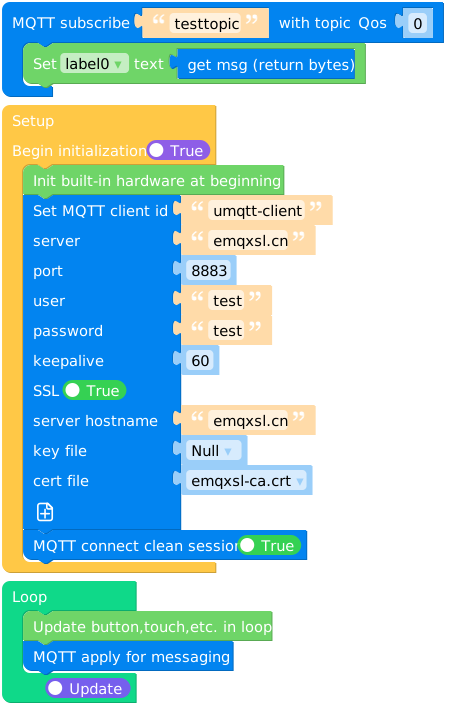
UIFLOW2 Example:
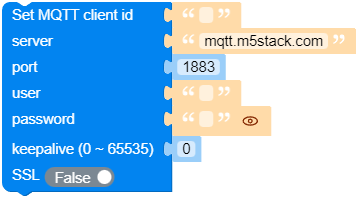
Constructors
- class umqtt.MQTTClient(client_id, server, port=0, user=None, password=None, keepalive=0, ssl=False, ssl_params={}) None
Create an MQTTClient object.
- 参数:
client_id (str) – the unique client id string used when connecting to the broker.
server (str) – 远程MQTT broker的主机名或 IP 地址。
port (int) – 要连接的服务器主机的网络端口。
user (str or None) – 用于MQTT broker身份验证的用户名。
password (str or None) – 用于MQTT broker身份验证的密码。
keepalive (int) – 与代理通信之间允许的最长时间(以秒为单位)。如果没有交换其他消息,这将控制客户端向代理发送 ping 消息的速率。
ssl (bool) – 是否使用ssl。
ssl_params (dict) – 启动 ssl 连接所需的一些参数。
- 返回:
MQTTClient 对象
- 返回类型:
UIFLOW2:

Methods
- MQTTClient.connect(clean_session=True) bool
连接到服务器。如果此连接使用存储在服务器上的持久会话,则返回 True (如果使用clean_session=True 参数(默认),则始终为 False )。
UIFLOW2:



- MQTTClient.ping() None
Ping 服务器(响应由
wait_msg()自动处理)。UIFLOW2:
None

- MQTTClient.subscribe(topic, handler, qos=0) None
订阅主题。
- 参数:
UIFLOW2:

显示已收到消息的处理程序:
def on_sub_cb(data):
    print("topic:", data[0])
    print("msg:", data[1])
On uiflow2, you can get the topic and message of the current handler through
 and
and  .
.
- MQTTClient.set_last_will(topic, msg, retain=False, qos=0) None
重要
应该在
connect()之前调用。设置 MQTT 遗嘱消息。
- 参数:
UIFLOW2:
- MQTTClient.wait_msg() None
重要
wait_msg()和check_msg()是主循环迭代方法,有阻塞和非阻塞版本。 如果您没有任何其他前台任务要执行(即您的应用程序仅对订阅的MQTT 消息做出反应),则应在循环中定期调用wait_msg(),如果您还处理其他前台任务,则使用check_msg ()。请注意,如果您只发布消息,从不订阅消息,则不需要调用
wait_msg()/check_msg()。等待服务器消息。
UIFLOW2:
None
- MQTTClient.check_msg(attempts=2) None
检查是否有来自服务器的待处理消息。如果是, 则与
wait_msg()处理方式UIFLOW2:
