PPS Module

PPS 类控制可编程电源(PPS),能够提供最高30V和5A的输出。它允许对输出电压和电流进行精确控制,并具有回读实际输出值和模块状态的功能。

支持以下产品:

PPSModule

Micropython 示例:

import os, sys, io
import M5
from M5 import *
from pps import PPS

pps = PPS(addr=0x35)
pps.set_output_voltage(5.5)
pps.set_output_current(1)
pps.enable_output()

# 读取值和状态
print("电压:", pps.read_output_voltage(), "V")
print("电流:", pps.read_output_current(), "A")
print("模式:", pps.read_psu_running_mode())

UIFLOW2 示例:
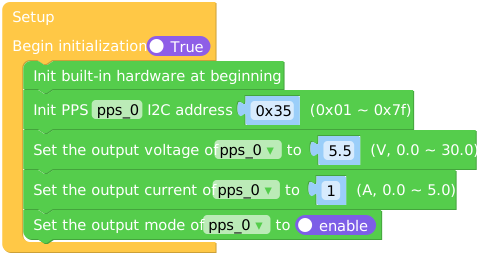
example.svg

PPS类

构造函数

class PPS(addr=0x35)

创建一个PPS对象以控制可编程电源。

  • addr: PPS设备的I2C地址(默认为`0x35`)。

方法

PPS.set_output(enable: bool)

启用或禁用PPS输出。

  • enable: True表示启用,False表示禁用。

UIFLOW2:

set_output.svg

PPS.enable_output()

启用PPS输出。

UIFLOW2:

enable_output.svg

PPS.disable_output()

禁用PPS输出。

UIFLOW2:

disable_output.svg

PPS.set_output_voltage(voltage: float)

设置PPS的输出电压。

  • voltage: 期望的输出电压,从0.0到30.0伏特。

UIFLOW2:

set_output_voltage.svg

PPS.set_output_current(current: float)

设置PPS的输出电流。

  • current: 期望的输出电流,从0.0A到5.0A。

UIFLOW2:

set_output_current.svg

PPS.read_psu_running_mode() int

读取PSU运行模式。

UIFLOW2:

read_psu_running_mode.svg

PPS.read_output_current() float

读取当前输出电流。

UIFLOW2:

read_output_current.svg

PPS.read_output_voltage() float

读取当前输出电压。

UIFLOW2:

read_output_voltage.svg

PPS.read_input_voltage() float

读取输入电压。

UIFLOW2:

read_input_voltage.svg

PPS.read_data_update_flag() int

读取数据更新标志,每当数据更新一次,此标志将增加1。

UIFLOW2:

read_data_update_flag.svg

PPS.read_mcu_temperature() float

读取MCU温度。

UIFLOW2:

read_mcu_temperature.svg

PPS.read_module_id() int

读取模块ID。

UIFLOW2:

read_module_id.svg

PPS.read_uid() bytearray

读取唯一标识符(UID)。

UIFLOW2:

read_uid.svg

PPS.get_i2c_address() int

获取设备的当前I2C地址。

UIFLOW2:

get_i2c_address.svg

PPS.set_i2c_address(new_address: int)

为设备设置新的I2C地址。

  • new_address: 要设置的新I2C地址。

UIFLOW2:

set_i2c_address.svg













