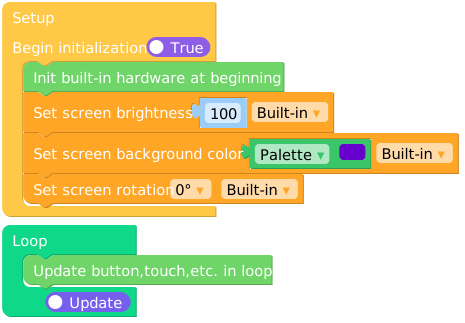
Widgets
Widgets.setBrightness()
Widgets.fillScreen()
Widgets.setRotation()
Micropython Example:
import M5
from M5 import Widgets

M5.begin()
Widgets.setBrightness(100)
Widgets.fillScreen(0x6600cc)
Widgets.setRotation(0)
UIFLOW2 Example:
example.m5f2
设置显示器的背光。brightness 的范围是 0 - 255。
brightness
UIFLOW2:
设置显示器的背景颜色。color 接受 RGB888 的颜色代码。
color
设置显示器的旋转角度。
rotation 参数只接受以下的值:
rotation
0: Portrait (0°C) 1: Landscape (90°C) 2: Inverse Portrait (180°C) 3: Inverse Landscape (270°C)
0: Portrait (0°C)
0
1: Landscape (90°C)
1
2: Inverse Portrait (180°C)
2
3: Inverse Landscape (270°C)
3