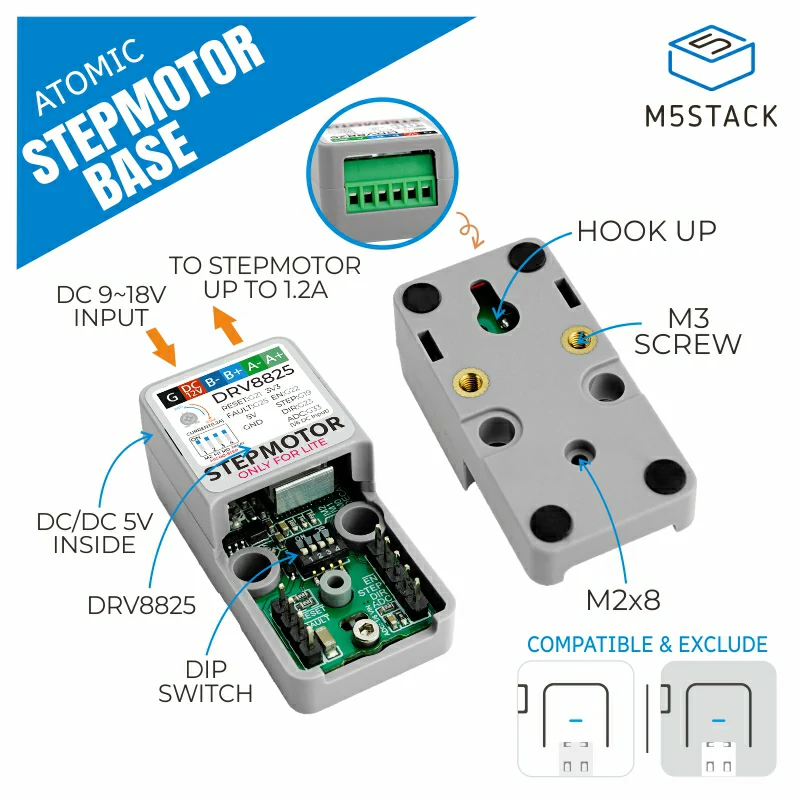
Atomic Stepmotor Base
Support the following products:
UiFlow2 Example
Direction control
Open the atoms3r_stepmotor_direction_control_example.m5f2 project in UiFlow2.
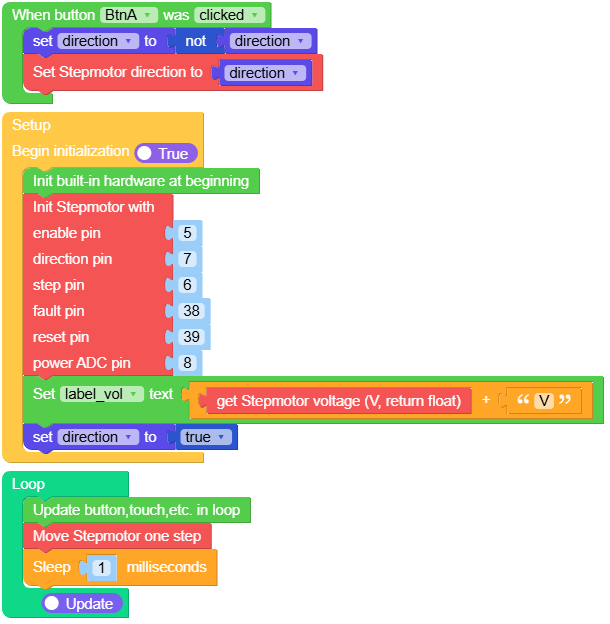
The example demonstrates motor direction control. Pressing the screen button toggles the rotation direction.
UiFlow2 Code Block:
Example output:
None
Rotate control
Open the atoms3r_stepmotor_rotate_control_example.m5f2 project in UiFlow2.
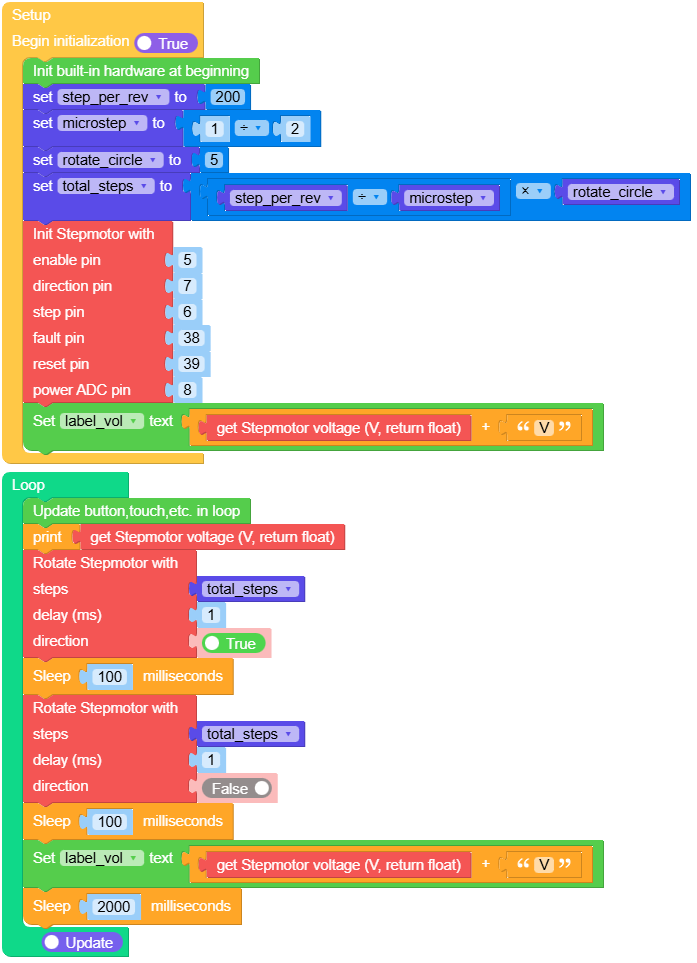
The example demonstrates the motor continuously rotating for multiple turns, then reversing for multiple turns, and repeating the cycle after a 2-second pause.
UiFlow2 Code Block:
Example output:
None
MicroPython Example
Direction control
The example demonstrates motor direction control. Pressing the screen button toggles the rotation direction.
MicroPython Code Block:
 1# SPDX-FileCopyrightText: 2025 M5Stack Technology CO LTD
 2#
 3# SPDX-License-Identifier: MIT
 4
 5import os, sys, io
 6import M5
 7from M5 import *
 8from base import AtomicStepmotorBase
 9import time
10
11
12title0 = None
13label0 = None
14label_vol = None
15base_stepmotor = None
16direction = None
17
18
19def btna_cliked_cb(state):
20    global title0, label0, label_vol, base_stepmotor, direction
21    direction = not direction
22    base_stepmotor.set_direction(direction)
23
24
25def setup():
26    global title0, label0, label_vol, base_stepmotor, direction
27    M5.begin()
28    title0 = Widgets.Title("Steps Ctrl", 3, 0xFFFFFF, 0x0000FF, Widgets.FONTS.DejaVu18)
29    label0 = Widgets.Label("vol:", 5, 35, 1.0, 0xFFFFFF, 0x000000, Widgets.FONTS.DejaVu18)
30    label_vol = Widgets.Label("12.0V", 43, 35, 1.0, 0xFFFFFF, 0x000000, Widgets.FONTS.DejaVu18)
31    BtnA.setCallback(type=BtnA.CB_TYPE.WAS_CLICKED, cb=btna_cliked_cb)
32    base_stepmotor = AtomicStepmotorBase(5, 7, 6, 38, 39, 8)
33    label_vol.setText(str((str((base_stepmotor.get_voltage())) + str("V"))))
34    direction = True
35
36
37def loop():
38    global title0, label0, label_vol, base_stepmotor, direction
39    M5.update()
40    base_stepmotor.step()
41    time.sleep_ms(1)
42
43
44if __name__ == "__main__":
45    try:
46        setup()
47        while True:
48            loop()
49    except (Exception, KeyboardInterrupt) as e:
50        try:
51            from utility import print_error_msg
52
53            print_error_msg(e)
54        except ImportError:
55            print("please update to latest firmware")
Example output:
None
Rotate control
The example demonstrates the motor continuously rotating for multiple turns, then reversing for multiple turns, and repeating the cycle after a 2-second pause.
MicroPython Code Block:
 1# SPDX-FileCopyrightText: 2025 M5Stack Technology CO LTD
 2#
 3# SPDX-License-Identifier: MIT
 4
 5import os, sys, io
 6import M5
 7from M5 import *
 8from base import AtomicStepmotorBase
 9import time
10
11
12title0 = None
13label0 = None
14label_vol = None
15base_stepmotor = None
16step_per_rev = None
17microstep = None
18rotate_circle = None
19total_steps = None
20
21
22def setup():
23    global \
24        title0, \
25        label0, \
26        label_vol, \
27        base_stepmotor, \
28        step_per_rev, \
29        microstep, \
30        rotate_circle, \
31        total_steps
32    M5.begin()
33    title0 = Widgets.Title("Steps Ctrl", 3, 0xFFFFFF, 0x0000FF, Widgets.FONTS.DejaVu18)
34    label0 = Widgets.Label("vol:", 5, 35, 1.0, 0xFFFFFF, 0x000000, Widgets.FONTS.DejaVu18)
35    label_vol = Widgets.Label("12.0V", 43, 35, 1.0, 0xFFFFFF, 0x000000, Widgets.FONTS.DejaVu18)
36    step_per_rev = 200
37    microstep = 1 / 2
38    rotate_circle = 5
39    total_steps = (step_per_rev / microstep) * rotate_circle
40    base_stepmotor = AtomicStepmotorBase(5, 7, 6, 38, 39, 8)
41    label_vol.setText(str((str((base_stepmotor.get_voltage())) + str("V"))))
42
43
44def loop():
45    global \
46        title0, \
47        label0, \
48        label_vol, \
49        base_stepmotor, \
50        step_per_rev, \
51        microstep, \
52        rotate_circle, \
53        total_steps
54    M5.update()
55    print(base_stepmotor.get_voltage())
56    base_stepmotor.rotate(total_steps, 1, True)
57    time.sleep_ms(100)
58    base_stepmotor.rotate(total_steps, 1, False)
59    time.sleep_ms(100)
60    label_vol.setText(str((str((base_stepmotor.get_voltage())) + str("V"))))
61    time.sleep_ms(2000)
62
63
64if __name__ == "__main__":
65    try:
66        setup()
67        while True:
68            loop()
69    except (Exception, KeyboardInterrupt) as e:
70        try:
71            from utility import print_error_msg
72
73            print_error_msg(e)
74        except ImportError:
75            print("please update to latest firmware")
Example output:
None
API
AtomicStepmotorBase
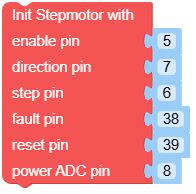
- class base.stepmotor.AtomicStepmotorBase(en=5, dir=7, stp=6, flt=38, rst=39, pwr_adc=8)
Bases:
objectCreate an AtomicStepmotorBase object.
- Parameters:
en (int) – Enable pin, used to enable or disable the stepper motor.
dir (int) – Direction pin, used to control the rotation direction of the motor.
stp (int) – Step pin, used for step control of the motor.
flt (int) – Fault pin, used to monitor the motor’s fault status.
rst (int) – Reset pin, used to reset the motor driver.
pwr_adc (int) – Power ADC monitoring pin, used to measure the input power supply voltage.
UiFlow2 Code Block:
MicroPython Code Block:
from base import AtomicStepmotorBase

base_stepmotor = AtomicStepmotorBase(en=5, dir=7, stp=6, flt=38, rst=39, pwr_adc=8)
- enable()
Enable the stepper motor driver.
UiFlow2 Code Block:

MicroPython Code Block:
base_stepmotor.enable()
- Return type:
None
- disable()
Disable the stepper motor driver.
UiFlow2 Code Block:

MicroPython Code Block:
base_stepmotor.disable()
- set_direction(direction=True)
Set direction.
- Parameters:
direction (bool) – Rotation direction. True or False.
- Return type:
None
UiFlow2 Code Block:

MicroPython Code Block:
base_stepmotor.set_direction(direction)
- step()
Move the stepper motor one step.
UiFlow2 Code Block:

MicroPython Code Block:
base_stepmotor.step()
- Return type:
None
- rotate(steps, delay_ms=0, direction=True)
Rotate the stepper motor for a specified number of steps.
- Parameters:
- Return type:
None
The actual rotation direction (clockwise or counterclockwise) depends on the motor wiring.
UiFlow2 Code Block:
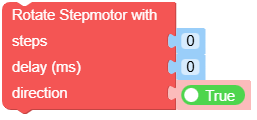
MicroPython Code Block:
base_stepmotor.rotate(steps, delay_ms, direction)
- stop()
Stop motor.
UiFlow2 Code Block:

MicroPython Code Block:
base_stepmotor.stop()
- Return type:
None
- get_status()
Get motor driver status.
- Returns:
Returns True if the driver is operating normally, or False if a fault is detected.
- Return type:
UiFlow2 Code Block:

MicroPython Code Block:
base_stepmotor.get_status()
- reset()
Reset the stepper motor driver.
UiFlow2 Code Block:

MicroPython Code Block:
base_stepmotor.reset()
- Return type:
None
