Stamp Timer Power 2
StampTimerPower2 provides power management, GPIO, ADC, PWM, NeoPixel, button events, IRQ, wakeup, watchdog, timers and RTC RAM through I2C.
Support the following products:

UiFlow2 Example
GPIO input
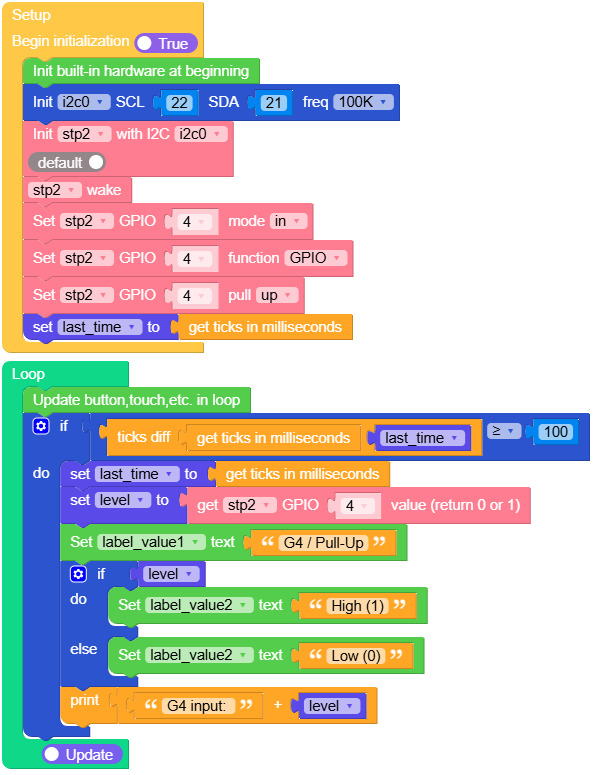
Open the basic_stp2_gpio_input_example.m5f2 project in UiFlow2.
G4 is a pull-up input. Connect G4 to GND for Low (0), or release it for High (1).
UiFlow2 Code Block:
Example output:
None
GPIO output
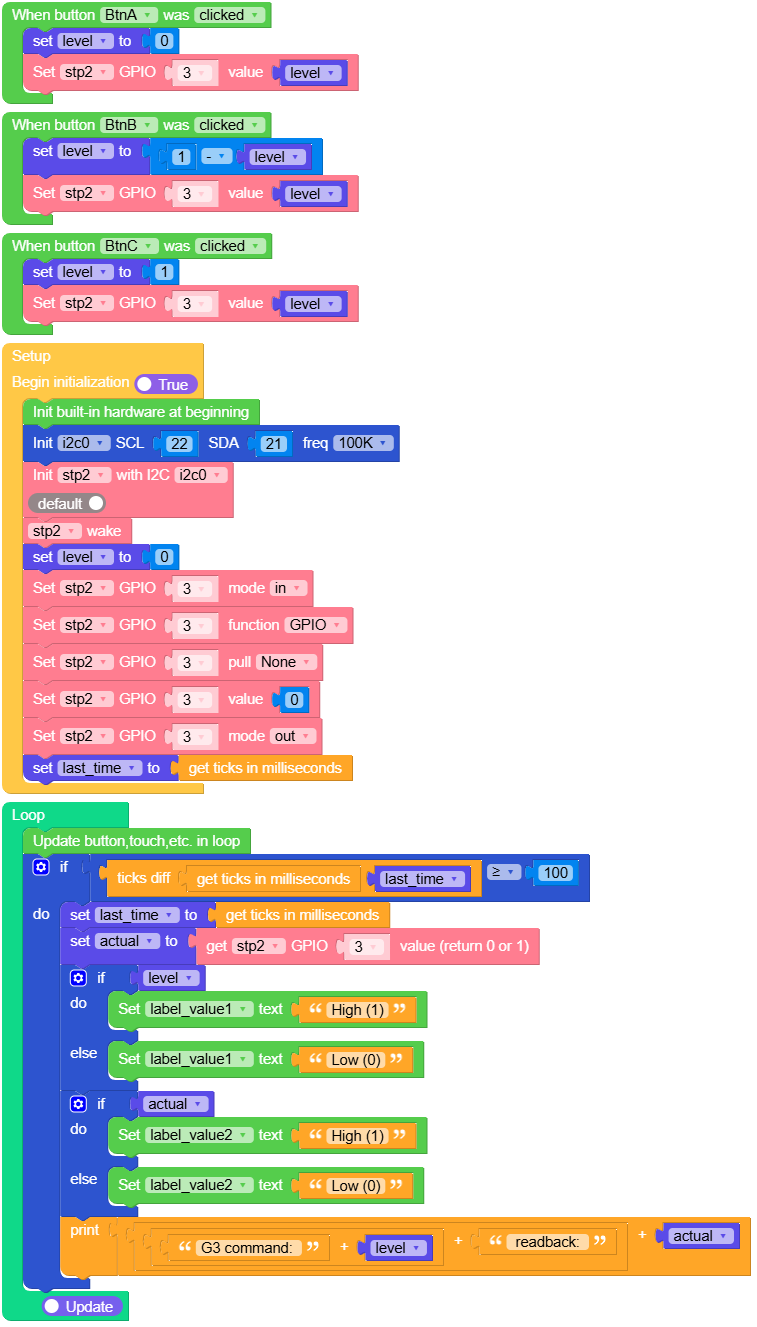
Open the basic_stp2_gpio_output_example.m5f2 project in UiFlow2.
G3 is the output. Button A sets Low, B toggles the level, and C sets High. The display shows the commanded level and pin readback.
UiFlow2 Code Block:
Example output:
None
GPIO interrupt
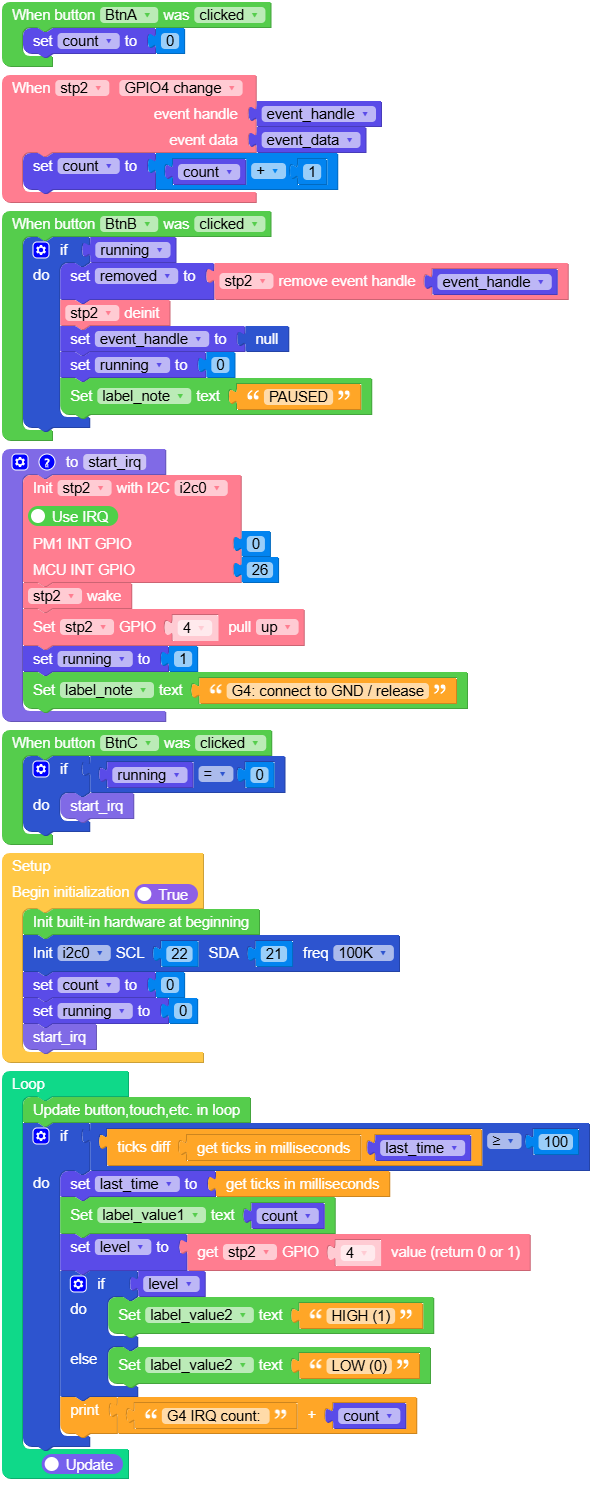
Open the basic_stp2_gpio_irq_example.m5f2 project in UiFlow2.
Connect STP2 G0 to Basic G26 for IRQ. Connect G4 to GND and release it to generate input changes. Button A clears the count, B pauses IRQ handling, and C resumes it. The display shows the count and G4 level.
UiFlow2 Code Block:
Example output:
None
ADC input
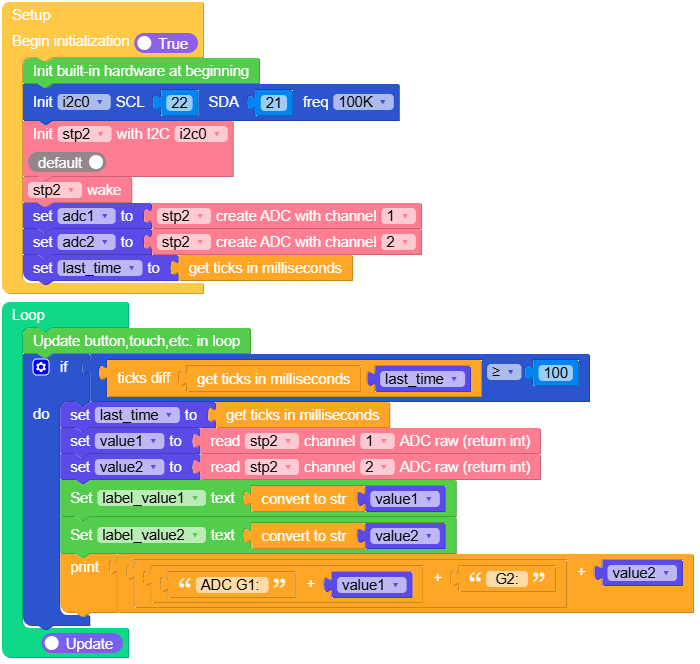
Open the basic_stp2_adc_example.m5f2 project in UiFlow2.
Read raw ADC values from G1 and G2. Each value is in the range 0 to 4095.
UiFlow2 Code Block:
Example output:
None
PWM output
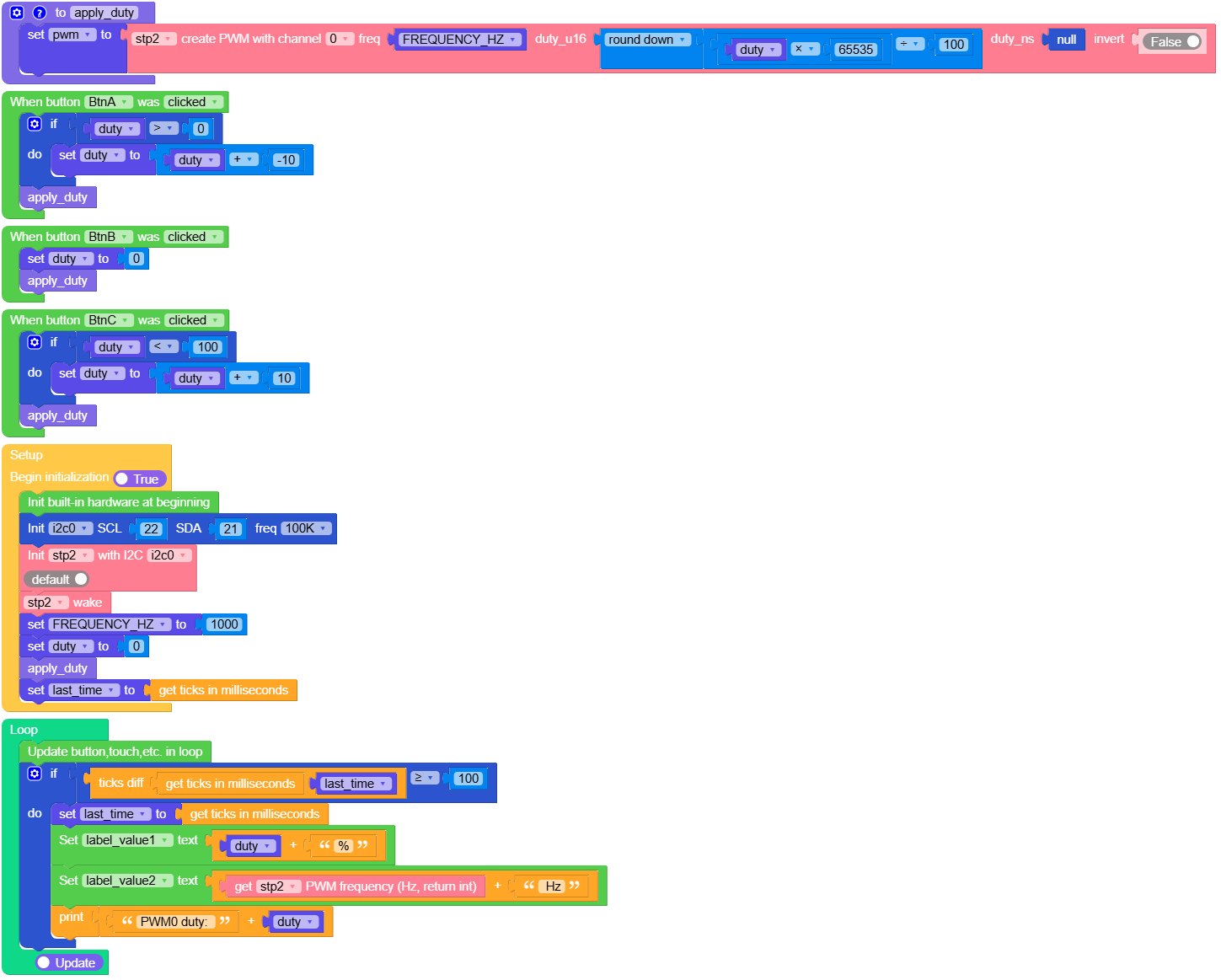
Open the basic_stp2_pwm_example.m5f2 project in UiFlow2.
PWM0 uses G3 at 1 kHz. Button A decreases duty by 10 percentage points, B sets duty to zero, and C increases duty by 10 percentage points. Duty is limited to 0 to 100 percent.
UiFlow2 Code Block:
Example output:
None
NeoPixel control
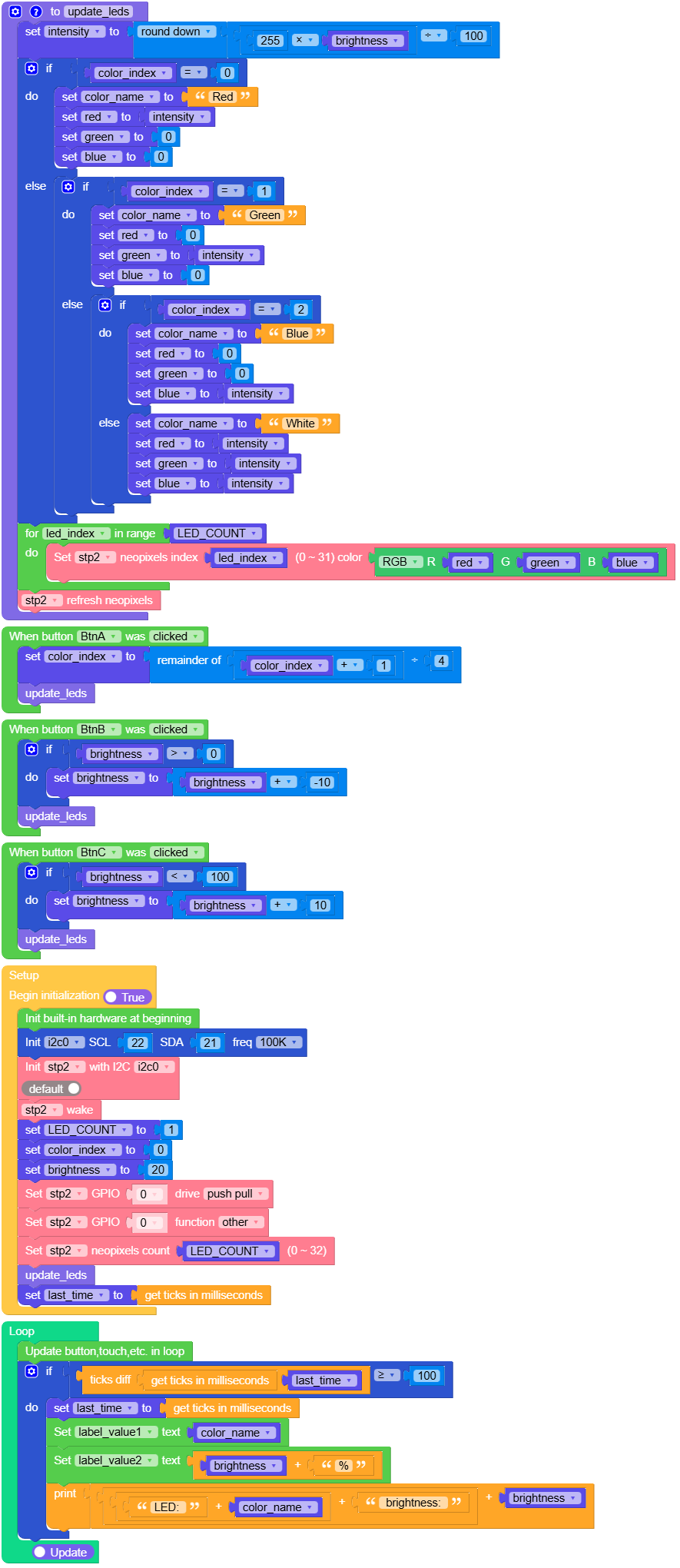
Open the basic_stp2_neopixel_example.m5f2 project in UiFlow2.
Connect the LED data input to G0 and share GND. Button A cycles through red, green, blue and white; B decreases brightness by 10 percentage points and C increases it by 10. The example controls one LED, starting with red at 20 percent brightness.
UiFlow2 Code Block:
Example output:
None
Power control
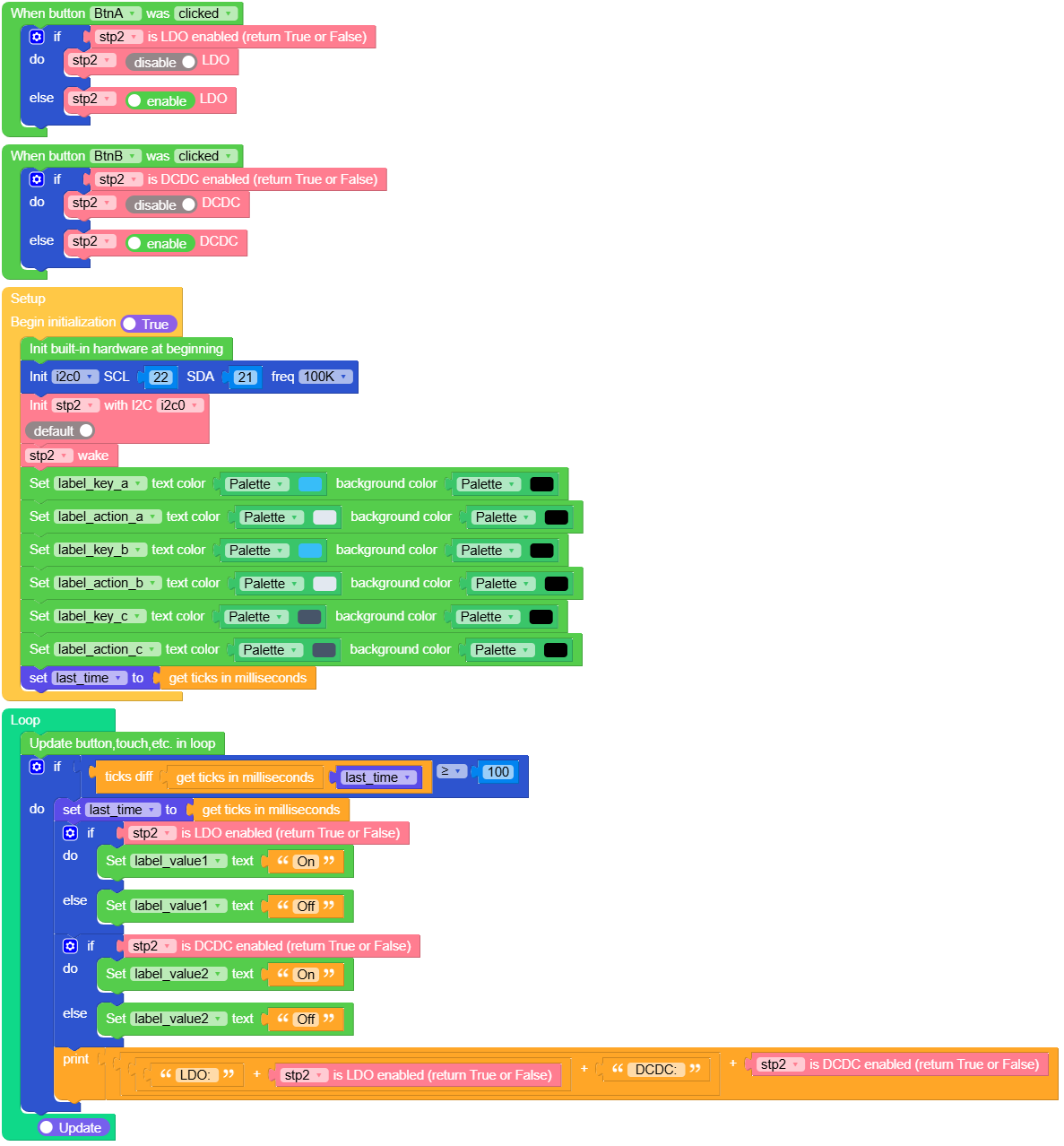
Open the basic_stp2_power_config_example.m5f2 project in UiFlow2.
Button A toggles LDO and button B toggles DCDC. The display and serial output show the enable states read from the module every 100 ms.
UiFlow2 Code Block:
Example output:
None
Timed power-on
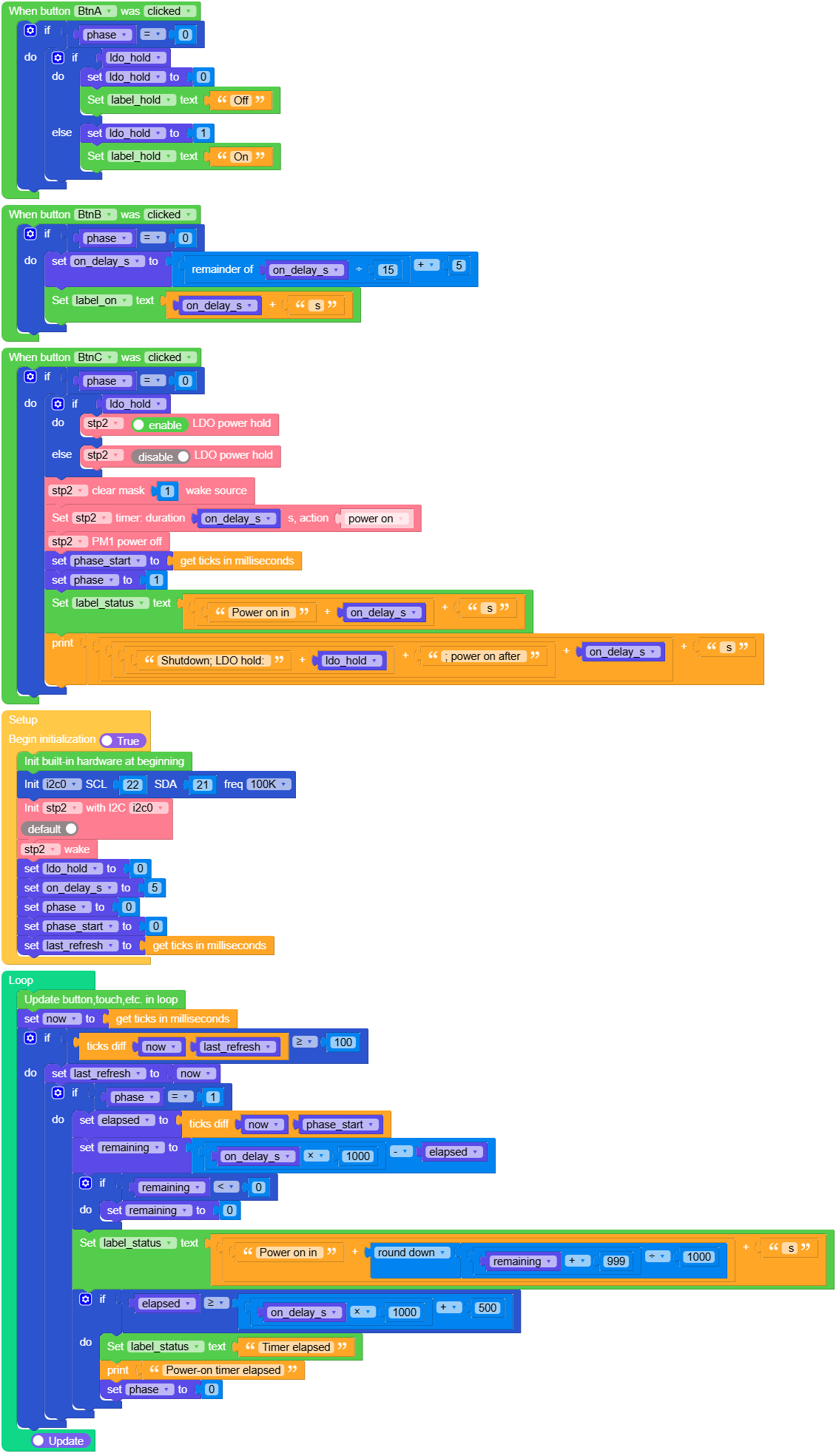
Open the basic_stp2_timer_example.m5f2 project in UiFlow2.
Button A toggles LDO output retention during shutdown (Off by default). Button B cycles the power-on delay through 5, 10 and 15 seconds (5 seconds by default). Button C (Shutdown) applies the setting, arms the power-on timer and immediately shuts down STP2. Buttons are locked until the countdown finishes.
Keep Basic independently powered so it can display the countdown while STP2 is shut down.
The graphical example displays Timer elapsed when the countdown finishes; it does not verify the wake source.
UiFlow2 Code Block:
Example output:
None
MicroPython Example
GPIO input
G4 is a pull-up input. Connect G4 to GND for Low (0), or release it for High (1).
MicroPython Code Block:
  1# SPDX-FileCopyrightText: 2026 M5Stack Technology CO LTD
  2#
  3# SPDX-License-Identifier: MIT
  4
  5import os, sys, io
  6import M5
  7from M5 import *
  8from hardware import Pin
  9from hardware import I2C
 10from stamp import StampTimerPower2
 11import time
 12
 13
 14label_title = None
 15label_description = None
 16label_caption1 = None
 17label_value1 = None
 18label_caption2 = None
 19label_value2 = None
 20i2c0 = None
 21stp2 = None
 22
 23
 24last_time = None
 25level = None
 26
 27
 28def setup():
 29    global \
 30        label_title, \
 31        label_description, \
 32        label_caption1, \
 33        label_value1, \
 34        label_caption2, \
 35        label_value2, \
 36        i2c0, \
 37        stp2, \
 38        last_time, \
 39        level
 40
 41    M5.begin()
 42    Widgets.setRotation(0)
 43    Widgets.fillScreen(0x000000)
 44    label_title = Widgets.Label(
 45        "GPIO Input", 108, 5, 1.0, 0x38BDF8, 0x000000, Widgets.FONTS.Montserrat18
 46    )
 47    label_description = Widgets.Label(
 48        "G4: GND = Low / release = High",
 49        12,
 50        38,
 51        1.0,
 52        0x94A3B8,
 53        0x000000,
 54        Widgets.FONTS.Montserrat14,
 55    )
 56    label_caption1 = Widgets.Label(
 57        "Input Pin", 12, 78, 1.0, 0x4ADE80, 0x000000, Widgets.FONTS.Montserrat14
 58    )
 59    label_value1 = Widgets.Label("--", 12, 96, 1.0, 0xFFFFFF, 0x000000, Widgets.FONTS.Montserrat24)
 60    label_caption2 = Widgets.Label(
 61        "G4 Logic Level", 12, 134, 1.0, 0x4ADE80, 0x000000, Widgets.FONTS.Montserrat14
 62    )
 63    label_value2 = Widgets.Label(
 64        "--", 12, 152, 1.0, 0xFFFFFF, 0x000000, Widgets.FONTS.Montserrat24
 65    )
 66
 67    i2c0 = I2C(0, scl=Pin(22), sda=Pin(21), freq=100000)
 68    stp2 = StampTimerPower2(i2c0)
 69    stp2.wake()
 70    stp2.set_pin_mode(4, StampTimerPower2.GPIO_MODE_IN)
 71    stp2.set_pin_function(4, StampTimerPower2.PIN_FUNCTION_GPIO)
 72    stp2.set_pin_pull(4, StampTimerPower2.GPIO_PULL_UP)
 73    last_time = time.ticks_ms()
 74
 75
 76def loop():
 77    global \
 78        label_title, \
 79        label_description, \
 80        label_caption1, \
 81        label_value1, \
 82        label_caption2, \
 83        label_value2, \
 84        i2c0, \
 85        stp2, \
 86        last_time, \
 87        level
 88    M5.update()
 89    if (time.ticks_diff((time.ticks_ms()), last_time)) >= 100:
 90        last_time = time.ticks_ms()
 91        level = stp2.read_pin(4)
 92        label_value1.setText(str("G4 / Pull-Up"))
 93        if level:
 94            label_value2.setText(str("High (1)"))
 95        else:
 96            label_value2.setText(str("Low (0)"))
 97        print((str("G4 input: ") + str(level)))
 98
 99
100if __name__ == "__main__":
101    try:
102        setup()
103        while True:
104            loop()
105    except (Exception, KeyboardInterrupt) as e:
106        try:
107            from utility import print_error_msg
108
109            print_error_msg(e)
110        except ImportError:
111            print("please update to latest firmware")
Example output:
None
GPIO output
G3 is the output. Button A sets Low, B toggles the level, and C sets High. The display shows the commanded level and pin readback.
MicroPython Code Block:
  1# SPDX-FileCopyrightText: 2026 M5Stack Technology CO LTD
  2#
  3# SPDX-License-Identifier: MIT
  4
  5import os, sys, io
  6import M5
  7from M5 import *
  8from stamp import StampTimerPower2
  9from hardware import Pin
 10from hardware import I2C
 11import time
 12
 13
 14label_title = None
 15label_description = None
 16label_caption1 = None
 17label_value1 = None
 18label_caption2 = None
 19label_value2 = None
 20label_key_a = None
 21label_action_a = None
 22label_key_b = None
 23label_action_b = None
 24label_key_c = None
 25label_action_c = None
 26i2c0 = None
 27stp2 = None
 28
 29
 30level = None
 31last_time = None
 32actual = None
 33
 34
 35def btna_was_clicked_event(state):
 36    global \
 37        label_title, \
 38        label_description, \
 39        label_caption1, \
 40        label_value1, \
 41        label_caption2, \
 42        label_value2, \
 43        label_key_a, \
 44        label_action_a, \
 45        label_key_b, \
 46        label_action_b, \
 47        label_key_c, \
 48        label_action_c, \
 49        i2c0, \
 50        stp2, \
 51        level, \
 52        last_time, \
 53        actual
 54    level = 0
 55    stp2.set_pin_value(3, level)
 56
 57
 58def btnb_was_clicked_event(state):
 59    global \
 60        label_title, \
 61        label_description, \
 62        label_caption1, \
 63        label_value1, \
 64        label_caption2, \
 65        label_value2, \
 66        label_key_a, \
 67        label_action_a, \
 68        label_key_b, \
 69        label_action_b, \
 70        label_key_c, \
 71        label_action_c, \
 72        i2c0, \
 73        stp2, \
 74        level, \
 75        last_time, \
 76        actual
 77    level = 1 - level
 78    stp2.set_pin_value(3, level)
 79
 80
 81def btnc_was_clicked_event(state):
 82    global \
 83        label_title, \
 84        label_description, \
 85        label_caption1, \
 86        label_value1, \
 87        label_caption2, \
 88        label_value2, \
 89        label_key_a, \
 90        label_action_a, \
 91        label_key_b, \
 92        label_action_b, \
 93        label_key_c, \
 94        label_action_c, \
 95        i2c0, \
 96        stp2, \
 97        level, \
 98        last_time, \
 99        actual
100    level = 1
101    stp2.set_pin_value(3, level)
102
103
104def setup():
105    global \
106        label_title, \
107        label_description, \
108        label_caption1, \
109        label_value1, \
110        label_caption2, \
111        label_value2, \
112        label_key_a, \
113        label_action_a, \
114        label_key_b, \
115        label_action_b, \
116        label_key_c, \
117        label_action_c, \
118        i2c0, \
119        stp2, \
120        level, \
121        last_time, \
122        actual
123
124    M5.begin()
125    Widgets.setRotation(0)
126    Widgets.fillScreen(0x000000)
127    label_title = Widgets.Label(
128        "GPIO Output", 99, 5, 1.0, 0x38BDF8, 0x000000, Widgets.FONTS.Montserrat18
129    )
130    label_description = Widgets.Label(
131        "G3 -> meter or resistor + LED",
132        12,
133        38,
134        1.0,
135        0x94A3B8,
136        0x000000,
137        Widgets.FONTS.Montserrat14,
138    )
139    label_caption1 = Widgets.Label(
140        "G3 Output Command", 12, 78, 1.0, 0xFBBF24, 0x000000, Widgets.FONTS.Montserrat14
141    )
142    label_value1 = Widgets.Label("--", 12, 96, 1.0, 0xFFFFFF, 0x000000, Widgets.FONTS.Montserrat24)
143    label_caption2 = Widgets.Label(
144        "G3 Pin Readback", 12, 134, 1.0, 0x4ADE80, 0x000000, Widgets.FONTS.Montserrat14
145    )
146    label_value2 = Widgets.Label(
147        "--", 12, 152, 1.0, 0xFFFFFF, 0x000000, Widgets.FONTS.Montserrat24
148    )
149    label_key_a = Widgets.Label("A", 60, 195, 1.0, 0x38BDF8, 0x000000, Widgets.FONTS.Montserrat14)
150    label_action_a = Widgets.Label(
151        "Low", 50, 215, 1.0, 0xE2E8F0, 0x000000, Widgets.FONTS.Montserrat14
152    )
153    label_key_b = Widgets.Label("B", 155, 195, 1.0, 0x38BDF8, 0x000000, Widgets.FONTS.Montserrat14)
154    label_action_b = Widgets.Label(
155        "Toggle", 140, 215, 1.0, 0xE2E8F0, 0x000000, Widgets.FONTS.Montserrat14
156    )
157    label_key_c = Widgets.Label("C", 248, 195, 1.0, 0x38BDF8, 0x000000, Widgets.FONTS.Montserrat14)
158    label_action_c = Widgets.Label(
159        "High", 235, 215, 1.0, 0xE2E8F0, 0x000000, Widgets.FONTS.Montserrat14
160    )
161
162    BtnA.setCallback(type=BtnA.CB_TYPE.WAS_CLICKED, cb=btna_was_clicked_event)
163    BtnB.setCallback(type=BtnB.CB_TYPE.WAS_CLICKED, cb=btnb_was_clicked_event)
164    BtnC.setCallback(type=BtnC.CB_TYPE.WAS_CLICKED, cb=btnc_was_clicked_event)
165
166    i2c0 = I2C(0, scl=Pin(22), sda=Pin(21), freq=100000)
167    stp2 = StampTimerPower2(i2c0)
168    stp2.wake()
169    level = 0
170    stp2.set_pin_mode(3, StampTimerPower2.GPIO_MODE_IN)
171    stp2.set_pin_function(3, StampTimerPower2.PIN_FUNCTION_GPIO)
172    stp2.set_pin_pull(3, StampTimerPower2.GPIO_PULL_NONE)
173    stp2.set_pin_value(3, 0)
174    stp2.set_pin_mode(3, StampTimerPower2.GPIO_MODE_OUT)
175    last_time = time.ticks_ms()
176
177
178def loop():
179    global \
180        label_title, \
181        label_description, \
182        label_caption1, \
183        label_value1, \
184        label_caption2, \
185        label_value2, \
186        label_key_a, \
187        label_action_a, \
188        label_key_b, \
189        label_action_b, \
190        label_key_c, \
191        label_action_c, \
192        i2c0, \
193        stp2, \
194        level, \
195        last_time, \
196        actual
197    M5.update()
198    if (time.ticks_diff((time.ticks_ms()), last_time)) >= 100:
199        last_time = time.ticks_ms()
200        actual = stp2.read_pin(3)
201        if level:
202            label_value1.setText(str("High (1)"))
203        else:
204            label_value1.setText(str("Low (0)"))
205        if actual:
206            label_value2.setText(str("High (1)"))
207        else:
208            label_value2.setText(str("Low (0)"))
209        print((str((str((str("G3 command: ") + str(level))) + str(" readback: "))) + str(actual)))
210
211
212if __name__ == "__main__":
213    try:
214        setup()
215        while True:
216            loop()
217    except (Exception, KeyboardInterrupt) as e:
218        try:
219            from utility import print_error_msg
220
221            print_error_msg(e)
222        except ImportError:
223            print("please update to latest firmware")
Example output:
None
GPIO interrupt
Connect STP2 G0 to Basic G26 for IRQ. Connect G4 to GND and release it to generate input changes. Button A clears the count, B pauses IRQ handling, and C resumes it. The display shows the count and G4 level.
MicroPython Code Block:
  1# SPDX-FileCopyrightText: 2026 M5Stack Technology CO LTD
  2#
  3# SPDX-License-Identifier: MIT
  4
  5import os, sys, io
  6import M5
  7from M5 import *
  8from stamp import StampTimerPower2
  9from driver.m5pm1 import EVENT
 10from hardware import Pin
 11from hardware import I2C
 12import time
 13
 14
 15label_title = None
 16label_description = None
 17label_note = None
 18label_caption1 = None
 19label_value1 = None
 20label_caption2 = None
 21label_value2 = None
 22label_key_a = None
 23label_action_a = None
 24label_key_b = None
 25label_action_b = None
 26label_key_c = None
 27label_action_c = None
 28i2c0 = None
 29stp2 = None
 30
 31
 32count = None
 33event_handle = None
 34event_data = None
 35running = None
 36removed = None
 37last_time = None
 38level = None
 39
 40
 41# Describe this function...
 42def start_irq():
 43    global \
 44        count, \
 45        event_handle, \
 46        event_data, \
 47        running, \
 48        removed, \
 49        last_time, \
 50        level, \
 51        label_title, \
 52        label_description, \
 53        label_note, \
 54        label_caption1, \
 55        label_value1, \
 56        label_caption2, \
 57        label_value2, \
 58        label_key_a, \
 59        label_action_a, \
 60        label_key_b, \
 61        label_action_b, \
 62        label_key_c, \
 63        label_action_c, \
 64        i2c0, \
 65        stp2
 66    stp2 = StampTimerPower2(i2c0, pm1_int_gpio=0, mcu_int_gpio=26)
 67    event_handle = stp2.add_event_cb(stp2_gpio4_change_event, EVENT.GPIO4_CHANGE)
 68    stp2.wake()
 69    stp2.set_pin_pull(4, StampTimerPower2.GPIO_PULL_UP)
 70    running = 1
 71    label_note.setText(str("G4: connect to GND / release"))
 72
 73
 74def btna_was_clicked_event(state):
 75    global \
 76        label_title, \
 77        label_description, \
 78        label_note, \
 79        label_caption1, \
 80        label_value1, \
 81        label_caption2, \
 82        label_value2, \
 83        label_key_a, \
 84        label_action_a, \
 85        label_key_b, \
 86        label_action_b, \
 87        label_key_c, \
 88        label_action_c, \
 89        i2c0, \
 90        stp2, \
 91        count, \
 92        event_handle, \
 93        event_data, \
 94        running, \
 95        removed, \
 96        last_time, \
 97        level
 98    count = 0
 99
100
101def stp2_gpio4_change_event(event):
102    global \
103        label_title, \
104        label_description, \
105        label_note, \
106        label_caption1, \
107        label_value1, \
108        label_caption2, \
109        label_value2, \
110        label_key_a, \
111        label_action_a, \
112        label_key_b, \
113        label_action_b, \
114        label_key_c, \
115        label_action_c, \
116        i2c0, \
117        stp2, \
118        count, \
119        event_handle, \
120        event_data, \
121        running, \
122        removed, \
123        last_time, \
124        level
125    event_data = event.user_data
126    count = count + 1
127
128
129def btnb_was_clicked_event(state):
130    global \
131        label_title, \
132        label_description, \
133        label_note, \
134        label_caption1, \
135        label_value1, \
136        label_caption2, \
137        label_value2, \
138        label_key_a, \
139        label_action_a, \
140        label_key_b, \
141        label_action_b, \
142        label_key_c, \
143        label_action_c, \
144        i2c0, \
145        stp2, \
146        count, \
147        event_handle, \
148        event_data, \
149        running, \
150        removed, \
151        last_time, \
152        level
153    if running:
154        removed = stp2.remove_event_cb(event_handle)
155        stp2.deinit()
156        event_handle = None
157        running = 0
158        label_note.setText(str("PAUSED"))
159
160
161def btnc_was_clicked_event(state):
162    global \
163        label_title, \
164        label_description, \
165        label_note, \
166        label_caption1, \
167        label_value1, \
168        label_caption2, \
169        label_value2, \
170        label_key_a, \
171        label_action_a, \
172        label_key_b, \
173        label_action_b, \
174        label_key_c, \
175        label_action_c, \
176        i2c0, \
177        stp2, \
178        count, \
179        event_handle, \
180        event_data, \
181        running, \
182        removed, \
183        last_time, \
184        level
185    if running == 0:
186        start_irq()
187
188
189def setup():
190    global \
191        label_title, \
192        label_description, \
193        label_note, \
194        label_caption1, \
195        label_value1, \
196        label_caption2, \
197        label_value2, \
198        label_key_a, \
199        label_action_a, \
200        label_key_b, \
201        label_action_b, \
202        label_key_c, \
203        label_action_c, \
204        i2c0, \
205        stp2, \
206        count, \
207        event_handle, \
208        event_data, \
209        running, \
210        removed, \
211        last_time, \
212        level
213
214    M5.begin()
215    Widgets.setRotation(0)
216    Widgets.fillScreen(0x000000)
217    label_title = Widgets.Label(
218        "GPIO Interrupt", 91, 5, 1.0, 0x38BDF8, 0x000000, Widgets.FONTS.Montserrat18
219    )
220    label_description = Widgets.Label(
221        "IRQ: STP2 G0 -> Basic G26", 12, 38, 1.0, 0x94A3B8, 0x000000, Widgets.FONTS.Montserrat14
222    )
223    label_note = Widgets.Label(
224        "G4: connect to GND / release", 12, 54, 1.0, 0x94A3B8, 0x000000, Widgets.FONTS.Montserrat14
225    )
226    label_caption1 = Widgets.Label(
227        "G4 Change Count", 12, 78, 1.0, 0x4ADE80, 0x000000, Widgets.FONTS.Montserrat14
228    )
229    label_value1 = Widgets.Label("--", 12, 96, 1.0, 0xFFFFFF, 0x000000, Widgets.FONTS.Montserrat24)
230    label_caption2 = Widgets.Label(
231        "G4 Level", 12, 134, 1.0, 0x4ADE80, 0x000000, Widgets.FONTS.Montserrat14
232    )
233    label_value2 = Widgets.Label(
234        "--", 12, 152, 1.0, 0xFFFFFF, 0x000000, Widgets.FONTS.Montserrat24
235    )
236    label_key_a = Widgets.Label("A", 60, 195, 1.0, 0x38BDF8, 0x000000, Widgets.FONTS.Montserrat14)
237    label_action_a = Widgets.Label(
238        "Clear", 46, 215, 1.0, 0xE2E8F0, 0x000000, Widgets.FONTS.Montserrat14
239    )
240    label_key_b = Widgets.Label("B", 155, 195, 1.0, 0x38BDF8, 0x000000, Widgets.FONTS.Montserrat14)
241    label_action_b = Widgets.Label(
242        "Pause", 135, 215, 1.0, 0xE2E8F0, 0x000000, Widgets.FONTS.Montserrat14
243    )
244    label_key_c = Widgets.Label("C", 248, 195, 1.0, 0x38BDF8, 0x000000, Widgets.FONTS.Montserrat14)
245    label_action_c = Widgets.Label(
246        "Resume", 222, 215, 1.0, 0xE2E8F0, 0x000000, Widgets.FONTS.Montserrat14
247    )
248
249    BtnA.setCallback(type=BtnA.CB_TYPE.WAS_CLICKED, cb=btna_was_clicked_event)
250    BtnB.setCallback(type=BtnB.CB_TYPE.WAS_CLICKED, cb=btnb_was_clicked_event)
251    BtnC.setCallback(type=BtnC.CB_TYPE.WAS_CLICKED, cb=btnc_was_clicked_event)
252
253    i2c0 = I2C(0, scl=Pin(22), sda=Pin(21), freq=100000)
254    count = 0
255    running = 0
256    start_irq()
257
258
259def loop():
260    global \
261        label_title, \
262        label_description, \
263        label_note, \
264        label_caption1, \
265        label_value1, \
266        label_caption2, \
267        label_value2, \
268        label_key_a, \
269        label_action_a, \
270        label_key_b, \
271        label_action_b, \
272        label_key_c, \
273        label_action_c, \
274        i2c0, \
275        stp2, \
276        count, \
277        event_handle, \
278        event_data, \
279        running, \
280        removed, \
281        last_time, \
282        level
283    M5.update()
284    if (time.ticks_diff((time.ticks_ms()), last_time)) >= 100:
285        last_time = time.ticks_ms()
286        label_value1.setText(str(count))
287        level = stp2.read_pin(4)
288        if level:
289            label_value2.setText(str("HIGH (1)"))
290        else:
291            label_value2.setText(str("LOW (0)"))
292        print((str("G4 IRQ count: ") + str(count)))
293
294
295if __name__ == "__main__":
296    try:
297        setup()
298        while True:
299            loop()
300    except (Exception, KeyboardInterrupt) as e:
301        try:
302            from utility import print_error_msg
303
304            print_error_msg(e)
305        except ImportError:
306            print("please update to latest firmware")
Example output:
None
ADC input
Read raw ADC values from G1 and G2. Each value is in the range 0 to 4095.
MicroPython Code Block:
  1# SPDX-FileCopyrightText: 2026 M5Stack Technology CO LTD
  2#
  3# SPDX-License-Identifier: MIT
  4
  5import os, sys, io
  6import M5
  7from M5 import *
  8from hardware import Pin
  9from hardware import I2C
 10from stamp import StampTimerPower2
 11import time
 12
 13
 14label_title = None
 15label_description = None
 16label_note = None
 17label_caption1 = None
 18label_value1 = None
 19label_caption2 = None
 20label_value2 = None
 21i2c0 = None
 22stp2 = None
 23
 24
 25last_time = None
 26value1 = None
 27adc1 = None
 28value2 = None
 29adc2 = None
 30
 31
 32def setup():
 33    global \
 34        label_title, \
 35        label_description, \
 36        label_note, \
 37        label_caption1, \
 38        label_value1, \
 39        label_caption2, \
 40        label_value2, \
 41        i2c0, \
 42        stp2, \
 43        last_time, \
 44        value1, \
 45        adc1, \
 46        value2, \
 47        adc2
 48
 49    M5.begin()
 50    Widgets.setRotation(0)
 51    Widgets.fillScreen(0x000000)
 52    label_title = Widgets.Label(
 53        "ADC Input", 111, 5, 1.0, 0x38BDF8, 0x000000, Widgets.FONTS.Montserrat18
 54    )
 55    label_description = Widgets.Label(
 56        "G1 / G2 analog input", 12, 38, 1.0, 0x94A3B8, 0x000000, Widgets.FONTS.Montserrat14
 57    )
 58    label_note = Widgets.Label(
 59        "Input: 0..Vref; never connect 5V",
 60        12,
 61        54,
 62        1.0,
 63        0x94A3B8,
 64        0x000000,
 65        Widgets.FONTS.Montserrat14,
 66    )
 67    label_caption1 = Widgets.Label(
 68        "ADC1 / G1  (Raw)", 12, 78, 1.0, 0x4ADE80, 0x000000, Widgets.FONTS.Montserrat14
 69    )
 70    label_value1 = Widgets.Label("--", 12, 96, 1.0, 0xFFFFFF, 0x000000, Widgets.FONTS.Montserrat24)
 71    label_caption2 = Widgets.Label(
 72        "ADC2 / G2  (Raw)", 12, 134, 1.0, 0x4ADE80, 0x000000, Widgets.FONTS.Montserrat14
 73    )
 74    label_value2 = Widgets.Label(
 75        "--", 12, 152, 1.0, 0xFFFFFF, 0x000000, Widgets.FONTS.Montserrat24
 76    )
 77
 78    i2c0 = I2C(0, scl=Pin(22), sda=Pin(21), freq=100000)
 79    stp2 = StampTimerPower2(i2c0)
 80    stp2.wake()
 81    adc1 = stp2.ADC(1)
 82    adc2 = stp2.ADC(2)
 83    last_time = time.ticks_ms()
 84
 85
 86def loop():
 87    global \
 88        label_title, \
 89        label_description, \
 90        label_note, \
 91        label_caption1, \
 92        label_value1, \
 93        label_caption2, \
 94        label_value2, \
 95        i2c0, \
 96        stp2, \
 97        last_time, \
 98        value1, \
 99        adc1, \
100        value2, \
101        adc2
102    M5.update()
103    if (time.ticks_diff((time.ticks_ms()), last_time)) >= 100:
104        last_time = time.ticks_ms()
105        value1 = stp2.read_adc_raw(1)
106        value2 = stp2.read_adc_raw(2)
107        label_value1.setText(str(str(value1)))
108        label_value2.setText(str(str(value2)))
109        print((str((str((str("ADC G1: ") + str(value1))) + str(" G2: "))) + str(value2)))
110
111
112if __name__ == "__main__":
113    try:
114        setup()
115        while True:
116            loop()
117    except (Exception, KeyboardInterrupt) as e:
118        try:
119            from utility import print_error_msg
120
121            print_error_msg(e)
122        except ImportError:
123            print("please update to latest firmware")
Example output:
None
PWM output
PWM0 uses G3 at 1 kHz. Button A decreases duty by 10 percentage points, B sets duty to zero, and C increases duty by 10 percentage points. Duty is limited to 0 to 100 percent.
MicroPython Code Block:
  1# SPDX-FileCopyrightText: 2026 M5Stack Technology CO LTD
  2#
  3# SPDX-License-Identifier: MIT
  4
  5import os, sys, io
  6import M5
  7from M5 import *
  8from stamp import StampTimerPower2
  9from hardware import Pin
 10from hardware import I2C
 11import time
 12
 13
 14label_title = None
 15label_description = None
 16label_caption1 = None
 17label_value1 = None
 18label_caption2 = None
 19label_value2 = None
 20label_key_a = None
 21label_action_a = None
 22label_key_b = None
 23label_action_b = None
 24label_key_c = None
 25label_action_c = None
 26i2c0 = None
 27stp2 = None
 28
 29
 30import math
 31
 32pwm = None
 33duty = None
 34FREQUENCY_HZ = None
 35last_time = None
 36
 37
 38# Describe this function...
 39def apply_duty():
 40    global \
 41        pwm, \
 42        duty, \
 43        FREQUENCY_HZ, \
 44        last_time, \
 45        label_title, \
 46        label_description, \
 47        label_caption1, \
 48        label_value1, \
 49        label_caption2, \
 50        label_value2, \
 51        label_key_a, \
 52        label_action_a, \
 53        label_key_b, \
 54        label_action_b, \
 55        label_key_c, \
 56        label_action_c, \
 57        i2c0, \
 58        stp2
 59    pwm = stp2.PWM(
 60        0, freq=FREQUENCY_HZ, duty_u16=math.floor((duty * 65535) / 100), duty_ns=None, invert=False
 61    )
 62
 63
 64def btna_was_clicked_event(state):
 65    global \
 66        label_title, \
 67        label_description, \
 68        label_caption1, \
 69        label_value1, \
 70        label_caption2, \
 71        label_value2, \
 72        label_key_a, \
 73        label_action_a, \
 74        label_key_b, \
 75        label_action_b, \
 76        label_key_c, \
 77        label_action_c, \
 78        i2c0, \
 79        stp2, \
 80        pwm, \
 81        duty, \
 82        FREQUENCY_HZ, \
 83        last_time
 84    if duty > 0:
 85        duty = duty + -10
 86    apply_duty()
 87
 88
 89def btnb_was_clicked_event(state):
 90    global \
 91        label_title, \
 92        label_description, \
 93        label_caption1, \
 94        label_value1, \
 95        label_caption2, \
 96        label_value2, \
 97        label_key_a, \
 98        label_action_a, \
 99        label_key_b, \
100        label_action_b, \
101        label_key_c, \
102        label_action_c, \
103        i2c0, \
104        stp2, \
105        pwm, \
106        duty, \
107        FREQUENCY_HZ, \
108        last_time
109    duty = 0
110    apply_duty()
111
112
113def btnc_was_clicked_event(state):
114    global \
115        label_title, \
116        label_description, \
117        label_caption1, \
118        label_value1, \
119        label_caption2, \
120        label_value2, \
121        label_key_a, \
122        label_action_a, \
123        label_key_b, \
124        label_action_b, \
125        label_key_c, \
126        label_action_c, \
127        i2c0, \
128        stp2, \
129        pwm, \
130        duty, \
131        FREQUENCY_HZ, \
132        last_time
133    if duty < 100:
134        duty = duty + 10
135    apply_duty()
136
137
138def setup():
139    global \
140        label_title, \
141        label_description, \
142        label_caption1, \
143        label_value1, \
144        label_caption2, \
145        label_value2, \
146        label_key_a, \
147        label_action_a, \
148        label_key_b, \
149        label_action_b, \
150        label_key_c, \
151        label_action_c, \
152        i2c0, \
153        stp2, \
154        pwm, \
155        duty, \
156        FREQUENCY_HZ, \
157        last_time
158
159    M5.begin()
160    Widgets.setRotation(0)
161    Widgets.fillScreen(0x000000)
162    label_title = Widgets.Label(
163        "PWM Output", 98, 5, 1.0, 0x38BDF8, 0x000000, Widgets.FONTS.Montserrat18
164    )
165    label_description = Widgets.Label(
166        "PWM0 / G3 -> oscilloscope or LED",
167        12,
168        38,
169        1.0,
170        0x94A3B8,
171        0x000000,
172        Widgets.FONTS.Montserrat14,
173    )
174    label_caption1 = Widgets.Label(
175        "PWM0 / G3 Duty", 12, 78, 1.0, 0xFBBF24, 0x000000, Widgets.FONTS.Montserrat14
176    )
177    label_value1 = Widgets.Label("--", 12, 96, 1.0, 0xFFFFFF, 0x000000, Widgets.FONTS.Montserrat24)
178    label_caption2 = Widgets.Label(
179        "Shared Frequency", 12, 134, 1.0, 0x38BDF8, 0x000000, Widgets.FONTS.Montserrat14
180    )
181    label_value2 = Widgets.Label(
182        "--", 12, 152, 1.0, 0xFFFFFF, 0x000000, Widgets.FONTS.Montserrat24
183    )
184    label_key_a = Widgets.Label("A", 60, 195, 1.0, 0x38BDF8, 0x000000, Widgets.FONTS.Montserrat14)
185    label_action_a = Widgets.Label(
186        "Duty -10", 36, 215, 1.0, 0xE2E8F0, 0x000000, Widgets.FONTS.Montserrat14
187    )
188    label_key_b = Widgets.Label("B", 152, 195, 1.0, 0x38BDF8, 0x000000, Widgets.FONTS.Montserrat14)
189    label_action_b = Widgets.Label(
190        "Zero", 139, 215, 1.0, 0xE2E8F0, 0x000000, Widgets.FONTS.Montserrat14
191    )
192    label_key_c = Widgets.Label("C", 245, 195, 1.0, 0x38BDF8, 0x000000, Widgets.FONTS.Montserrat14)
193    label_action_c = Widgets.Label(
194        "Duty +10", 216, 215, 1.0, 0xE2E8F0, 0x000000, Widgets.FONTS.Montserrat14
195    )
196
197    BtnA.setCallback(type=BtnA.CB_TYPE.WAS_CLICKED, cb=btna_was_clicked_event)
198    BtnB.setCallback(type=BtnB.CB_TYPE.WAS_CLICKED, cb=btnb_was_clicked_event)
199    BtnC.setCallback(type=BtnC.CB_TYPE.WAS_CLICKED, cb=btnc_was_clicked_event)
200
201    i2c0 = I2C(0, scl=Pin(22), sda=Pin(21), freq=100000)
202    stp2 = StampTimerPower2(i2c0)
203    stp2.wake()
204    FREQUENCY_HZ = 1000
205    duty = 0
206    apply_duty()
207    last_time = time.ticks_ms()
208
209
210def loop():
211    global \
212        label_title, \
213        label_description, \
214        label_caption1, \
215        label_value1, \
216        label_caption2, \
217        label_value2, \
218        label_key_a, \
219        label_action_a, \
220        label_key_b, \
221        label_action_b, \
222        label_key_c, \
223        label_action_c, \
224        i2c0, \
225        stp2, \
226        pwm, \
227        duty, \
228        FREQUENCY_HZ, \
229        last_time
230    M5.update()
231    if (time.ticks_diff((time.ticks_ms()), last_time)) >= 100:
232        last_time = time.ticks_ms()
233        label_value1.setText(str((str(duty) + str("%"))))
234        label_value2.setText(str((str((stp2.get_pwm_frequency())) + str(" Hz"))))
235        print((str("PWM0 duty: ") + str(duty)))
236
237
238if __name__ == "__main__":
239    try:
240        setup()
241        while True:
242            loop()
243    except (Exception, KeyboardInterrupt) as e:
244        try:
245            from utility import print_error_msg
246
247            print_error_msg(e)
248        except ImportError:
249            print("please update to latest firmware")
Example output:
None
NeoPixel control
Connect the LED data input to G0 and share GND. Button A cycles through red, green, blue and white; B decreases brightness by 10 percentage points and C increases it by 10. The example controls one LED, starting with red at 20 percent brightness.
MicroPython Code Block:
  1# SPDX-FileCopyrightText: 2026 M5Stack Technology CO LTD
  2#
  3# SPDX-License-Identifier: MIT
  4
  5import os, sys, io
  6import M5
  7from M5 import *
  8from hardware import Pin
  9from hardware import I2C
 10from stamp import StampTimerPower2
 11import time
 12
 13
 14label_title = None
 15label_description = None
 16label_caption1 = None
 17label_value1 = None
 18label_caption2 = None
 19label_value2 = None
 20label_key_a = None
 21label_action_a = None
 22label_key_b = None
 23label_action_b = None
 24label_key_c = None
 25label_action_c = None
 26i2c0 = None
 27stp2 = None
 28
 29
 30import math
 31
 32intensity = None
 33color_index = None
 34brightness = None
 35color_name = None
 36led_index = None
 37last_time = None
 38red = None
 39LED_COUNT = None
 40green = None
 41blue = None
 42
 43
 44# Describe this function...
 45def update_leds():
 46    global \
 47        intensity, \
 48        color_index, \
 49        brightness, \
 50        color_name, \
 51        led_index, \
 52        last_time, \
 53        red, \
 54        LED_COUNT, \
 55        green, \
 56        blue, \
 57        label_title, \
 58        label_description, \
 59        label_caption1, \
 60        label_value1, \
 61        label_caption2, \
 62        label_value2, \
 63        label_key_a, \
 64        label_action_a, \
 65        label_key_b, \
 66        label_action_b, \
 67        label_key_c, \
 68        label_action_c, \
 69        i2c0, \
 70        stp2
 71    intensity = math.floor((255 * brightness) / 100)
 72    if color_index == 0:
 73        color_name = "Red"
 74        red = intensity
 75        green = 0
 76        blue = 0
 77    else:
 78        if color_index == 1:
 79            color_name = "Green"
 80            red = 0
 81            green = intensity
 82            blue = 0
 83        else:
 84            if color_index == 2:
 85                color_name = "Blue"
 86                red = 0
 87                green = 0
 88                blue = intensity
 89            else:
 90                color_name = "White"
 91                red = intensity
 92                green = intensity
 93                blue = intensity
 94    for led_index in range(LED_COUNT):
 95        stp2.set_neopixel_color(led_index, (red << 16) | (green << 8) | blue)
 96
 97    stp2.refresh_neopixels()
 98
 99
100def btna_was_clicked_event(state):
101    global \
102        label_title, \
103        label_description, \
104        label_caption1, \
105        label_value1, \
106        label_caption2, \
107        label_value2, \
108        label_key_a, \
109        label_action_a, \
110        label_key_b, \
111        label_action_b, \
112        label_key_c, \
113        label_action_c, \
114        i2c0, \
115        stp2, \
116        intensity, \
117        color_index, \
118        brightness, \
119        color_name, \
120        last_time, \
121        red, \
122        LED_COUNT, \
123        green, \
124        led_index, \
125        blue
126    color_index = (color_index + 1) % 4
127    update_leds()
128
129
130def btnb_was_clicked_event(state):
131    global \
132        label_title, \
133        label_description, \
134        label_caption1, \
135        label_value1, \
136        label_caption2, \
137        label_value2, \
138        label_key_a, \
139        label_action_a, \
140        label_key_b, \
141        label_action_b, \
142        label_key_c, \
143        label_action_c, \
144        i2c0, \
145        stp2, \
146        intensity, \
147        color_index, \
148        brightness, \
149        color_name, \
150        last_time, \
151        red, \
152        LED_COUNT, \
153        green, \
154        led_index, \
155        blue
156    if brightness > 0:
157        brightness = brightness + -10
158    update_leds()
159
160
161def btnc_was_clicked_event(state):
162    global \
163        label_title, \
164        label_description, \
165        label_caption1, \
166        label_value1, \
167        label_caption2, \
168        label_value2, \
169        label_key_a, \
170        label_action_a, \
171        label_key_b, \
172        label_action_b, \
173        label_key_c, \
174        label_action_c, \
175        i2c0, \
176        stp2, \
177        intensity, \
178        color_index, \
179        brightness, \
180        color_name, \
181        last_time, \
182        red, \
183        LED_COUNT, \
184        green, \
185        led_index, \
186        blue
187    if brightness < 100:
188        brightness = brightness + 10
189    update_leds()
190
191
192def setup():
193    global \
194        label_title, \
195        label_description, \
196        label_caption1, \
197        label_value1, \
198        label_caption2, \
199        label_value2, \
200        label_key_a, \
201        label_action_a, \
202        label_key_b, \
203        label_action_b, \
204        label_key_c, \
205        label_action_c, \
206        i2c0, \
207        stp2, \
208        intensity, \
209        color_index, \
210        brightness, \
211        color_name, \
212        last_time, \
213        red, \
214        LED_COUNT, \
215        green, \
216        led_index, \
217        blue
218
219    M5.begin()
220    Widgets.setRotation(0)
221    Widgets.fillScreen(0x000000)
222    label_title = Widgets.Label(
223        "Neopixel Output", 83, 5, 1.0, 0x38BDF8, 0x000000, Widgets.FONTS.Montserrat18
224    )
225    label_description = Widgets.Label(
226        "LED DIN -> G0; shared GND", 12, 38, 1.0, 0x94A3B8, 0x000000, Widgets.FONTS.Montserrat14
227    )
228    label_caption1 = Widgets.Label(
229        "LED Color", 12, 78, 1.0, 0xFBBF24, 0x000000, Widgets.FONTS.Montserrat14
230    )
231    label_value1 = Widgets.Label("--", 12, 96, 1.0, 0xFFFFFF, 0x000000, Widgets.FONTS.Montserrat24)
232    label_caption2 = Widgets.Label(
233        "Brightness", 12, 134, 1.0, 0xFBBF24, 0x000000, Widgets.FONTS.Montserrat14
234    )
235    label_value2 = Widgets.Label(
236        "--", 12, 152, 1.0, 0xFFFFFF, 0x000000, Widgets.FONTS.Montserrat24
237    )
238    label_key_a = Widgets.Label("A", 60, 195, 1.0, 0x38BDF8, 0x000000, Widgets.FONTS.Montserrat14)
239    label_action_a = Widgets.Label(
240        "Color", 50, 215, 1.0, 0xE2E8F0, 0x000000, Widgets.FONTS.Montserrat14
241    )
242    label_key_b = Widgets.Label("B", 155, 195, 1.0, 0x38BDF8, 0x000000, Widgets.FONTS.Montserrat14)
243    label_action_b = Widgets.Label(
244        "Dim -10%", 125, 215, 1.0, 0xE2E8F0, 0x000000, Widgets.FONTS.Montserrat14
245    )
246    label_key_c = Widgets.Label("C", 248, 195, 1.0, 0x38BDF8, 0x000000, Widgets.FONTS.Montserrat14)
247    label_action_c = Widgets.Label(
248        "Up +10%", 222, 215, 1.0, 0xE2E8F0, 0x000000, Widgets.FONTS.Montserrat14
249    )
250
251    BtnA.setCallback(type=BtnA.CB_TYPE.WAS_CLICKED, cb=btna_was_clicked_event)
252    BtnB.setCallback(type=BtnB.CB_TYPE.WAS_CLICKED, cb=btnb_was_clicked_event)
253    BtnC.setCallback(type=BtnC.CB_TYPE.WAS_CLICKED, cb=btnc_was_clicked_event)
254
255    i2c0 = I2C(0, scl=Pin(22), sda=Pin(21), freq=100000)
256    stp2 = StampTimerPower2(i2c0)
257    stp2.wake()
258    LED_COUNT = 1
259    color_index = 0
260    brightness = 20
261    stp2.set_pin_drive(0, StampTimerPower2.DRIVE_PUSH_PULL)
262    stp2.set_pin_function(0, StampTimerPower2.PIN_FUNCTION_OTHER)
263    stp2.set_neopixel_count(LED_COUNT)
264    update_leds()
265    last_time = time.ticks_ms()
266
267
268def loop():
269    global \
270        label_title, \
271        label_description, \
272        label_caption1, \
273        label_value1, \
274        label_caption2, \
275        label_value2, \
276        label_key_a, \
277        label_action_a, \
278        label_key_b, \
279        label_action_b, \
280        label_key_c, \
281        label_action_c, \
282        i2c0, \
283        stp2, \
284        intensity, \
285        color_index, \
286        brightness, \
287        color_name, \
288        last_time, \
289        red, \
290        LED_COUNT, \
291        green, \
292        led_index, \
293        blue
294    M5.update()
295    if (time.ticks_diff((time.ticks_ms()), last_time)) >= 100:
296        last_time = time.ticks_ms()
297        label_value1.setText(str(color_name))
298        label_value2.setText(str((str(brightness) + str("%"))))
299        print(
300            (str((str((str("LED: ") + str(color_name))) + str(" brightness: "))) + str(brightness))
301        )
302
303
304if __name__ == "__main__":
305    try:
306        setup()
307        while True:
308            loop()
309    except (Exception, KeyboardInterrupt) as e:
310        try:
311            from utility import print_error_msg
312
313            print_error_msg(e)
314        except ImportError:
315            print("please update to latest firmware")
Example output:
None
Power control
Button A toggles LDO and button B toggles DCDC. The display and serial output show the enable states read from the module every 100 ms.
MicroPython Code Block:
  1# SPDX-FileCopyrightText: 2026 M5Stack Technology CO LTD
  2#
  3# SPDX-License-Identifier: MIT
  4
  5import os, sys, io
  6import M5
  7from M5 import *
  8from stamp import StampTimerPower2
  9from hardware import Pin
 10from hardware import I2C
 11import time
 12
 13
 14label_title = None
 15label_description = None
 16label_caption1 = None
 17label_value1 = None
 18label_caption2 = None
 19label_value2 = None
 20label_key_a = None
 21label_action_a = None
 22label_key_b = None
 23label_action_b = None
 24label_key_c = None
 25label_action_c = None
 26i2c0 = None
 27stp2 = None
 28
 29
 30last_time = None
 31
 32
 33def btna_was_clicked_event(state):
 34    global \
 35        label_title, \
 36        label_description, \
 37        label_caption1, \
 38        label_value1, \
 39        label_caption2, \
 40        label_value2, \
 41        label_key_a, \
 42        label_action_a, \
 43        label_key_b, \
 44        label_action_b, \
 45        label_key_c, \
 46        label_action_c, \
 47        i2c0, \
 48        stp2, \
 49        last_time
 50    if stp2.is_ldo_enabled():
 51        stp2.disable_ldo()
 52    else:
 53        stp2.enable_ldo()
 54
 55
 56def btnb_was_clicked_event(state):
 57    global \
 58        label_title, \
 59        label_description, \
 60        label_caption1, \
 61        label_value1, \
 62        label_caption2, \
 63        label_value2, \
 64        label_key_a, \
 65        label_action_a, \
 66        label_key_b, \
 67        label_action_b, \
 68        label_key_c, \
 69        label_action_c, \
 70        i2c0, \
 71        stp2, \
 72        last_time
 73    if stp2.is_dcdc_enabled():
 74        stp2.disable_dcdc()
 75    else:
 76        stp2.enable_dcdc()
 77
 78
 79def setup():
 80    global \
 81        label_title, \
 82        label_description, \
 83        label_caption1, \
 84        label_value1, \
 85        label_caption2, \
 86        label_value2, \
 87        label_key_a, \
 88        label_action_a, \
 89        label_key_b, \
 90        label_action_b, \
 91        label_key_c, \
 92        label_action_c, \
 93        i2c0, \
 94        stp2, \
 95        last_time
 96
 97    M5.begin()
 98    Widgets.setRotation(0)
 99    Widgets.fillScreen(0x000000)
100    label_title = Widgets.Label(
101        "Power Control", 94, 5, 1.0, 0x38BDF8, 0x000000, Widgets.FONTS.Montserrat18
102    )
103    label_description = Widgets.Label(
104        "STP2 LDO / DCDC Toggle", 12, 38, 1.0, 0x94A3B8, 0x000000, Widgets.FONTS.Montserrat14
105    )
106    label_caption1 = Widgets.Label(
107        "LDO Output", 12, 90, 1.0, 0xFBBF24, 0x000000, Widgets.FONTS.Montserrat14
108    )
109    label_value1 = Widgets.Label(
110        "--", 140, 86, 1.0, 0xFFFFFF, 0x000000, Widgets.FONTS.Montserrat24
111    )
112    label_caption2 = Widgets.Label(
113        "DCDC Output", 12, 140, 1.0, 0xFBBF24, 0x000000, Widgets.FONTS.Montserrat14
114    )
115    label_value2 = Widgets.Label(
116        "--", 140, 136, 1.0, 0xFFFFFF, 0x000000, Widgets.FONTS.Montserrat24
117    )
118    label_key_a = Widgets.Label("A", 60, 195, 1.0, 0x38BDF8, 0x000000, Widgets.FONTS.Montserrat14)
119    label_action_a = Widgets.Label(
120        "LDO", 50, 215, 1.0, 0xE2E8F0, 0x000000, Widgets.FONTS.Montserrat14
121    )
122    label_key_b = Widgets.Label("B", 155, 195, 1.0, 0x38BDF8, 0x000000, Widgets.FONTS.Montserrat14)
123    label_action_b = Widgets.Label(
124        "DCDC", 140, 215, 1.0, 0xE2E8F0, 0x000000, Widgets.FONTS.Montserrat14
125    )
126    label_key_c = Widgets.Label("C", 248, 195, 1.0, 0x38BDF8, 0x000000, Widgets.FONTS.Montserrat14)
127    label_action_c = Widgets.Label(
128        "--", 248, 215, 1.0, 0x475569, 0x000000, Widgets.FONTS.Montserrat14
129    )
130
131    BtnA.setCallback(type=BtnA.CB_TYPE.WAS_CLICKED, cb=btna_was_clicked_event)
132    BtnB.setCallback(type=BtnB.CB_TYPE.WAS_CLICKED, cb=btnb_was_clicked_event)
133
134    i2c0 = I2C(0, scl=Pin(22), sda=Pin(21), freq=100000)
135    stp2 = StampTimerPower2(i2c0)
136    stp2.wake()
137    label_key_a.setColor(0x38BDF8, 0x000000)
138    label_action_a.setColor(0xE2E8F0, 0x000000)
139    label_key_b.setColor(0x38BDF8, 0x000000)
140    label_action_b.setColor(0xE2E8F0, 0x000000)
141    label_key_c.setColor(0x475569, 0x000000)
142    label_action_c.setColor(0x475569, 0x000000)
143    last_time = time.ticks_ms()
144
145
146def loop():
147    global \
148        label_title, \
149        label_description, \
150        label_caption1, \
151        label_value1, \
152        label_caption2, \
153        label_value2, \
154        label_key_a, \
155        label_action_a, \
156        label_key_b, \
157        label_action_b, \
158        label_key_c, \
159        label_action_c, \
160        i2c0, \
161        stp2, \
162        last_time
163    M5.update()
164    if (time.ticks_diff((time.ticks_ms()), last_time)) >= 100:
165        last_time = time.ticks_ms()
166        if stp2.is_ldo_enabled():
167            label_value1.setText(str("On"))
168        else:
169            label_value1.setText(str("Off"))
170        if stp2.is_dcdc_enabled():
171            label_value2.setText(str("On"))
172        else:
173            label_value2.setText(str("Off"))
174        print(
175            (
176                str((str((str("LDO: ") + str((stp2.is_ldo_enabled())))) + str(" DCDC: ")))
177                + str((stp2.is_dcdc_enabled()))
178            )
179        )
180
181
182if __name__ == "__main__":
183    try:
184        setup()
185        while True:
186            loop()
187    except (Exception, KeyboardInterrupt) as e:
188        try:
189            from utility import print_error_msg
190
191            print_error_msg(e)
192        except ImportError:
193            print("please update to latest firmware")
Example output:
None
Timed power-on
Button A toggles LDO output retention during shutdown (Off by default). Button B cycles the power-on delay through 5, 10 and 15 seconds (5 seconds by default). Button C (Shutdown) applies the setting, arms the power-on timer and immediately shuts down STP2. Buttons are locked until the countdown finishes.
Keep Basic independently powered so it can display the countdown while STP2 is shut down.
The Python example reads the wake source after the countdown and displays whether a timer wake was detected.
MicroPython Code Block:
  1# SPDX-FileCopyrightText: 2026 M5Stack Technology CO LTD
  2#
  3# SPDX-License-Identifier: MIT
  4
  5import time
  6import M5
  7from M5 import BtnA, BtnB, BtnC, Widgets
  8from hardware import I2C, Pin
  9from stamp import StampTimerPower2
 10
 11stp2 = None
 12label_hold = None
 13label_on = None
 14label_status = None
 15ldo_hold = False
 16on_delay_s = 5
 17phase = 0
 18phase_start = 0
 19last_refresh = 0
 20
 21
 22def btna_was_clicked_event(state):
 23    global ldo_hold
 24    if phase == 0:
 25        ldo_hold = not ldo_hold
 26        label_hold.setText("On" if ldo_hold else "Off")
 27
 28
 29def btnb_was_clicked_event(state):
 30    global on_delay_s
 31    if phase == 0:
 32        on_delay_s = on_delay_s % 15 + 5
 33        label_on.setText(str(on_delay_s) + " s")
 34
 35
 36def btnc_was_clicked_event(state):
 37    global phase, phase_start
 38    if phase != 0:
 39        return
 40    if ldo_hold:
 41        stp2.enable_ldo_power_hold()
 42    else:
 43        stp2.disable_ldo_power_hold()
 44    stp2.clear_wake_source(StampTimerPower2.WAKE_SOURCE_TIMER)
 45    # Arm the power-on timer before shutting down STP2.
 46    stp2.set_timer(on_delay_s, StampTimerPower2.TIMER_ACTION_POWER_ON)
 47    stp2.power_off()
 48    phase_start = time.ticks_ms()
 49    phase = 1
 50    label_status.setText("Power on in " + str(on_delay_s) + " s")
 51    print("Shutdown requested; LDO hold:", ldo_hold, "; power on after", on_delay_s, "s")
 52
 53
 54def setup():
 55    global stp2, label_hold, label_on, label_status, last_refresh
 56    M5.begin()
 57    Widgets.setRotation(0)
 58    Widgets.fillScreen(0x000000)
 59    Widgets.Label("Power-on Timer", 80, 5, 1.0, 0x38BDF8, 0x000000, Widgets.FONTS.Montserrat18)
 60    Widgets.Label(
 61        "Keep LDO output during shutdown",
 62        12,
 63        38,
 64        1.0,
 65        0x94A3B8,
 66        0x000000,
 67        Widgets.FONTS.Montserrat14,
 68    )
 69    Widgets.Label("LDO keep on", 12, 80, 1.0, 0xFBBF24, 0x000000, Widgets.FONTS.Montserrat14)
 70    label_hold = Widgets.Label("Off", 190, 76, 1.0, 0xFFFFFF, 0x000000, Widgets.FONTS.Montserrat24)
 71    Widgets.Label("Power on after", 12, 125, 1.0, 0x4ADE80, 0x000000, Widgets.FONTS.Montserrat14)
 72    label_on = Widgets.Label("5 s", 190, 121, 1.0, 0xFFFFFF, 0x000000, Widgets.FONTS.Montserrat24)
 73    label_status = Widgets.Label(
 74        "Ready", 12, 164, 1.0, 0x94A3B8, 0x000000, Widgets.FONTS.Montserrat14
 75    )
 76    Widgets.Label("A", 60, 195, 1.0, 0x38BDF8, 0x000000, Widgets.FONTS.Montserrat14)
 77    Widgets.Label("LDO keep", 30, 215, 1.0, 0xE2E8F0, 0x000000, Widgets.FONTS.Montserrat14)
 78    Widgets.Label("B", 155, 195, 1.0, 0x38BDF8, 0x000000, Widgets.FONTS.Montserrat14)
 79    Widgets.Label("On +5 s", 125, 215, 1.0, 0xE2E8F0, 0x000000, Widgets.FONTS.Montserrat14)
 80    Widgets.Label("C", 248, 195, 1.0, 0x38BDF8, 0x000000, Widgets.FONTS.Montserrat14)
 81    Widgets.Label("Shutdown", 217, 215, 1.0, 0xE2E8F0, 0x000000, Widgets.FONTS.Montserrat14)
 82    i2c = I2C(0, scl=Pin(22), sda=Pin(21), freq=100000)
 83    stp2 = StampTimerPower2(i2c)
 84    stp2.wake()
 85    BtnA.setCallback(type=BtnA.CB_TYPE.WAS_CLICKED, cb=btna_was_clicked_event)
 86    BtnB.setCallback(type=BtnB.CB_TYPE.WAS_CLICKED, cb=btnb_was_clicked_event)
 87    BtnC.setCallback(type=BtnC.CB_TYPE.WAS_CLICKED, cb=btnc_was_clicked_event)
 88    last_refresh = time.ticks_ms()
 89
 90
 91def loop():
 92    global phase, phase_start, last_refresh
 93    M5.update()
 94    now = time.ticks_ms()
 95    if time.ticks_diff(now, last_refresh) < 100:
 96        return
 97    last_refresh = now
 98    if phase == 1:
 99        # Keep I2C idle while STP2 is off; BASIC stays independently powered.
100        elapsed = time.ticks_diff(now, phase_start)
101        remaining = max(0, on_delay_s * 1000 - elapsed)
102        label_status.setText("Power on in " + str((remaining + 999) // 1000) + " s")
103        if elapsed >= on_delay_s * 1000 + 500:
104            stp2.wake()
105            source = stp2.get_wake_source()
106            if source & StampTimerPower2.WAKE_SOURCE_TIMER:
107                label_status.setText("Timer wake confirmed")
108            else:
109                label_status.setText("Timer wake not detected")
110            print("Wake source:", source)
111            phase = 0
112
113
114if __name__ == "__main__":
115    setup()
116    while True:
117        loop()
Example output:
None
API
StampTimerPower2
Constructors
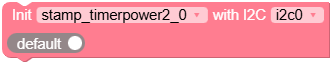
- class stamp.StampTimerPower2(i2c, *, pm1_int_gpio=-1, mcu_int_gpio=-1)
Create the module at fixed I2C address
0x6E. The application owns the I2C object. Supply both IRQ GPIOs or leave both at-1.- Parameters:
- Raises:
ValueError – Invalid GPIO arguments or an incomplete IRQ pair.
OSError – I2C communication failed.
RuntimeError – Host IRQ support is unavailable.
UiFlow2 Code Block:
MicroPython Code Block:
import M5
from hardware import I2C, Pin
from stamp import StampTimerPower2

M5.begin()
i2c = I2C(0, scl=Pin(22), sda=Pin(21), freq=100000)
stp2 = StampTimerPower2(i2c)
# For INT callbacks only: connect STP2 G0 to Basic G26.
# stp2 = StampTimerPower2(i2c, pm1_int_gpio=0, mcu_int_gpio=26)
Constants
Constant |
Value |
Meaning |
|---|---|---|
|
0 |
Normal GPIO function. |
|
1 |
Active-low IRQ output function. |
|
2 |
Power-off wake input function. |
|
3 |
ADC, PWM, NeoPixel, or another alternate function. |
|
0 |
Digital input mode. |
|
1 |
Push-pull output mode. |
|
2 |
Open-drain output mode. |
|
0 |
No internal pull resistor. |
|
1 |
Internal pull-up enabled. |
|
2 |
Internal pull-down enabled. |
|
0 |
Push-pull drive. |
|
1 |
Open-drain drive. |
|
0 |
No power-source flag is active. |
|
1 |
5VIN / USB input is active. |
|
2 |
The bidirectional 5VINOUT input is active. |
|
4 |
Battery input is active. |
|
1 |
Timer wake. |
|
2 |
5VIN insertion wake. |
|
4 |
Power-button wake. |
|
8 |
Reset-button wake. |
|
16 |
Command-reset wake. |
|
32 |
GPIO input wake. |
|
64 |
5VINOUT event wake. |
|
0 |
Single-click timing selector. |
|
1 |
Double-click timing selector. |
|
2 |
Long-press timing selector. |
|
0 |
Stop when the timer expires. |
|
1 |
Generate an event flag when the timer expires. |
|
2 |
Reboot when the timer expires. |
|
3 |
Power on when the timer expires. |
|
4 |
Power off when the timer expires. |
|
0 |
irq group gpio |
|
1 |
irq group system |
|
2 |
irq group button |
|
0 |
wake edge falling |
|
1 |
wake edge rising |
Combine EVENT flags with bitwise OR for add_event_cb(). The namespace refers to the existing driver constants without copying values.
Constant |
Value |
Meaning |
|---|---|---|
|
0x1 |
gpio0 change |
|
0x2 |
gpio1 change |
|
0x4 |
gpio2 change |
|
0x8 |
gpio3 change |
|
0x10 |
gpio4 change |
|
0x20 |
vin insert |
|
0x40 |
vin remove |
|
0x80 |
vinout insert |
|
0x100 |
vinout remove |
|
0x200 |
battery insert |
|
0x400 |
battery remove |
|
0x800 |
button click |
|
0x1000 |
wake |
|
0x2000 |
button double |
|
0x3fff |
all |
Methods
Methods below are called on the StampTimerPower2 instance. Register transactions may raise OSError; failed communication is reported as False by is_connected(). Setters and action methods return None unless a return value is listed. Inputs are converted and validated by the current implementation; validation errors may be ValueError or TypeError.
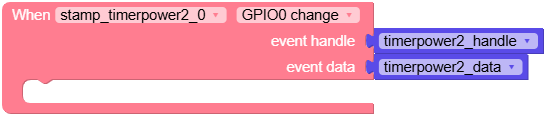
- add_event_cb(callback, filter, *, user_data=None)
Register an event listener. The IRQ output and MCU falling-edge input are initialized by the StampTimerPower2 constructor. The driver combines all filters, configures IRQ masks, and automatically switches GPIO event inputs to GPIO input mode without changing their pull settings. The original GPIO configuration is restored after its last listener is removed.
- Parameters:
- Returns:
Registration handle accepted by
remove_event_cb().- Return type:
- Raises:
TypeError – Invalid argument type.
ValueError – Invalid argument value.
Callbacks run in scheduled MicroPython context. Each triggered bit produces one Event with target, code and user_data. code contains one EVENT flag. Calling without an IRQ pair raises RuntimeError; remove callbacks by their returned handle.
UiFlow2 Code Block:
MicroPython Code Block:
# Requires an stp2 instance configured for INT callbacks.
def on_event(event):
    print(event.code)

handle = stp2.add_event_cb(on_event, StampTimerPower2.EVENT.GPIO4_CHANGE)
# Keep the Basic main loop running; when finished:
# stp2.remove_event_cb(handle)
# stp2.deinit()
- remove_event_cb(handle_or_callback)
Remove one listener by handle or all registrations using the same callback object.
- Parameters:
handle_or_callback (int / callable) – Registration handle or callback object.
- Returns:
Number of registrations removed.
- Return type:
- Raises:
TypeError – Invalid argument type.
UiFlow2 Code Block:

MicroPython Code Block:
# handle was returned by add_event_cb().
removed = stp2.remove_event_cb(handle)
- deinit()
Release the host IRQ registration owned by this driver.
This operation is idempotent. Ordinary register access remains available, and add_event_cb() can recreate the IRQ registration when the pins were configured.
- Returns:
No return value.
- Return type:
None
UiFlow2 Code Block:

MicroPython Code Block:
stp2.deinit()
- wake()
Wake StampTimerPower2 and wait for communication to recover. The driver sends an empty I2C transaction and ignores a NACK from the first wake attempt.
- Returns:
No return value.
- Return type:
None
UiFlow2 Code Block:

MicroPython Code Block:
stp2.wake()
- is_connected()
Check whether a device responds at the configured I2C address.
- Returns:
Truewhen the device responds, otherwiseFalse.- Return type:
UiFlow2 Code Block:

MicroPython Code Block:
value = stp2.is_connected()
print(value)
- get_device_info()
Read the device information block.
- Returns:
(device_id, device_model, hardware_version, firmware_version).- Return type:
UiFlow2 Code Block:

MicroPython Code Block:
value = stp2.get_device_info()
print(value)
- get_uid()
Read the 12-byte device unique identifier.
- Returns:
The 12-byte device UID.
- Return type:
UiFlow2 Code Block:

MicroPython Code Block:
value = stp2.get_uid()
print(value)
- get_device_id()
Read the device ID.
- Returns:
Device ID in the range
0~255.- Return type:
UiFlow2 Code Block:

MicroPython Code Block:
value = stp2.get_device_id()
print(value)
- get_device_model()
Read the device model.
- Returns:
Device model in the range
0~255.- Return type:
UiFlow2 Code Block:

MicroPython Code Block:
value = stp2.get_device_model()
print(value)
- get_hardware_version()
Read the hardware version.
- Returns:
Hardware version in the range
0~255.- Return type:
UiFlow2 Code Block:

MicroPython Code Block:
value = stp2.get_hardware_version()
print(value)
- get_firmware_version()
Read the firmware version.
- Returns:
Firmware version in the range
0~255.- Return type:
UiFlow2 Code Block:

MicroPython Code Block:
value = stp2.get_firmware_version()
print(value)
- Pin(gpio, mode=None, pull=-1, *, value=None)
Create a MicroPython Pin-style object backed by StampTimerPower2 GPIO registers.
- Parameters:
gpio (int) – StampTimerPower2 GPIO number in the range
0~4.mode (int / None) –
Pin.IN,Pin.OUT, orPin.OPEN_DRAIN;Nonepreserves the current mode. Default:None.pull (int / None) –
Pin.PULL_UP,Pin.PULL_DOWN, orNone;-1preserves the current setting. Default:-1.value (int / bool / None) – Initial output level;
Noneleaves the output latch unchanged. Default:None. Keyword-only parameter.
- Returns:
Configured StampTimerPower2 GPIO object.
- Return type:
- Raises:
ValueError – Invalid argument value.
UiFlow2 Code Block:

MicroPython Code Block:
from hardware import Pin
pin = stp2.Pin(4)
# Use the returned object, then release it.
pin.deinit()
- ADC(channel)
Create a MicroPython ADC-style object for GPIO1 or GPIO2.
- Parameters:
channel (int) – ADC channel; only
1(GPIO1) or2(GPIO2) is supported.- Returns:
A new ADC object for the selected input.
- Return type:
- Raises:
ValueError – Invalid argument value.
UiFlow2 Code Block:

MicroPython Code Block:
adc = stp2.ADC(1)
# Use the returned object, then release it.
adc.deinit()
- PWM(channel, *, freq=None, duty_u16=0, duty_ns=None, invert=False)
Create a MicroPython PWM-style object for PWM0 or PWM1.
- Parameters:
channel (int) – PWM channel; only
0(GPIO3) or1(GPIO4) is supported.freq (int / None) – Shared frequency in the range
1~65535Hz;Nonepreserves it, falling back to 500 Hz when the frequency register is zero. Default:None. Keyword-only parameter.duty_u16 (int) – Initial duty in the range
0~65535. Default:0. Keyword-only parameter.duty_ns (int / None) – Initial high pulse width in nanoseconds; mutually exclusive with nonzero
duty_u16. Default:None. Keyword-only parameter.invert (bool) –
Trueselects inverted output polarity. Default:False. Keyword-only parameter.
- Returns:
Configured StampTimerPower2 PWM object.
- Return type:
PWM
- Raises:
ValueError – Invalid argument value.
UiFlow2 Code Block:

MicroPython Code Block:
pwm = stp2.PWM(0)
# Use the returned object, then release it.
pwm.deinit()
- NeoPixel(gpio, count, *, bpp=3, timing=1)
Create a buffered MicroPython NeoPixel-style object.
- Parameters:
gpio (int) – NeoPixel output pin; only StampTimerPower2 GPIO0 is supported.
count (int) – Number of buffered LEDs in the range
1~32.bpp (int) – Bytes per pixel; only RGB value
3is supported. Default:3. Keyword-only parameter.timing (int) – NeoPixel protocol timing selector,
0or1; StampTimerPower2 uses fixed hardware timing for both. Default:1. Keyword-only parameter.
- Returns:
A new buffered NeoPixel object.
- Return type:
NeoPixel
- Raises:
ValueError – Invalid argument value.
UiFlow2 Code Block:

MicroPython Code Block:
pixels = stp2.NeoPixel(0, 1)
# Use the returned object, then release it.
pixels.deinit()
- set_pin_function(gpio, function)
Set a GPIO function mux.
- Parameters:
- Raises:
ValueError – Invalid argument value.
- Returns:
No return value.
- Return type:
None
UiFlow2 Code Block:

MicroPython Code Block:
stp2.set_pin_function(4, StampTimerPower2.PIN_FUNCTION_GPIO)
- set_pin_mode(gpio, mode)
Set a GPIO input/output mode.
- Parameters:
- Raises:
ValueError – Invalid argument value.
- Returns:
No return value.
- Return type:
None
UiFlow2 Code Block:

MicroPython Code Block:
stp2.set_pin_mode(4, StampTimerPower2.GPIO_MODE_IN)
- set_pin_pull(gpio, pull)
Set GPIO pull configuration.
- Parameters:
- Raises:
ValueError – Invalid argument value.
- Returns:
No return value.
- Return type:
None
UiFlow2 Code Block:

MicroPython Code Block:
stp2.set_pin_pull(4, StampTimerPower2.GPIO_PULL_UP)
- set_pin_drive(gpio, drive)
Set GPIO output drive type.
- Parameters:
- Raises:
ValueError – Invalid argument value.
- Returns:
No return value.
- Return type:
None
UiFlow2 Code Block:

MicroPython Code Block:
stp2.set_pin_drive(4, StampTimerPower2.DRIVE_PUSH_PULL)
- set_pin_value(gpio, value)
Write a GPIO output latch value.
- Parameters:
gpio (int) – GPIO index in the range
0~4.value (int / bool) – Output level:
0,1,False, orTrue.
- Raises:
ValueError – Invalid argument value.
- Returns:
No return value.
- Return type:
None
UiFlow2 Code Block:

MicroPython Code Block:
stp2.set_pin_value(4, 1)
- read_pin(gpio)
Read a GPIO input value.
- Parameters:
gpio (int) – GPIO index in the range
0~4.- Returns:
Current input level,
0or1.- Return type:
- Raises:
ValueError – Invalid argument value.
UiFlow2 Code Block:

MicroPython Code Block:
value = stp2.read_pin(4)
print(value)
- get_power_source()
Read the active power-source bit mask.
- Returns:
ORed
POWER_SOURCE_*flags.- Return type:
UiFlow2 Code Block:

MicroPython Code Block:
value = stp2.get_power_source()
print(value)
- get_power_config()
Read the power-configuration bit mask.
- Returns:
Raw power-configuration bit mask in the range
0~255.- Return type:
UiFlow2 Code Block:
get_power_config.pngMicroPython Code Block:
value = stp2.get_power_config()
print(value)
- is_charging_enabled()
Return whether battery charging is enabled.
- Returns:
Truewhen the charging-enable bit is set.- Return type:
UiFlow2 Code Block:

MicroPython Code Block:
value = stp2.is_charging_enabled()
print(value)
- is_dcdc_enabled()
Return whether the DCDC power rail is enabled.
- Returns:
Truewhen the DCDC rail is enabled.- Return type:
UiFlow2 Code Block:

MicroPython Code Block:
value = stp2.is_dcdc_enabled()
print(value)
- is_ldo_enabled()
Return whether the LDO power rail is enabled.
- Returns:
Truewhen the LDO rail is enabled.- Return type:
UiFlow2 Code Block:

MicroPython Code Block:
value = stp2.is_ldo_enabled()
print(value)
- is_boost_enabled()
Return whether the BOOST / 5VINOUT power rail is enabled.
- Returns:
Truewhen the BOOST / 5VINOUT rail is enabled.- Return type:
UiFlow2 Code Block:

MicroPython Code Block:
value = stp2.is_boost_enabled()
print(value)
- enable_charging()
Enable battery charging.
- Returns:
No return value.
- Return type:
None
UiFlow2 Code Block:

MicroPython Code Block:
stp2.enable_charging()
- disable_charging()
Disable battery charging.
- Returns:
No return value.
- Return type:
None
UiFlow2 Code Block:
disable_charging.pngMicroPython Code Block:
stp2.disable_charging()
- enable_dcdc()
Enable the DCDC power rail.
- Returns:
No return value.
- Return type:
None
UiFlow2 Code Block:

MicroPython Code Block:
stp2.enable_dcdc()
- disable_dcdc()
Disable the DCDC power rail.
- Returns:
No return value.
- Return type:
None
UiFlow2 Code Block:
disable_dcdc.pngMicroPython Code Block:
# Manual power test only; affects the external STP2.
stp2.disable_dcdc()
- enable_ldo()
Enable the LDO power rail.
- Returns:
No return value.
- Return type:
None
UiFlow2 Code Block:

MicroPython Code Block:
stp2.enable_ldo()
- disable_ldo()
Disable the LDO power rail.
- Returns:
No return value.
- Return type:
None
UiFlow2 Code Block:
disable_ldo.pngMicroPython Code Block:
# Manual power test only; affects the external STP2.
stp2.disable_ldo()
- enable_boost()
Enable the BOOST / 5VINOUT power rail.
- Returns:
No return value.
- Return type:
None
UiFlow2 Code Block:

MicroPython Code Block:
stp2.enable_boost()
- disable_boost()
Disable the BOOST / 5VINOUT power rail.
- Returns:
No return value.
- Return type:
None
UiFlow2 Code Block:
disable_boost.pngMicroPython Code Block:
# Manual power test only; affects the external STP2.
stp2.disable_boost()
- set_led_enable_level(level)
Set the LED_EN default output level bit.
- Parameters:
level (int / bool) – Default LED_EN output level:
0/Falsefor low,1/Truefor high.- Raises:
ValueError – Invalid argument value.
- Returns:
No return value.
- Return type:
None
UiFlow2 Code Block:

MicroPython Code Block:
stp2.set_led_enable_level(True)
- set_battery_low_voltage_threshold_mv(voltage_mv)
Set the battery low-voltage protection threshold.
- Parameters:
voltage_mv (int) – Low-voltage threshold in millivolts; one of
3000,3100,3200, or3300.- Raises:
ValueError – Invalid argument value.
- Returns:
No return value.
- Return type:
None
UiFlow2 Code Block:

MicroPython Code Block:
stp2.set_battery_low_voltage_threshold_mv(3000)
- get_battery_low_voltage_threshold_mv()
Read the configured battery low-voltage threshold.
- Returns:
Configured threshold in millivolts:
3000,3100,3200, or3300.- Return type:
UiFlow2 Code Block:

MicroPython Code Block:
value = stp2.get_battery_low_voltage_threshold_mv()
print(value)
- enable_gpio_power_hold(gpio)
Enable power-hold behavior for one GPIO output.
- Parameters:
gpio (int) – GPIO output index in the range
0~4.- Raises:
ValueError – Invalid argument value.
- Returns:
No return value.
- Return type:
None
UiFlow2 Code Block:

MicroPython Code Block:
stp2.enable_gpio_power_hold(4)
- disable_gpio_power_hold(gpio)
Disable power-hold behavior for one GPIO output.
- Parameters:
gpio (int) – GPIO output index in the range
0~4.- Raises:
ValueError – Invalid argument value.
- Returns:
No return value.
- Return type:
None
UiFlow2 Code Block:
disable_gpio_power_hold.pngMicroPython Code Block:
stp2.disable_gpio_power_hold(4)
- enable_ldo_power_hold()
Enable LDO power hold.
- Returns:
No return value.
- Return type:
None
UiFlow2 Code Block:

MicroPython Code Block:
stp2.enable_ldo_power_hold()
- disable_ldo_power_hold()
Disable LDO power hold.
- Returns:
No return value.
- Return type:
None
UiFlow2 Code Block:
disable_ldo_power_hold.pngMicroPython Code Block:
stp2.disable_ldo_power_hold()
- enable_boost_power_hold()
Enable BOOST / 5VINOUT power hold.
- Returns:
No return value.
- Return type:
None
UiFlow2 Code Block:

MicroPython Code Block:
stp2.enable_boost_power_hold()
- disable_boost_power_hold()
Disable BOOST / 5VINOUT power hold.
- Returns:
No return value.
- Return type:
None
UiFlow2 Code Block:
disable_boost_power_hold.pngMicroPython Code Block:
stp2.disable_boost_power_hold()
- read_adc_raw(channel)
Read a raw ADC conversion value.
- Parameters:
channel (int) – ADC channel; use
1,2, or internal temperature channel6.- Returns:
Native 12-bit ADC code in the range
0~4095.- Return type:
- Raises:
ValueError – Invalid argument value.
OSError – Operation failed.
UiFlow2 Code Block:

MicroPython Code Block:
value = stp2.read_adc_raw(1)
print(value)
- read_adc_mv(channel)
Read an external ADC channel in millivolts.
- Parameters:
channel (int) – External ADC channel; only
1(GPIO1) or2(GPIO2) is supported.- Returns:
External ADC input voltage in millivolts.
- Return type:
- Raises:
ValueError – Invalid argument value.
OSError – Operation failed.
UiFlow2 Code Block:

MicroPython Code Block:
value = stp2.read_adc_mv(1)
print(value)
- read_temperature_raw()
Read the internal temperature sensor raw code.
- Returns:
Internal temperature-channel code in the range
0~4095.- Return type:
- Raises:
OSError – Operation failed.
UiFlow2 Code Block:

MicroPython Code Block:
value = stp2.read_temperature_raw()
print(value)
- read_button()
Read the current PM1 button state.
- Returns:
Current button level:
0when released or1when pressed.- Return type:
UiFlow2 Code Block:

MicroPython Code Block:
value = stp2.read_button()
print(value)
- read_button_event()
Read the sticky button-pressed flag.
- Returns:
Truewhen the sticky pressed flag was set; reading clears the hardware flag.- Return type:
UiFlow2 Code Block:

MicroPython Code Block:
value = stp2.read_button_event()
print(value)
- set_button_timing(event, duration_ms)
Configure button timing.
- Parameters:
- Raises:
ValueError – Invalid argument value.
- Returns:
No return value.
- Return type:
None
UiFlow2 Code Block:

MicroPython Code Block:
stp2.set_button_timing(StampTimerPower2.BUTTON_TIMING_CLICK, 250)
- read_reference_voltage_mv()
Read the PM1 reference voltage.
- Returns:
Current reference voltage in millivolts.
- Return type:
UiFlow2 Code Block:

MicroPython Code Block:
value = stp2.read_reference_voltage_mv()
print(value)
- read_battery_voltage_mv()
Read the battery voltage.
- Returns:
Battery voltage in millivolts.
- Return type:
UiFlow2 Code Block:

MicroPython Code Block:
value = stp2.read_battery_voltage_mv()
print(value)
- read_vin_voltage_mv()
Read the voltage at the external module 5VIN input.
- Returns:
5VIN voltage in millivolts.
- Return type:
UiFlow2 Code Block:

MicroPython Code Block:
value = stp2.read_vin_voltage_mv()
print(value)
- read_5v_inout_voltage_mv()
Read the voltage at the external module 5VINOUT port.
- Returns:
5VINOUT voltage in millivolts.
- Return type:
UiFlow2 Code Block:

MicroPython Code Block:
value = stp2.read_5v_inout_voltage_mv()
print(value)
- get_wake_source(*, clear=False)
Read wake-source flags.
- Parameters:
clear (bool) – Clear the wake-source flags returned by this read. Default:
False. Keyword-only parameter.- Returns:
Wake-source bit mask.
- Return type:
- Raises:
ValueError – Invalid argument value.
UiFlow2 Code Block:

MicroPython Code Block:
value = stp2.get_wake_source()
print(value)
- clear_wake_source(mask=None)
Clear wake-source flags.
- Parameters:
mask (int / None) – Wake-source bits to clear;
Noneclears every valid wake-source bit. Default:None.- Raises:
ValueError – Invalid argument value.
- Returns:
No return value.
- Return type:
None
UiFlow2 Code Block:

MicroPython Code Block:
stp2.clear_wake_source()
- set_pwm_frequency(frequency)
Set the shared PWM frequency.
- Parameters:
frequency (int) – Shared PWM frequency in the range
1~65535Hz.- Raises:
ValueError – Invalid argument value.
- Returns:
No return value.
- Return type:
None
UiFlow2 Code Block:

MicroPython Code Block:
stp2.set_pwm_frequency(1000)
- get_pwm_frequency()
Read the shared PWM frequency.
- Returns:
Shared PWM frequency in hertz.
- Return type:
UiFlow2 Code Block:

MicroPython Code Block:
value = stp2.get_pwm_frequency()
print(value)
- set_pwm_duty_percent(channel, percent, *, invert=False)
Set a PWM channel duty by percent.
- Parameters:
- Raises:
ValueError – Invalid argument value.
- Returns:
No return value.
- Return type:
None
UiFlow2 Code Block:

MicroPython Code Block:
stp2.set_pwm_duty_percent(0, 50)
- set_pwm_duty_u12(channel, duty_u12, *, invert=False)
Set a PWM channel duty by 12-bit code.
- Parameters:
- Raises:
ValueError – Invalid argument value.
- Returns:
No return value.
- Return type:
None
UiFlow2 Code Block:

MicroPython Code Block:
stp2.set_pwm_duty_u12(0, 2048)
- enable_pwm(channel)
Enable a PWM output channel.
- Parameters:
channel (int) – PWM channel; only
0(GPIO3) or1(GPIO4) is supported.- Raises:
ValueError – Invalid argument value.
- Returns:
No return value.
- Return type:
None
UiFlow2 Code Block:

MicroPython Code Block:
stp2.enable_pwm(0)
- disable_pwm(channel)
Disable a PWM output channel.
- Parameters:
channel (int) – PWM channel; only
0(GPIO3) or1(GPIO4) is supported.- Raises:
ValueError – Invalid argument value.
- Returns:
No return value.
- Return type:
None
UiFlow2 Code Block:
disable_pwm.pngMicroPython Code Block:
stp2.disable_pwm(0)
- get_pwm_duty_percent(channel)
Read a PWM channel duty by percent.
- Parameters:
channel (int) – PWM channel; only
0(GPIO3) or1(GPIO4) is supported.- Returns:
Duty percentage in the range
0~100.- Return type:
- Raises:
ValueError – Invalid argument value.
UiFlow2 Code Block:

MicroPython Code Block:
value = stp2.get_pwm_duty_percent(0)
print(value)
- get_pwm_duty_u12(channel)
Read a PWM channel duty by 12-bit code.
- Parameters:
channel (int) – PWM channel; only
0(GPIO3) or1(GPIO4) is supported.- Returns:
12-bit duty value in the range
0~4095.- Return type:
- Raises:
ValueError – Invalid argument value.
UiFlow2 Code Block:

MicroPython Code Block:
value = stp2.get_pwm_duty_u12(0)
print(value)
- set_neopixel_count(count)
Set the active NeoPixel LED count.
- Parameters:
count (int) – Active LED count in the range
0~32;0disables output.- Raises:
ValueError – Invalid argument value.
- Returns:
No return value.
- Return type:
None
UiFlow2 Code Block:

MicroPython Code Block:
stp2.set_neopixel_count(1)
- set_neopixel_color(index, color)
Write one RGB888 color into LED RAM.
- Parameters:
index (int) – LED RAM index in the range
0~31.color (int / tuple) –
0xRRGGBBor(r, g, b)with each component in0~255.
- Raises:
ValueError – Invalid argument value.
- Returns:
No return value.
- Return type:
None
UiFlow2 Code Block:

MicroPython Code Block:
stp2.set_neopixel_color(0, (32, 0, 0))
- write_neopixels(colors, *, auto_refresh=True)
Write multiple RGB888 colors into LED RAM.
- Parameters:
colors (iterable) – Up to 32 RGB colors in integer or tuple form.
auto_refresh (bool) – Refresh the LED output after writing. Default:
True. Keyword-only parameter.
- Raises:
ValueError – Invalid argument value.
- Returns:
No return value.
- Return type:
None
UiFlow2 Code Block:

MicroPython Code Block:
stp2.write_neopixels([(32, 0, 0)])
- refresh_neopixels()
Refresh NeoPixel output from LED RAM.
- Returns:
No return value.
- Return type:
None
UiFlow2 Code Block:

MicroPython Code Block:
stp2.refresh_neopixels()
- clear_neopixels(*, auto_refresh=True)
Clear LED RAM to black.
- Parameters:
auto_refresh (bool) – Refresh the LED output after clearing. Default:
True. Keyword-only parameter.- Raises:
ValueError – Invalid argument value.
- Returns:
No return value.
- Return type:
None
UiFlow2 Code Block:

MicroPython Code Block:
stp2.clear_neopixels()
- enable_neopixels()
Enable NeoPixel output without changing LED RAM. After disable_neopixels(), the remembered count is cleared; enabling starts with one LED. Call set_neopixel_count() to select another count.
- Returns:
No return value.
- Return type:
None
UiFlow2 Code Block:

MicroPython Code Block:
stp2.enable_neopixels()
- disable_neopixels()
Disable NeoPixel output without clearing LED RAM.
- Returns:
No return value.
- Return type:
None
UiFlow2 Code Block:
disable_neopixels.pngMicroPython Code Block:
stp2.disable_neopixels()
- set_aw8737a_pulse(gpio, pulses, *, refresh=True)
Configure AW8737A pulse output.
- Parameters:
- Raises:
ValueError – Invalid argument value.
- Returns:
No return value.
- Return type:
None
UiFlow2 Code Block:

MicroPython Code Block:
stp2.set_aw8737a_pulse(4, 1)
- refresh_aw8737a()
Execute the last configured AW8737A pulse output.
- Returns:
No return value.
- Return type:
None
UiFlow2 Code Block:

MicroPython Code Block:
stp2.refresh_aw8737a()
- set_aw8737a_mode(gpio, mode, *, refresh=True)
Set AW8737A gain mode.
- Parameters:
- Raises:
ValueError – Invalid argument value.
- Returns:
No return value.
- Return type:
None
UiFlow2 Code Block:

MicroPython Code Block:
stp2.set_aw8737a_mode(4, 1)
- get_irq_status(group, *, clear=False)
Read an IRQ status group.
- Parameters:
group (int / str) – IRQ group constant or corresponding string.
clear (bool) – Clear the flags returned by this read. Default:
False. Keyword-only parameter.
- Returns:
Status bit mask for the selected IRQ group.
- Return type:
- Raises:
ValueError – Invalid argument value.
UiFlow2 Code Block:

MicroPython Code Block:
value = stp2.get_irq_status(StampTimerPower2.IRQ_GROUP_GPIO)
print(value)
- clear_irq(group, mask=None)
Clear IRQ status bits.
- Parameters:
group (int / str) – IRQ group constant or corresponding string.
mask (int / None) – Group-local status bits to clear;
Noneclears every valid bit in the group. Default:None.
- Raises:
ValueError – Invalid argument value.
- Returns:
No return value.
- Return type:
None
UiFlow2 Code Block:

MicroPython Code Block:
stp2.clear_irq(StampTimerPower2.IRQ_GROUP_GPIO)
- disable_irq_events(group, events)
Mask IRQ bits.
- Parameters:
group (int / str) – IRQ group constant or corresponding string.
events (int) – Group-local event bit mask to disable.
- Raises:
ValueError – Invalid argument value.
- Returns:
No return value.
- Return type:
None
UiFlow2 Code Block:
disable_irq_events.pngMicroPython Code Block:
stp2.disable_irq_events(StampTimerPower2.IRQ_GROUP_GPIO, 0x10)
- enable_irq_events(group, events)
Unmask IRQ bits.
- Parameters:
group (int / str) – IRQ group constant or corresponding string.
events (int) – Group-local event bit mask to enable.
- Raises:
ValueError – Invalid argument value.
- Returns:
No return value.
- Return type:
None
UiFlow2 Code Block:

MicroPython Code Block:
stp2.enable_irq_events(StampTimerPower2.IRQ_GROUP_GPIO, 0x10)
- enable_pin_wakeup(gpio)
Enable GPIO wakeup.
- Parameters:
gpio (int) – Wake GPIO in the range
0~4; GPIO1 does not support wakeup.- Raises:
ValueError – Invalid argument value.
- Returns:
No return value.
- Return type:
None
UiFlow2 Code Block:

MicroPython Code Block:
stp2.enable_pin_wakeup(4)
- disable_pin_wakeup(gpio)
Disable GPIO wakeup.
- Parameters:
gpio (int) – GPIO index in the range
0~4.- Raises:
ValueError – Invalid argument value.
- Returns:
No return value.
- Return type:
None
UiFlow2 Code Block:
disable_pin_wakeup.pngMicroPython Code Block:
stp2.disable_pin_wakeup(4)
- set_pin_wakeup_edge(gpio, edge)
Set GPIO wakeup edge.
- Parameters:
- Raises:
ValueError – Invalid argument value.
- Returns:
No return value.
- Return type:
None
UiFlow2 Code Block:

MicroPython Code Block:
stp2.set_pin_wakeup_edge(4, StampTimerPower2.WAKE_EDGE_FALLING)
- enable_watchdog(timeout_s)
Set watchdog timeout.
- Parameters:
timeout_s (int) – Watchdog timeout in the range
1~255seconds.- Raises:
ValueError – Invalid argument value.
- Returns:
No return value.
- Return type:
None
UiFlow2 Code Block:

MicroPython Code Block:
# Manual power test only; affects the external STP2.
stp2.enable_watchdog(10)
- disable_watchdog()
Disable the watchdog.
- Returns:
No return value.
- Return type:
None
UiFlow2 Code Block:

MicroPython Code Block:
stp2.disable_watchdog()
- feed_watchdog()
Feed the watchdog.
- Returns:
No return value.
- Return type:
None
UiFlow2 Code Block:

MicroPython Code Block:
stp2.feed_watchdog()
- get_watchdog_countdown_s()
Read the watchdog countdown.
- Returns:
Remaining watchdog time in seconds.
- Return type:
UiFlow2 Code Block:

MicroPython Code Block:
value = stp2.get_watchdog_countdown_s()
print(value)
- set_timer(duration_s, action)
Set the PM1 timer and timeout action.
- Parameters:
- Raises:
ValueError – Invalid argument value.
- Returns:
No return value.
- Return type:
None
UiFlow2 Code Block:

MicroPython Code Block:
stp2.set_timer(5, StampTimerPower2.TIMER_ACTION_FLAG)
- clear_timer()
Stop and clear the PM1 timer.
- Returns:
No return value.
- Return type:
None
UiFlow2 Code Block:

MicroPython Code Block:
stp2.clear_timer()
- set_i2c_sleep_timeout_s(timeout_s)
Set PM1 I2C idle sleep timeout.
- Parameters:
timeout_s (int) – Idle sleep timeout in seconds, range
0~15.- Raises:
ValueError – Invalid argument value.
- Returns:
No return value.
- Return type:
None
UiFlow2 Code Block:

MicroPython Code Block:
stp2.set_i2c_sleep_timeout_s(10)
- get_i2c_sleep_timeout_s()
Read PM1 I2C idle sleep timeout.
- Returns:
Idle-sleep timeout in the range
0~15seconds.- Return type:
UiFlow2 Code Block:

MicroPython Code Block:
value = stp2.get_i2c_sleep_timeout_s()
print(value)
- set_i2c_frequency(frequency)
Set PM1 device-side I2C speed mode.
- Parameters:
frequency (int) – I2C frequency; only
100000or400000Hz is supported.- Raises:
ValueError – Invalid argument value.
- Returns:
No return value.
- Return type:
None
UiFlow2 Code Block:

MicroPython Code Block:
stp2.set_i2c_frequency(100000)
- get_i2c_frequency()
Read the PM1 device-side I2C speed mode.
- Returns:
I2C frequency, either
100000or400000Hz.- Return type:
UiFlow2 Code Block:

MicroPython Code Block:
value = stp2.get_i2c_frequency()
print(value)
- read_rtc_ram(offset=0, length=32)
Read a region of the 32-byte RTC retention RAM. Retention depends on the module power conditions; this is not flash storage.
- Parameters:
- Returns:
Requested RTC RAM byte sequence.
- Return type:
- Raises:
ValueError – Invalid argument value.
UiFlow2 Code Block:

MicroPython Code Block:
value = stp2.read_rtc_ram()
print(value)
- write_rtc_ram(offset, data)
Write a region of the 32-byte RTC retention RAM. Retention depends on the module power conditions.
- Parameters:
offset (int) – Byte offset in the range 0~31; offset + len(data) must not exceed 32.
data (buffer / iterable) – Bytes to write;
offset + len(data)must not exceed32.
- Raises:
ValueError – Invalid argument value.
- Returns:
No return value.
- Return type:
None
UiFlow2 Code Block:

MicroPython Code Block:
original = stp2.read_rtc_ram(24, 2)
try:
    stp2.write_rtc_ram(24, bytes([0x55, 0xAA]))
finally:
    stp2.write_rtc_ram(24, original)
- restore_defaults()
Restore writable StampTimerPower2 configuration to the documented defaults, including power, GPIO, wake, ADC, PWM, timer, IRQ, button, NeoPixel, and AW8737A settings, and clear sticky wake and IRQ status. Event callbacks are removed. Device information, UID, and the 32-byte RTC RAM are preserved, and the chip is not rebooted.
The StampTimerPower2 I2C speed returns to 100 kHz. Configure the host I2C bus for the same speed before subsequent access. Existing
Pin,ADC,PWM, andNeoPixelobjects must be reinitialized before reuse.Exceptions
OSErroris raised on I2C failure; configuration may then be only partially restored.- Returns:
No return value.
- Return type:
None
UiFlow2 Code Block:

MicroPython Code Block:
# Manual power test only; affects the external STP2.
stp2.restore_defaults()
- power_off()
Send a power-off command to the external StampTimerPower2. Basic remains powered by its own USB or battery supply.
- Returns:
No return value.
- Return type:
None
UiFlow2 Code Block:

MicroPython Code Block:
# Manual power test only; affects the external STP2.
stp2.power_off()
- reboot()
Reboot the external StampTimerPower2. Basic continues running; wait for the module to recover before further I2C access.
- Returns:
No return value.
- Return type:
None
UiFlow2 Code Block:

MicroPython Code Block:
# Manual power test only; affects the external STP2.
stp2.reboot()
- enter_download_mode()
Request PM1 download mode.
- Returns:
No return value.
- Return type:
None
UiFlow2 Code Block:

MicroPython Code Block:
# Manual power test only; affects the external STP2.
stp2.enter_download_mode()
- enable_download_lock()
Enable the PM1 download-mode lock.
- Returns:
No return value.
- Return type:
None
UiFlow2 Code Block:

MicroPython Code Block:
stp2.enable_download_lock()
- disable_download_lock()
Disable the PM1 download-mode lock.
- Returns:
No return value.
- Return type:
None
UiFlow2 Code Block:
MicroPython Code Block:
stp2.disable_download_lock()
- enable_single_click_reset()
Enable single-click reset behavior.
- Returns:
No return value.
- Return type:
None
UiFlow2 Code Block:

MicroPython Code Block:
stp2.enable_single_click_reset()
- disable_single_click_reset()
Disable single-click reset behavior.
- Returns:
No return value.
- Return type:
None
UiFlow2 Code Block:
MicroPython Code Block:
stp2.disable_single_click_reset()
- enable_double_click_power_off()
Enable double-click poweroff behavior.
- Returns:
No return value.
- Return type:
None
UiFlow2 Code Block:

MicroPython Code Block:
stp2.enable_double_click_power_off()
- disable_double_click_power_off()
Disable double-click poweroff behavior.
- Returns:
No return value.
- Return type:
None
UiFlow2 Code Block:
MicroPython Code Block:
stp2.disable_double_click_power_off()
Pin object methods
Create this helper through stp2.Pin(). The following methods belong to the returned object, not the StampTimerPower2 instance.
- init(mode=None, pull=-1, *, value=None)
Initialize or reconfigure the GPIO pin.
- Parameters:
mode (int / None) –
Pin.IN,Pin.OUT, orPin.OPEN_DRAIN;Nonepreserves the current mode. Default:None.pull (int / None) –
Pin.PULL_UP,Pin.PULL_DOWN, orNone;-1preserves the current setting. Default:-1.value (int / bool / None) – Initial output level;
Noneleaves the output latch unchanged. Default:None. Keyword-only parameter.
- Raises:
ValueError – Invalid argument value.
- Returns:
No return value.
- Return type:
None
MicroPython Code Block:
from hardware import Pin
pin = stp2.Pin(4, Pin.IN, pull=Pin.PULL_UP)
try:
    pin.init()
finally:
    pin.deinit()
- deinit()
Restore a floating GPIO input and deactivate this object.
- Returns:
No return value.
- Return type:
None
MicroPython Code Block:
from hardware import Pin
pin = stp2.Pin(4, Pin.IN, pull=Pin.PULL_UP)
try:
    pin.deinit()
finally:
    pin.deinit()
- value(value=None)
Read or write the GPIO value.
- Parameters:
value (int / bool / None) – Output level;
Nonereads, while0,1,False, orTruewrites. Default:None.- Returns:
0or1when reading;Nonewhen writing.- Return type:
int / None
- Raises:
RuntimeError – The object is not in a valid state.
ValueError – Invalid argument value.
MicroPython Code Block:
from hardware import Pin
pin = stp2.Pin(4, Pin.IN, pull=Pin.PULL_UP)
try:
    value = pin.value()
    print(value)
finally:
    pin.deinit()
- on()
Set the GPIO output high.
- Raises:
RuntimeError – The object is not in a valid state.
- Returns:
No return value.
- Return type:
None
MicroPython Code Block:
from hardware import Pin
pin = stp2.Pin(3, Pin.OUT, value=0)
try:
    pin.on()
finally:
    pin.deinit()
- off()
Set the GPIO output low.
- Raises:
RuntimeError – The object is not in a valid state.
- Returns:
No return value.
- Return type:
None
MicroPython Code Block:
from hardware import Pin
pin = stp2.Pin(3, Pin.OUT, value=0)
try:
    pin.off()
finally:
    pin.deinit()
pin() reads the level and pin(value) writes it, as aliases for value(). Use hardware.Pin.IN, OUT, OPEN_DRAIN, PULL_UP and PULL_DOWN for the helper arguments.
ADC object methods
Create this helper through stp2.ADC(). The following methods belong to the returned object, not the StampTimerPower2 instance.
- init()
Initialize or reinitialize the ADC input.
- Returns:
No return value.
- Return type:
None
MicroPython Code Block:
adc = stp2.ADC(1)
try:
    adc.init()
finally:
    adc.deinit()
- deinit()
Release the ADC function and restore a floating GPIO input.
- Returns:
No return value.
- Return type:
None
MicroPython Code Block:
adc = stp2.ADC(1)
try:
    adc.deinit()
finally:
    adc.deinit()
- read()
Read the native 12-bit ADC code.
- Returns:
Native 12-bit ADC code in the range
0~4095.- Return type:
- Raises:
RuntimeError – The object is not in a valid state.
OSError – Operation failed.
MicroPython Code Block:
adc = stp2.ADC(1)
try:
    value = adc.read()
    print(value)
finally:
    adc.deinit()
- read_u16()
Read a full-scale normalized unsigned 16-bit value.
- Returns:
Full-scale normalized value in the range
0~65535.- Return type:
- Raises:
RuntimeError – The object is not in a valid state.
OSError – Operation failed.
MicroPython Code Block:
adc = stp2.ADC(1)
try:
    value = adc.read_u16()
    print(value)
finally:
    adc.deinit()
- read_uv()
Read the ADC input voltage in microvolts.
- Returns:
ADC input voltage in microvolts.
- Return type:
- Raises:
RuntimeError – The object is not in a valid state.
OSError – Operation failed.
MicroPython Code Block:
adc = stp2.ADC(1)
try:
    value = adc.read_uv()
    print(value)
finally:
    adc.deinit()
PWM object methods
Create this helper through stp2.PWM(). The following methods belong to the returned object, not the StampTimerPower2 instance.
- init(*, freq=None, duty_u16=None, duty_ns=None, invert=None)
Initialize or reconfigure the PWM output.
- Parameters:
freq (int / None) – Shared frequency in the range
1~65535Hz;Nonepreserves it, falling back to 500 Hz when the frequency register is zero. Default:None. Keyword-only parameter.duty_u16 (int / None) – Duty in the range
0~65535;Nonepreserves it. Default:None. Keyword-only parameter.duty_ns (int / None) – High pulse width in nanoseconds; mutually exclusive with
duty_u16. Default:None. Keyword-only parameter.invert (bool / None) – Output polarity;
Nonepreserves it. Default:None. Keyword-only parameter.
- Raises:
ValueError – Invalid argument value.
- Returns:
No return value.
- Return type:
None
MicroPython Code Block:
pwm = stp2.PWM(0, freq=1000, duty_u16=32768)
try:
    pwm.init()
finally:
    pwm.deinit()
- deinit()
Disable PWM and restore its fixed pin as a floating input.
- Returns:
No return value.
- Return type:
None
MicroPython Code Block:
pwm = stp2.PWM(0, freq=1000, duty_u16=32768)
try:
    pwm.deinit()
finally:
    pwm.deinit()
- freq(value=None)
Read or set the shared PWM frequency.
- Parameters:
value (int / None) – Shared frequency in the range
1~65535Hz;Nonereads it. Default:None.- Returns:
Frequency in hertz when reading;
Nonewhen setting.- Return type:
int / None
- Raises:
RuntimeError – The object is not in a valid state.
ValueError – Invalid argument value.
MicroPython Code Block:
pwm = stp2.PWM(0, freq=1000, duty_u16=32768)
try:
    value = pwm.freq()
    print(value)
finally:
    pwm.deinit()
- duty_u16(value=None)
Read or set duty using the MicroPython unsigned 16-bit scale.
- Parameters:
value (int / None) – Duty in the range
0~65535;Nonereads it. Default:None.- Returns:
Duty in the range
0~65535when reading;Nonewhen setting.- Return type:
int / None
- Raises:
RuntimeError – The object is not in a valid state.
ValueError – Invalid argument value.
MicroPython Code Block:
pwm = stp2.PWM(0, freq=1000, duty_u16=32768)
try:
    value = pwm.duty_u16()
    print(value)
finally:
    pwm.deinit()
- duty_ns(value=None)
Read or set PWM pulse width in nanoseconds.
- Parameters:
value (int / None) – High pulse width in nanoseconds;
Nonereads it. The value cannot exceed the current PWM period. Default:None.- Returns:
High pulse width in nanoseconds when reading;
Nonewhen setting.- Return type:
int / None
- Raises:
RuntimeError – The object is not in a valid state.
ValueError – Invalid argument value.
MicroPython Code Block:
pwm = stp2.PWM(0, freq=1000, duty_u16=32768)
try:
    value = pwm.duty_ns()
    print(value)
finally:
    pwm.deinit()
- invert(value=None)
Read or set output invert.
- Parameters:
value (bool / None) –
Trueselects inverted polarity,Falseselects normal polarity, andNonereads it. Default:None.- Returns:
Invert state when reading;
Nonewhen setting.- Return type:
bool / None
- Raises:
ValueError – Invalid argument value.
RuntimeError – The object is not in a valid state.
MicroPython Code Block:
pwm = stp2.PWM(0, freq=1000, duty_u16=32768)
try:
    value = pwm.invert()
    print(value)
finally:
    pwm.deinit()
Use duty_u16() or duty_ns(); this implementation does not provide duty(). Frequency is shared between both channels.
NeoPixel object methods
Create this helper through stp2.NeoPixel(). The following methods belong to the returned object, not the StampTimerPower2 instance.
- init()
Initialize or reinitialize the fixed GPIO0 NeoPixel output.
- Returns:
No return value.
- Return type:
None
MicroPython Code Block:
pixels = stp2.NeoPixel(0, 1)
try:
    pixels.init()
finally:
    pixels.deinit()
- deinit()
Clear LEDs, disable output, and restore GPIO0 as an input.
- Returns:
No return value.
- Return type:
None
MicroPython Code Block:
pixels = stp2.NeoPixel(0, 1)
try:
    pixels.deinit()
finally:
    pixels.deinit()
- fill(color)
Fill the local buffer without writing the LEDs.
- Parameters:
color (int / tuple) –
0xRRGGBBor(r, g, b)with each component in0~255.- Raises:
ValueError – Invalid argument value.
- Returns:
No return value.
- Return type:
None
MicroPython Code Block:
pixels = stp2.NeoPixel(0, 1)
try:
    pixels.fill((32, 0, 0))
    pixels.write()
finally:
    pixels.deinit()
- write()
Convert the RGB buffer to RGB565 and refresh the LED output.
- Raises:
RuntimeError – The object is not in a valid state.
- Returns:
No return value.
- Return type:
None
MicroPython Code Block:
pixels = stp2.NeoPixel(0, 1)
try:
    pixels.fill((32, 0, 0))
    pixels.write()
finally:
    pixels.deinit()
len(pixels) returns the LED count. pixels[index] reads or writes an RGB tuple in the local buffer; call write() to display changes. Indices range from 0 to count-1, and RGB components from 0 to 255.